Desert Online General Trading LLC
Dubai, United Arab Emirates
Desert Online General Trading LLC
Dubai, United Arab Emirates
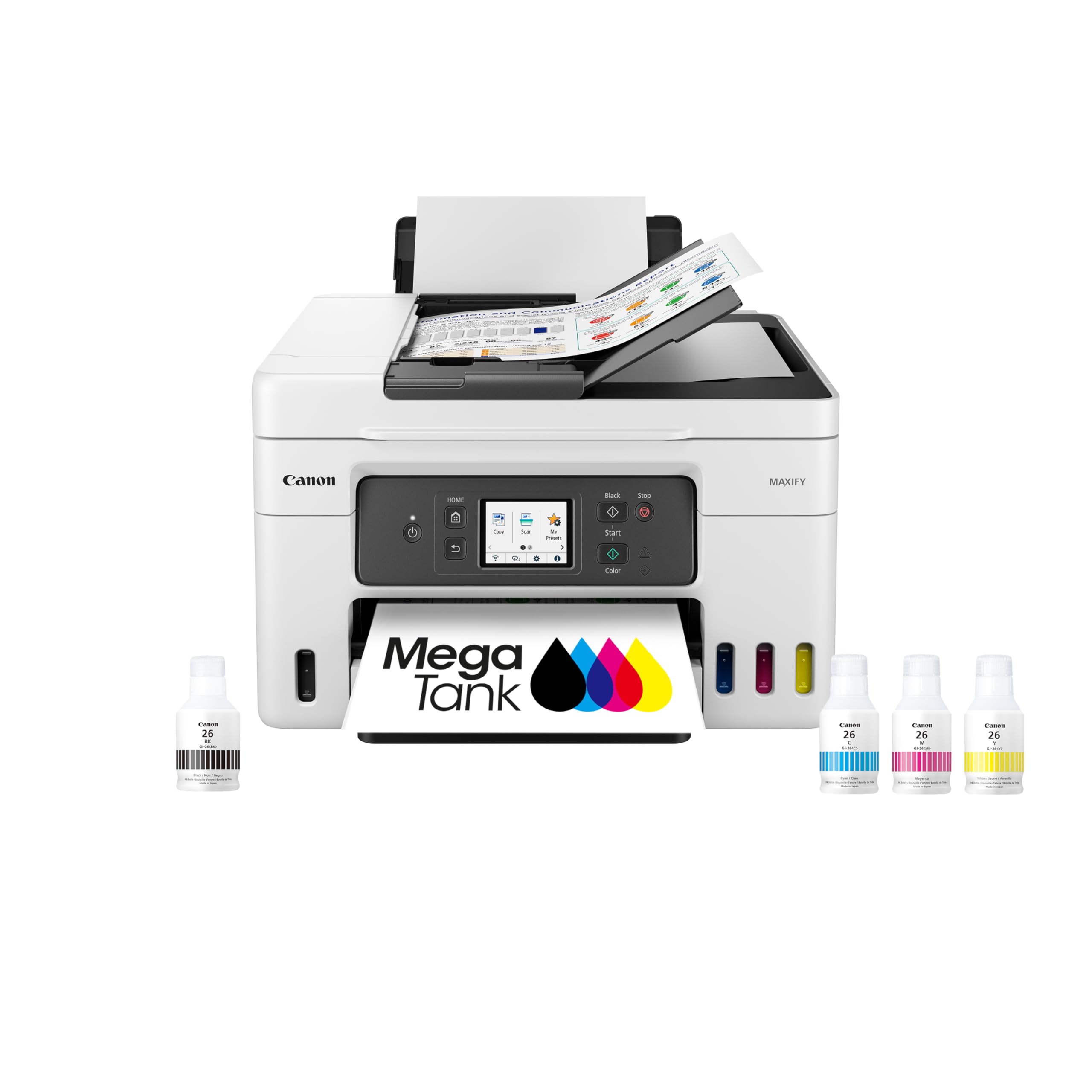


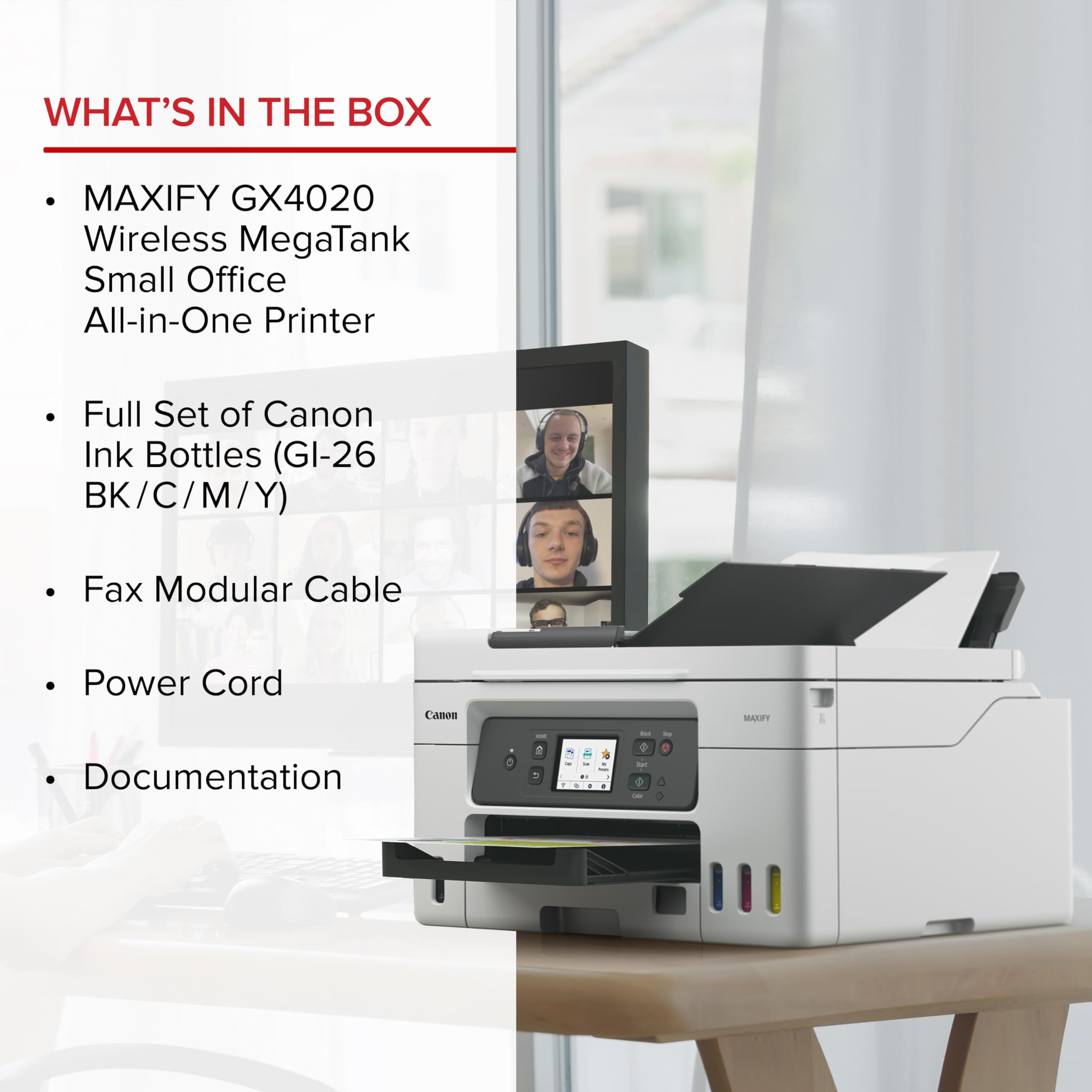
🖨️ Elevate your workspace with the powerhouse printer that never quits!
The Canon Megatank GX4020 is a versatile all-in-one inkjet printer offering wireless print, copy, scan, and fax capabilities. Featuring a 2.7” color touchscreen, auto duplex printing, and a 50-sheet semi-auto document feeder, it delivers up to 14,000 color pages per ink set. Designed for professionals seeking high-volume, efficient, and mobile-friendly printing with a 3-year warranty for peace of mind.


| Maximum Print Resolution Black and White | 2400 dpi |
| Is Electric | Yes |
| Duplex | auto |
| Dual-sided printing | Yes |
| Color | MAXIFY GX4020 Print, Copy, Scan & Fax |
| Paper Size | 4” x 6”, 5” x 5”, 5” x 7”, 7” x 10”, 8” x 10”, 8.5” x 11”,8.5” x 14” |
| Maximum Sheet Capacity | 35 |
| Media Size Maximum | 8.5 x 14 inch |
| B&W Pages per Minute | 18 ppm |
| Color Pages per Minute | 13 ppm |
| Total Usb Ports | 1 |
| Hardware Connectivity | USB 2.0 |
| Connectivity Technology | wired, wireless |
| Ink Color | Black, Cyan, Magenta, Yellow |
| Additional Printer Functions | All In One |
| Warranty Type | 3 Year (or 80,000 Sheet) Warranty |
| Maximum Copies Per Run | Not Specified |
| Number of Trays | 3 |
| Processor Count | 1 |
| Control Method | Touch |
| Controller Type | Android |
| Print media | Paper (plain), Glossy photo paper |
| Scanner Type | Sheetfed |
| Display Type | LCD |
| Compatible Devices | Smartphones |
| Printer Type | Inkjet |
| Additional Features | Auto-Duplex, Energy Star, Auto Document Feeder, Touch Screen |
| Printer Output Type | Color |
| Item Weight | 20.9 Pounds |
| Item Dimensions D x W x H | 15.8"D x 28.4"W x 12"H |
K**R
Reliable workhorse
I have a small office that relies on fail-safe printing, scanning, and copying. For years I have chucked out HP, Epson, and other printers because they were unreliable, frequently had software issues, and hardware failures. I took great pleasure in taking them to the dumps and throwing them into the detritus. This Canon is the exception. I have had it for about nine months, and it performs wonderfully. I recently had to print out a complex project involving 2,000+ pages. There were no printer errors, and the final product was outstanding. A couple of times the printer notified me that it needed ink. The process for filling the tanks was easy and straightforward. Scanning was sometimes interrupted because the documents being scanned were irregular or bent. It was easy to clear the documents and re-scan. My only complaint is that the instruction window is a bit small, but it’s a vast improvement over previous models. The cost to keep this machine in ink is low, and the printer is frugal in its ink usage. My experience with this printer has been refreshingly positive. I rarely give product reviews, but my experience with this printerhas been outstanding.
P**S
Don't buy this printer
Purchased printer in Nov 2023, and also purchased Asurion 4 yr protection plan, which fortunately was a good thing. I didn't use printer heavily until spring 2025 and then found that it was unable to consistently and accurately print double-sided sheets. It would print maybe 2 pages ok, then the next page would be about an inch at the bottom. And then it might wait a few minutes and print the whole 6 page document successfully. Sometimes it would grab two pieces of paper and print on one side of one and one side of another. This would vary with number of pages, and whether it would print both sides. Unpredictable! A headache! Asurion asked me to send them the printer and gave me free shipping label, but I had to find a box and package it up myself and take it to UPS. Within a few days it came back with the same problem, with the first document i tried to print! I called Asurion again and it took Asurion time to respond back to me on the phone as I wanted a refund at that time, but they said I had to send it back again, but this time I had kept the box they sent it to me in and used that one. I also sent a very detailed description of the problem, and within a week they said they would give me a full refund as an Amazon Gift Card. So, thankfully I paid the $50 for Asurion, but the refund was not in cash back. I will say print quality was very good, but the functioning was not.
E**.
Awesome, wish I found this sooner.
This printer is a jem. I'm not sure what people are complaining about.Setup was a breeze on a home network, but we did use the Ethernet cable, and not WiFi.colors were great (better than our previous printer)Scanning is easy (easier/better interface than my previous scanner)Printing is fast (or at least faster than my previous scanner)We'll see if ink usage is better, but probably the same.So for years we had an Epson Workforce ET-3760. We ended up printing almost 38,000 pages. Yep, that's right. But it struggled a little on head cleaning and the prints weren't that good. But it just kept printing. and we raelly liked it even though the colors weren't great (kind of washed out; blacks not very dark). The scanning utility really sucks...and it's the same one they use for workforce standalone scanners. It's boring and not the most user friendly. Why can't I name the file anything I want when I scan it without having to dig into the menu every time? C'mon Epson. And there was no direct sheet feeder for card stock, but it seemed to handle it ok.Finally, it just wouldn't print any more. The print head would move, but no ink would come out. We did head cleaning and then deep cleaning multiple times, but finally we had to give it up.Reviews for tank-based printers are really bad all around. And very few had jacks for hard wire Ethernet. I just don't like using wifi and have really no use for Bluetooth.We gave the Canon a try and so far it surpasses everything about the Epson. If you have a modicum of computer skills, then setup and usage will be easy. It's all pretty well automated.
R**E
A great upgrade to our printer!
We previously had a HP printer that was having odd issues that no one seemed to be able to fix. So, we began researching new printers. What a daunting task! There are so many various kinds out there. After reading multiple articles and talking to some friends, I knew we wanted a tank one. You get so much more out of the ink that way. After that, we researched what all we were going to use it for and landed on this guy. While I hate to spend money, even when I need to, this was well worth it. We have had it up and running for about 1.5 months so far. Not a single paper jam, prints my cardstock just fine and scans effortlessly. I thought it had a special third paper area in the far back, but have not seen anything to that as of yet. It is fairly easy to setup and navigate. I was printing within an hour of opening the box. Their customer service people were helpful. My only real complaint is that it does not come with a physical manual. I get that everything is online now, but there is something to be said about having the manual to reference, especially with products such as this. As of now I am happy with the purchase.
J**T
Canon replaced my HP, works with Windows 11, MacOS, iOS
Replaced my HP with smart connect and all that and couldn't be happier. Not a single problem so far, and the ink tank is huge. HP had a bunch of money grabbing internet connectivity features that drove me crazy, also expensive ink. It also was super loud and getting louder. This Canon is much better, if a bit slow to power up the first time of the day. Lots of features to select in the menus. No problems with Windows 11 and MacOS, no problems remote printing from iOS.
A**R
No impressed
Print quality is good. setup is timely and not easy. Scanner cannot decide when it will and wont work, but more times than not, it wont. find the connectivity setting, because it will go into sleep mode and not come out. I just turned it on 24/7. This is easily the most obnoxious printer I have owned in 20+ years.
Trustpilot
3 weeks ago
4 days ago
1 month ago
5 days ago