Desert Online General Trading LLC
Dubai, United Arab Emirates
Desert Online General Trading LLC
Dubai, United Arab Emirates


🎯 One Remote to Rule Your Entertainment Kingdom
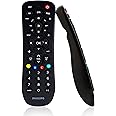
The Philips SRP9232D/27 Universal Remote consolidates control of up to three devices—including TVs, streaming players, and soundbars—into a single, easy-to-use remote. Preprogrammed for Samsung and Roku devices, it features automatic code search, unified volume control, and dedicated streaming app buttons, making it the ultimate clutter-buster for your home entertainment setup.


| Brand | Philips |
| Manufacturer | rca |
| Model | SRP9232D/27 |
| Model Name | SRP9232D/27 |
| Model Year | 2018 |
| Product Dimensions | 15.24 x 20.32 x 5.08 cm; 132 g |
| Batteries | 2 AA batteries required. |
| Item model number | SRP9232D/27 |
| Hardware Platform | television |
| Compatible Devices | Streaming Device |
| Special Features | Remote Controlled |
| Display Technology | lcd |
| Battery Description | AAA |
| Batteries Included | No |
| Batteries Required | Yes |
| Connector Type | Infrared |
| Does it contain liquid? | No |
| Includes Rechargeable Battery | No |
| Manufacturer | rca |
| Item Weight | 132 g |
S**K
Really wish it had more codes for Toshiba Fire TV to try....
UPDATE: tried code #5531 & instead of Amazon home page working when pressing the "home" button, it will pop up when pressing the "exit" button just to the right of it. Still playing with it, tho.Not sure why the home button doesn't work, but hey, at least there is a button to bring it up AND the directional arrows work. Yay!! LolUpdated to 4 stars.... so glad I'm finally getting the remote to work, it is a nice one!! No Alexa voice command, but I hardly use that anyway.- - - - - -I just bought a Toshiba Fire TV and for whatever reason, the Toshiba remote has no numbers to input for local channels. So I've been looking for a backup remote to use for that, plus control streaming.This is my 3rd attempt at finding one and so far, I love the design/feel/looks of it this remote the best.Unfortunately, it only provides 1 code to enter for Toshiba Fire tv (6091). The channel buttons don't work and when you press the 'home' button, the Amazon screen comes on as normal but the arrows do not work to navigate.At this time, depending on what I'm watching (local vs streaming), since it's super easy to enter the codes, I alternate them (very easy to enter 4 digit code, so that is a plus 👍)I still have time to return it, but keep hoping I will hit on a sweet number that will work everything.I really like this remote and am trying to make it work.
J**N
Works well good value
Bought about 2 years ago and worked great, ended up buying a new Samsung TV and I prefer this remote over the one that came with it. So much so that this remote is now lost and I'm on here thinking about buying new one instead of using the remote that came with the TV. I'll give it a couple more days if we don't find it I'm going to order another one that's a good thing about it too it's less than $10 so even if I do end up finding the old one it's not a big deal and I'll have an extra one.
D**N
Decent remote for old fashioned devices
The remote was fairly easy to program and is very affordable. I have some general complaints about it though. First, one of the most frequently used buttons on my Roku TV is the back button (exit channel and go back to stream selection) and this remote uses a TINY "Exit" button for this purpose. It needs a big back button. Second, the remote must be pointed directly at the TV IR receiver to work, so you wind up punching buttons while pointing downward, which means you're mostly looking at the bottom of the remote while using it. Again, overall works as advertised but the design a bit lacking.
A**R
Pretty good universal remote
I bought this for an LG DVD player whose remote had gone bad, and programmed it for other devices (TV and VCR) at the same time. It works quite well and was easy to set up. The biggest drawback, which is common to all universal remotes, is that the device selector buttons have fixed names on them that don’t correspond to the actual devices. I don’t know any obvious way to get around that, short of having stickers or a little window you could slide a label card into.And yes, we do still have a VCR. ;-)
A**R
Works OK with my Roku,Roku box.
I purchased this to replace a Roku remote. The features said it was preprogrammed for Roku. I was able to connect to my box fairly easy.I was surprised that the purple buttons and arrows did not function exactly like the Roku remote. You also have to use the regular arrows to navigate the menus on Roku. You also have to press the TV button at the top to turn TV on or off. The press the Std button to control the Roku box. It's a good try, but I think they could have done a little better with the Roku part.
Trustpilot
2 weeks ago
2 months ago