

Desert Online General Trading LLC
Warehouse # 7, 4th Street, Umm Ramool, Dubai, 30183, Dubai
Desert Online General Trading LLC
Warehouse # 7, 4th Street, Umm Ramool, Dubai, 30183, Dubai


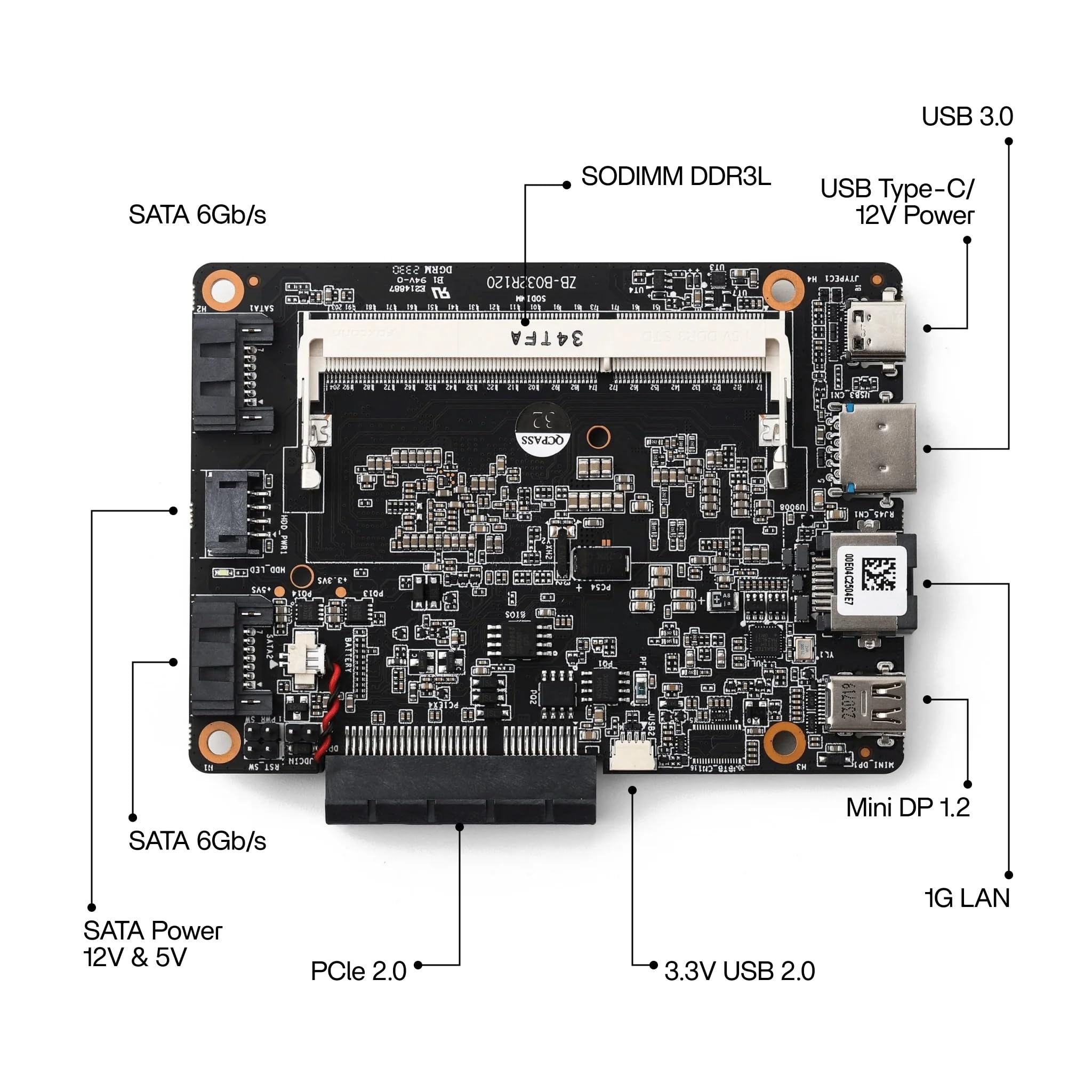

🚀 Elevate your home server game with ZimaBlade – where power meets silence and endless upgrade paths!
The ZimaBlade 7700 is a compact, fanless x86 single board server engineered for continuous 24/7 operation. Featuring a quad-core CPU, 16GB RAM, 32GB eMMC storage, dual SATA ports, and native PCIe expansion, it delivers true server-grade performance and flexibility. With built-in 2.5GbE networking and broad OS compatibility, it’s ideal for NAS, HomeLab, AI NVR, and virtualization workloads—offering a quiet, upgradeable alternative to ARM SBCs and mini PCs.

| Hard Drive | 32 SSD |
| Brand | zimablade |
| Series | ZimaBlade |
| Item model number | ZimaBlade |
| Item Weight | 1.41 pounds |
| Package Dimensions | 7.64 x 5.67 x 4.45 inches |
| Color | Basic Kit |
| Flash Memory Size | 32 GB |
| Hard Drive Interface | PCIE x 4 |
| Hard Drive Rotational Speed | 7200 |
| Manufacturer | SHANGHAI ICEWHALE TECHNOLOGY CO LTD |
| ASIN | B0FBFQDXSQ |
| Date First Available | May 30, 2025 |
P**A
Easy to setup and very stable
I have two of these and have found them to be easy to setup and very reliable. They do not drop off the network and are very easy to upgrade.
D**S
Great for Tinkering
Got this device as a little tinkering box and it's been pretty versatile. Got this with an NVMe PCIE device and everything worked right away. I installed Linux as a little home server and has worked well since.Had some caveats due to not doing a lot of research before getting this. 16GB ram stick are expensive except the one IceWhale sells, but IceWhale RAM sticks have a pretty significant delivery lag time at the time of this review (2-4 weeks). 8GB RAM sticks are pretty quick to get though. Also, be sure to have a 12v/3amp USB-C power supply on hand as they only ship the USB-C cable without a power adapter with this unit.
G**L
Well, that was irritating....
I bought two of these because I needed a small form factor tinker toy. This fit the bill especially because it was on sale.Gripe: Ram doesn't come with it. Yeah, I know it says that right in the description... but this is DDR 3 ram we are talking about at this point, there should be a landfill of this stuff just like the chips used in the product (not complaining about that piece... just saying)Actual issue: The biggest one of them all. Where the heck are you all finding the exact chargers for these things besides buying them direct from IceWhale? I used 7, yes... SEVEN... different chargers in my house and none of them worked. Just a solid red light when attempting to power on.My biggest beef here is that, if the company wants to make a product that's actually going to be used, they need to not make a charger that is uncommon to the common user. It feels very bait-and-switchy to have to say "Sure, we will sell you the base model of a product at an excellent price, but to make it actually work, you have to spend more money on a specific item from us". That's like saying, I'll sell you the car, but the key is extra.I REALLY wanted to love this product. I watched so many videos reviewing this thing and it really fit the bill for what I wanted. But this power cord thing soiled it for me for the product and the company.
T**Y
Not bad
It's pretty good for the price considering it's around the price of a pi5 with a case when i bought it
I**N
Get the correct power supply!!
Just awesome. Love the OS and the unit. Extremely fast.
D**D
Slick at home Nas
need a ddr3L stick 8gb is plenty unless youre doing more but it's cheap I had a pcie to m.2 adapter worked just fine. A little mad had to buy a bigger phone charger for it but that's $5 and forget about it. Had to hunt but you just type the internal ip into your fav browser and you get full access.
D**D
not worth it dont listen to youtubers
it could be better as far as design. instead of spending on the pretty plastic case its in probably woulda been a better idea to just stick some vents on it and a standard fan header pointing up from the board so you can do it without a soldering iron like why is it on the bottom sticking into the side of the case with no access to it like ok so I gotta throw the case away to actually use it without steadily rising heat. 2 its supposed to be a headless machine so when you do have to add a monitor its more frequent than you would imagine as the first shutdown fails and requires you to reinstall a fresh os, or adding a drive on restart of course it doesnt seem to keep the boot order so go back to finding a monitor, just for clarity do you ever plug a monitor into your raspberry pi's or oranges or any single boards, shoot lets be honest even some old nuc or some old 30 dollar server off craigslist? probably not but not so bad it happens in all setups whos sticking single boards on a kvm or a dedicated monitor. but the thing has a display port like who the heck has a newer monitor sitting in their bunch of server stuff area the hdmi port would be less expensive and more versatile so more than likely you have to go dragging a monitor in from another room to troubleshoot it instead of something like why the hell does it change the boot drive if im adding a drive as storage makes no sense the internal drive just doesnt want to keep itself as boot, but it does make sense because of the paired wire for more than one drive so unless you have a label machine or are just obsessive compulsive with sticking some masking tape labels on every wire your gonna be back to dragging a monitor and keyboard to this thing. for whatever reason when anybody would say what the entire hell are you striping your startup drive into yourself for. In my opinion this is just a thing for youtubers to shill till its worth the time just get a cheap nuc for the same price or probably less
R**Y
Great little device
I used this for an inexpensive DIY NAS. It's been doing the job without any issues.
Trustpilot
2 days ago
3 weeks ago