
DOWNLOAD THE APP


Customer Services
Copyright © 2025 Desertcart Holdings Limited
DOWNLOAD THE APP
![[Wired] Kinesis Advantage 360 [Kinesis Advantage 360] [KB360-GBR]](https://m.media-amazon.com/images/I/51jEVi2sHHL.jpg)


⌨️ Elevate your workflow with the keyboard that works as hard as you do!
The Kinesis Advantage360 is a wired ergonomic keyboard featuring a unique bowl-shaped, split layout designed to reduce wrist strain and improve typing comfort. Weighing just 1.45 kg and measuring 38.1 x 20.3 x 7.6 cm, it offers a compact, professional-grade solution compatible with Windows 10 laptops and PCs.
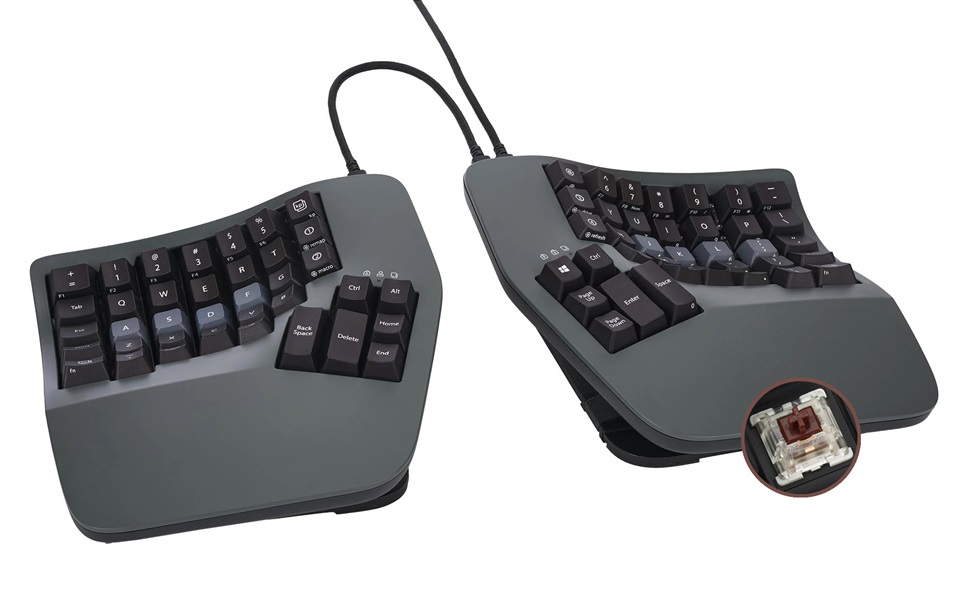


| Brand | Kinesis |
| Manufacturer | Kinesis |
| Series | Kinesis |
| Product Dimensions | 38.1 x 20.32 x 7.62 cm; 1.45 kg |
| Item model number | KB360-GBR |
| Color | gray (dark gray) |
| Item dimensions W x H | 38.1 x 20.3 x 7.6 cm |
| Power Source | Corded Electric |
| Hardware Platform | Laptop, PC |
| Operating System | Windows 10 |
| Are Batteries Included | No |
| Item Weight | 1.45 Kilograms |
A**R
Advantageは15年以上使っているので(PS2->USB->赤軸)、キーボード自体が特殊かどうかはもう慣れてしまったのでわかりません。ただ、それ程慣れが必要という事もないかと思います。今回、かなり高くなっていますが。 数か月使ってみた感触としては以下でしょうか。 ・基本的な使いやすさは変わらず 問題ないですね。BT接続だったり、バックライトが必要か?というと疑問ですが ・パームパッドがマグネット式になった これまではテープで貼る形だったので、外しにくかったり汚れたりしていた。 ・ファンクションキーがないのが少し不便 たまに使う時に物理キーがないので、あれ?となります。キートップに印字してくれていたらよかったのですが(前面に印刷されているが傾斜のためほぼ見えない)。F4が3キーだったりするのも困りもの。リマップしてずらせばいいじゃないと指摘されそうですが、今度はF12があふれちゃうんですよね。 ・テンキーでフットペダルが使えない これまでテンキー入力時はフットペダルを踏んで入力していたのですが、Proの方はフットペダル非対応なので、それが使えない。これまでの癖でペダルを踏む動作をしようとしちゃいます。 ・日本語キーボードマッピングは可能 基本的には英語キーボードで全く問題ないのですが、在宅用の貸与PC(Windows)が日本語キーボードのため。設定が変えられないんですよね。これまではかえうち2で対処していたのですが、今回認識せず。 そのままだとキーのリマップができないので、configでCONFIG_ZMK_HID_REPORT_TYPE_HKRO=yにすると日本語キーのリマップが可能となります。リマップ自体は他のZMKキーボード(globe80とか)を参考にすればいいかと。
A**R
自分のタイピングについてしまっていた、ミスタイプの原因になるくせに気が付かされます。 正しい指でタイプしないと打てない、、という配置なので、慣れるまでは時間がかかりますが、正しい共生なので、それはいいとして。 ただし、強制が終わったとしても、最速でタイプできるかというとちょっと微妙です。 特に小指でタイプするキーは、私だとかなり指を伸ばさないと届かないのできつい。 そこだけ手首を返して薬指で打つ、としてもいのですが、結構厄介。 しかも、指に若干のマヒが出ている人だと、さらにきつい。 エルゴノミックは、ユニバーサルデザインとは別の概念なんだな、、と気が付かされました。 また、それ以外のキーも、結構しっかりと打ち込まないといけないので、指に力がかかります。 1日作業していると、結構指が疲労していることに気が付きます。 高いだけあって品質はいいのですが、自分に合う最適解かというとちょっと微妙かもしれません。 小指が長い人ならいいのですが。
試**み
キーボードとしては素晴らしい商品。キーボードをよく触る職業なら間違いなく買いだと思う。 ただし、充電まわりが非常に残念。 ・充電中に無線での使用ができない ・そのくせ、充電の減りが早い ・充電後Bluetooth再接続が上手く行かない(コツが要る)
D**T
弧を描くキーボードはたいていそうですが、フレキシブルPCBなのでスイッチの交換はできません。もちろん自分でハンダを外してやれることはないと思いますが、保証が切れます。
V**M
It took me ~ a month to get used to the keyboard, but now I love it. Something that it pushed me to do is to use right fingers to type certain keys. Also I feel a bit more efficient after I started to use VIM motions with the keyboard almost everywhere - magic.
I**N
This keyboard is awesome! I've gone through a bunch of other keyboards over the years from cheap Dell ones, Keychron mechanical keyboards (great keyboards for normal layouts), Unicomp IBM Model M and was skeptical at first about this, primarily as I've never touch-typed.. can type fast with numerous fingers but mostly looked at the keyboard. This Kinesis has taught me to touch type too now, within a few weeks. I remapped a few of the keys due to programming needs, but it's so comfy and allows me to sit in a better position. It's not cheap, bit if you're looking for a split ergo keyboard, I'd highly recommend it!
E**A
Saved my wrists. Once you get used to it, the strain on your wrists and forearms disappear. A bit pricy but worth it if you type a lot. Would be five stars but it bugs out sometimes, needing to be unplugged and replugged in (macros stop working)
D**Y
This keyboard is awful. Nearly 1000 dollars and you have to use a janky fork of a GitHub repository to change anything.
Z**R
It's been about twenty years since I first used a Kinesis and haven't used one since. For the past 14 months I've been using a Moonlander split keyboard. It's a decent keyboard, but the options for tenting are very poor unless you invest in more hardware purchased from their site. They do offer excellent support, though. I'd had the keyboard for about six months when the right side thumb cluster hinge broke. They sent me a replacement for free. Back to the Kinesis. I write A LOT. I'm a full-time author so I bang out hundreds of thousands of words per year. I'm in my mid-fifties, and fingers and wrist hurt all the time because of poor ergonomics and cheap keyboards. The Kinesis Advantage 360 is kind of amazing. It has true tenting, and the concave nature of the pieces means you can comfortably rest your palms on the outside and only move your fingers. Since I have used a split ortho board for over a year, this was not a huge learning curve. The keys are laid out well, but I had to change a few. I like the CTRL and ALT on the left side on the bottom row. I moved those keys using the ZMK software which is not really friendly. You have to have a Github account, fork builds, and then use the key mapper to generate new firmware. Each piece of the keyboard them must be connected via USB. Copy the corresponding builds to each piece and then swap key caps. I'm happy with the four or five keys I moved and have this looking almost exactly like my Moonlander layout. Bluetooth has worked perfectly on my PC. I've had zero issues so far. I hit a key in the morning and my PC wakes up. I leave the backlighting off. After two weeks of heavy use, the batteries are still going strong without a recharge. I purchased the palm pad separately. Why aren't these included with this very expensive keyboard? Come to find out, they might not be needed depending on your hands. I find them okay, but I will probably switch back to using the palm rests without the pads. They are comfortable and all, but I'm making more typos with them installed. This is a very expensive keyboard, and it will not be for everyone. There is a learning curve. When I initially switched to a Moonlander, my WPM dropped to about five words per minute. I'm a slow and not very accurate typist, but after this short amount of time I'm up to about 70 WPM with a 98% accuracy rate. This is fantastic for my old hands. Overall, this is a technical board that requires an understanding that the interface software is far from user friendly. Remapping keys will be challenging. I find that the key caps get oily from my fingers rather quickly, which is a weird thing to write, but it's true. So far this has not affected my typing, but I feel like I need to wipe them with a cloth a few times a week. Lightly textured key caps would have been perfect on this thing. Even with these negatives, I feel this keyboard beats the Moonlander by a mile. This is a true ergo keyboard and so far I love typing on it. The Gateron brown switches feel really nice. Negatives aside, this is the best keyboard I've ever owned. I look forward to many years with this thing.
Trustpilot
2 months ago
5 days ago