
DOWNLOAD THE APP


Customer Services
Copyright © 2025 Desertcart Holdings Limited
DOWNLOAD THE APP

⚡ Unlock the future of home WiFi with ASUS RT-BE92U – speed, security, and control in one sleek powerhouse!
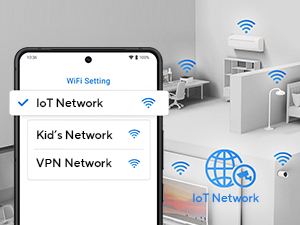
The ASUS RT-BE92U is a cutting-edge tri-band WiFi 7 router delivering up to 9700 Mbps wireless speeds and 10G wired capacity. Featuring AI-powered AiMesh for extended coverage, advanced network security without subscriptions, and comprehensive parental and VPN controls, it’s designed for tech-savvy professionals demanding ultra-fast, stable, and secure home networks. Perfect for 8K streaming, VR, gaming, and smart home ecosystems, it future-proofs your connectivity with robust hardware and intuitive app management.




| ASIN | B0DD7JRH81 |
| Antenna Location | Gaming, Home Network |
| Best Sellers Rank | 1,823 in Computers & Accessories ( See Top 100 in Computers & Accessories ) 13 in Routers |
| Box Contents | RT-BE92U, plug, warranty card, set-up guide |
| Brand | ASUS |
| Brand Name | ASUS |
| Compatible Devices | Laptop, Personal Computer, Smart Television, Tablet |
| Compatible devices | Laptop, Personal Computer, Smart Television, Tablet |
| Connectivity Technology | Ethernet |
| Control Method | App |
| Country of Origin | China |
| Coverage | Medium to Large Home or Office |
| Customer Reviews | 4.3 out of 5 stars 1,990 Reviews |
| Data Transfer Rate | 9700 Megabits Per Second |
| Frequency | 6 GHz |
| Frequency Band Class | Tri-Band |
| Frequency band class | Tri-Band |
| Is Modem Compatible | Yes |
| LAN Port Bandwidth | 10 Gbps |
| Manufacturer | ASUS |
| Maximum Upstream Data Transfer Rate | 2400 Megabits Per Second |
| Model Name | RT-BE92U |
| Model Number | RT-BE92U |
| Model name | RT-BE92U |
| Number of Ports | 1 |
| Operating System | RouterOS |
| Other Special Features of the Product | Parental Control, VPN |
| Security Protocol | WPA, WPA2, WPA3 |
| Special feature | Parental Control, VPN |
| UPC | 197105580664 |
| Wireless Compability | 802.11.be |
| Wireless communication standard | 802.11.be |
E**E
I AM SPEEEEED
I am a PC-VR user and read that the crown of optimisation was getting a Wifi 6 router to significantly increase the amount of bandwidth you could get for remote VR systems via Wifi. This speciifc router is recommended by the VirtualDesktop community (at the time of purchasing, at least) and it has lived up to expectations. I am very tech savvy so the setup was pretty easy. I have a VirginMedia hub router that you have to jump through some minor hoops with. If you're good with tech, it'll take maybe half an hour to set up. If not, put aside at least 2 hours to configure everything. The router config via the Asus portal is super easy and it gives you access to all of the advanced features that I cared about like router level VPN, custom DNS, and per-band level device configuration. The wifi speed is just insane. I am pulling NVME up/down speeds via wifi. It is now faster for me to set up a temporary shared network in my house file transfer an album from my PC to my phone via wifi than it is to plug my phone into my PC and transfer via a cable. The stability and consistency of connection is also as advertised. I have no more dead zones in my house and elevated all of my personal devices to the fastest wifi band. Even with thick walls, I'm getting solid wifi connections that I would normally have to set up a mesh network for with multiple devices - instead I can just use this and get stupid fast speeds that are now only limited by the speed of my ISP. Look, aftermarket routers are almost always overkill but the way I think about it is that it removes another bottleneck for really good quality home networks. Your ISP may change, but using a custom router it's always the same. Set the ISP router to bridge mode and your custom router settings are always there, with advanced features that most ISPs limit or don't want you to have direct access to. Pricey? Sure. Worth it? Absolutely.
P**R
Superb WiFi 7 router – fast, stable and packed with useful features
I bought the ASUS RT-BE92U BE9700 WiFi 7 router to upgrade my home network, and it has been a huge improvement over my previous WiFi 5/6 hardware. Wireless performance is excellent – speeds are consistently high across the house, and latency is noticeably lower, even with multiple devices streaming and gaming at the same time. The WiFi 7 features really make a difference. The tri-band setup, wide channels and improved efficiency mean that devices get a strong, stable connection without the random slowdowns I used to see at busy times. Coverage is very good on its own, and the option to add AiMesh nodes in the future gives me confidence that I can easily extend the network if needed. The web interface and app are both clear and powerful. Setting it up took only a few minutes, but there is plenty of depth if you want to tweak things: AI WAN detection, VLANs, QoS, guest networks, parental controls, VPN support and more. It’s nice to have these advanced options available without the interface feeling overwhelming. Security features are another plus – automatic updates, built-in protection and easy-to-manage guest access give some peace of mind, especially with lots of smart home devices connected. Wired performance via the Ethernet ports is also rock solid for PCs and consoles that need the absolute best stability. Overall, this router has transformed my home network: much faster WiFi, better coverage and a lot more control. If you’re looking for a future-proof, high-performance router that can handle a busy modern home, this ASUS WiFi 7 model is an excellent choice. I’m extremely happy with it and would definitely recommend it.
S**R
Fantastic piece of kit (why are people returning)
not sure why so many people are returning this item, I must admit I was very sceptical about buying this Router after seeing that it had a very high return. but I'm pretty sure the issues others have had are down to just there set up as I've found this router to be very configurable, its super fast, installed VPN on it and it was easy, user interface is a breeze, the router does all the work for you, I'm very impressed getting close to the 500MBs download speeds that's the max my ISP provide and that's running it through a VPN. there's no throttling at all, no dropping out at all. very impressed
C**�
Good WiFi range and stability at an affordable price.
After an initial hiccup the RT-AX52 has been rock solid for me. The hiccup was that it would sometimes lose the 2.4 ghz WiFi completely. It wouldn't even show up in the list of WiFi connections to connect to on my iPhone. After a couple of reboots of the router it came back and I was able to connect to it without issue and it's been faultless ever since (nearly 3 months). That hiccup only happened on the first day of receiving it and setting it up. I can't give a full in-depth review because I'm using it in Access Point mode which disables a lot of the router functions such as QOS, VPN, Alexa integration, etc. It has many of the same functions and features as my more powerful ASUS RT-AXE7800 router and there's no reason to believe the RT-AX52 will be any less competent. As an access point it functions very well. I have it set up in a shed at the top of the garden (55 metres/180 feet) away. The internet connection is coming from a very long ethernet cable connected between a switch in the house and another switch in the shed. From there the RT-AX52 is connected via a short ethernet cable to the shed switch. When I plug a laptop in to one of the RT-AX52's LAN ports and run SpeedTest I get my full 1gig download speed and maximum upload speed. When I unplug that short ethernet cable and connect to the WiFi speeds are great. Obviously, speeds are at their very best when closer to the router/access point and connected to 5ghz WiFi but even when walking 20-30 metres away from the router I stay connected to the 5 ghz network and have usable speeds. The 2.4ghz band gives me full garden coverage and more than adequate speeds. I was able to play YouTube videos in 1080p, 2K and 4K resolutions without any lag or buffering. Before purchasing I knew that I wanted a router that I could use as an access point, was easily configurable, wasn't too gimmicky, and that provided stability for wired and wireless connection. The RT-AX52 fits the bill perfectly. As a router there's enough options for configurability for all but the most technically minded of people/tinkerers. For the average user its a pretty accomplished device and it works very well as an access point. Note: I recommend downloading the ASUS Router phone app and configuring the router from there. There are quite a few YouTube videos out there to assist you if you need help.
L**E
Great as Wi-Fi repeater.
I bought the ASUS RT-AX57 specifically to use as a Wi-Fi repeater, and I’m impressed so far. It performs exactly as needed, repeating an existing wireless signal without requiring a physical Ethernet connection to the main router, which was essential in my case, as I don’t have easy access to the primary router. It accepts mixed 2.4 GHz / 5 GHz signal and rebroadcasts both bands separately as new SSIDs. Performance has been stable and I get much better coverage. Tips: Use a browser, not the ASUS app, for the initial setup when configuring as a repeater. • The default router IP is 192.168.1.1. • Update the firmware right away as the 5 GHz band didn’t work correctly until I installed the latest update. • After switching to Repeater Mode, the router will receive a new IP address from your main router. At this point, you should have full internet access via the new Wi-Fi signal. • To find the new IP and access the config portal later, just use the ASUS Router app — it works well once the repeater is active.
T**R
Unstable when WiFi 7 and MLO turned on (Hardware revision 4.1)
I have two of the 4.1 hardware revisions in an AI mesh configuration. After many hours wasted, I've found that these routers are highly unstable when WiFi 7 6GHz and MLO are enabled. The WiFi network constantly drops and goes missing, and the routers freeze. Factory resetting does no help. Things are only stable if you turn off WiFi 7 and MLO. Unsure if hardware or firmware related, but I suspect both as they have released multiple hardware revisions since launch. Disappointing, as I've been an Asus router customer for a long time. Returned.
F**R
Cheap and impressive upgrade from ISP router
Like many others, I bought this to replace the sky max hub which i found to be less than adequate to serve my 3 bed house. The RT-AX52 was one of the first routers that popped up when searching for a WiFi 6 router, and after a quick google session, found that it was compatible with the sky fibre. As others say, it was straight forward to set up by simply connecting the cable from the ONT to the WAN port, and switching the unit on. I then navigated to the routers web page where it asked me to set a login password, and then enabled me to set my SSID and password. The wifi signal throughout the house is now much improved, with the asus giving a 5Ghz connection at near enough full speed in areas where the sky hub had struggled to maintain a 2.4Ghz connection, even with a multitude of devices all connected and streaming at the same time. The router has many other useful functions which i am taking advantage of including a free DDNS hostname and VPN server, aswell as parental controls so i can restrict the kids from accessing things they shouldnt be accessing. The app comes in handy for seeing who's connected, and also enables me to block internet access to certain devices at the click of a button which helps keeps the kids in line. Also, if you need to reboot it for any reason, it is really quick and you dont have to wait 20 minutes for it come back on like you do with ISP routers! All in all I would recomend this router to anyone looking to improve their wifi coverage and speed, from beginners to experts. Really easy to set up and use - even for those with no experience, and has the advanced features available for those who need them. 10/10 and a bargain at this price - treat yourself.
L**C
Great router & very pleased
First class router that should see me out - No problems with it at all - It being slim & vertical placed it easy to place & there is a wall mount if required - It is a replacement for a cheaper ASUS that developed a fault but this is fine, lots of options in set-up with & Trend AI protection etc. for me its worth the money, I may be getting a none BT/VM fibre connection so this is well up to the job of higher input speeds - Maybe a bit of overkill for me at the moment but very pleased, very stable router. Should you buy one & set-up or change a Wi-Fi / SSD there can be a fair amount of time while the router reboots, this is not an issue but I first I thought I had done something wrong, just be aware of this, as you get no lights on the router & its not connectible for what SEEMS like a while until its sorts thongs out. Nice router that should be long lasting!
Trustpilot
1 month ago
5 days ago