
DOWNLOAD THE APP


Customer Services
Copyright © 2025 Desertcart Holdings Limited
DOWNLOAD THE APP
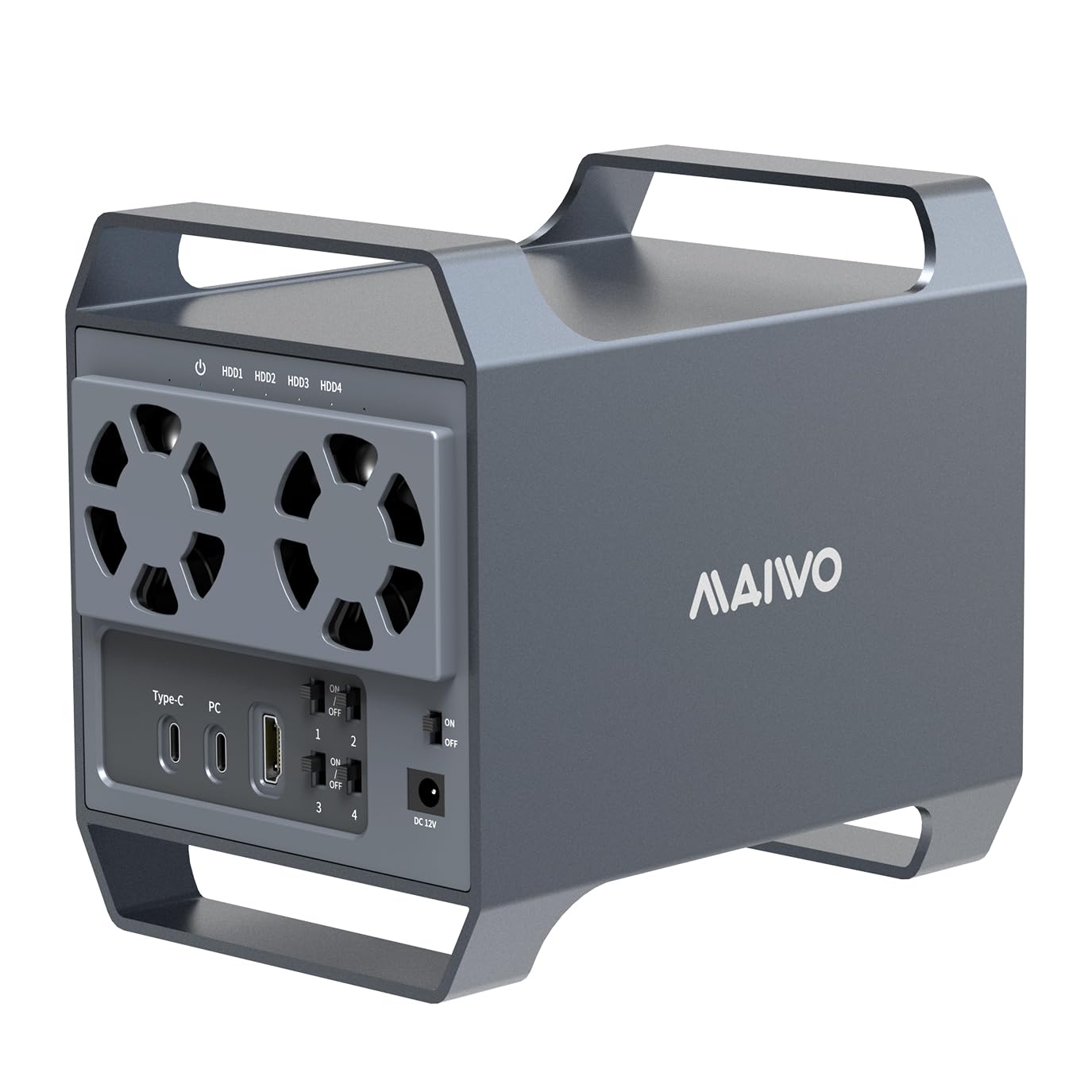
💼 Elevate your data game with speed, space, and smart cooling—because your files deserve the best.
The MAIWO 4 Bay Hard Drive Enclosure is a robust, aluminum-alloy DAS storage solution featuring USB 3.1 Type-C connectivity with 10 Gbps transfer speeds. It supports up to four 3.5” SATA HDDs or SSDs, totaling 96TB capacity, and includes dual cooling fans that activate automatically to maintain optimal drive temperatures. Compatible across major OS platforms and equipped with daisy chain expansion, it offers versatile, high-capacity storage with reliable power management for professional and multimedia use.


| ASIN | B0D28Q187R |
| Best Sellers Rank | #724 in Enclosures |
| Brand | MAIWO |
| Built-In Media | 1x 12V/7A Power supply, 1x 4 bay SATA drive enclosure, 1x C-A cable, 1x C-C cable, 1x small Screwdriver, 1 set screws |
| Color | Black |
| Compatible Devices | Computers, Laptops, and Smart TVs |
| Customer Reviews | 3.7 out of 5 stars 73 Reviews |
| Data Transfer Rate | 10 Gigabits Per Second |
| Enclosure Material | Acrylonitrile Butadiene Styrene (ABS), Aluminum |
| Hard Disk Form Factor | 3.5 Inches |
| Hardware Interface | USB 3.1 Type C |
| Hardware Platform | Universal |
| Item Dimensions L x W x H | 7.27"L x 5.03"W x 6.4"H |
| Item Weight | 1.1 Kilograms |
| Manufacturer | MAIWO |
| Material | Acrylonitrile Butadiene Styrene (ABS), Aluminum |
| Memory Storage Capacity | 88 TB |
| Product Dimensions | 7.27"L x 5.03"W x 6.4"H |
| Supported Devices Quantity | 4 |
| Warranty Description | 1 Year |
R**I
An Excellent Enclosure with all the latest connectivity ports.
This enclosure replaces an Akitio Thunder3 Quad enclosure that was not working with my mac. This Maiwo enclosure works with Windows and macOS. No additional drivers needed.
A**R
Great until it wasn't. 2 months and dead.
Buyer beware! Read the reviews on this, they are accurate. Purchased this April 4th. Died tonight, two months later. Seems to be a power issue. Nothing wrong with the power block the best I can see. The indicator light is illuminating anyway. But for whatever reason when I flip the power to On, the power LED basically turns of for a fraction of a second then turns off and nothing happens beyond that. No start up, no fan movement, no additional lights turn off. In short this thing is a total brick. I wanted to love this thing. Functionally it was great for the last two months. Had no issues installing my HHDs. Speeds where alright. Seemed like a win at the price until tonight. I checked the manufacturers website and the instructions given to combat an outage were futile. I'll attempt to reconcile this with there customer service department but from what I've read it sounds like its an uphill battle to find a resolution that doesn't involve buying another unit. I hate wasting my hard earned money and that sadly is how I feel tonight. Such a shame.
V**R
A bargain for a reason
UPDATE (14 months later): Unfortunately, after about 14 months of normal use, this enclosure failed completely. It will no longer power on or stay powered, even with no drives installed. I verified the original power adapter and tested multiple known-good 12V adapters (including a higher-rated 12V/10A unit, confirmed with a multimeter). The issue is not the power supply — the enclosure itself has failed. I contacted the seller (MAIWOASIA). They suggested purchasing a replacement power adapter and offered reimbursement, but after I explained that I had already tested multiple adapters and that the enclosure fails with no drives installed, they stopped responding. Amazon ultimately stepped in and processed a one-time exception refund, which I appreciate. However, given the complete failure just outside the warranty period and the lack of follow-up from the seller, I can no longer recommend this enclosure for long-term use — especially for important data. ORIGINAL POST: (UPDATE: When using a proper cable (Thunderbolt 4) the unit CAN be used in the back ports of your Mac mini M4 AND the HDMI works with no issues.)) This device is an absolute bargain. It features four hard drive bays and is an ideal enclosure for backup drives. The exterior is made of aluminum, while the interior is plastic. However, it’s not suitable for everyone. I’m using it with a 2024 Mac mini Pro. When connected to the Thunderbolt 5 ports on the back, it doesn’t function. It works perfectly with the USB ports on the front of the machine. I couldn’t get the HDMI port to work, but since I don’t need it, I’m not using it. CAUTION: all the pieces are slightly rough around the edges, and some of the edges are razor-sharp. You could easily get cut.
J**R
Small, sleek, and built well
Love this thing - super solidly built, and not *crazy* loud (but the small fans on the back could use some work). Easy to. setup and does exactly what I need. Running 4x6tb drives out of it, and they run totally fine. If you're looking for RAID or something fancier, this isn't going to get you there (unless you want SWD RAID) but for JBOD it's great.
T**S
WARNING! READ BELOW BEFORE INSTALLING DRIVES WITH PERSONAL DATA
This MAIWO 4 bay drive enclosure might be corrupting existing partitions or writing over existing partitions without warning! It would be wise to BACKUP all your PERSONAL DATA (like videos and photos) on any drives BEFORE you connect them to this MAIWO 4 bay drive enclosure for the first time! I installed four (10TB, 5TB and two 3TB) WD drives into this MAIWO 4 bay enclosure and all 4 drives had personal data on them. After installing them (only physically, NO partitioning) and turning each drive on I was immediately prompted in Windows 11 to format three of the four drives! Three (5TB and two 3TB) drives somehow had their original partitions and files system overwritten, removed or corrupted! Their data was wiped out, GONE! For some reason the 10TB drive was the only drive that didn't lose it's data since it's partition and files system was untouched. It was in the number 4 bay of this MAIWO 4 bay drive enclosure, and was the first drive to be turned on (before the other 3 drives). I'm using Windows 11 pro OS and was NEVER prompted or warned about any partition or file system change warning. After turning on these drives Windows prompted me to perform a disk format for three of the affected drives since their file systems were either removed, deleted or corrupted. Either it's a built-in software feature in the circuit board of this MAIWO 4 bay drive enclosure that did this, or Windows does this whenever you plug in ANY USB 4 bay drive enclosure for the first time to install drives, or something happened that's defective in the device or software, I don't know at this point. I will update my review once I have time to run some tests on this MAIWO 4 bay drive enclosure to see if it's working correctly, and hopefully not the cause of this data loss. So I'm forewarning you to be CAREFULL AND BACKUP UP ALL DRIVES before installing them in this MAIWO 4 bay enclosure! On a lighter note, this MAIWO 4 bay drive enclosure will only power-on if you have a drive installed AND the usb cable is connected to a running computer. Otherwise it will seem like the AC power to this device is not working, I think it's a safety or drive standard feature and not an issue with this device. Also the fans ONLY turn on when the MAIWO 4 bay drive enclosure reaches a certain temperature (that's in the manual) which is another feature built-in to this device. I like the well designed and solid aluminum case shell/cover, even though the rest of this device is plastic there are these brass implanted threads in the plastic parts so screws can be tighter and more secure, without being strip and loosened over time. I do like that each bay has it's own power switch for turning on/off individual drive and has USB Type-C 10GB/s transfer speeds at a reasonable price, these two features are mainly why I purchased it. Fortunately I did a backup all my drives to a WD 20TB drive before installing them into this 4 bay enclosure. It was just sheer luck I did because I NEVER expected these drives to have their data and partition wiped clean!
R**L
UPDATED: Works as advertised, Reimbursed for missed power brick from seller
The drive bays were solid, had all the necessary screws, and while it wasn't flawless to install, you get what you pay for, and it delivers on what it advertises for everything I've tested. it only lost 2 stars because it arrived without the necessary power adapter brick to power the damn thing. i tried to contact the company, but they stopped responding, so i eventually just ordered my own with overnight shipping. UPDATE: the seller reached out and remedied the missing power supply issue, refunded the price we paid for the new power adapter to our original payment method! lovely customer service, highly recommend!
J**0
Worked ok for 4 months. Then it quit and broke.
Only lasted 4 months. Seemed like a great deal, but after 4months it won't power on. Trying to deal with warranty appeared too difficult, and my time is important, so we just have to buy another brand.
R**N
Works for Me
I bought this MAIWO 4 Bay Hard Drive Enclosure almost a year ago. I read all reviews at the time and there were many bad reviews. I use this almost every day and have swapped out drives many times. There is nothing I can say bad about this enclosure. I gave 5 stars because it works great and for as long as I have had it. I would recommend this to someone who wants to backup, mirror, or a desktop multi drive. It works great in Windows 11 Storage spaces to make all the drives as 1 big one.
Trustpilot
2 weeks ago
2 months ago