Some deliveries may take a little longer than usual due to regional shipping conditions.

DOWNLOAD THE APP


Customer Services
Copyright © 2025 Desertcart Holdings Limited
DOWNLOAD THE APP
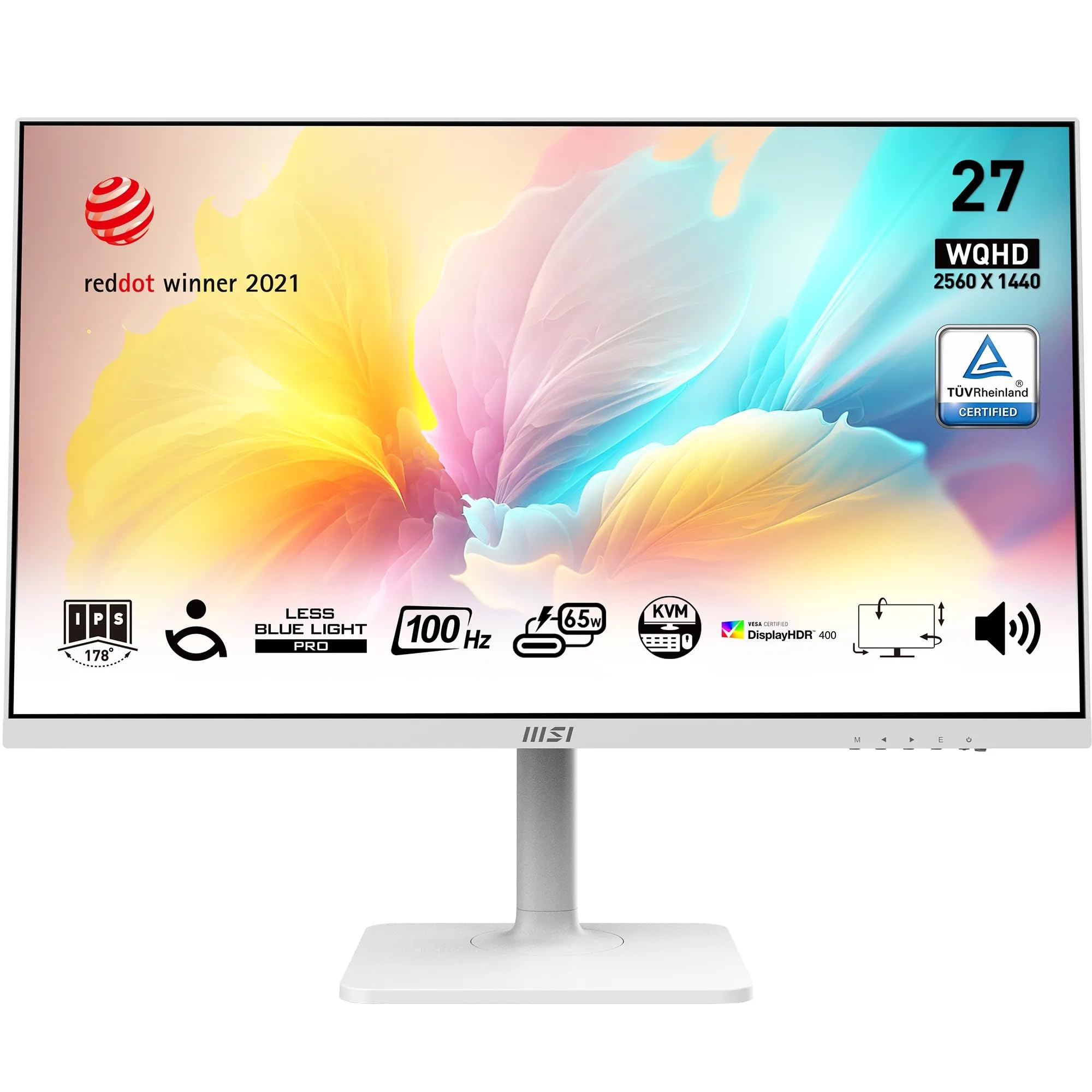
🚀 Elevate your workspace with MSI’s sleek, smart, and eye-friendly 27-inch powerhouse!
The MSI Modern MD272QXPW is a 27-inch WQHD (2560x1440) IPS monitor featuring a 100Hz refresh rate for smooth visuals, TÜV Rheinland certified eye-care technology, and an award-winning ergonomic stand. It supports versatile connectivity including USB-C with Power Delivery, DisplayPort 1.2a, and HDMI 2.0b, plus a built-in KVM switch for multi-system control, making it a stylish and practical choice for professionals seeking productivity and comfort.


| ASIN | B09YY988T5 |
| Are Batteries Included | No |
| Brand | MSI |
| Colour | 100Hz / IPS |
| Customer Reviews | 4.5 4.5 out of 5 stars (218) |
| Date First Available | 25 Nov. 2023 |
| Guaranteed software updates until | unknown |
| Item Weight | 558 g |
| Item model number | 9S6-3PB19H-221 |
| Manufacturer | MSI |
| Number of HDMI Ports | 1 |
| Number of USB 3.0 Ports | 1 |
| Product Dimensions | 62 x 42 x 21 cm; 558 g |
| Resolution | 2560 x 1440 |
| Screen Resolution | 2560x1440 |
| Series | MD272QXPW |
| Standing screen display size | 27 Inches |
| Wattage | 65 watts |
E**4
Excellent 27-inch Display, Small Connectivity Quirk 😍
The MSI Modern MD272QXPW 27-inch monitor has been a great upgrade. The picture quality is sharp, colors look vibrant, and the clean design fits nicely on my desk. The adjustable stand is very convenient, and setup was quick and easy. I did notice occasional inconsistencies with my wireless mouse and keyboard, but so far, resetting the monitor has resolved the issue. Overall, it’s a reliable, stylish display that I’m happy to recommend.
G**E
Unbelievable value for money for 4K and USB C, incredible screen
This monitor is amazing for the price I paid, 188.99 on offer. I use this with an Apple MacBook Air for graphic design work and didn't want to shell out £1500 for the Apple Studio Display. Obviously this is not the same quality but really is not far from it. For my needs I have several requirements. The first is 4K resolution so that screen quality can be similar in quality to my Mac's screen. Obviously it isn't as good but it's not far off. No dead pixels, no visible banding or dark areas. It looks good from all angles with no major light bleed. Colour reproduction is excellent, read the specs this has great colour accuracy which is important for my work. The second requirement was power delivery and USB C connection to attain Apple's pixel scaling. I set mine so it "looks like" 1440p but is still 4K in terms of quality. Power Delivery works well through the monitor using a decent Thunderbolt cable (not a USB C cable). I had a good quality HDMI to Thunderbolt converter cable which works well. The last thing I wanted was for it to look good. This matches my laptop's space grey colour and its overall aesthetic is very similar to an iMac / Apple Studio Display. The stand it sits on is almost identical. In terms of gripes others reviewers have found I have no issues with – not being able to raise the height no support for VESA only 60Hz poor speakers poor on screen adjustment controls which are hidden away. These are all genuine concerns for some but if you already know about them then why buy the monitor and then complain about something you already knew? Making others aware is fine but personally I read the specs and reviews first, I don't just impulse buy. I used the on screen controls once to set the screen up how I wanted but probably won't use it again so these aren't an issue for me. I use my laptop's speakers plus webcam so am not bothered about the monitor's. The main feature is the crisp, bright, colour-accurate screen plus the ability to use Thunderbolt/USB C and the fact that it looks great on my work desk. This monitor is phenomenal value for money if you know what you want, an absolute bargain.
B**E
Excellent 4K monitor with great connectivity — perfect for video editing
I’ve been really impressed with the MSI Modern MD271UL. The 4K UHD display is sharp and detailed, and the IPS panel gives accurate colours and wide viewing angles. The anti‑glare coating and reduced blue‑light features make long sessions much easier on the eyes. The range of connection options is a big plus — 2× HDMI, DisplayPort, and USB‑C — which makes it simple to switch between devices. I use it mainly with my MacBook Air M4 for video editing, and it handles the workflow brilliantly. The clarity and colour accuracy make a noticeable difference, and the USB‑C connection keeps everything tidy. The built‑in speakers are handy for quick playback, and the VESA mount support gives flexibility for desk setups. Overall, a fantastic monitor that fits perfectly into my editing setup.
A**A
Good screen, let down by poor speakers.
Pros: Good screen, nice picture, nice attractive design. White body and stand, white cables. Choice of colour display settings. Input from HDMI or USB-C (both work well). Easy to adjust stand. Cons: Speakers are poor quality, very tinny, useless for music or videos. Probably only good for notification beeps. Don't waste money on getting the version with speakers, better to buy external speakers.
G**8
Excellent VFM, Performs well, I don't have any complaints
Bought this as a replacement for an end of life 1440p Samsung 27" monitor in my office. I went for the 4K as the price was excellent (sub £300) and it has USB-C connectivity which my new work laptop also has. The combination is excellent. I work on process and data for hours every day and this monitor is facilitating this perfectly, no straining on my eyes and the clarity is brilliant. It also looks very nice, it's clean lines and simple stand design make it professional, unfussy and elegant. I certainly can't have any complaints and would recommend this for professional/office use. I can't comment on usage for gaming as this is not it's use case but I can't see how it would not be a good monitor in that instance.
O**Z
The power cable is far too short
Amazing monitor, great image, great price, speakers are fine, works perfectly with bluetooth speakers otherwise (Google tv fixes up any audio delay so flawless there). However! MSI.. why oh why.. did you include such a short power cable? I now need to try and find another one which actually can reach a plug.. Using it with a VESA mount so need extra length, but this was too short even to have the monitor on a desk plug wise. Very disappointing in that area.
J**N
Superb features and usability
This is definitely the best screen I've bought. I've held off giving a review, and have had this screen for over a year now. The base is nice and sturdy, solid, doesn't feel cheap, this is proved by how easy it is to move the screen, which can be raised and lowered simply by pushing from the bottom or top, as it slides up and down. The screen also can be swiveled so you can view it in portrait or landscape. This is fantastic, as i have now got 2 screens, and one is portrait (vertical) and the other is landscape (normal). They have multiple settings for display brightness and other settings to most/ very likely get to a visual setting which you will be comfortable with. I spend 10 hours plus each day in front of these screens and my eyes are not tired, each person is different, but i would recommend these to anyone.
J**E
Fait le taf
C**O
Excellent!
E**O
Muy buena pantalla cumple con todas las características que estaba buscando. Eso sí al ser un panel VA y el anterior que tenía era IPS (de menos tamaño) note el monitor con mucho más brillo, pero después de configurar un poco las opciones se ve mucho mejor.
F**T
25 gündür kullanıyorum ve artık tavsiye edecek kadar deneyimim oldu! Aslında ürünü geri vermek için çok bahane aradım, sanırım 1 ölü piksel de buldum ama sonunda severek kabullendim. Önce kullanıcı profilimi tanımlıyım: ben bir iç mimarım, curve kullanmamam gerekir en başta! IPS ve renk doğruluğu yüksek bir monitör kullanmam gerekir, VESA, standartları olmazsa olmaz derken KVM de çift PC kullanımım yüzünden radarıma girmişti. Ama tüm bu saydıklarımı aynı anda veremeyen (KVM olmadan) monitörler bile 40 bin den başlıyor, ben 14 bine aldım bu ürünü. Herzamana IPS'i kullanan birisi için çok eziyetli bir başlangıç oldu ama insan beyni geçekten çok tuhaf çalışıyor, (eğer monitör kendini düzeltmediyse) IPS severlere bir kaç gün sabırlı olmayı tavsiye ediyorum. Tüm VA sıkıntılarını 3-4 gün sonra hisetmez oldum. Kastettiğim siyah bir ekrana bakarken görüntünün yanlara doğru renk değiştiriyomuş gibi aldatıcı olması. Alışana kadar VA kullanıcılarına söylemediğim laf kalmadı :) Bu arada ayarlarla da çok oynadım. Sürücüleri güncelledim ve MSI'ın ilgili yazılımını iki pc'ye de kurdum (ProductivityIntelligence). Şuanda ekranın genişliğinin tadını tam oalrak çıkardığımı söyleyebilirim, (32:9'lara bakmaya başladım bile). GÖRÜŞLERİM HAKKINDA ÖNEMLİ BİLGİ: panel hakkındaki yorumlarım, gözlük kallanması gerkeen ama kullanmayan orta-ileri seviye astigmat gözlerimin özenel yorumudur! Bilmeyenler için astigmat, ince detayları görmeyi zorlaştıran bir göz kusurudur. Özellikler hakkında yorumlarım: -Cuve: Çizim yapanlar için bir handikap olduğunu söyleyebilirim. Ekrana bakış açısınız ve çizimlerin kerandaki pozisyonuna göre çizimlerinyamuk olduğunu hissedebiliyorsunuz. Ancak bunu geniş bir ekranda düz panel kullanmaya tercih ettim ben ve doğru bir karar olduğunu düşünüyorum. Çünkü aynı formatın düz olanları da vardı. Fakat kesinlikle 1000R tavsiye etemem, görüş konforu daha yüksek olsa da çizimler çok yamulacaktır. Ayrıca bir çok panelde noktasal çap değişken oluyor yani ortadan fazla büküp yanlar düz geliyor. Bu çapda ve modelimde bu sorun çok iyi tolere edilmiş. Çizim yamuk olsa bile her noktada eşit yamuşması sorunuyla beyniniz başedebilir. -Dahili hoparlör: Cızırtısız ve iyi yerleştirilmişler, genelde monitör hoparlörleri çok kötü olur, kötü değil ama ben de iyi bir şey aramıyordum Snopy'leri emekli etmeye yetti ondan iyi sesi (Snopy SN-03A 2.0 2Wx2 USB Mini Multimedia Speaker). -KVM: doğru kabloları kullanmalısınız yoksa çok sorun yaşayabilirsiniz. kablosuz mause klavye için bir uzatma kullanıyorum monitör arkasında parazitten kaynaklı sinyalin bozulma ihtimali var, başlarda yaşadığım bazı sorunlara sebep olduğunu düşünüyorum. KVM için A-B uclu USB kablosunu (kutudan çıkıyor) ve bu ürüne denk "Juo USB 4.0 240W 40Gbps Thunderbolt 4 8K 60Hz USB-C Görüntü Aktarım ve Type-C Hızlı Şarj ve Data Kablosu 1 Metre" bir kabloyu kullanmanız gerekecek. TB4 kabloyu laptop'a (Laptop'a görüntü bu kablo üstünden gidiyor) ve A-B USB'yi masaüstüne bağlıyorum, masüstüne kutusundan çıkan DP kablo ile bağlanıyorum. Ardından iki PC'ye de MSI'ın ProductivityIntelligence programını kuruyorum. -HDR / sRGB: HDR kullanmıyorum, grafik ve çizim işlerinde görüş konforunu düşürüyor, zaten sRGB mod kullanmak grafik işleri ve göz konforu için çok daha doğru. Bu arada ekranın 8 bit ile 16 milyon renkte kalıyor, ancak FCR teknolojisi ile 10 bit ile bir milyara ulaşıyor. Bunlar kağıt üstünde güzel fakat ben FCR'den hiç hoşlanmadım. Normalde ekran açısal renk doğruluğu olarak IPS ekranlarda alıştığım seviyede ama 10bit FCR açtığımda (bunu nvidia masaüstü ayarlarından yapıyorsunuz) çok az bir açı değişiminde ki zaten ekranın her noktası farklı bir açıdan görünür, işte bu farklı açılarda kırmızılıklar hissediliyor. Bu bir ayarı doğru yapamamakla mı ilgili yoksa FCR'nin titreşim temelli renk manipülasyonu tekniği mi buna sebep oluyor bilmiyorum. -300 nit parlaklık!: (HDR modda tepe değer 375 veriyor) Kağıt üstünde en çok canımı sıkan özellik buydu. Ama gördüm ki 300 nit çok çok yeterli bir parlakıl, hatta beyaza bakamıyorum gözlerim sızlıyor, eğer siz de bunu sorun ediyorsanız gün ışığında pencereye arkanızı verip oturmayacaksanız (zaten arkanızı pencereye vermeyin bence) asla sorun olmaz. Ben pencereye 1.5m mesafede ışığı her sabah solumdan alıyorum. Bazen güneş monitörü sıyırıyor ve parlaklığının yeterli olduğu o an kendini belli ediyor. Bu arada tüm bu yeterlilik monitörün %50 parlaklık ayarı için olan yorumum, en üst ayarlar benim için çok gereksiz. -Kontrol paneli tuşları: Sağ alt köşedeki bu tuşlara oldum olası sinir olurum. Hep yerlerini karıştırırım. Joystick olmaması hiç hoşuma gitmedi. Ama yine de bu tuşlardan üçü programlanabiliyor "ProductivityIntelligence" yazılımıyla. Hatta KVM hızlı geçiş işlemleri için sanırım Joystick kullanımından daha kullanışlı diyebilirim. -VESA: işiniz masada pc başında oturmaksa, iyi bir sandalye kadar önemlidir VESA ile kullanılabilen bir askı kolu (Nb F80 17-30 " LCD / LED Monitör Daytona Tutucu Kol) her ofis projemde iş verene en çok almasını ısrar ettiğim üründür kendisi, tabi bunun için VESA desteği olan bir monitör de aldırırım. Pozisyonu uturma pozisyonunuza göre ayarlamak hem uzun oturmaları yorucu olmaktan çıkarır hem de verimliliği artıtır. Eğer kullanmıyorsanız bence bunu deneyin. -Piksel büyüklüğü ve yoğunluğu / Ölü piksel: Bundan gerçekten emin değilim, ekranın sol üstünde ölü bir piksel vardı ama tam oalrak ölü piksel gibi net değil, biraz dağınık görünüyordu, bu nedenle kozmetik bir hata gibi de görünüyordu, şuanda yok ve muhtemelen bir lekeydi, sildiğimde çıkmış olmalı. Bu arada ekranın piksel youğunluğu boyutunu göz önünde bulundurursak gerçekten iyi. Referans olarak 2k 17" profesyonel seri bir MSI laptopun (Creator Z17 HX Studio A14VGT) IPS ekranını kullanarak bunu söylüyorum. Genelde ekrandaki küçük yazılar ve program arayüzlerinde rahatsız eden pikselleşmeler kendini göstermiyor diyebilirim. Görsellere monitörün kullandığım ayarlarını ekliyorum.
O**N
bought this for my girlfriend and it has very stunning design. Minimal, no frame and it is enough for her. Screen is very good, you can also check from youtube videos as well. We didnt care it does google tv or not but sometimes we use that options for listen a song with remote. Just small reminder, if you put a receiver for keyboard or mouse, Every time you press a key, the light flashes on and off, which can be a bit annoying. Since we couldn't find a way to turn it off, I plugged the keyboard's receiver into the laptop, and we haven't encountered this problem since. You can see the light in second photo. It turns orange and white.
Trustpilot
1 month ago
3 days ago