We remain fully operational. Our teams are working around the clock to ensure your deliveries continue safely.

DOWNLOAD THE APP


Customer Services
Copyright © 2025 Desertcart Holdings Limited
DOWNLOAD THE APP

🖥️ Elevate your workspace, dominate your day.
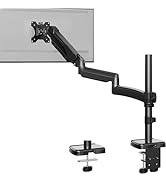
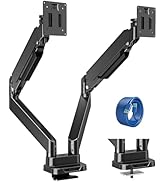
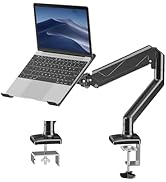
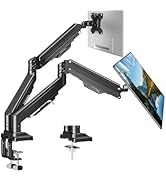
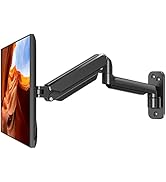
The ErgoFocus Dual Monitor Wall Mount supports two monitors sized 13 to 32 inches, each holding up to 19.8 lbs. Featuring full motion gas spring arms with 360° rotation, 180° swivel, and tilt from +90° to -90°, it offers ergonomic flexibility to optimize your viewing comfort. Compatible with VESA 75x75 and 100x100 patterns, this mount frees up desk space by securely mounting monitors on the wall. Tested for over 10,000 adjustment cycles, it ensures long-lasting durability and smooth positioning. Easy to install with included hardware, it’s the perfect upgrade for a sleek, productive workspace.









| ASIN | B0BYZ5S5L7 |
| Best Sellers Rank | #501 in Computer Monitor Arms |
| Brand Name | ErgoFocus |
| Color Name | Black |
| Customer Reviews | 4.6 4.6 out of 5 stars (111) |
| Date First Available | July 9, 2023 |
| Item Weight | 7.68 pounds |
| Package Dimensions | 15.4 x 10.3 x 4.5 inches |
B**N
Works extremely well
Holds monitor firmly and easy to position where needed. Highly recommended.
B**8
Awesome monitor mount
I was blown away with the quality of this wall mount for the price I got it at. It was on sale for around $32, and just wow. I didn't just choose this mount for the value, I also required to be able to wall mount a 32" monitor. I currently have a 32" and 28". I thought the monitor arms may have been too tight to accomplish the viewing angles I wanted, but I was wrong. They fit next to each other perfectly, it transformed my desk setup immensely as well. No more massive monitor stands on my desk. The hardware included is decent, not the best, but it works well. I recommend using a 11mm(my lag bolts were 11mm but I know sometimes products can vary) 6 point socket when drilling in the lag bolts in. From years of mounting TV's professionally, using the phillips option on the lag bolt is sort of lame. I've only used it when I forgot my sockets on the job in the past. Other hardware included was for installing the bracket onto the monitor. Yet, I only used the washers they included. My monitors had screws included for a wall mount bracket. Spacers were also not necessary for me, but it's nice they include them. This is a great wall monitor mount, I will be recommending this mount to my friends in the future.
C**U
Up, up, and away -- not for small light monitors. They hydraulics are too strong
It's good and fells sturdy because I put it directly into the stud in the wall. However, this must be made for much larger and heavier monitors because no matter how tight I put the tension the monitors just rise up on the hydraulics. (My monitors are 22" and very light.) They are not adjustable because they can only be at the highest point. They can be moved side to side and tilted on angles but up up and away as far as the height. I will have to replace it but probably cannot return it at this point.
N**E
Solid performer - reasonable install instructions
Good solid support for two 24" monitors. Paper wall template to help you determine proper placement. Included mounting hardware satisfactory. Limited adjustment range for monitor placement once mounted. Super strong and possibly dangerous when you release the mounting arms from their shipping tie downs. Don't underestimate the force behind the mounting arms. Nice minimalist presence when mounted. Sadly cheap and semi effective cable route vanity covers fall off fairly easy one installed. Cable channels are very tight when using a thicker display cable and power cord, such as those designed for longer runs. Cable management is both annoying and too time consuming, but once done, well, it's ok.
L**A
Holds great!
Easy to install sturdy and durable!
P**C
Great Value! I am very happy with it!
Easy installation! Quality and value. Fast shipping. Easy to adjust to needed height for optimal viewing. Thank you!
C**I
Good adjustability
Holds 34" oled secure, enough room to mount 34" horizontal and 27" vertical.
G**R
Strong sturdy baseplate
Holds up 2x 27" Dell monitors using the included mount perfectly!
D**V
holds 2 samsung 27" superbly, 180° swivel, tilt +90° to -90°, 360°rotation, Soild buid for custom setups,No desk clamp. My work is gaming, drawing, reading/editing. ✅My TIPS: -Use a stud finder to locate the studs in the wall and mark them for accurate installation. - Measure and mark the desired height and position for each monitor on the wall. Visulize factors like eye level, viewing angle, and ergonomic comfort while positioning the monitors. - screws are tightened properly to avoid any accidents or damage. -brackets secure, carefully lift each monitor , align with respective bracket or arm. seated , secured. -Adjust each monitor individually for optimal viewing experience. rtilt, swivel, rotation as the work needs, and person height, range of sight. 2 ways installation, drywall or wallstud, depending on the type of monitors. all hardware , spacers inclueded.Clamped unto an ikea desk. Used for gaming and regular desk work, no wobble. This system would allow users to easily adjust the tilt or height of their monitors without the need for any additional tools.Would have liked a implementing a quick-release lever system, but not possible at this price range. Sharing is caring, I ❤ to share my trials. Hope this helps ✌
M**9
Works great. Well-labeled parts and decent instructions. Construction of the parts was good quality. A bit of a pain to get the cords in the arm brackets but success was had. My hole unit is crooked though I did use a level which bothers me but I don't want to use the bolts to force the unit straightmand put indents in the wall. See my tips below. TIPS: 1. Install the bracket a few degrees offset to the left. Because the top screws are not even and the screw holes are oversized, the entire unit tilts to the right when you install it "level". 2. Be careful when releasing the tie wraps. Mine was under a lot of pressure and sprang open quite forcefully and smashed my thumb. 3. Before mounting the monitors, confirm the units are at minimum pressure. Mine were at maximum pressure on delivery. Adjustments with the monitors in place were completely ineffective. Removing the monitors and then adjusting to minimum did the trick and I was able to reinstall and lower the monitors. 👍👍
L**G
Looking for a sturdy and ergonomically designed wall mount for your computer screens? Look no further than this incredible product! With its innovative dual monitor design, this mount is perfect for anyone looking to maximize their work space and improve their overall productivity. Here are just a few of the reasons why you'll love this product: ☑️ Holds two monitors up to 19.8lbs each, making it perfect for heavy-duty workstations. ☑️ Features a full motion gas spring arm for easy angle adjustments and optimal viewing angles. ☑️ Comes with VESA 75x75/100x100 mounting plates for added versatility and easy installation. ☑️ Designed to be both sturdy and durable, ensuring it will last for years to come. ☑️ Provides exceptional value and functionality at a great price point. ⭐⭐⭐⭐⭐ With its sleek design, ease of use, and superior functionality, the ErgoFocus Dual Monitor Wall Mount is a must-have for anyone looking to improve their work space and optimize their productivity. So why wait? Order your own today and start enjoying all the benefits that this incredible product has to offer!
P**F
At-a-glance (full review below): PROS: - Instructions easy to follow and install - Holds monitor easily and allows for lots of rotation CONS: - Need 2 people for installation - Can't adjust monitor height down —— Full Review —— I got this dual monitor wall mount as my desk was getting too full and I was running out of space. It has been a great addition to my at home setup as I now have more desk space. The instructions were super easy to follow, so installation went smoothly. You will need a second person to help you as you screw the mount into the wall. Someone will need to hold the mount steady while the other person screws in the bolts by hand. There is a decent amount of rotation for the wall mount. You can spin your monitor 90 degrees so it can be positioned either horizontally or vertically. However, you will need to plan out what height you want your monitors to be at their lowest point, as the mount does not allow for a lot of movement downwards. Overall, for about $120 (at the time of this review) this wall mount is an excellent choice and will help clear your desk space immensely.
A**A
For clearing desktop space, a wall-mounted wall monitor mount is a great idea, doubly so if you want a dual monitor set up side by side or one on top of the other. I have this set up with 27” and 24” screens side by side but it’s compatible up to 32 inches for those with larger mini-TV type computer screens! The wall mounted bracket is easy to install, and you can either opt to install it on a wall stud (if possible) or use butterfly toggle bolts for drywall installation if the provided large gauge plastic wall anchors and big bolts aren’t suitable. They’ve included a template for where to drill the holes so you won’t have to second guess the bolt placements. The monitor arms don’t sag under the weight of my monitors and I love being able to tilt the screens up/down or side to side depending on how I’m sitting which has helped with my posture while sitting at the computer. Ideally you want the monitors at eye-level, not too high not too low for neck and spinal health.
Trustpilot
2 months ago
3 weeks ago