
DOWNLOAD THE APP


Customer Services
Copyright © 2025 Desertcart Holdings Limited
DOWNLOAD THE APP

🚀 Compact Powerhouse: Triple 4K, Ryzen Speed & Silent Efficiency in One Mini Marvel!
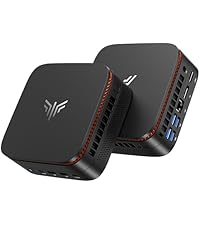
The NiPoGi Pinova P1 Mini PC packs an AMD Ryzen 3 4300U processor with integrated Radeon graphics, 8GB DDR4 RAM, and a 256GB SSD into a sleek, ultra-compact chassis. It supports triple 4K@60Hz displays via HDMI, DisplayPort, and USB-C, making it ideal for multitasking professionals and home office setups. With expandable memory and storage, whisper-quiet cooling, and Windows 11 Pro pre-installed, it offers a perfect blend of performance, portability, and future-proof versatility—all backed by lifetime technical support.



| ASIN | B099KMCT4X |
| Aspect Ratio | 16:9 |
| Available Memory Slots | mini pc |
| Best Sellers Rank | 3,372 in Computers & Accessories ( See Top 100 in Computers & Accessories ) 6 in Desktop PCs 3,208 in Climate Pledge Friendly: Shop All |
| Box Contents | 1 x HDMI cable, 1 x NiPoGi Mini PC, 1 x User Manual, 1 x VESA bracket, 1 x power supply UK |
| Brand | NiPoGi |
| Brand Name | NiPoGi |
| CPU Model Number | AMD Ryzen3 4300U |
| CPU Model Speed Maximum | 3.7 GHz |
| CPU model | AMD Ryzen 3 4300G |
| CPU speed | 2.7 GHz |
| Cache Memory Installed Size | 4 MB |
| Cache size | 4 MB |
| Colour | Silver Mini Desktop PC |
| Compatible Devices | Keyboard, Mouse, Projector, Speaker, Webcam |
| Cooling Method | Without Fan |
| Country of Origin | China |
| Customer Reviews | 4.4 out of 5 stars 2,477 Reviews |
| Display Type | LED, LCD (UHD) |
| Graphics Card Interface | Integrated |
| Graphics Card Ram | 8 GB |
| Graphics Coprocessor | Intel UHD Graphics 4K UHD Display |
| Graphics Description | Integrated |
| Graphics Ram Type | DDR4 SDRAM |
| Graphics card description | Integrated |
| Hard Disk Description | SSD |
| Hard Disk Interface | Solid State |
| Hardware Interface | 3.5mm Audio, 802.11 ac/b/g/n, Bluetooth, Ethernet, HDMI, USB 3.2 Gen 2, USB Type C |
| Human Interface Types | Buttons, Keyboard, Microphone, Mouse |
| Item Dimensions | 12.8 x 12.8 x 5.1 centimetres |
| Item Type Name | Mini PC |
| Item Weight | 500 Grams |
| Keyboard Description | German Keyboard |
| Keyboard Layout | QWERTZ |
| Manufacturer | NiPoGi |
| Maximum Display Resolution | 3840x2160 Pixels |
| Memory Clock Speed | 2666 GHz |
| Memory Speed | 2666 MHz |
| Memory Storage Capacity | 8 GB |
| Model Name | AK1PLUS |
| Model Number | P1 |
| Model Year | 2025 |
| Native Resolution | 3840 x 2160 |
| Network Connectivity Technology | Wi-Fi |
| Operating Systems | OS |
| Operating system | OS |
| Personal Computer Design Type | Mini PC |
| Power Consumption Size | 28 Watts |
| Power Plug Type | Type G |
| Processor Brand | AMD |
| Processor Count | 4 |
| Processor Series | AMD Ryzen 3 4300G |
| Processor Socket | FP6 |
| Processor Speed | 2.7 GHz |
| Product Features | Small PC, micro computer Windows 11 Pro, mini desktop computer, mini tower pc, silent mini pc |
| Product Warranty | All NiPoGi Mini PCs are backed by a 1-year warranty, lifetime technical support and professional 24/7 customer service. |
| RAM Memory Installed | 8 GB |
| RAM Memory Technology | DDR4 |
| RAM Type | DDR4 SDRAM |
| Ram Memory Maximum Size | 8 GB |
| Resolution | 3840 x 2160 |
| Screen Size | 51 Inches |
| Speaker Description | AMD Ryzen3 4300U |
| Speaker Type | multimedia pc |
| Specific Uses For Product | HTPC, Billboard Digitale, Video Editing, Photo,Editing,Multimedia,Light Gaming, Work, Daily Use, Training, Business |
| Specification Met | desktop pc windows 11 Pro, mini pc linux, pc computer |
| Style Name | P1(4300U+8+256) |
| Total Expansion Slots Quantity | 1 |
| Total HDMI Port | 1 |
| Total USB Ports | 4 |
| Total Video Out Ports | 3 |
| UPC | 634562469427 665878528089 610840949478 |
| Video Output | HDMI |
| Video Output Interface | HDMI |
| Video Processor | Intel |
| Wireless Compability | 802.11a/b/g/n/ac |
| Wireless Network Technology | Wi-Fi |
| Wireless Technology Type | 2.4_ghz_radio_frequency, 5.8_ghz_radio_frequency, Ethernet, WiFi Built-in, Bluetooth, USB, Wireless, Wi-Fi |
C**S
Perfect little headless device
I purchased this MiniPC to act as an 'always-on' machine to manage my 2 NAS boxes, and have to say that I have been very impressed with it so far. Physically, it is tiny - same length / width as a CD and only a couple of inches tall. Performance-wise, setup was a doddle and despite the relatively low spec, it boots up pretty fast and didn't come with much in the way of 'bloatware' pre-installed - at least, not that I really noticed; just the usual Microsoft Apps that come as part of Windows! When it is running, it truly is whisper quiet yet still allows me to browse the web, edit spreadsheets, watch videos and play music without seeming to struggle, so more than adequate for my needs. To begin with, I was a little worried that the blue glow emitted when the device is on would be distracting or overly bright when the room was dark, but this proved to be unfounded, and is actually very subdued (looks more intense in the photo than it really is!). Talking about that glow, it is worth mentioning that the light changes to a dim red when the device is put into 'sleep' mode - a really nice touch to visually indicate its status at a glance. All in all, I really can't fault this MiniPC; outstanding value for money, and delivers great performance while taking up minimal space!
M**.
Great item
Easy to set up, nice and compact. Plenty USB ports, boots up fast, very quiet. Good price Computer technician has since informed me that if anything goes wrong with it, the data would not be recoverable, so I'd recommend to back up regular.
M**H
Good replacement for aging Desktop PC
This is a very small MiniPC which is slightly larger than a packet of butter being an exact square shape. It comes with a metal mounting bracket which you can fit to the back of your television if it has a mounting point. Two small screws are supplied. This mini PC just plugs into the television using the supplied HDMI lead. I found it is better to put this MiniPC underneath the television on top of the DVD player rather than fit it to the rear of the set. The drawback of fitting the MiniPC to the rear of the TV set is that you have to lean over the set to reach the power button to turn the thing on! I also found the fan makes more noise when the MiniPC is mounted vertically. The fan noise is hardly noticeable when the MiniPC is placed on a flat surface. But if you hang it on the back of the TV set, then that location amplifies the sound. You can buy this MiniPC as a replacement for an existing Desktop machine, using your old keyboard, mouse and monitor. If the monitor only has a VGA connector, then you will need to order a small HDMI to VGA adaptor. I found no problems at all using my VGA monitor with the adapter. The only slight snag is that if you do not connect a TV set, then there is no sound, unless you have a PC sound system you can plug in. The initial set-up of the MiniPC went without a hitch in my case. However, it is advisable to connect your MIniPC directly to the router using an Ethernet cable for the initial startup. Once the set-up has been completed, and you are in Windows, you can enter choose your WiFi connection and enter your password. There is no opportunity to set up WiFi during startup, so you have to connect the Ethernet cable if you want your Windows to install on the latest version straight away. As regards speed, the MiniPC seems quite fast and responsive for web browsing and YouTube videos. But for other tasks such as rendering a video file, it is no faster than a laptop. I think if you want a MiniPC for gaming, then I would pay a bit more. This is a good buy for the £124.99 Amazon voucher price I paid in October 2023. Bear in mind you have got to factor in the price of a Keyboard, mouse and screen if you do not already have these. I would order a laptop from Amazon if you do not have a suitable keyboard and screen. Although this MiniPC can be plugged into the Television and is great for watching YouTube videos. in front of the TV is inconvenient in other ways and you can find yourself kneeling in front of the set with the keyboard and mouse on the carpet!
C**T
Solid PC - very good, very good customer service
Had an issue with my initial PC, would just go to black screen randomly and couldnt get it back. Something to do with the graphics drivers. I asked support they tried to help but nothing they could do, so they offered me a free replacement, and paid for the return also. Very helpful and very fast replies on email. Thanks for the help guys, the replacement is working great so far!
S**D
A fantastic little daily use/Plex server PC
So for a while I had been running my Plex server from my customer built gaming PC. The problem was that even at idle my computer was pulling quite a lot of watts - CPU approx 28w, GPU 18w (both measurements taken from HWInfo64), and I cannot even begin to measure how many watts all 9 fans, water pump and everything else in my setup is pulling without having to buy a measuring device to plug into my mains. If I was to hazard a guess, I would say around 100w at idle. So how many watts was this little PC pulling at idle? Three. That's it, 3 watts of power when just sitting there. Even when plex was streaming a film to another device, it only went up to an average of 6. This machine's CPU apparently has a TDP of 15 watts. I've yet to get it to do that with what I do. So what you get for your money is an Intel N95 CPU - this is essentially 4 e-cores with no hyperthreading that runs at a max boost of 3.4Ghz. At idle it can run as low as 900Mhz from my testing and average use it pushes at around 1.5-2Ghz. This would be web browsing and youtube video watching. The memory config I got was the 8Gb model, which for the purpose I needed it for is perfectly fine. a 256Gb NVMe drive was installed the version I had which contained the Windows 11 OS. Kudos to the seller, absolutely no bloatware was included. It doesn't really get any cleaner as an install, unless you wish to wipe and install your own OS of choice. It's not a lightning fast drive but still fast enough for day to day usage and still a million times faster than a mechanical hard drive. Two HMDI outputs are supplied which can drive two 4K (2160p) monitors/TVs at a max of 60Hz. Of course if doing so, try not to push too much out of the CPU at once, especially multimedia based stuff. The manufacturer even supplies a short HDMI cable in the box. What is a great little bonus is the removable SSD drive enclosure on the underside. If you have no intention of installing one, then you can just simply unclip this part and the PC is even thinner. However it is a great addition and again for my Plex server it meant I could connect a 2Tb SSD drive to the underside to store my media. Now I run it as a Plex server and for that it is perfectly fine. Just some tweaks may be needed to ensure that Plex is running towards the faster end of transcoding as opposed to pushing the CPU and you will be fine. In all honesty I couldn't see really any difference in quality on 4K videos. Gaming? Forget it. Unless you plan to run older stuff (retro gaming like Mame/Retroarch etc...) or DOS based games (DOSBox etc...) then it's not meant for current gaming. Will most modern games run? Yes. Is it worth it? Absolutely not. But then it wasn't designed for that. Noise levels, it really is a quite little thing. As long as you have the power settings to balanced and not try to push it beyond what it's really designed for then you barely hear the fan at all. Mine is located right behind the TV in my front room and even when everything else is off in the room, I struggle to hear the PC running. Aesthetically it looks very nice with the LED lighting going around the top, just under the lid and through the cooling fins, so if you have the PC on a desk, it does look very good. So in conclusion, if you are looking for a daily use mini-PC for browsing, office type work and even basic low spec gaming or running a media server, this machine is for you. For the price, I cannot really fault it.
T**N
Great mini PC backed by excellent customer support
After 6 months use, I can confirm I found the mini PC perfect for my use. The Windows 11 upgrades happen perfectly. The supplier support has been great - I had a recent issue with the power adapter that they replaced it to resolve the problem.
J**N
small, fast & silent mini PC. But stopped working
After less than a year WiFi has stopped working. So now no use. Bought the 16GB RAM & 512GB HD version. Had it up and running out of the box in less than 10mins, needed quite a few Windows 11 updates initially. Really small footprint and nice additional feature that can add extra SATA drive for extra capacity. I have found it totally silent. I was looking for a cheap Windows PC and this totally fits the requirement and exceeded expectations .Web browsing and MS Office are fast.
N**N
Fantastic Home Media Server
This is a great budget friendly product for use as a home media server, and potentially as a lightweight desktop system it comes pre-installed with a genuine copy of Windows 11 and runs a generic AMI BIOS with minimal configuration options - although configuration likely isn't needed. In the box I found: * NiPoGi Mini PC * Power Adapter * Mounting Bracket * HDMI Cable * Instruction Leaflet I use this to run Proxmox which allows me to run a number of virtualized containers and operating systems namely: * Home Assistant OS * Plex LXC Container * Plex Utilities LXC Container * Steam LXC Container (RemotePlay) The Intel N95 CPU also comes paired with an iGPU which allows for hardware encoding and decoding so I can accelerate Plex transcodes and Steam RemotePlay decoding. I've had no issue running 2x4K video transcodes while also streaming games from my desktop PC simultaneously. I would highly recommend opting for the 16GB version as you may run into memory constraints depending on your usage - Windows 11 can use a lot of memory simply running the desktop - and depending on if you use this as a home server it's nice to have more as this will typically be your first bottleneck. Although the memory is upgradable through the 2xSODIMM slots the N95 is limited to 16GB. I use a single 4TB HDD for my relatively small media collection, but the PC also has support to upgrade the internal M.2 SSD and install an additional internal 2.5" SSD through the easily accessible panel on the bottom of the device. Connectivity is also good: * 2xHDMI Outputs * 4xUSB (2 USB 3.0 on the side, 2 USB 2.0 - 1 on the side, 1 on the back) * Gigabit Ethernet * 3.5mm Audio Jack Overall I have no complaints I am well aware of what the system is capable of doing and what it is not - you'd be hard pressed to run any serious games on this, but that's not the point of it. I would definitely recommend if someone is looking to run a similar setup on a budget.
Trustpilot
2 months ago
2 weeks ago