

🚀 Elevate your desk game with the ultimate 10-in-1 USB-C powerhouse!
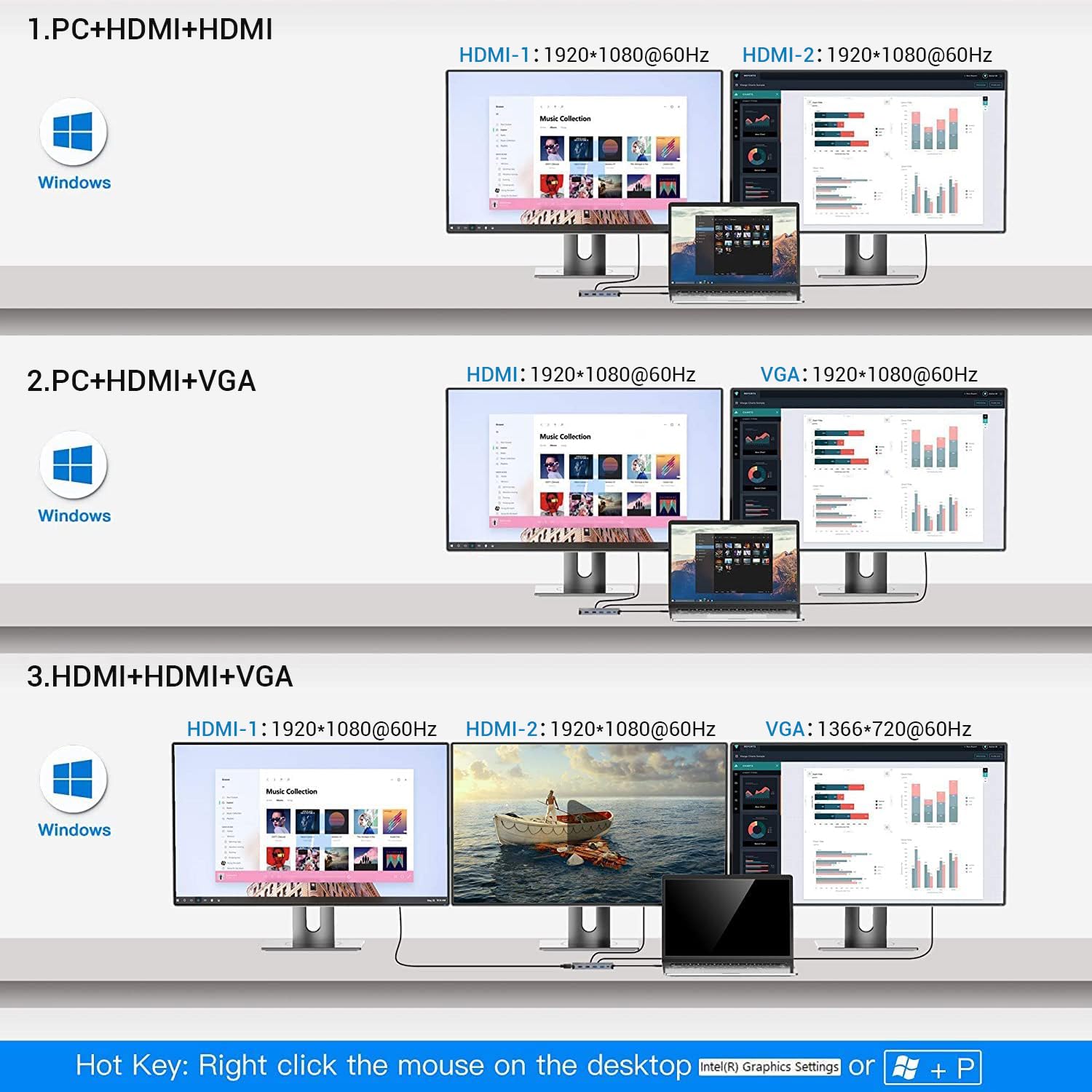
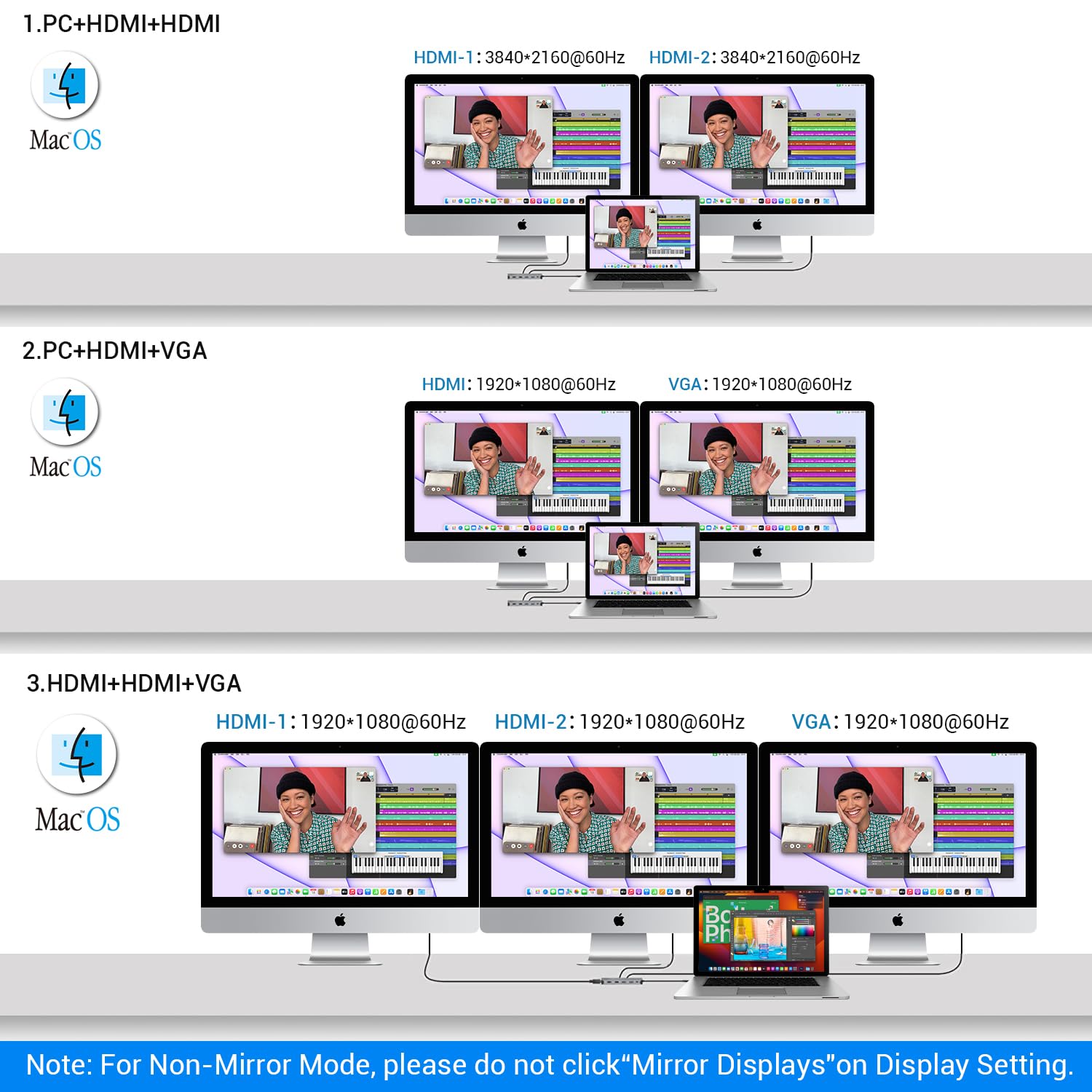
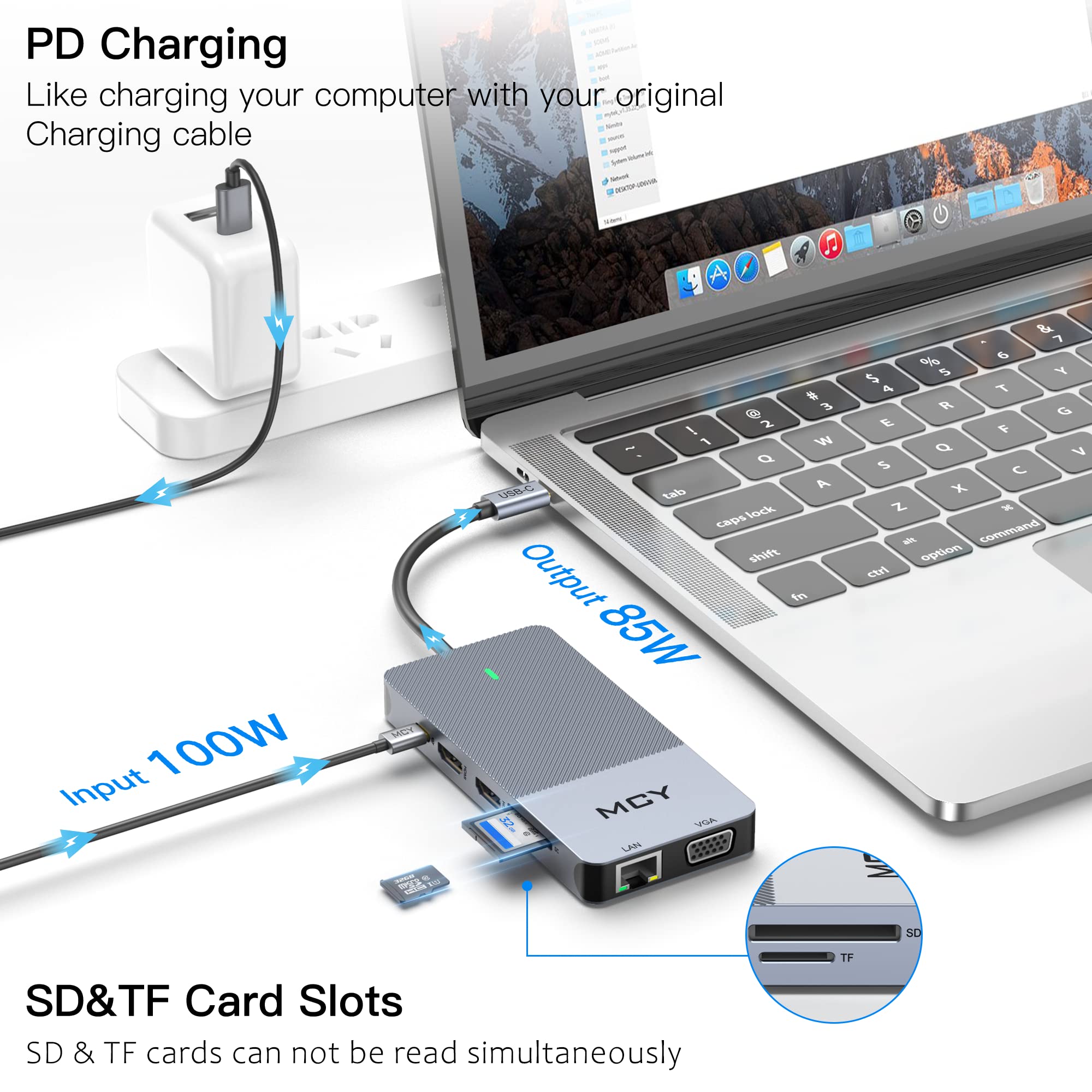
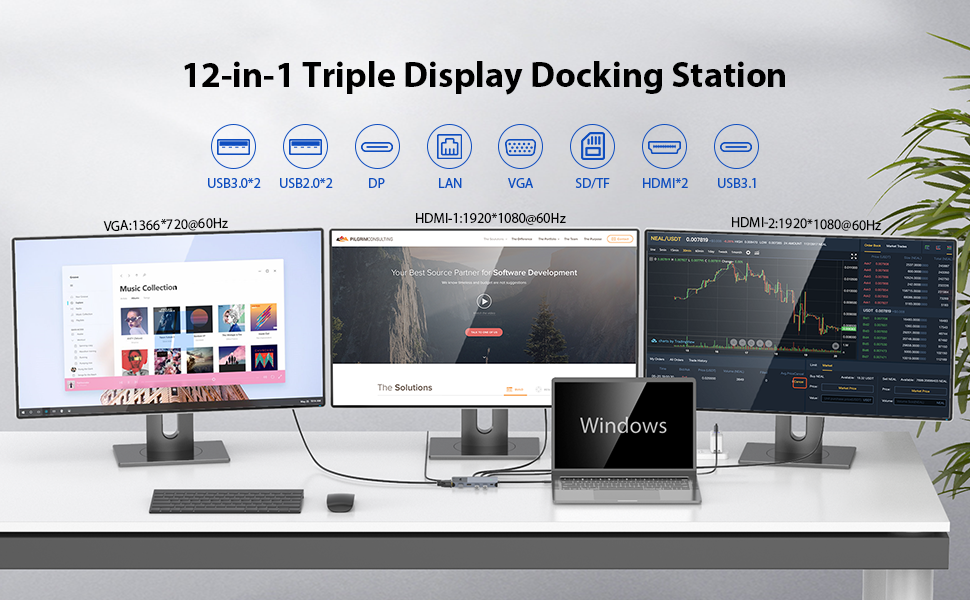
The MCY USB C Hub is a premium 10-in-1 docking station designed for professionals seeking ultra-high-definition dual monitor support (up to 8K single or dual 4K@60Hz), rapid 100W power delivery charging, and high-speed 5Gbps data transfer. Featuring a robust aluminum build and broad OS compatibility, it consolidates multiple ports—including HDMI, USB-A, USB-C, Ethernet, and card readers—into a sleek, plug-and-play device that transforms any USB-C laptop into a versatile workstation.





| ASIN | B09GFVQM6Z |
| Additional Features | Anti-Slip, Fast Charging, Plug and Play, Portable |
| Best Sellers Rank | #264,353 in Electronics ( See Top 100 in Electronics ) #2,142 in Laptop Docking Stations |
| Brand | MCY |
| Color | light gray |
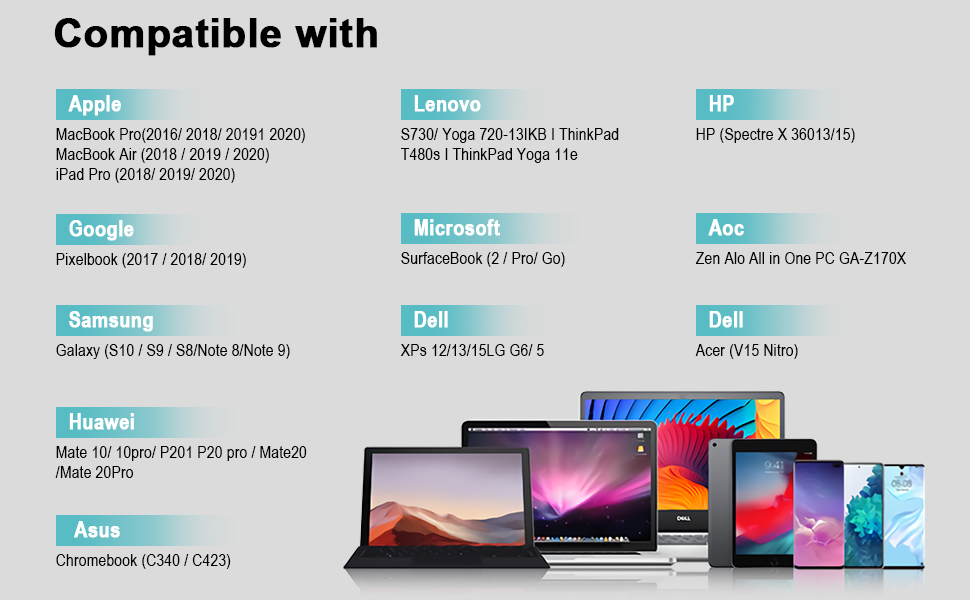
| Compatible Devices | Laptops |
| Customer Reviews | 4.2 out of 5 stars 838 Reviews |
| Data Transfer Rate | 5 Gigabits Per Second |
| Enclosure Material | Aluminum |
| Global Trade Identification Number | 06974393002931 |
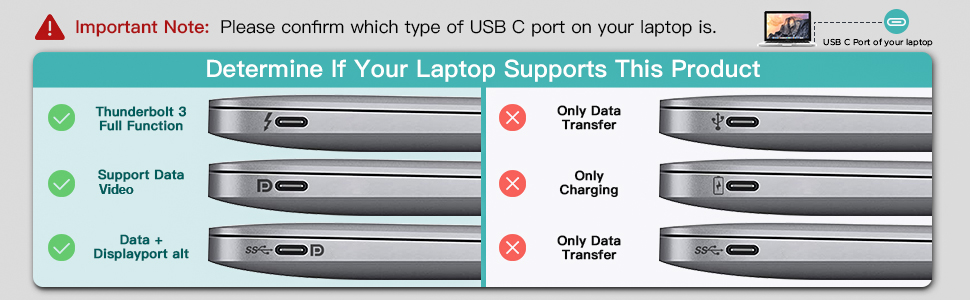
| Hardware Interface | USB Type C |
| Item Height | 0.57 inches |
| Item Weight | 4.64 ounces |
| Manufacturer | Jiangxi Kingtron Technology Co., Ltd. |
| Number of Ports | 10 |
| Operating System | Windows, macOS, Linux |
| Total Usb Ports | 5 |
| Warranty Description | 1 |
C**.
High Quality! Perfect Utility! Great Value!
Ive been using this MCT 12-in-1 Docking Station for a while now and I have to say it has exceeded my expectations and it is highly versatile. I go use my laptops video out ports in addition to using this docking station. So say your PC has ports for 2 monitors then if you add this you can connect an additional 2 monitors for a total of 4. My setup I use 3 monitors. 1 is display port directly to my pc for my gaming monitor and I have 2 monitors using hdmi going through the dock. I also have all my 4 usb inputs for keyboard mouse printer etc. and my ethernet plugged into this docking station. So for me that is 4 usb + 2 hdmi + 1 Eth for a total of 7 plugs reduced to just 1 usb-c plug that I have to plug in when returning my laptop to my desk, which reduces the wear and tear on all my ports and makes life so much easier when connecting. Just my power cable and usb-c for this dock and I am good to go. It is also nice to have an adapter with VGA capabilities so I can make use of VGA monitors when needed. Another 2 bonus ports are the Usb-C power input which will power the dock and charge your devices and computer but it also has a second usb-C port capable of data input, which I tested with everything else by plugging a usb-c adapter for more usb plugs which also worked on that extra usb-C data input port which means you don't lose access to your usb-c port when plugging this dock into what may be your only usb-c port on your laptop like mine. The build is high quailty with a nice smooth finish metal. It has a very smart and sharp look that I don't mind seeing on my desk. I am surprised how easily everything worked out of the box with zero issues. Even though I didn't have issues the conpany was kind enough to reach out to make sure I wasn't having trouble which is allstar customer service. I only write reviews for products I recommend others buy. This was a great purchase I do not regret. If you are on the fence I suggest you buy it you won't be disappointed. Overall: A+++ Quality, Utility, Ease of Use, Value and if you need a docking station this is a must buy.
C**.
Works way better than another product
I have had and use this dock daily over the past 3 months. I bought this dock for my work computer which only has USB-C ports (newer Dell). Of course I have devices I need to plug in that have usb a female ports and carrying around those teeny little adapters they sell on here to convert them is a pain to keep track of. I am grateful for a more "all in one" option. I am an Instructional Designer and I am constantly plugging in other devices such as USB mic's when I make videos, external hard drives, headphones that have USB capability, hooking computer up by HDMI for meetings or presentations while working from home. I have a docking station that my work provided for when I work from home which only has one USB A & C port; I plug in a wired mouse into it and all the other ports have the monitors and external speaker connected so I have hardly any available ports to plug in anything additional. Needless to say the MCY dock provides me with plenty of ports. I had a port from another provider and it used to say "can't read disc" all the time, or disconnected on its own while it was still plugged in, which was very frustrating and this is why I decided to try this device to replace the other one. I haven't had any issues with the MCY device saying can't read disc nor has it disconnected on me while being plugged into my work laptop. I almost need to buy a second one for when I have to go into the office weekly to leave there. I left my MCY dock at work recently and I drove back to the office one evening when I was working from home because I needed the dock. It is a bit pricy but thus far has been well worth it. I'll update my review after a few more months of use.
G**S
The Docking Station works very well.
The Docking Station aesthetically looks very good, and in general it works well. My Docking Station is connected to a Lenovo YOGA 7i to connect a display and the ethernet cable through which I get the internet. Everything works fine, but every so often, for some unknown reason, the laptop makes a beep and when I look, I see that I have lost the internet connection via ethernet cable and the laptop connects to the internet via WIFi, after a few seconds, the internet connection returns again by cable, it seems that the RJ45 port restarts from time to time. On the other hand, on some occasions, when I disconnect the Docking Station from the laptop and reconnect it, I have to restart the laptop because it starts showing me a message that tells me: A high consumption equipment has been connected to the laptop, This message doesn't go away until I restart the laptop. For everything else, the docking station works very well.
S**E
Great Little Docking Station!!
I was in search of a docking solution that I could use for my work laptop at home. Now that we are getting ready to head back into the office, I wanted to simplify the connections to make it a breeze to connect and disconnect when needed. This is the perfect device for my needs. It allows me to hook up a keyboard, mouse, headset, camera, ethernet, and power all into the dock, then with one single cable, connect all of those things to the laptop through the Thunderbolt connection. It works perfect and charges my laptop too. Note that to power and charge your laptop, you will need to purchase a 100w USB C power adapter separately (I use the MacBook Pro one purchased on Amazon for $36.99)
W**S
This Docking Station is Exellent
I tried a docking station before this, but it did not meet my needs. But the "MCY 12 in 1 Triple Display Laptop USB C Docking Station" was perfect for my needs and worked great. The price was much more competitive than they first one I purchased. Out of the box this Docking Station was easy to setup and has worked flawlessly ever since. It is lightweight, portable and sturdy. I appreciate top quality products that work as stated. Thanks!
J**N
Great for my work laptop
So far I have not had any complains outside of a small driver issue with Windows 11. The dock was easy to set up and everything was clearly marked. It works great on my Win10 Work laptop which has the usb C charger. The dock charges my laptop quickly with no issues. I was even able to connect it to a Chromebook and it worked well. I connected it to my iPad Air however the display did not work. Everything else did. I have had this issue with the iPad Air and other docking stations so I assume is a limitation on the iPad and not the dock. One issue I have had is i recently received a Windows 11 laptop for work and It doesn't seem to like the docking station. This is likely a driver issue with Windows that will probably be resolved at some point in the future. Other then that i have no complaints. It is a great product
K**S
Two MIRRORED monitors only
I bought this and two monitors for extended screens (each screen is separate) but had to use a second dongle for one of the monitors in order to get it to accept the second monitor as an extension. Probably could have gotten two cheaper dongles and got all the ports I needed and spent less. Other than that, it’s sturdy and connects everything with ease.
W**E
Great quality, portable dock with a sleek modern finish
I recently got a high end laptop to do graphics work on the go and needed a dock to use it as a desktop at home. I bought this product based on the price and have been thoroughly pleased. I’m able to connect my two monitors, mouse and keyboard all by plugging in one type-c cable. The product looks a lot better than other ones I’ve seen in this price bracket and has pretty decent specs. The finish matches well with my Asus Zephyrus G15 and will match the newer dark grey macbooks as well in color. Only drawback for me is the HDMI outputs only support up to 60 FPS. I rarely need to go above 60 for most things but have occasionally had to plug in my main monitor directly. This isnt a knock on the product though, any dock that delivers above 60 fps output will be understandable 2-3x the price for the more powerful components. For an affordable, all-purpose type-c dock this is the one to get.
Trustpilot
1 week ago
1 day ago