
DOWNLOAD THE APP


Customer Services
Copyright © 2025 Desertcart Holdings Limited
DOWNLOAD THE APP
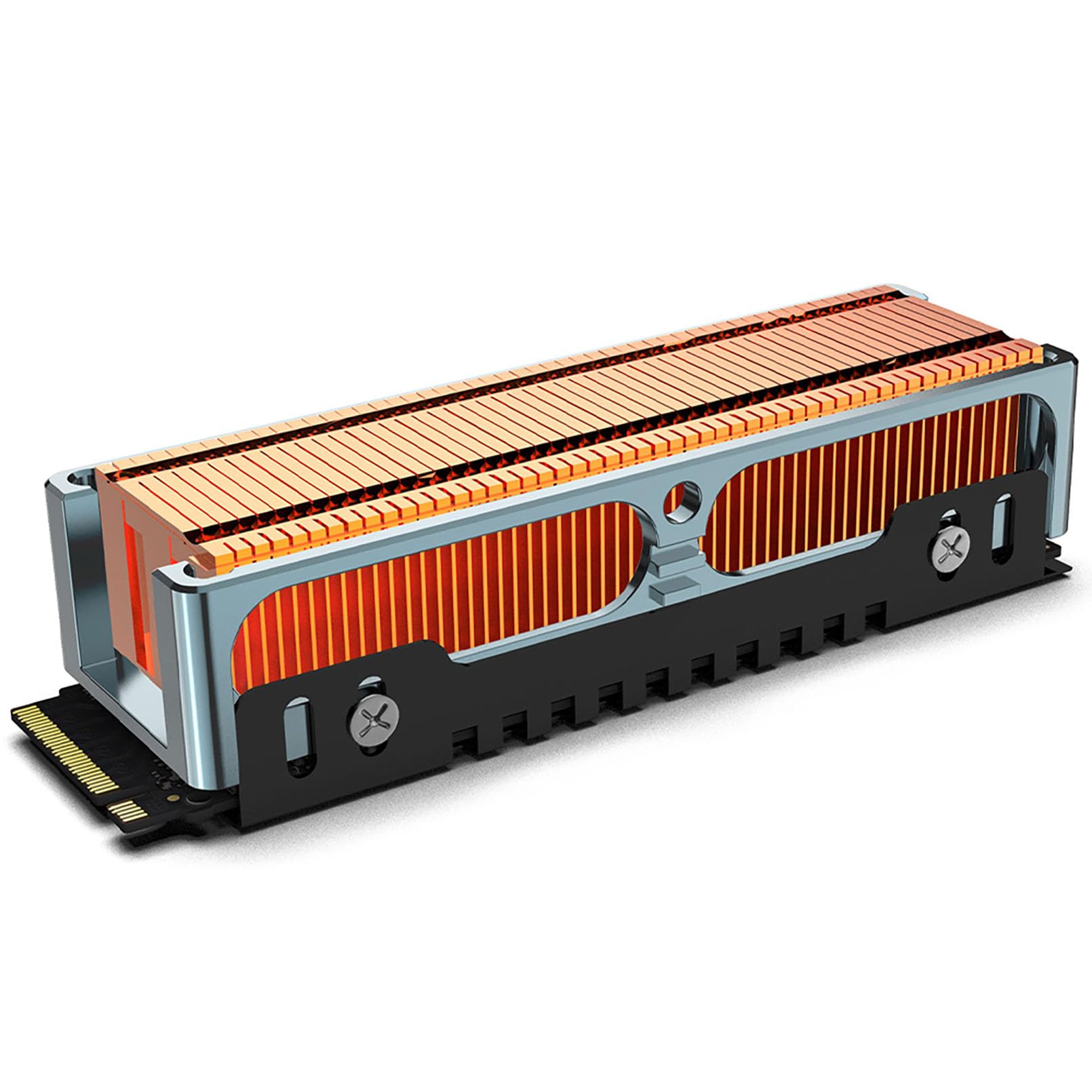
❄️ Keep your SSD chill, or risk the heatwave!
The JEYI Q150 M.2 HeatSink features high-performance copper fins with 401 W/m.K thermal conductivity and a precision CNC aluminum frame, designed specifically for high-heat M.2 2280 SSDs like Samsung PCIe 4.0 980Pro and EVO 970Pro. Weighing just 50 grams and measuring 17mm in height, it includes thermal compound and installation tools for easy setup, ensuring optimal heat dissipation and reliable SSD performance.


| Brand | JEYI |
| Cooler Heatsink Material | Aluminum |
| Cooler Heatsink Compatibility | 401 (W/m.K) |
| Item Weight | 50 Grams |
| Mounting Type | Chassis Mount |
| Manufacturer | JEYI |
| Product Dimensions | 2.91 x 0.94 x 0.67 inches |
| Item Weight | 1.76 ounces |
| ASIN | B09C6GH8VV |
| Item model number | Q150 |
| Date First Available | August 10, 2020 |
L**R
amazing heatsink
I started out getting the Q80 heatsink to use in the M2_2 spot, under the graphics card on the ASUS TUF B560-plus-WIFI board I used to build a media computer for streaming to the main TV. The Samsung 980 non-pro drive would hit 70C drive using the performance benchmark. The Q80 dropped the temps 20C+ to the high 40s (46-48C) under load.I used the Q150 heatsink to replace the stock ASUS-TUF-B560M-Plus heatsink they supply for the m2_1 position and it brought down temps 10-12C from the flat aluminum plate part. The stock ASUS heatsink was reducing temps from the 70C range with no heatsink to about 60C under load. I used the performance benchmark in Samsung magician to provide a repeatable and comparable load. The Q150 brought the temps down to the high 40's (46-48C) under the same load, the same effect as the Q80.They both enclose the whole M.2 drive evenly from front to back with the back plate, where the stock heatsink tends to bow the drive in the middle from the pressure applied by the heatsink and thermal pad that ASUS provides. Yes, ASUS provides extra rubber spacer pads to support the drive, but with this Q80 and Q150 design that is not needed. The Q150 design allowed me to lightly clamp the M.2 drive in the two halves to promote great contact before fixing the two halves with the included screws. The Q150 is too tall to fit under the graphics card in the M2_2 space. I used it in the m2_1 space. I did need to trim the PCIe latch a little so the heatsink did not have pressure on it from the latch. The stock ASUS heatsink is cut away to fit the latch with needing to trim it. Keep this in mind if you want to use this heatsink in the m2_1 space on this mATX board.The Q80 did fit into the M2_2 space ... with almost no room to spare. A sheet of paper width is still available between the shroud on the EVGA GeForce GT 1030 (active heatsink). I am not sure if there is enough space for any other graphics card heatsink. It BARLY fits with this ASUS board and this EVGA graphics card. The Q80 would also fit in the m2_1 spot but would still need the PCIe latch trimmed. Both heatsinks leave room the ASUS Q-Latch, but you do need to make sure you have the drive on the right location on the heatsink back. Take your time to get this part right and installation will be easy. The Samsung drive has a little circle punched out of the PCB near the connector that I used as a guide to line it up.The packaging is top notch for both the Q80 and the Q150, preventing any damage in transit. Amazon shipped mine in one of those plastic bubble wrap pouch bags, but the heatsinks were in perfect shape. (I was not so lucky with some cheaper flat plate/rubber band style heatsinks that were shipped in only a small zip lock-you guessed it they went back – late, damaged, and delayed the build) They (JEYI) provide an orange rubber pad for the bottom and a full cover thermal pad for the top of the m.2 drive, but they also supply a set of pre-cut individual thermal pads that could be applied to each chip on the m.2 drive if you needed that thermal configuration instead. Yes, both heatsinks also come with a cool, magnetized mini-phillips screwdriver, one extra drive cage machine screw and some extra M.2 hold down screws. All-in-all a really well thought out package. Make sure you check amazon listing for pictures of the assembly order, they do provide a 3d barcode on a card in the box, for a link to their support page but all you really need is the picture on the amazon site.The Q150 and the Q80 are both superb heatsinks, are well built, and exquisitely engineered, but best of all either one dropped the temps by at least 20C for the Samsung 980 drives (pro in the PCIe 4.0 M2_1 spot and non-pro in the PCIe 3.0 M2_2 spot). M.2 Drives need a heatsink. The flat aluminum plate style should be used at a minimum, but this design is optimal. Buy with confidence! I hope this review helps ... I know I had a lot of questions ...
J**Y
Great heatsink!
Worked as expected. Easy install.
T**.
Fit and works well.
For reference, I’m using this with a firecuda 530 on a TUF X570 board. As the heat sink wraps around the ssd, it will add to the width a bit. In my case it barely misses the latch of the PCIe slot.The copper is beautiful and the fit is excellent. Not sure how the metal will look over time, but right now it looks great. Note that the fins are closed on top and the design relies on axial air flow, while the other version (Q150) under this listing appears to support air flow 90 degree off.The included heat pads are a bit confusing at first as I didn’t see an explanation for the colors. The blue actually sticks to the surface and works best between the copper sink and the ssd. The pink one is for the black u-channel and the non-stick side (no foil) goes towards the ssd.Overall, I am impressed by the build quality, almost as much as I am surprised by the heat those ssd develop. The benefit turns out to be about 14C cooler than another M2 that’s directly under the original heat spreader of my motherboard.So I was curious and replaced the latter with another Finscold Q80. That's a 500GB version of the Seagate firecuda 530 while the original one is a 1TB version of the very same series. So it turns out that even with identical heat sinks, the SSD in the m.2_1 slot runs a bit warmer than the one near the CPU in the m.2_2 slot. That could have many reasons, but one plausible one would be that the air flow is better around the CPU while the other slot get a bit of heat from the GPU. (Note that PCIe slot in line with the m.2_1 slot becomes unusable due to the height of the Q80. The similar TUF X570-Pro board, doesn’t even have that particular PCIe slot.)Still, the difference between both is now 9C, or 5C less. Hence, the Finscold Q80 does cool better, even if not by much and certainly not a difference between life and death.I ended up upgrading the m.2_1 slot to a Q150, and while it may have resulted in 1-2C lower temperature of the ssd, the difference is minimal.
W**I
Solid NVMe heatsink, quality materials, no instructions
I got this after receipt of a $7 heatsink that was pretty much junk, which I returned and got this. Jeyi is a decent manufacturer. Not as good as Sabrent, but a decent Chinese company. The first thing you must understand is that there are no English instructions, so you must know your way around these. They come with 2 types of screws, one type is to assemble your heatsink, the other type is longer is made to attach your NVMe to your motherboard, (its an M2 screw). It comes with 3 cheap thermal pads, one orange one .5mm thick and 2 1mm thick. The pads that usually come with heatsinks are the cheap blue ones. I used instead, some high quality ones from Amazon that are much more thermally conductive because I was using a SN850X which runs hot. I used a .5mm on top and bottom so that hte total height was minimal and heat conduction maximal. Installed it in a Western Digital D50 and had to use a nonstandard M3 screw to attach the NVMe to the board. Runs fine. Solid transfer speeds, close to 2800_ Mbps. Recommended if you have the clearance to use this. I deducted one star due to the anodic surface treatment. It prevents corrosion, which is moot with aluminum and reduces thermal conductivity. You want for a heat sink, high thermal conductivity, not low thermal conductivity, which they evidently have applied.
Trustpilot
4 days ago
2 weeks ago