
DOWNLOAD THE APP


Customer Services
Copyright © 2025 Desertcart Holdings Limited
DOWNLOAD THE APP


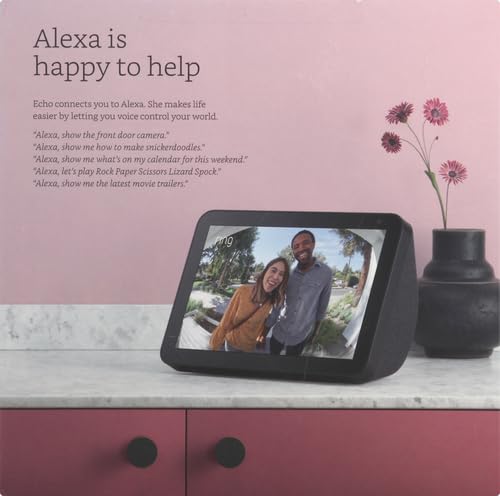


📱 Elevate Your Everyday with Echo Show 8!
The Echo Show 8 (1st Gen, 2019) is an HD smart display featuring an 8-inch screen, a 1MP camera with a built-in shutter, and dual-band Wi-Fi connectivity. It allows for video calling, smart home control, and serves as a digital photo frame with unlimited cloud storage for Prime members. Designed with privacy in mind, it includes multiple controls to protect your personal information.
| Size | 7.9”x 5.4”x 3.9” (200mm x 135mm x 99mm) |
| Weight | 36.6 oz (1037 grams) Actual size and weight may vary by manufacturing process. |
| Display | 8.0” touch screen |
| Camera | 1MP camera with built-in shutter |
| WiFi connectivity | Dual-band Wi-Fi supports 802.11a/b/g/n/ac Wi-Fi networks. Does not support connecting to ad-hoc (or peer-to-peer) Wi-Fi networks. |
| Amazon Sidewalk | A shared network that can simplify Echo device setup and can help your device reconnect to your Wi-Fi router when you update your password or network name. Sidewalk uses a small portion of your internet bandwidth to provide these services to you and your neighbors, and is enabled on your device unless you have previously disabled the setting. You can disable Sidewalk at anytime. Learn more here. |
| Bluetooth connectivity | Advanced Audio Distribution Profile (A2DP) support for audio streaming from your mobile device to Echo Show 8 or from Echo Show 8 to your Bluetooth speaker. Audio/Video Remote Control Profile (AVRCP) for voice control of connected mobile devices. Hands-free voice control is not supported for Mac OS X devices. Bluetooth speakers requiring PIN codes are not supported. |
| Audio | 2.0” (52 mm) neodymium speakers with passive bass radiator |
| System Requirements | Echo Show 8 comes ready to connect to your WiFi. The Alexa app is compatible with Fire OS, Android, and iOS devices and also accessible via your web browser. Supported operating systems. Certain skills and services may require subscription or other fees. |
| Setup technology | Amazon Wi-Fi simple setup enables customers to connect smart devices to their Wi-Fi network in a few easy steps. Wi-Fi simple setup is another way Alexa is always getting smarter. Learn more about Wi-Fi simple setup. |
| Processor | MediaTek MT 8163 |
| Accessibility features | On Echo devices with screens, you can enable Alexa captioning and closed captioning, magnify the screen, toggle color inversion, and choose between color correction options. You can also enable the VoiceView screen reader to use gestures to navigate the screen and hear spoken feedback about the items you select. Learn more about Echo with a screen accessibility and Alexa accessibility. |
| Warranty and Service | 1-year limited warranty and service included. Optional 1-year, 2-year, and 3-year extended warranty available for U.S. customers sold separately. Use of Echo Show 8 is subject to these terms. |
| Included in the Box | Echo Show 8, power adapter (30W)/cable (4.9 ft.) and quick start guide. |
| Privacy Features | Wake word technology, streaming indicators, microphone/camera off button, built-in camera shutter, the ability to view and delete your voice recordings, and more. Visit the Alexa Privacy Hub to explore how Alexa and Echo devices are designed to protect your privacy. |
| Language | Alexa speaks English and Spanish |
| Recommended device footprint | Echo Show 8 device is 7.9”W x 3.9”D. Recommended footprint: 8”W x 5”D. |
| Software Security Updates | This device receives guaranteed software security updates until at least four years after the device is last available for purchase as a new unit on our websites. Learn more about these software security updates. If you already own an Amazon Echo, visit Manage Your Content and Devices for information specific to your device. |
M**Y
Great device to have!
this was our first echo purchase and we absolutely love it. The ease of set up is very simple, the size is perfect for a nightstand or in any room of the house really. It functions doing everything I need, including connecting to my ring cameras, being able to drop in and video chat, setting my alarms, and having access to anything else in the house, I have connected to my Alexa devices. The volume is awesome, I never use it fully turned up because it’s loud enough at eight. it looks very sleek and well made as well.
C**I
A Great Addition to Your Home Tech
This is my first Echo device. Had already set up several skills on the Alexa app before the Echo Show 8 arrived, so I was ready for it; and had my expectations already set as to the quality of the response to the voice commands. If you are considering entering the Echo 'echo-system' and are on the fence about getting one of these, try downloading the Alexa app to your phone or tablet and try it out. On the phone app (iPhone and iPad in my case), a button push activates Alexa; with the Show 8, just say her name and she starts listening. Some of the Alexa skills still need some work, and your satisfaction with them may vary. But for the Show 8, it's great! The speakers sound better than I expected (actually are pretty awesome compared to the Show's size) and will fill the room with sound. The Show 8 has an external speaker jack on the back, but I don't see ever using it - the internal speakers are THAT good - can feel the bass from the speakers vibrating the kitchen countertop. With the speakers in the rear, having it backed up close to a wall provides the best sound projection and quality. A similar concept to some higher end Bose speakers, which have rear-firing elements that are designed to reflect the sound off of a wall and provide more ambience. When music is played, the lyrics scroll on the screen, so you can sing along (if your housemates and dog can stand it). Even when playing at a higher volume level, I can still get Alexa's attention but it may take more than one attempt. The microphones are quite sensitive and will pick me up from another room as long as there is not much background noise. The Show 8 also has Bluetooth, so you can pair it with a phone, laptop or other device and play music through the Show 8's speakers. I do this frequently since the Show 8's speakers sound much better than the internal phone or laptop speakers. I did notice a bit of a delay in watching a video on the laptop, and then the audio coming out of the Show 8. It just may be an artifact of using Bluetooth to send the audio. Rather than the recommended stand (or no stand), I purchased the "Echo Show 8 Adjustable Aluminum Swivel Stand" also sold on Amazon (you can see my review of the stand on that page). A stand is recommended to allow you to position the Show 8 at an optimum viewing angle. I also purchased several of the Meross Wifi smart plugs (also sold on Amazon). Have them programmed to link with Alexa so I can give one command (such as "Alexa, turn on Christmas Lights") and ALL the plugs in the Christmas group turn on at the same time. Pretty cool! Once Christmas is over, the plugs will be assigned other duties. The Show 8 can browse the web. There is a Firefox skill that will allow you to open a web browser. And if you don't like tapping letters on the screen, you can pair a Bluetooth keyboard and mouse (see photo). If you have an HP printer, it can be linked to the Show 8 to print grocery lists or stuff you find on the internet. Not a deal-killer for me, but can't seem to be able to disable the "Try Alexa <blah blah blah>" on the bottom of the home screen. You CAN disable the skills cycling with other topics in the center of the screen as another reviewer noted. I have the Show 8 in my kitchen; so the display is not "in my face" and I am not looking at it all the time, so it is not THAT big of a deal. Have to admit I was skeptical and wasn't sure if I would find it useful....but I'm liking this device more every day. Now an Echo Dot has found its place in our household as well. Along with some Echo Buttons.... Like the Echo Show 8 so much that I ordered another one to give to my daughter and son-in-law!
M**.
This is an amazing device!
We have both the Echo dot and the Echo Show 5 as well as the Echo Show 8. Having all three devices allows for a great comparison. Each device has its place and each is an excellent value (what it will do for what you pay). Buying them when they are on sale is the way to go, given that they have frequent sales (worth the wait). But of the three, the Echo Show 8 really blows the others away. First, having the video screen brings significant advantages to the Echo Show 5 and 8 (the number represents the approximate diagonal size of the screen in inches). Being able to watch videos, see news as text and have the words for songs show up (they do for most Amazon Music songs) makes the Echo Shows well worth the investment. The sound on all three Echos is excellent, but the Show 5 has deeper bass and better volume than the dot and the Show 8 has about three times the volume of the Show 5, with excellent bass. And the larger screen on the Show 8 is not only larger than the Show 5, but much brighter. We have chosen to put the Show 8 in the kitchen and it is the main unit we use (it easily fills a large room with high quality sound). The Show 5 works well in a bedroom and the dot is perfect for a hallway, bathroom or smaller space. All three seem to pick up our voice from anywhere in the room very well, unless you also are listening to TV or other sound-producing devices - but that is as I would have expected. One unexpected advantage of the Show 5 and Show 8 (haven't tried it on the Dot yet) is the ability to make calls WITHOUT pairing with a cellphone. You can ask Alexa to call the number you speak - and it will make the call. Although I have not tried it yet, I assume this would also work with 911 - which would be great for older adults that might fall or otherwise not be able to reach a phone or emergency button. Having a voice entry system is a huge advantage. We plan to purchase the Show 5 and Show 8 for family gifts at birthdays or Christmas, we are so impressed with them. We have also found them ideal for older adults that live alone and would like to have "something to interact with". My mother-in-law is 93 years old and nearly blind, and she LOVES the Echo dot. She is unable to see the TV screen anymore or operate a remote and for that reason the Echo Shows would not be a good option for her. But she uses the Echo Dot constantly to ask about weather, news and other voice-tasks, and loves being able to ask it to play music from her youth (the Amazon Music subscription has been an excellent investment for her as well). We watched many comparison videos (check them out on YouTube) between the various Echo models as well as comparisons with the Nest and other competing devices. I would recommend the Echo Show 8 as the best choice for most individuals or families. The extra cost of the Echo Show 10 is hard to justify unless you are using it to control a number of smart home devices. But, for the modest difference in cost over the dot or Show 5, the enhanced sound and viewing of the Show 8 is definitely the way to go!
J**4
Not Just A Glorified Alarm Clock...
I have been reading the Amazon Echo 5 reviews for quite sone time and trying to make up my mind on if I should buy it or not. When I saw the pre-order starting for Echo Show 8 I was not sure if I was going to get it or not but I put my name on the list anyway. Before the Echo Show arrived I planned on it just basically being a clock for me but I was wrong! I had every plan of holding onto my alarm clock even after I set up the Echo Show in my apartment but it did not work out that way. I saw the “skill” for this speaker to play my Apple Music so that was the first thing that I tried because I wanted to see if it had good speaker quality like my Wonderboom blue tooth speaker which is my usual way of listening to my playlists. It exceeded my expectations and since I set it up I have not turned on my Wonderboom speaker at all which is amazing to me because I like quality sound. Even stopping the music for a few minutes is easily done with a voice command. I am, and have been a longtime fan of everything Apple. I do have an Amazon Kindle Fire but thought that would be it for me with Amazon’s devices. I thought that I would have as much of a “problem” as quite a few others had with the things that come across the Echo’s screen but to my surprise it is not bothersome at all to me. I have long liked Apple’s customer service and when I purchased my smart tv and my sound bar I saw that one of the services Amazon provided was customer support. My friend had set up the tv and the soundbar for me and he relied heavily on this service that Amazon provided in setting it up with the soundbar. While I was confident that I would not need to use this service when I set up the Echo Show I figured that it would be fairly easy but was happy that if a problem arises and I cannot figure it out that I could always call and find an answer from Amazon. I saw that on Black Friday (today) that the selling price is lower than I bought it for ($99) but that was to be expected. I just decided that I would write a review on this product since it seemed ironic to me that I chose Amazon over Apple in this type of device. I was seriously thinking I would stay with my plan of buying the Apple Home Pod because of the critical reviews of “ads” on the Show but I see I am wrong with that. Since I have set this unit up I see that it has surpassed my expectations because it is a great product that not only has great sound, it also has good clarity on the screen. The only problem I have encountered with the Echo Show, and it is not much of a problem, is to remember to say Alexa instead of Siri. Since I have only a small efficiency apartment (400 square feet) I do not need another Echo Show but if I did I would not hesitate to purchase another one of these units. For me to write something like this for an Amazon product it is a pleasant surprise because I myself rely heavily on all reviews because they are very valuable in deciding what to purchase since I am on a small fixed income and I figured there are so many reviews of the Echo Show that I wouldn’t have to bother with that but I changed my mind after seeing this is a wonderful product. Thank you Amazon for giving such good quality for such a small purchase! I would not hesitate to even buy one as a present for somebody if they wanted something like this. UPDATE- I decided to call customer service since I was not happy with seeing the selling price go from $129.99 to $99 and now to $79. I usually never call for things like this but I was very happy with the agent telling me that I will get a promotional discount which is very good for me since I am on a very small fixed income. Thank you Amazon your customer service is always good!
M**R
Only 4-stars because it's an extremely underpowered/limited function Alexa product
Amazon could give me a 15" picture frame version of this with an i7 processor 16gb of ddr5 ram & a gtx3060 in it... that would still only get 4 stars because literally none of that would ever get put put to use with how restricted & locked down the Alexa products are. They have 1 function. To be alexa..Alexa... and this one does that. Enter than any of the products I've tried this far so it's an A+ for price and an A- for function. Almost never catches the wake word first time I say "alexa" unless I make a point to say it with some authority... to be honest my echo dot 3rd gens were the BEST, most reliable when it came to recognition and waking that I've ever experienced. Aside from that one minor issue though, this device does what it supposed to and for $50-60 what more could you ask for in a replacement for your boring ol' bedside alarm clock, really?...👍 Also, it's just a little slow to get up and moving in general most of.the time, but once it's "woke" you're almost always good to go with this version of Alexa. Only gripe I have is how slow my camera feeds load up when asking Alexa to show me "blank"... it's a solid 15 second+ load time before the live/low latency video is streaming to me from my blink mini or my blurams 2k dome camera, either one. Great quality once they are streaming but that loading time is a killllller when it comes to say - getting a motion alarm notification at my driveway camera and I say "Alexa show me the driveway"...immidiately Alexa says "okay" and it starts laoding.... .... .... .... Somebody could have siphoned half my tank of gas out of my car by the time it starts playing lol realistically though. On the flip side, no star retraction for this because I know its got alot to do with my camera running on the 2.4ghz only band on my router which makes the latency (reaction/tranfer times) as well as the video stream loading, cloud writing and basically every function to do with the cameras at all - 2-5x slower than if they were connected to the one of the TWO 5GHz bands broadcast by my asus RT-3200AC wireless router, instead of using the ancient 2.4ghz protocol, and even this 1st gen echo show is connected via 5Ghz, so I'm sure that dosent help that it has to locate the camera it's and everything through my router and on switch to the 2.4ghz band everytime i want to see the stream i would assume is where the excess load times come into play past 12-15second every once in a while... which is kind of a major issue if you really think about how much malicious stuff a person could really get done in a matter of 10-15 seconds while you cant see a thing and have no clue because you echo show screen just says "loading stream...." for those precious 10-15 seconds that they really are in that type of situation... Not to mention the 5-10seconds that it takes for the notification to play from alexa that motion was even detected in the first place... 🙃 BUT im sure i could cut all of these times down to about 1/3 or less hat they are currently with this confoguration by spending a ton of money on 5ghz cameras instead of the 2.4ghz band to match what this device is connected to and automatically boost the entire system 150% even without matching the bands because 5ghz is just that much faster and lower latency. (This configuration is still totally acceptable knowing its my cameras, not this device for normal scenarios like seeing who just pulled up in your driveway for example. Just not fast enoughin a crucial situation where somebody's crazy ex runs up and stabs 1 tire and is gone from the frame before the stream ever even loads leaving you wondering if there's something wrong with you motion detection again or what that was about because you can't see anything by the time it's loaded 🤨🤔) overall a great little bedside assistant gor the money. If money were nk object though, the latest version gen 2 is no doubt much faster and a little less laggy than this one I would assume so yah... if you have a bunch of those exes/concerns, just spend double for that one, it's worth it looking back now 😆
T**S
One of the best Amazon devices out there
I would like to first start by saying that I am a huge Amazon fan but I'm going to try and keep this review unbiased . To start off this comes very well packaged and is pretty much just like every other Amazon device packaging not flimsy and seems to be made high quality. As for the setup, it is super simple to set up answer a few basic questions and it starts up. The screen is very clear . This product does have weight to it and has one of the best sounding sets of speakers that I have heard in a long time. This does have a software-based equalizer to adjust the low mid and high range. Controlling the device is very simple via voice or via touch, simply say your wake word and then say the command or swipe from right to left and choose a function. I am giving this five stars despite having a few negatives. First negative even though set up is flawless and this appears to be nothing more than a tablet attached to some really high quality speakers and some software you cannot add anything other than skills. Which in my opinion kind of defeats the purpose of having something as amazing as this. I would like to see the ability to utilize and customize screensavers backgrounds whatever and be able to make it my own. There are very limited options for customization. Although this is not a deal-breaker many people including myself would like the ability to select what they want on it such as placing android-based apps. In addition, although the sound is truly phenomenal I would really like to see more control of specific sounds by use of a seven band equalizer instead of just the standard three band, possibly surround sound effects as well. If you have never owned one of these devices before you will be pleased to know that these have fantastic video calling features that can sense low bandwidth and adjust the image quality accordingly I have used this on a hotspot 3g with absolutely no problem getting high def the call quality was pretty decent I did not notice any lag or video degradation while on a high-speed connection as mentioned earlier on 3g video degradation is possible. Watching movies on this is the equivalent of watching movies on a tablet however the sound quality is truly remarkable. Although the paper documentation is limited the voice controls appear to be exactly the same as the fire cube. I have been using this for about 2 weeks now and it is the perfect companion to my other Amazon devices. One thing I forgot to mention was that the camera does have a physical shutter which can be manually opened and manually closed to increase your privacy. As with all echo devices this does have a button to silence the microphone and this does have a volume up and volume down. All of these settings are controlled via the software settings button which is located by swiping from the top to the bottom and from within the Alexa app. As we are in the midst of a pandemic with no hard end in sight I did wind up purchasing five of these devices for Christmas gifts. It is in my opinion one of the best most versatile devices on the market which seamlessly integrates with your prime membership. Even if you choose not to have a prime membership you can use all of the features of this device it costs nothing to operate but you do need to have some form of internet connection wirelessly.. Note for people with vision problems. It is recommended by me to avoid purchasing the echo show 5 and purchase a echo show 8 or echo show 10 if you have problems with eyesight or for the elderly as it is a much bigger screen and easier to read. And again I am rating this five stars.
T**D
Bringing family's together!
Well this is a long story but I promise well worth reading! Ive been in a wheelchair for 30 year's and I am with the most amazing woman in the world! And she is all about getting deals & clearance sales..lol We were just watching T.V together one evening and they were Advertising About Amazon day's. And she told me we she at leaat take a look. Well she knows I really miss my momma every since she moved away but more so now that she's older & lives 9 hours away. And I'm unable to handle that long of a drive & even half way would be pushing it. Not to mention my sister's want to see her as well & they wouldn't be able to either. I love my momma so much & miss being able to see her when she came to see us all. So we both were on our cell's & I came across the Echo Show 8 & half off a Smart plug-in. And it was one of the prime day sales. And I told her hey look at this and what it can do! Do you think my mom would use this? She said aak her..lol So I had to call her & told her. I wanted to buy one for her & me but she didn't want me to ir let me pay for hers. My better half seen Echo Dot 3 w/ half off on a smart plug-in. Whixh she LOVES music and cooking and has been wanting to get one. Well after looking a little while longer we came across a doorbell camera wich she found made by someone else and I have respect for the makers of all the echoes so I will not say who it is but it isAlexa compatible. With me being in a wheelchair I can't see who is outside if someone comes by. Well due to the prime day's & have Amazon Prime membership wich does get you even more off on some thing on sale (not often but it happens). And it was all for under $200. And if we had got it without prime day's it would have been $399 & im not sure if that's before or after tax but either way amazing deal! And my mom said she was getting the Echo Show 8 also. Well at first it said it was going to be something like 3-5 weeks. Well it was around a week. Still waiting on the Echo Dot 3 & both smart plug-in. But my momma surprised me by making a video call to me one day! And I was taking a nap so really caught me off guard. It was AMAZING the sound was almost perfect the video waa the same & I'd had few people that said it will drop your call well we talked for 3 hour's!! I hadn't seen her in a long time & it was like she waa sitting beside me &my wife was sitting with us as well. It waa so great to be able to talk & actually see each other & when you're talking about something you can just show them! THIS IS AN AMAZING PRODUCT! I would pay full price if i hadn't seen it on sale. And now my little sisters can see her as well. But more importantly to me she xan see her 6 grandchildren!! I do not have any kids but my niece's & nephews can see her. 3 of them are 4 years ago or younger. I just want to say thank you to the makers of such an amazing idea! I know that you can use your cell but its hard to see and then you have to move it everywhere so they can see eaxh other. So the show is well worth the money. Amd not to mention it has so many features & Alexa can do more than you can imagine. (Sorry for such a long review but I want the owners & the people that make and sell it it to know what good they are doing for people like myself & my family) Thank you!!! 👍
U**L
Good Device and Works With My XT2 Camera System
My specific purpose for buying this item was for working with my XT2 camera system. I was concerned about a number of things: (a) The 'things to try' crap supposedly showing constantly on the screen, and supposedly not being able to get rid of it, and complaints that the Show 8 would not work with the Blink XT2 camera system. Well, you CAN't totally get rid of the 'things to try' blip, but you CAN greatly reduce it, to a degree of almost background noise, by reducing the rotation rate. It then almost becomes a non-factor, which makes me EXTREMELY happy. As for the connection to the Blink XT2 camera, you need to do a little bit of work. You need to have established a Blink account, as instructed by the Blink XT2 camera instructions. After you have created your Blink account, you then need to enable the 'Blink Smarthome' skill, for your echo Show 8. When you have gone though the process of setting your camera system up, the skill on your echo Show 8 allows you to work with your XT2 camera, with no issues, via voice command, as you would expect. Now for another comment, about the camera itself, which has really nothing to do with the Echo Show 8, but just as an FYI. I noted a lot of folks unhappy with the XT2, because it did not notify you immediately, when it detected omtion. This was due to the fact that it notified AFTER it finished making a recording, NOT upon start of the recording, with detected motion. Well, at the end of 2019, that item was addressed by Blink, as stated in the following message: "We’re excited to announce our newest feature available for XT2 users, Early Notification, provided as a Beta preview release. This is currently only available in the US and Canada but we will be rolling this out to other regions soon. This article will be updated when that happens. When enabled, Early Notification configures the camera to send a message as soon as motion is detected, then the motion clip is recorded as usual and will appear in your list. When the Early Notification message appears in your app, you can tap it to join a live view of that camera and respond to events in real time. When disabled, notifications are sent when the motion clip finishes recording. To enable this feature, go to the camera settings screen and switch on the “Early Notification” toggle (shown in the image)." I have this new/beta item enabled on my new camera. ************************************************************************************************************************************** UPDATE After successfully adding the first camera, of my three camera system, I proceeded today to set the two remaining cameras up. I could not get the cameras to connect to the Blink app, and I spent a good 30 min. going nuts. I then remembered something. My Netgear Wireless Router and myself are very well acquainted with each other. I routinely look at the logs, to see who is attempting to connect to my system, as I have the router email them to me. I also used the feature 'Access Control' on the router to basically deny access to my system by any new system that wants to connect. In this manner, I control who gets on my network. Well, I had to turn this feature back to the 'allow all systems', to get the cameras permission to access my network. Yep, I was happy, I had resolved the problem--NOPE!! The cameras still would not connect!! I think went into trouble-shooting mode, and plugged/unplugged the BLINK switch a couple of times--NO GO!! I then noticed something in my router log, the following item was showing as being blocked: F6B85E9992C5-MYSIMPLELINK . I looked that up on-line and found that it was tied into BLINK camera live initialization. The 'F6B85E9992C5' contains the MAC address of the camera, which is stated on the camera, right under the serial number. No, the MAC address that I am showing DOES NOT match my actual MAC address, I changed it, so as not to be stupid in a public showing. I used the router software control to ALLOW access to the 'F6B85E9992C5-MYSIMPLELINK' item, which was the camera that I was trying to install. The camera connected, both of them, and all was well. Making this simplified, if you cannot get your camera to connect to the BLINK app, take a look at your router log ( if you have one ), and see if something is showing as being blocked, which matches the string that I previously mentioned. It appears that the hexadecimal part of the front end of this string will change, to match the device, but the 'MYSIMPLELINK' stays the same, which you can always change the name, to match the location of the camera. I left the hexadecimal front end alone, and just change the MYSIMPLELINK to match the location of my camera. CHEERS!!
Trustpilot
2 months ago
2 days ago