
DOWNLOAD THE APP


Customer Services
Copyright © 2025 Desertcart Holdings Limited
DOWNLOAD THE APP

🚀 Elevate Your Build with Style and Functionality!
The Silverstone Tek TJ08B-E is a sleek mid-tower computer case designed for professionals, featuring an aluminum front panel and a robust steel body. It includes a powerful 180mm Air Penetrator fan for superior cooling, quick access filters to minimize dust, and ample storage options for multiple drives. With its removable motherboard tray and adjustable CPU cooler holder, this case is perfect for efficient and stylish builds.



| Material | Aluminum |
| Color | TJ08B-E |
| Recommended Uses For Product | Business |
| Item Weight | 15 Pounds |
| Total Usb Ports | 2 |
| Special Features | Air Penetrator Fan, Quick Access Filters |
| Hard Disk Form Factor | 2.5 Inches, 3.5 Inches |
| Internal Bays Quantity | 6 |
| Compatible Devices | Micro-ATX, Mini-DTX, Mini-ITX motherboards |
| Number of Fans | 1 |
| Fan Size | 120 Millimeters |
| Total Expansion Slots Quantity | 3 |
| Total USB 2.0 Ports | 2 |
| Supported Motherboard | Micro-ATX, Mini-DTX, Mini-ITX |
| Case Type | Mid Tower |
| Power Supply Mounting Type | Rear Mount |
| Cooling Method | Air |
A**E
Art and Technology Combined
I had my eye on this particular computer case for a long time, in anticipation of a new build that I finally had a chance to realize. I did a lot of research on this case, and other "full tower" cases, and decided to get this unit, even if by some accounts the design might seem a bit dated. Now having had a chance to actually use this case and create a new system, I could not be more pleased with this full tower computer case. While the computer case is mostly aluminum, the main body is a thick and heavy aluminum that is incredibly rigid and heavy. The black anodized finish is absolutely first class, and the fit and finish are just outstanding. There was nothing flimsy about this computer case. I did look at the Silverstone TJ-11, and while I also like that case, I felt it was a bit of overkill for what I was looking for. The interesting thing about this particular Silverstone Computer case, is that it is probably one of the best cases to have for custom watercooling, or making major modifications to the layout. Since most everything is tightly screwed together in the construction, you can take the inner frame apart, and create a "BTX style" layout if you wish, and reverse the side of the Motherboard. While I stayed with Air Cooling for this particular computer build, I was impressed to find that both Phobya and Swiftech both make very robust radiator frames that fit this case perfectly in the bottom of the case, with the pre-existing, (and pre-drilled) holes already lined up for the radiator mount installation. No drilling and tapping needed. Since I did not use the supplied Hard Drive frames/cages but still liked the fan location on the bottom, I used a Phobya radiator mount, and just re-mounted the two fans in the same exact place by just using the radiator mount. It all fit perfectly, and the bottom fans retain their "stock" position. I can use this to mount a large radiator later on, should I ever decide to go with custom water cooling with room to spare. - I want to add that whether one considers this design "dated" or not, the fit and finish of this computer case is impeccable. The quality in appearance, construction, and finish make this a work of art. This may have been my first build with a full tower case, but it will not be my last. Having the room to work with arranging the computer wiring, plenty of Optical Bays, dual power supply space (if needed), and the possibility to custom water cool, make this case a winner, even if you are going with a standard ATX Motherboard. The Motherboard stand offs in this case are also quite "high", meaning that it is easy to route wires behind the Motherboard if so desired. On the flip side, this case width will not support the most "tall" dual tower type of the large CPU air coolers on the market, such as the Noctua NH-D15 (I used a Noctua NH-C14S with great results). The 2 top 120mm fans have kind of a strange spacing to them, but it is not difficult to drill a couple of new holes in the mesh if you wish to mount them in slightly different positions. There is not enough clearance at the top of the case for an AIO water system, unless you want to mount the fans or the radiator external to the case, or you have a very thin radiator or use slim fans. If you want a case that offers a lot of great options when you open the box with no modifications, this is probably not the best case. If you want a case that you can easily modify, change, or really customize, the Silverstone TJ-07 would be an excellent choice. If you really want to go wild with the design, there are a number of aftermarket companies, (all in Europe it seems), that offer custom panels, brackets, and other items just for this particular case. To sum up, I really do love this computer case, and it should serve me as long as the ATX format is alive and well.
L**R
A very nice looking, and compact Micro ATX computer case from ...
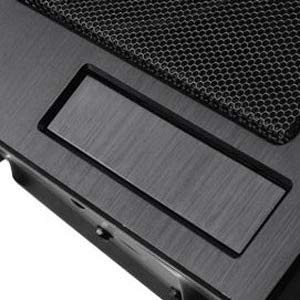
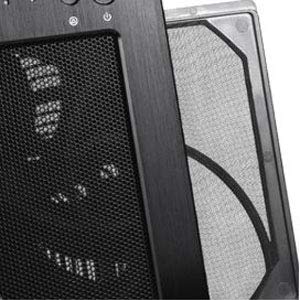
A very nice looking, and compact Micro ATX computer case from Silverstone. The biggest problem is building in it. Everything is reversed in this case, so it can get confusing. Also, any future servicing will be difficult because of this. The motherboard tray is removable, which is a necessity for building in this case. The case has great airflow, with the huge fan in the front. It is also really quiet because of this. You have dust filters for the front, and the power supply, which is mounted on the top, with the air being drawn in and vented out the back. The filter is magnetic, which is a nice touch. The front fan filter slides out from either side, with the push of your finger. The SSD drive mount position is really crazy, being mounted on the bottom of the case, underneath where the hard drives go. It is really difficult to get to. A really cool feature is the CPU cooler jack on the bottom of the case. This helps support the weight of large heat sinks. A great design touch by Silverstone. Video cards also get support on the hard drive cage, by the included rubber pad. This is allows long video cards to rest there, which in turns prevents sagging, a problem with long cards, due to the weight. The instructions were fantastic also. Silverstone has detailed instructions for different type of installation scenarios, including what will fit and what won't, depending on your configuration. I have yet to see another computer case design company go to the lengths these guys did. The computer case is very well made, with really solid power and reset buttons. The front is solid brushed aluminum, and looks really nice. It reminds me of Lian Li cases. Even the 5.25" and 2.5" drive bay covers are solid aluminum. Except for the odd layout, and difficulty building in, this is a really nice micro ATX case.
D**H
Don't Skimp on Using a Cheap Looking Case for Your Home-Build - Buy a SilverStone Case
First impressions, as the build is still underway...Case QualityUsual Silverstone, very little to fault. I won't buy any other brand.No nasty sharp edges on the sheet metalwork to cut your hands on (BTDT). Nicely painted inside and out. Covers for 5.25 inch dive bays and single 3.5 inch drive bay are metal and held in by screws, not cheap plastic snap-in / snap-out ones, or with sheet metalwork you have to snap out in order to use them.Appearance:This is a "Plain Jane" case, which some people will like, especially if you're intent on spending money INSIDE the box, rather than on "disco lights" all over / within the box itself. That having been said, this is a very high quality product that will make any home-assembled PC look as good as a shop-bought one. Being all metal, it should stand up to a fair amount of abuse as well.Case ConvenienceSo far, so good. I wanted a mid-sized tower case for this build, so will buy components with that in mind. I won't be trying to "shoe horn" old / leftover components into this case.Fitting an SSDThe instructions try to explain how you can fit a solid state drive (SSD) directly onto the base of the case. I couldn't figure this out as there don't appear to be any screw holes matching up with those on a typical 2.5 inch SSD (mine's a Samsung). I had a spare SSD mounting bracket, so I'm currently working the pros and cons of sacrificing the bottom 3.5 inch drive slot (which could be used for a floppy drive or card reader or something) or sacrificing one of the four 3.5 hard disk slots. I'll probably go for the latter as I want to fit a card reader and as I'm not planning on using all four hard disk slots anyway/ (For what it's worth on a previous build I found that sitting four Western Digital Caviar Blacks this close to each other in a RAID setup caused the hard disks to overheat in pairs, thus negating the benefits of using RAID storage).Internal Hard DIsk Mounts - Unlike another Silverstone case I have, the hard disks screw directly into the slots provided - four of them - rather than mounting the disks in plastic cages which then snap into - and promptly fall out of - slots in an oversized cage.Motherboard MountingThe motherboard backing plate comes out, so you should be able to assemble the motherboard, memory, fan etc. on the bench then fit the finished assembly into the case, rather than trying to build everything up from within. I expect graphics cards, etc., however, need to be added afterwards. Still, the backing plate has a nice big hole in it under the CPU area, so fitting a heatsink and fan should be easy.Full Length Graphics Cards:You should be able to fit at least one full length (i.e. huge) graphics card with no problems. There's even a plastic pad on top the hard disk cage and a stick-on rubber pad to go with it to help support their weight. Ftting two full length graphics cards might be an issue, however, and you MIGHT need to sacrifice the hard disk cage to do it, use SSDs and / or the bottom floppy drive and / or one of the top 5.25 inch external bays for your hard disk(s).CoolingNice big 180 mm fan right next to the hard disk rack should keep the disk drives cool. The filter is removable for easy cleaning. Like that's ever going to happen, but....The back panel has a space for a 120 mm fan. I intend to use a liquid cooling setup and to mount the radiator and fan here. I shall have to see how I get on as I'm concerned that the fan(s) and radiator might be quite "thick" and getting the hoses to bend the way I want them to might be a challenge.CriticismsThe plastic cover for the power supply fan outlet (on top the case) is only held there by magnets embedded in the plastic. There are holes for screws in the plastic cover, but not in the case.There's a little fold-flat gizmo in the bottom of the case that (I think) is supposed to help support a tall CPU heat sink / fan combo. It looks like it will fold flat on its own if any weight is actually applied, so I'm dubious about its usefulness.The external 3.5 inch bay (for a floppy disk - remember them? - drive or a card reader) is on the bottom of the case. This might be an issue if you're putting this case on a carpeted floor (which you shouldn't do, of course). On the other hand, if you're not going to use this slot, or are going to put the case on a desk or table, it's not an issue and having it at the bottom, in a less conspicuous place, might actually be good.
Trustpilot
2 weeks ago
2 days ago