Some deliveries may take a little longer than usual due to regional shipping conditions.

DOWNLOAD THE APP


Customer Services
Copyright © 2025 Desertcart Holdings Limited
DOWNLOAD THE APP


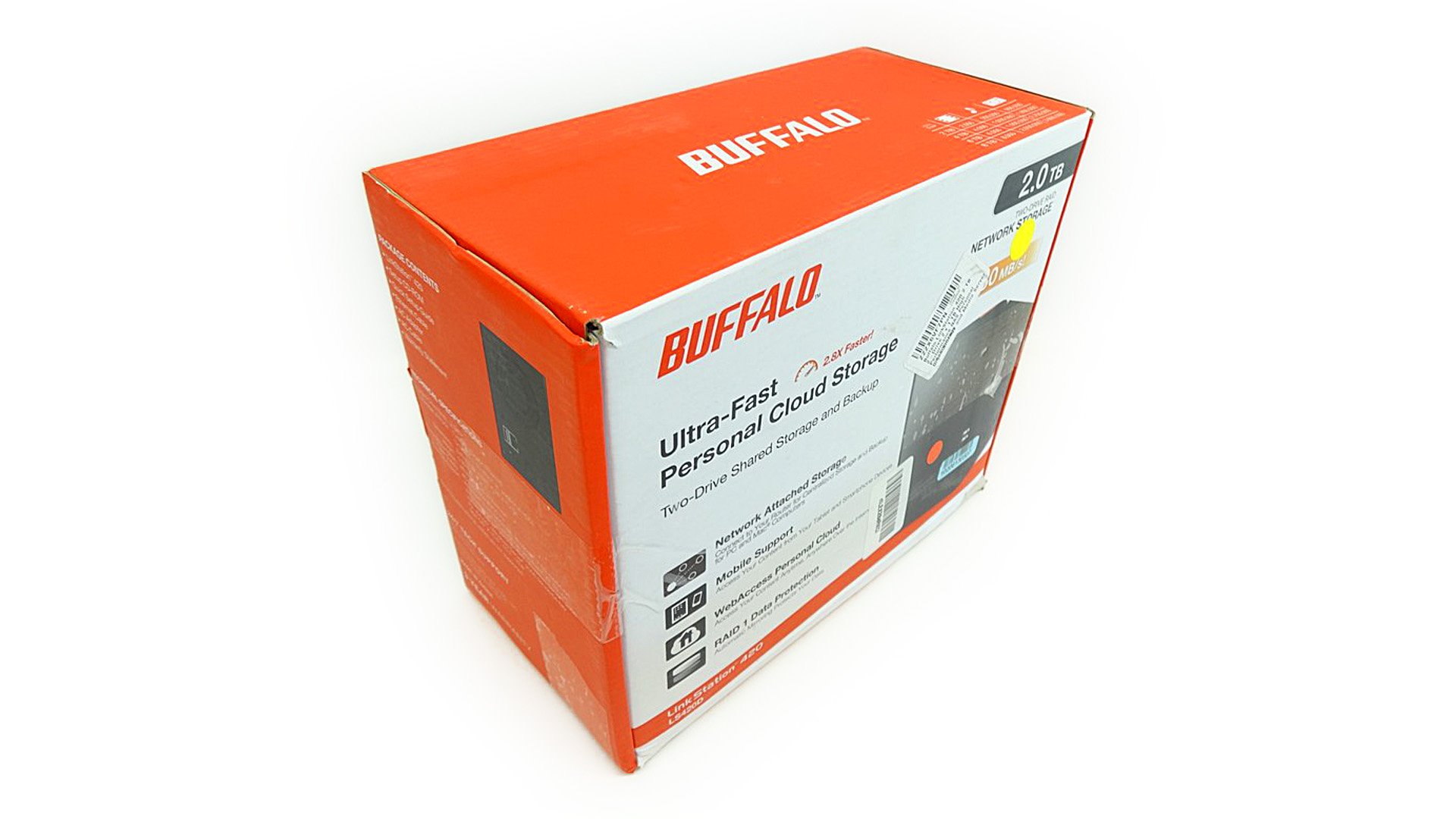

⚡ Own your data, stream your life, anytime, anywhere!
The Buffalo LinkStation 420 is a high-performance 2 TB NAS designed for home and home office use. Featuring dual drives with RAID 0/1 support, it delivers fast 100 MB/s transfer speeds and versatile media streaming via DLNA and iTunes compatibility. With free WebAccess personal cloud functionality and included Nova BACKUP software for up to 5 devices, it ensures secure, accessible storage backed by a 3-year warranty and round-the-clock support.


| Hard Drive | 2 TB Desktop |
| Number of USB 2.0 Ports | 1 |
| Brand | BUFFALO |
| Series | BUFFALO AMERICAS, INC |
| Item model number | LS420D0202 |
| Hardware Platform | PC and MAC |
| Operating System | Windows 10, Windows 8 (32-bit/64-bit), Windows 7 (32-bit/64-bit), Windows Vista (32-bit/64-bit), Windows XP, Windows 2000, Windows Server 2012, Windows Server 2008, Windows Server 2003, Windows 2000 Server, Mac OS X up to 10.10 (Some included optional utilities are not supported. The HDD default format is NTFS; to work with Mac, reformat the HDD using Mac Disk Utility) |
| Item Weight | 0.01 ounces |
| Product Dimensions | 10.5 x 5.1 x 8.7 inches |
| Item Dimensions LxWxH | 10.5 x 5.1 x 8.7 inches |
| Color | Black |
| Number of Processors | 2 |
| Computer Memory Type | DDR3 SDRAM |
| Flash Memory Size | 2 TB |
| Hard Drive Interface | USB |
| Manufacturer | Buffalo |
| ASIN | B00CO0DH6S |
| Is Discontinued By Manufacturer | No |
| Date First Available | June 11, 2013 |
A**R
Hard Drive Failure - RAID array is in degraded mode
Second Hard Drive started failing two months after purchase. I get an error message that states "The RAID array is in degraded mode" and it says that Disk 2 has failed. I've started the process of replacing the disk under warranty, but it's really annoying that it has happened this soon. Otherwise I was already loving the product.
V**E
Works fine and easy to set up.
Very quick and easy setup. Worked exactly as advertised out of the box. No problems at all after a couple of months in operation. I own other Link Stations and all of them have been excellent. They are on line 24/7 and some of my older ones have run for years without any issues.
L**S
Extreme Caution NOT RECOMMENDED BEWARE
Warnings about this product. Be very very careful. NOT FOR MAC. NOT FOR MAC. BARELY FOR PC. First of all it is advertised both on Buffalo's website and Amazon that it has a transfer rate of up to 100 MB\s yet when the box arrives it will only 80 MB\s. Bad start. The when attempting to change from Raid 0, which is the default, to Raid 1, it just sat there at 50% for over an hour. Closed the app and reopened and the entire array had disappeared off charts! Gone! I called Tech support, who are nice folks, but only Level 1 meaning that they can only spell hard drive. Buffalo do not provide their techs with either the actual units to learn with nor do they have the actual same software that you will have. So it is a shot in the dark for them as they ask, "What do you see on your screen now?" questions since they have nothing. Worked for an hour with a very nice lady who was totally lost and finally got a fellow who announced, "I'm Level 3" and then proceeded to tell me that I had "broken" the machine!!! Not even 2 hours old and I BROKE it!!! Simply by clicking on an icon!!! Incredible!!! Probably don't want to buy this unit!. Then the fellow told me that since he could not help me find the array again (it was still there, just in a Failed state now) that I should just send the unit back. Ouch! Bye Bye Buffalo! Your techs are running your customers off!So I asked the Level 3 fellow if they had a utility to "rebuild" the array and he said, "Yes, but you will have to transfer over to using a PC and then you will have to locate the .ini files and then edit them and on and on and on. So basically he said, "This is product is NOT for MAC!" Beware. Beware.After 2 hours of this malarkey I hung up (very nice lady, just ignorant about computers) and was searching around the confusing myriad of menus and found a menu, three levels down that gave me three choices for rebuilding the array. I chose to rebuild to "Original Factory Defaults" and a Warning came up saying that this would take almost 4 hours! OK. So went to bed and came back 8.5 hours later and the message tells me, 505 minutes elapsed, another 139 to go. Holy S*#t!!!!!!!!!!You got to be kidding! To rebuild a 2 TB BLANK array?Bottom line----This unit is CHINESE in all aspects and not a mature product. This unit is NOT FOR MAC. Remember, IF you ever have a problem, it could take DAYS to fix. Buy an AMERICAN product that works.
B**N
Inexpensive NAS. Good for home, could be better, but a good value overall.
I like it, but it's nothing special.For me, this was an educated buy based on not having the budget for a high end NAS. I got what I expected.I've used my old computer configured with FreeNAS for years now. My issue for wanting an upgrade is to get a smaller physical unit that is more modern so it sucks less power and is much quieter.I ideally would like to get a Synology DS214play or maybe 713+. But those units are $400+ not including drives.This Buffalo unit was $200 and came with 2 drives installed. Buffalo is a decent brand and it has drives which saves about $70 at today's prices (I got the 2x1TB model).The Buffalo LinkStation is indeed small. Very small. Tiny. I like that. It is also silent. I don't hear anything.The 2 drives that it came with are 1TB Toshiba drives. I actually haven't looked at the disc speed, but I am presuming 5400rpm. My experience with Toshiba drives in the past are that they are generally a little less expensive but are still good quality. It has been a few years since I had any, but if the company hasn't changed much I would still recommend the drives, so I'm good with them as the included hardware.The system comes preconfigured as Raid 0, where both drives are viewed as one which gives you 2TB of storage and you benefit from double the speed. This is not what I wanted so I changed it to a Raid 1, where the drives are mirrors of each other (redundancy for backup purposes).It was no big deal because it can be changed, but I found it odd that was their format out of the box when the box literally has a blurb on it stating that it supports Raid 1 for data protection. The bigger deal is that I had to change it, which isn't too bad but brings me to my main complaint of the system.My biggest gripe about this unit is the horrible user interface. I'm not even talking that a UI needs to be pretty and simple, but at least intuitive. This one is not good at all.First, you need to install a small program on your home computer to manage the NAS. Why not a direct browser based interface?Secondly, once your drive shows up, when you select settings it takes you to a browser based interface. So why not skip that first step? It didn't make anything easier.Then the interface is not great. In fact, the Advanced Settings were not even showing on my screen. I had to scroll down to see that selection, even though there was clearly enough room to put that "box" of options further up. I suspect it is some html aspect ratio that isn't very dynamic, it may show up perfectly for some others. But still, that shows bad design in my book.There is a manual (pdf and html) on the CD, and they weren't worthless, but they also didn't help much either.I still have yet to get the web service running.There are 3 sets of instructions on the Buffalo website and none of them match this system.I need to basically just set it up manually and take care of it on my router's side and call it a day.Okay, so all that out of the way, now that it is all set up it seems like a good unit.I can access the files really easily anywhere from my home network. Multiple PCs, PS3 consoles, Android tablet/phone (via ES File explorer..not via web since my web access isn't set up right).It seems to perform well. I haven't used it much other than testing, but it loads video files very quickly over the network and doesn't appear to have any lag under load (streaming two videos to various devices simultaneously).I am pretty happy with this NAS.Yes, there are things I think could be better (like 1GB of RAM rather than 512MB, or a USB3 port instead of only USB2) but those things are to be expected on a budget machine.In fact, I don't even know what processor is in this thing. I read one place it is a single core ARM processor, another place said dual core. The specs don't actually say it either. But so far I haven't seen an issue.So I would recommend this item to anybody wanting a NAS on a budget. $200 is a great price and this hardware seems decent.If you can afford more, I would upgrade and look into a Synology, or maybe a Qnap product. But again, the difference between $200 all in vs $500-$600 is a big leap in my pocketbook.I'd give this 3.5 stars if I could. 4 seems a bit too much in overall quality, and 3 seems to sell it short for it's value.
Trustpilot
5 days ago
2 weeks ago