
DOWNLOAD THE APP


Customer Services
Copyright © 2025 Desertcart Holdings Limited
DOWNLOAD THE APP

🎯 SpyderX Elite: Calibrate like a pro, see like a visionary.
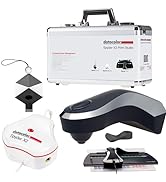
The Datacolor Spyder X Elite is a cutting-edge monitor calibration tool designed for professional photographers and motion imagemakers. Featuring the fastest calibration speed in the Spyder lineup, a revolutionary lens-based color engine, and multi-display matching capabilities, it guarantees precise color accuracy and consistency. Its intuitive interface combined with expert-level controls and real-time before/after visual proof empowers creatives to confidently perfect their color workflow across all modern display technologies.




| ASIN | B0076A620Y |
| Battery Description | battery not included |
| Best Sellers Rank | #83,252 in Electronics ( See Top 100 in Electronics ) #289 in Motion Detectors (Electronics) |
| Brand | datacolor |
| Color | White |
| Compatible Devices | Desktop |
| Customer Reviews | 4.3 4.3 out of 5 stars (1,727) |
| Date First Available | January 31, 2019 |
| Global Trade Identification Number | 00875720001510 |
| Is Discontinued By Manufacturer | No |
| Item Weight | 10.2 ounces |
| Item model number | SXE100 |
| Manufacturer | Datacolor |
| Mounting Type | Ceiling Mount |
| Power Source | Corded Electric |
| UPC | 875720001510 |
T**S
Excellent color calibrator hardware and software at a reasonable price.
I new I'd have a problem when I bought a new computer with Windows 11. My old Dell Optiplex was well beyond its useful like but my photography workflow requires a calibrated monitor. My 15 year old work horse GretagMcbeth iOne Professional system does not work with Windows 11 (so much for Microsoft's claim of backward compatibility with prior Windows OS). This colorimeter/sensor/calibrator is significantly easier to use than my old one. It is much more compact. I am very pleased with the ease of installation, ICC profile creation and ease of application to the NVidia graphics card my new computer uses.
M**.
A must have for Photographers!
This is a must have products for photographers and video professionals who needs color-perfect output. This device works like a charm and calibrates the monitor so you know how the output of your work will be. I tried it on my ASUS PA329C, which came factory calibrated. Turns out the monitor is properly calibrated except I need to lower the brightness to 30. Once I did that, it reached perfect calibration. A great device, and highly recommended for photo / video professionals.
Z**N
Works flawlessly out of the box and does exactly what I wanted it to!
I have two monitors on a Mac Pro that have always looked slightly different no matter how much time I spent on calibration. Though they are the same model, they were purchased a year apart, and their differences in brightness and color temperature were not small. About fifteen minutes after installing the Datacolor software and calibrating both with the Spyder X Elite, both of those monitors now look absolutely IDENTICAL. I can take a photo and enlarge it across BOTH monitors and it looks no different than if it were just on one or the other. I had tried to achieve that same effect manually for literally years with no success; five minutes on each monitor with the Spyder X Elite and it's done! The best part is I also have a newer iMac, and after calibration it looks identical to the monitors on the Mac Pro! This device does exactly what it says it will with no issues whatsoever. The only note is that the software warns you to only connect the device to a USB port on the computer, but that's simply not possible for computers with external monitors, but as long as your monitors have a GOOD built-in hub that can supply the Spyder X's power needs, it all works as it should. VERY highly recommended for anyone that does design, photography or video editing. The downside is now I can see how far off photos I processed in Lightroom previously are. :-)
N**S
Frustrating, but finally got to be useful. ( PLEASE READ HOW I DID IT)
This is an update to the review I left two hours ago. This is what I've discovered using my Spyder X Elite. Basically, you need to figure out your ideal White Point on your computer's built-in display color controls (it's the "Display" function inside the Mac's System Preferences), and have your computer's screen brightness be at the max, as it is in your computer's default color setting. Then, when doing a calibration in Spyder X, you leave the White Point and Brightness controls set to "Do Not Adjust", then do the color calibration. THAT is the ONLY way I can get this thing to actually work. If I have Spyder X change the White Point or Brightness of my monitor during the calibration, what it does is so unbelievably stupid looking. It makes my monitor look broken. Anyways, at least after trying this out for 5 hours I was finally able to have it work for me. I hope this review is helpful to some people.
S**P
So thats what the true color is?
Does exactly as is billed. Needed to color adjust 2 laptops, one of which is about 10 years old. This older model just would not allow me to see or adjust the real colors is video or photos. I mean the colors were WAY off. This device is easy to use, by just following along as instructed through the guided calibration process. Walla!!!! Finally true colors and great calibration results. One thing I would change/suggest during the calibration process is for the software to identify your exact details of the computers graphic card with the recommended settings or allow the user to select or use alternate settings if they choose to. Highly recommended.
G**.
AMAZON AGGREGATES PRO AND ELITE REVIEWS
Unless a reviewer specifies, you can't tell if a review is for Elite or Pro.. This review is for both. I've been using colorimeters since CRT days, with good results. My discontinued X-rite Eye-One worked fine until I installed Windows 11. After that the software would always report that there was no profile for either monitor. I recently purchased the cheaper Pro version, which didn't work for me at all. When calibration completed, the monitor would shift to a green tint. Both monitors did the same thing. The old X-rite could do better job with it's outdated software. Then they went on sale. The Elite was now the same price that I paid for the Pro. So, I switched with Amazon, hoping fancy software would make a difference. Devices are both the same Spyder X. I used the same procedure previously used with the Pro software and calibration was perfect on the 1st try. I didn't use any of the extended Elite feature set. I expected to be able to make a software comparison, but now suspect that my 1st Spyder X was probably defective. Addendum: Now that I've had the Elite for a few days, I can see that the Elite software is necessary to make 2 different monitor types look exactly the same.
R**O
Por lo menos a mí no me funcionó. Quizás las condiciones de luz de mi oficina en fin no se pero el coló era malo
F**.
Un seul point négatif pour moi, faire tenir cet appareil sur l'écran devant la cible, n'est pas facile, ou on le tient à la main et avec le test total incluant les nuances de gris, cela peut être "fatiguant", ou pour un portable on fait tenir le couvercle avec un pince à linge, ça fonctionne mais avec certains écrans il faut faire très attention à ne rien abimer. On ne fait pas cela tous les jours non plus ;)
L**X
Ayant un APN reflex Canon et une imprimante photo Canon j'ai acheté cette sonde pour calibrer mon écran Samsung S25G40B afin que l'impression soit identique à ce que l'écran affiche. La calibration est on ne peut plus intuitive : On démarre le logiciel, entre les infos demandées puis paramétrons l'écran ( Luminosité, gamma, couleurs RVB ) comme demandé par le logiciel et c'est tout :-) . Le résultat est bluffant ! Par contre il faut aimer avoir de belles photos car cette sonde n'est pas bon marché...
L**S
Pour photographes etc, il est évident que calibrer son/ses écrans est indispensable. Je ne trouve malheureusement pas d'info sur les lentilles de cette X2, par rapport à d'anciens modèles (dans mon cas la Spyder 5 Elite). La nouveauté de taille est le logiciel bien plus rapide et précis. Pour un moniteur de qualité comme E*zo, pas de différence notable en terme d'étalonnage avec la Spyder 5, par contre, pour un moniteur de portable (de "bonne" qualité, 100% sRGB), la différence est bien visible. Selon vos besoins, il n'est donc pas forcément nécessaire de faire l'upgrade, bien que cette Spyder X2 Elite (que l'on peut mettre à jour vers la version "Ultra" au niveau logiciel) est toujours très efficace, et le programme est bien plus "user friendly". A noter qu'il manque toujours la possibilité de définir le point noir, mais on peut gérer le contraste autrement. Par contre j'obtiens de meilleurs résultats en 'L*' ("L star") qu'avec la Spyder5, est-ce la sonde ou le logiciel ? Il y a bien sûr la possibilité de gérer la lumière de la pièce, éventuellement en temps réel, ce qui n'est sans doute pas une bonne idée pour qui travaille dans un environnement stable. En conclusion, Datacolor n'a certainement rien à envier sur son concurrent, personnellement je trouve l'utilisation de leurs sondes bien plus agréable ! Et le résultat est bien au rdv. Un indispensable.
T**I
今まで、適当にモニター調整していましたが、この商品を購入して画面の明るさが随分違う設定になり目の疲れなどもなくなりとても使いやすくそれとプリントした時の差もほとんど無くなり買って良かったと思います。おすすめです
Trustpilot
2 weeks ago
5 days ago