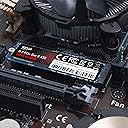
๐ Elevate Your Storage Game!
The Silicon Power 1TB NVMe M.2 PCIe Gen3x4 SSD offers lightning-fast read/write speeds of up to 3,400/3,000MB/s, making it an ideal choice for gamers and professionals alike. With a compact design and robust warranty, this SSD is engineered for high performance and reliability.


| ASIN | B07L6GF81L |
| Additional Features | Portable |
| Best Sellers Rank | #2,531 in Internal Solid State Drives |
| Brand | SP Silicon Power |
| Cache Memory Installed Size | 1 |
| Color | 1TB |
| Compatible Devices | This drive is compatible with servers and arrays that accept M.2 2280 PCle drives |
| Connectivity Technology | PCIe Gen3.0 |
| Customer Reviews | 4.6 out of 5 stars 4,731 Reviews |
| Data Transfer Rate | 3400 Megabits Per Second |
| Digital Storage Capacity | 1 TB |
| Form Factor | Solid State Drive |
| Global Trade Identification Number | 00886576042251 |
| Hard Disk Description | Solid State Drive |
| Hard Disk Interface | Raid |
| Hard-Drive Size | 1 TB |
| Hardware Connectivity | PCIE x 4 |
| Hardware Platform | PC, laptop |
| Installation Type | Screw In |
| Item Dimensions L x W x Thickness | 3.15"L x 0.87"W x 0.16"Th |
| Item Weight | 8 Grams |
| Manufacturer | SP Silicon Power |
| Media Speed | 3400 megabits_per_second |
| Mfr Part Number | FIN-SU001TBP34A80M28AB |
| Model Name | P34A80 |
| Model Number | P34A80 |
| Number of Items | 1 |
| Read Speed | 3400 Megabytes Per Second |
| Special Feature | Portable |
| Specific Uses For Product | Gaming |
| UPC | 886576042251 |
T**R
Turbocharge Your Gaming Rig with Silicon Power 2TB NVMe M.2 SSD
Upgrading your gaming PC's storage is a surefire way to enhance performance and reduce loading times. The Silicon Power 2TB NVMe M.2 SSD, equipped with DRAM Cache and PCIe Gen3x4 interface, promises to take your gaming experience to the next level. In this review, we'll explore the key features and benefits that make this SSD a compelling choice for gaming enthusiasts. The Silicon Power NVMe M.2 SSD lives up to its promise of delivering exceptional performance. With PCIe Gen3x4 interface support, this drive ensures blazing-fast data transfer speeds, significantly reducing game loading times and improving overall system responsiveness. The inclusion of DRAM Cache further enhances read and write speeds, making it an ideal choice for gamers who demand optimal performance from their storage solutions. The generous 2TB capacity of this NVMe M.2 SSD provides ample space for your growing game library, high-resolution game assets, and other multimedia files. The spacious storage not only accommodates large game installations but also allows for seamless multitasking without worrying about running out of space. Designed in the M.2 2280 form factor, the Silicon Power NVMe SSD is compatible with a wide range of gaming motherboards. Whether you're building a new gaming PC or upgrading an existing one, the M.2 form factor ensures easy integration without the need for additional cables, making it a hassle-free solution for gamers of all levels. The Silicon Power 2TB NVMe M.2 SSD is a stellar choice for gamers seeking a storage solution that delivers on both performance and capacity. With its high-speed PCIe Gen3x4 interface, DRAM Cache, and spacious 2TB storage capacity, this SSD ensures a responsive gaming experience and accommodates the demands of modern game installations. While additional cooling solutions may be considered for extreme gaming setups, the overall value and reliability make the Silicon Power NVMe M.2 SSD a worthy investment for anyone looking to turbocharge their gaming PC.
D**A
High Speed, Low Price
Most All M.2 / NVME drives deliver performance. Silicon Power's 512GB offers everything a Samsung M.2 has at a lower cost. (I own two of these). This review will start out with practical information the moving into the more technical aspect of the SP 512GB NVME drive. This will be a long review. The biggest concern for anyone buying this is: "How can I use this if I don't have a slot on my motherboard for a M.2 SSD?". You need to get an adapter like this: QNINE NVME PCIe Adapter, M.2 NVME SSD to PCI Express 3.0 Host Controller Expansion Card This M.2 NVME SSD is the right "key" for the above adapter. The "key" is just the notched pattern for the NVME drive. (without getting too technical about it). You can put the drive + adapter into any PC that has a PCI-e slot. BOOTING from the NVME Drive may or may not be supported by your motherboard. Your operating system has to be 84-bit and supports UEFI; Windows 7*, 8*, 8.1* or Windowsยฎ 10. (Check your motherboard information about UEFI and NVME) If all this sounds technically confusing you can do this: 1) boot off a regular 2.5 inch SSD drive (have your Operating system on it). 2) install the PCIe adapter + M.2 NVME drive into your PCI-e (x4){version 3.x} slot (check your motherboard specs) 3) make the M.2 a secondary drive like D: or E: or F: (all you have to do is format it, windows will give it the drive letter) 4) install any heavy loading programs on the M.2 I have this above outline configuration. Heavy programs or data goes to my M.2 Drives. You can even get two of these and make the M.2s into a RAID 0 stripped drive for double the speed. My advice is to format the M.2 as ReFS.ReFS protects against data corruption. (see attached image) (SKIP this section if you are not interested in ReFS formatting) Checking if TRIM is set for your ReFS formatted drive: 1) click on start or type in the windows 8/10 search box "CMD" 2) once you see CMD right click on the black icon and select "Run as Administrator" 3) type in the black window (Command Prompt) that just opened: a) fsutil behavior query DisableDeleteNotify 1) NTFS DisableDeleteNotify = 0 (says that TRIM is active for NTFS) 2) ReFS DisableDeleteNotify = 0 ((says that TRIM is active for ReFS) 3) if you get = "is not currently set" for either NTFS or ReFS You can enable it with the following command: a) fsutil behavior set DisableDeleteNotify ReFS 0 (this will set TRIM for ReFS) b) fsutil behavior set DisableDeleteNotify NTFS 0 (this will set TRIM for ReFS) Silicon Power M.2 NVME Drive: Speeds: (Crystal Disk Mark) {See attached image} (NTFS formatted) - READ and WRITE speeds: 2,000 MB/s (ReFS formatted) - READ speeds: 2,000 MB/s - WRITE speed: 634 MB/S (due to error/checksum checking) Write speeds are slower on ReFS due to error/checksum checking. 634MB/s is still SSD fast. ALL NVME drives are subject to thermal throttling which means once the M.2/NVME drive reaches a certain temperature the onboard chips will throttle down the speed/transfer to save the chips from overheating. Larger, longer transfers will trip the "thermal throttling" so just be aware it isn't the manufacturer's fault but the nature of the NVME design overall (across all manufacturers) My systems have SP SSD drives installed. I do large data transfers almost daily. SP drives keep pace with Samsung on speeds. Reliability can't be gauged on a short-term basis. Most of my drives are a year or younger in age. I do suggest trying either this M.2 drive or one of SP's other SSD drives. If you have an older system that doesn't have PCI-e (3.0) or greater to go with a regular 2.5" SSD drive. You really won't notice the difference. If all this sounds overwhelming find a geeky friend to help you out. I hope this information helps someone out. I always try to revise my reviews as needed.
R**.
Great Value! Good Quality! Bang For The Buck!
*I bought the 512gb version* Ive had the ssd for a little over two months now and i use my laptop about 6hrs a day, and its work super fast and great load speeds it loads as if my apps were never closed! thats how fast! I had upgraded from an hdd, but i still use the hdd as storage and swapped the os and all my other applications on to the ssd so now all of my apps and os run at super high speed, pcie ssd's are the first and best thing to upgrade when you want to make your computer faster. This nvme ssd is by far one of the most value for your money ssds out there I did tons of research on other products but I was also not wanting to spend $~160, becaase I was also buying some ram for my laptop (Also Silicon Power Ram!) The only trouble I had was with the copying and formating but theres tons of helpful youtube videos out there for it. Super easy to install to, theres also youtube videos on that to and also make sure you watch different kinds of youtube videos to gain all around specific knowledge and opinions to help mold you choices. great quality too!
J**ยฐ
Who needs PCIe Gen 4 when striping two of these SP 1TB drives into a RAID 0 works so well?
I download about 6 Tb of data each month and that data is stored on two 32 Tb external drive enclosures with four much slower 8 Tb traditional 3.5-inch mechanical drives. The speed at which the data comes in is much too fast for the enclosures to write the data in real time creating a huge bottleneck. So instead of writing directly to the enclosures, I used my solid state NVME drive to a large cache the incoming data as it comes in. Then the data from that cache will trickle the content to my enclosures. But there was still bottlenecking and some latency when I was just using one of these Silicon Power NVME drives. So, I purchased another one and a PCI-E to NVME m.2 adapter. I created the RAID 0 in my BIOS so that the two drives would double my storage space, but also increase the read/write speed. After installing my OS and updating all the drivers and software, I ran a benchmark on the RAID 0 and was extremely pleased to see how much faster two of these Silicon Power NVME drives performed together please see the screen capture that I uploaded. For my purposed, this setup work great. I have the RAID split into two partitions. The smaller one has my OS and apps installed on it. The much larger second partition is set aside for some backup storage, but it also serves as the first place my downloads are stored prior to being sent to my external drives for permanent storage. With the price of 2 Tb PCi-e Gen 4 drives hovering around $400 and the price of one of these 1 Tb drives at $99 at the time of this writing, using two of these drives was much less expensive even when the PCI-e to m.2 NVME adapter which cost about $20 was included in order to create the array. So, for almost half the price of a gen 4 2 Tb drive, I was able to get the same high performance at about half the price. For my needs, Silicon Power came through for me and I couldn't be happier because the bottle neck is gone!
R**H
how???
First nvme and my god have the prices come into reality. This kind of nvme was easily $500 about 2 years ago. Absolutely blazing fast, phenomenal price for the performance. Get one, in fact get two. Don't buy a heatsink, the 'label' is actually a very well designed heat spreader. The memory likes to run hot while writing like 50-70C, while the controller likes to be cold. The controller heats up, which then spreads to the memory through the heatspreading label and helps to bring the memory temps up. Because lets be honest this thing won't be writing for more than a few seconds at a time. If you cool your memory and lets say it never gets above 40C while writing, you'll be damaging your drives longevity writing below optimal temperatures. Don't bother even buying a heatsink with the thermal tape and cutting in so it only touches the controller because then the heat from the controller still won't be spreading to help bring the memory temps up from ambient to where they like to be. That little metal label is actually pure genius, very simple and keeps your drive healthy. The only time it would probably be worth to cool your nvme controller more aggressively is if you're writing 24/7 with it at which point the memory will heat up enough on its own and stay there over long periods and you can really crank down on the controller to keep it from throttling.
M**Y
In my opinion a great SSD for the price, but don't trust reviews.
I mainly got this as a replacement for my storage SSHD, but I now use it as my OS drive as well. My computer boots faster, file transfer are snappy, games load faster (though not much more noticeable than my older 850 Evo). If you use this for everyday use/gaming I don't think you'll be disappointed. This all being said, there have been some changes to the device since many of the reviews came out. The one I got is no longer single sided, I haven't been able to verify the controller yet, but if it's single side 1TB it's not the Phison E12 model. Having compared performance benchmarks to those on Tomshardware, the drive performs worse. In short, great SSD for the price. Great for every day use. However, the model has been changed since the original Phison E12 versions, so don't expect performance like you see in many reviews of the drive.
W**T
Pretty good bang for buck (edited back)
Dirt cheap, great warranty, great performance and comes in simple package, haven't had any issues and don't notice any difference between this and the Kingston KC3000 (for gaming and day to day use). Second Edit: turns out the Kingston ssd was the one giving me issues, I tought I was using the SP one as the boot drive but no, so my original review stands, my apologies about the confusion. Edit: I'm getting corrupted files all the time, which started maybe 3 months after buying it, making me format the pc every 2-3 months, chkdsk just delays it, I'm tired of it, the only reason I don't just throw it is because I need the extra space for now, will definitely stay away from these in the future. Btw, I don't know if it is because I let my pc sleep all the time and just shut it down every 2-3 weeks and some black outs happened here and there but this is the only drive I've had issues with using my pc the same way every time, not even the cheap kingston sata have these issues (I still have 2 in it right now), so it is unclear if the quality is bad or I just got bad luck.
B**V
Runs great and good numbers.
In image 1 is the Silicon Power 1TB NVMe Gen3 x4. Image 2 is my Samsung 850 EVO 500GB 2.5" SATA SSD for a side-by-side comparison. Well, if you could call it a comparison. This NVMe completely obliterated it. The NVMe is on a Gigabyte Aorus Elite X570 ATX motherboard with a Ryzen 7 3700X CPU. Running Windows 10 64-bit update 18363.592. I'm using the board's included M.2 heat sink. The NVMe drive sits just above a rather warm Gigabyte R9 390. Thermals have stayed manageable and speeds have been as expected with no issues. I moved my Arch Linux installation to a little over half of the NVMe and it's running exceptionally well. You can see from the 3rd image that the NVMe ran cooler than the 2.5" Samsung SSD. M.2s can benefit a lot from the airflow of being on the motherboard rather than in the PSU shroud or behind the motherboard panel, where a traditional 2.5" drive would often find itself. I have it installed in an NZXT H510 case with 3x 120mm PWM fans (1800 RPM max) and 1x stock 120mm DC /w voltage control fan (1500 RPM max). Fans are configured for a positive pressure, with the rear PWM fan as exhaust, single top DC fan as intake over the CPU, and 2 front PWM fans as intake. The Samsung SSD is behind the motherboard panel and installed on a modular tray. I've been using the drives for various tasks throughout the day, including the CrystalDiskMark 6.0.0 bench. HWMonitor was up and recording max temps during that time. Verdict: BUY
T**N
Works great.
The company spec is a bit conservative. I get about 3500 for read and around 3200 for write with CrystalDiskMark benchmark. At about 250-300GB of usage, the cache will run out and starts to slow down like an old school hard drive. This happened when I was cloning a backup disc only. Update - It's been 5.5 years and the drive still works great with no drive errors or heating problems. I'm currently in the market for a new Gen 4 SSD so I came back to look up the brand and leave a quick update. I highly recommend this brand for quality and affordable SSD.
R**I
4 years later and no issues.
Speeds as advertised for random 4k reads/writes as measured with CrystalDiskMark. I was upgrading the system drive that came with my MSI Apache GE62-6QD. Installation was a breeze once I got the case open. Fortunately, stand-off and mounting screw were present. Make sure you have the latest BIOS to ensure your MB recognizes NVME drives. Both My Ubuntu 16.04 and Win 10 recognized the drive. Migration failed when I tried to restore backups with my paid version of Acronis True Image 2017. Tried Minitool Partition Wizard Free - migrate OS option and it worked first time - very impressive. My only minor complaint is that the management software offered by SP caused my AVG antivirus to freak out when I tried to install it so I didn't bother. The drive does not appear to have a heat sink so if you plan to push it, expect thermal throttling. It works fine for my purposes. Edit: For those that are concerned about the quality, it is still running fine after 4 years. I don't use it every day but every time I need it, It has not let me down. In fact, between this drive and switching from Windows to Ubuntu, I have had much better user experiences.
V**U
Great price
As described, wish the memory chip is on the other side.
S**N
Value for money
One of the best emerging companies providing the best SSD at a very reasonable price. Performance is at par with the leading SSD manufacturers . The reviews are also good for this SSD. After a thorough review, I bought this at a good deal.
I**M
Quality ssd with reasonable price
Got 1000MB/s read and write test on CrystalDiskMark using usb-c 3.1 gen2 nvme enclouser.
Trustpilot
2 weeks ago
3 weeks ago