



OTraki USB MIDI Cable Converter
Product ID: 91065854
Details
- BrandOTraki
- Connector TypeUSB Type A
- Cable TypeUSB
- Compatible DevicesPC Laptop
- Recommended Uses For Productmusical in
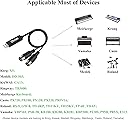
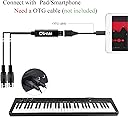
Product description Easy to Use and Play Plug "IN" cable to "Out" interface on keyboard & device ; Plug "OUT" cable to "In" interface on keyboard & device ; Support 16 channels to play at the same time. You can use it directly after you connect it with device (automatically install drivers), don't need download any app Note Tips The USB Type-A interface can compatible with USB 2.0 & 3.0 devices ; If your USB Port is USB-C (Thunderbolt 3), please use original authentic USB-C to manufacturer USB adapter Please note the Applicable Device Model before purchase. Connecting with Phone & Pad If you want use it with phone or Pad, you need add a OTG cable ( OTG cable not included ). Follow below steps to start your music tours Plug midi cable "IN" to midi device's “OUT” slot, midi cable "OUT" to midi device's “IN” slot. Plug the USB interface into any USB 2.0 or 3.0 socket on your computer; Open your music software program, such as Cubase, Sonar, MIDI Connections, etc., and set up the “MIDI IN / OUT” into USB-Audio-Device; Your USB to MIDI interface is now ready for use. To save potential problems, it is recommended that this interface is always connected to the same SUB as it was originally installed on USB to prevent multiple installations of the driver. Compatible with Widely System 5 pin din cable, well compatible with most computer systems, compatible with Windows XP, compatible with Vista, compatible with Win7, compatible with Win8, compatible with Win10 and compatible with Mac OS X operating systems. Applicable Most of Devices Can used for the device only with independent midi input and midi output slot [please reference to the 2nd picture]. Can't use for the device that has USB Type-B interface. High-performance FTP Processing Chip Strong anti-interference, to ensure the stability of input signal and without delay, fast and stable MIDI data transmission, enjoy the happy of music Review: NOTE: Be sure to plug the "IN" to MIDI "OUT" - READ THE INSTRUCTIONS in the product description! You need to plug the "IN" cable to the MIDI "OUT" and the "OUT" cable to the MIDI "IN" port. I'm using this cable along with a $12.58 KOHAW Male-to-Female USB-to-Lightning adaptor to connect a Casio Privia PX-100 electronic keyboard to my iPad's SimplyPiano app by Joy Tunes. Once I overcame the operator errors causing a slow start (didn't originally order the USB-to-lighting adaptor and wrongly plugged the cable "IN" to "IN" and "OUT" to "OUT") it worked perfectly. My iPad recognizes that a MIDI is connected with the cable plugged incorrectly but for it to work with the app I had to read and follow directions. Duh! Who would have thought??? I would recommend this cable. Good price, good delivery time, good product. Review: Works with M1 Mac - For those of you who got this because their current midi setup stopped working with the M1 Mac this is a solution. I have a Clarrett thunderbolt which doesn't work yet with the M1 ( I have a M1 Mac mini ) and wanted something relatively inexpensive that I could use while I either get a new interface or wait for focusrite to release drivers. The good news, my pianoteq software recognizes this and it works! I haven't tried recording with it, but I'm sure that should work given it works with pianoteq. Anyways, for the price and function this is a great product.
| ASIN | B07JBJ9V11 |
| Brand | OTraki |
| Brand Name | OTraki |
| Cable Type | USB |
| Color | Blue |
| Compatible Devices | PC Laptop, Professional Piano Keyboard |
| Connectivity Technology | USB |
| Connector Gender | Male-to-Male |
| Connector Type | USB Type A |
| Customer Package Type | Standard Packaging |
| Customer Reviews | 4.4 out of 5 stars 557 Reviews |
| Data Transfer Rate | 480 Megabits Per Second |
| Indoor Outdoor Usage | Indoor |
| Item Shape | Round |
| Manufacturer | Partyreal |
| Maximum Voltage | 5 Volts (DC) |
| Model | OTRK_ELECTRO_PIANO_CONNECT_LINE_TYPEC_GY |
| Number of Items | 1 |
| Number of Pins | 5 |
| Part Number | CONNECT_LINE_TYPEC |
| Recommended Uses For Product | musical performance, recording in home music studios |
| Unit Count | 1 Count |
M**A
NOTE: Be sure to plug the "IN" to MIDI "OUT"
READ THE INSTRUCTIONS in the product description! You need to plug the "IN" cable to the MIDI "OUT" and the "OUT" cable to the MIDI "IN" port. I'm using this cable along with a $12.58 KOHAW Male-to-Female USB-to-Lightning adaptor to connect a Casio Privia PX-100 electronic keyboard to my iPad's SimplyPiano app by Joy Tunes. Once I overcame the operator errors causing a slow start (didn't originally order the USB-to-lighting adaptor and wrongly plugged the cable "IN" to "IN" and "OUT" to "OUT") it worked perfectly. My iPad recognizes that a MIDI is connected with the cable plugged incorrectly but for it to work with the app I had to read and follow directions. Duh! Who would have thought??? I would recommend this cable. Good price, good delivery time, good product.
V**K
Works with M1 Mac
For those of you who got this because their current midi setup stopped working with the M1 Mac this is a solution. I have a Clarrett thunderbolt which doesn't work yet with the M1 ( I have a M1 Mac mini ) and wanted something relatively inexpensive that I could use while I either get a new interface or wait for focusrite to release drivers. The good news, my pianoteq software recognizes this and it works! I haven't tried recording with it, but I'm sure that should work given it works with pianoteq. Anyways, for the price and function this is a great product.
S**E
“Just Worked” under Windows 10, But Design May Lack Mechanical Strength
The interface worked fine under Windows 10 on my system and didn’t require any additional drivers beyond those automatically installed by Windows. The one small issue of concern is the mechanical strength of the design. The usb connector has bent slightly under the weight of the cable itself (I haven’t bumped it or stressed it otherwise) and is no longer fully in line with the plastic body of the adapter, which leads me to wonder about the likely longevity of the product. That said, I’m happy with my purchase overall because it “just worked” when I plugged it in. [Update] It’s been about seven months since I posted the last review and the unit just came apart (the usb connector separated from the body where the body continued to come apart, despite my wrapping it with electrical tape to try to slow its separation). Where it was located the cable was subject to some movement daily as the laptop it was connected to was moved around, but none of the normal usb cables with strain relief sections connected to the laptop seem the worse for wear. I’d recommend against this adapter unless you can position it so there is nearly no strain on the cable AND it sees very little movement. I was very happy with its performance right up until it broke, however.
G**N
Great for what I'm doing
I'm learning piano and have found the app Complete Music Reading Trainer from Binary Guilt to be awesome for noob level note reading. However, without MIDI connected, my Samsung tab was giving far too many inaccurate note results. Especially on sharps and flats. I looked at several cable converters and ended up picking this one. Reasons, much more streamlined looks than others, acceptable latency and USB 3.0 vs. others that only work with 2.0. The result, WORKS PERFECTLY. The keyboard is an old Casio CTK-650 and the tab is a Samsung E-8. I can't vouch for other setups, but if this is similar to your situ, here's the green light.
S**D
Works perfect... as soon as you reverse In and Out just like everyone else said!
Well, if I didn't see all the other reviews to reverse the In and Out before I purchased this I probably would have thought I got a dead on arrival. But, that does the trick and then this showed up immediately on my PC when I hooked up my old Yamaha keyboard to Reaper. So, I can't really be that upset. It was really really easy setup. I also liked having the light on the USB connection so I can see that it's definitely working. That was a nice touch.
D**O
cheap Midi din to USB cable,
It does what it’s supposed to do. It’s a bit short on length. Cable is a little cheap probably would not buy it again. On and Amazon It transmits midi data not sound. lol Also why a question about tech support. Hahaha who needs tech support for a midi din to USB cable? rofl.
C**N
Solved: Problem with incorrect timing and dropped notes in OSX / Ableton Live
I was having inconsistent timing issues and notes misfiring. My setup is Ableton Live on OSX, MIDI out to modular. Here's what I did to fix it. In Ableton, go to MIDI settings and turn OFF 'sync' (only have 'track' ON). Next, go to 'Audio MIDI setup' settings in OSX. Enable the channels you want to use and check the "General MIDI" box under 'features'. Although some of these recommended settings may not be necessary (you may want to experiment further), everything is rock solid for me now. I hope it works for you too!
B**C
Switch the In and Out Cables!!!!!!!!!!!
Try switching the In and Out cables. I'm a professional musician, and I bought this cable. I hooked it to my computer and drum machine, and it didn't work. In my world, In goes to In, and Out goes to Out. Just on a whim, I switched the cables. It worked. Now that I read the description of the item, that's exactly how it says to connect to gear: In cable to Out on gear, Out cable to In on gear. Backasswards, if you ask me.
)**.
Works, just had to put the output in Input and vice versa
I have a 2001 keyboard, and it works just fine with midi files :]
M**I
work without any set up
It a just plug-and-play with the Yamaha keyboard. recommending it
C**C
Can be used for Raspberry Pi running minidexed DX7 synthesizer emulator.
Can be used for Raspberry Pi running minidexed Yamaha DX7 synthesizer emulator to connect a MIDI keyboard. cables are a little thin but it works.
Z**U
Works great for my Roland keyboard controller
Works great for my Roland keyboard controller
L**U
It is a nice stuff
I have a old keyboard with analog midi in/out port. With this adapter, I connect my keyboard to my laptop via USB port. Pretty cool!!!
Trustpilot
1 week ago
4 days ago