Desertcart purchases this item on your behalf and handles shipping, customs, and support to Ireland.
⚡ Power your play, light your style, own the game.
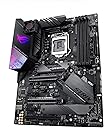
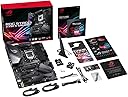
The ASUS ROG Strix Z390-E Gaming motherboard is a premium ATX board designed for 8th and 9th Gen Intel Core processors, featuring dual M.2 slots with heatsinks, ultra-fast DDR4 memory support up to 4266 MHz, integrated 802.11ac Wi-Fi, and customizable Aura Sync RGB lighting. It offers advanced 5-Way Optimization for effortless overclocking and dynamic cooling, making it the ultimate foundation for high-performance gaming and professional builds.


| Asin | B07HS7C63T |
| Available Memory Slots | 1 |
| Best Sellers Rank | 62,435 in Computers & Accessories (See Top 100 in Computers & Accessories) 441 in Motherboards |
| Brand Name | ASUS |
| Chipset Family | intel z390 |
| Chipset Type | Intel Z370 |
| Compatible Devices | Personal Computer |
| Compatible Processors | 9th Generation Intel Core |
| Cpu Model | Xeon |
| Customer Reviews | 4.6 4.6 out of 5 stars (1,102) 4.6 out of 5 stars |
| Global Trade Identification Number | 04718017122832 |
| Graphics Card Interface | PCI-Express x16 |
| Item Type Name | Newcomer in the range, Mainboards ASUS STRIX Z390-E Gaming, Intel Z390 , RoG - Sockel 115 |
| Item Weight | 1 Kilograms |
| Main Power Connector Type | ATX |
| Manufacturer | ASUS |
| Manufacturer Part Number | 90MB0YF0-M0EAY1 |
| Memory Clock Speed | 4266 MHz |
| Memory Storage Capacity | 64 GB |
| Model Name | ASUS ROG Strix Z390-E Gaming |
| Model Number | 90MB0YF0-M0EAY1 |
| Number Of Ethernet Ports | 1 |
| Number Of Items | 1 |
| Number Of Ports | 10 |
| Platform | Windows 10 |
| Processor Socket | 1 x M.2 Socket 3, with M key, type 2242/2260/2280 storage devices support (both SATA & PCIE mode)*1, 1 x M.2 Socket 3, with M key, type 2242/2260/2280/22110 storage devices support (PCIE 3.0 x 4 mode) 6 x SATA 6Gb/s port(s), Support Raid 0, 1, 5, 10 |
| Product Warranty | Manufacturer warranty for 90 days from date of purchase. |
| Ram Memory Maximum Size | 64 GB |
| Ram Memory Technology | DDR4 |
| System Bus Standard Supported | SATA 3 |
| Total Pcie Ports | 1 |
| Total Sata Ports | 4 |
| Total Usb Ports | 8 |
| Unit Count | 1.0 count |
| Usb 2 0 | 6 |
User
Everything I was looking for.
This is a high quality, easy to install and full of features motherboard. One word of warning is to make sure the board has the minimum required BIOS for your CPU already installed or the board will not post. ASUS will say that it should still post to BIOS but I can tell you from first hand experience that it won't until it is updated. Apart from that the board is superb. Using the built in AI overclocking software it achieves settings just as good as I could get manually which makes overclocking so much quicker. I achieved 49 ratio on 6 cores and 50 ratio on 3 cores with an i5-9600k Refresh (R0 stepping). I also managed to overclock my Corsair Vengeance DDR4 memory from stock 2133MHz C13 to 3200MHz C16 at 1.35v. The only negative I found for this board is the CPU usage for Aura lighting. I must point out though that this issue is not exclusive to this board, it is the same on all ASUS ROG Strix boards. I feel it is more an issue with how the software interacts with the board rather than the board itself. Ways to fix this is to 1) Turn off the effects 2) or run the effects in either Dark(same as turning them off), Static, or smart. If like myself your case has an inbuilt RGB controller then I recommend using this as it uses zero CPU resources. I recommend this board very highly and anyone thinking of buying one won't be disappointed.
User
Many configuration options and overclocking features
I love this product because it comes with Wifi, supports overclocking and has dual M.2. It also provides some overclocking profiles to help simplify the process. I took advantage of the dual M.2 slots and I can say that data transfer is lightning fast when copying data from one to the other. Though I'm not into LED lighting but it looks really cool at night especiall if you have a glass PC case. However, you can turn this off if it is distracting.After many hours Gaming with overclocked settings (Intel CPU i7 9000K from 3.6 MHz to 5.2 MHz), the system remains stable all the time. It is almost two months since I purchased this product and I haven't noticed any stability issues even with high overclock settings.I would recommend it to anyone, but if you do not require the WiFi feature, there are cheaper models that support overclocking too.
User
Great quality, good looking motherboard
Really great motherboard which I use with an i7 9700K and an RTX 2080 ASUS ROG Strix card. Packaged really well which all the appropriate cables I needed. Very simple to install in my case (Corsair 500D) and looks really good, I/O shield comes pre-mounted which is very useful.I went for the bluetooth version which works very well with my headphones, no additional work needed there.It's a very good looking board, with good quality connections and great RGB.
User
Great board, perform a BIOS update immediately!
I bought the Z390-E version and its great, I love the aesthetics. I haven't had any problems yet (hopefully it stays that way). However, I did get a BSOD randomly when I was working on an Excel document and I performed a bios update (version 602 to 905) and I haven't had a BSOD since, but the motherboard may have not been the problem.
User
Got a broken/defunct product first time
So, I really like this motherboard. Features are great, it looks nice, good slots and ports, everything you could want.My problem is, the first one I ordered had two problems with it. Firstly, 1 pin in the CPU socket was completely missing. Not bent, completely gone! Now, I don't know if this was a manufacturing problem that was overlooked or if it somehow came out during shipment but nonetheless, one was missing. And this caused a very annoying issue for me in that Windows 10 installation would freeze and I'd have to restart my whole computer to get it to reset. I knew for a fact it wasn't my hardware so I just got unlucky.Secondly, and this one is more obscure, but everytime I plugged in a USB peripheral - whether that be a mouse, keyboard, USB stick etc....... it also caused this freezing issue even on an SSD that already had Windows 7 installed on it.So, not only did it have a CPU socket pin missing, but even if it was there, the USB ports were somehow busted and causing freezing which is an issue in this day and age when PS/2 keyboards have gone out of fashion.The reason this is not 1 star is due to the fact that I have ordered a second one. All CPU sockets seem to be there, waiting on a new CPU cooler to arrive. If this one works all well and good, then I would recommend this motherboard with just a bit of caution you might get a faulty one. If my second one also has problems, then I will update this with 1-star. I'll let you all knowEDIT: Second one indeed worked, bumped up to 4 stars but be warned. You may get a broken one. But if you do, Amazon will refund you and this motherboard is worth the hassle
User
Definitely will be buying again for future builds and recommending to friends!
Couldn't be a better board. I've built a fair few systems, and this has been the easiest to get up and running and overclock. Really nice features, auto overclocking if you don't want to get down and dirty yourself, very strong XMP profile.Look no further!
User
Looks good.
I was going to go for the maximum xi but went for this to save some dosh. Also I thought it would look nicer with a vertical gpu which would have hidden the ROG eye on the maximus. Housing an i5 9600k out the box without needing to update bios which I was worried about.I installed windows then updated the bios. I hit some problem by doing this then got a cannot repair message and windows was unable to load. I thought it was beyond repair but I managed to get past this somehow but can't remember the details. So if it is running OK I suggest not updating the bios if you have no problems already and are unsure of any hurdles you may hit.If you have an aio cooler you may get an error for having no cpu fan and you will be stuck on the bios screen. You should go into bios and select DISABLE CPU FAN if you choose not to use the cpu fan header. But make sure your fans are blowing and controllable. I'm just waiting for a fan splitter then I will connect to the cpu header.EditNote that the large USB lead from your case is plugged in to the bottom on this motherboard. This will leave the cable on top of the psu shroud. It is more tidy to have this USB socket on the right of the board. I will be having a vertical gpu to hide this.
User
Awesome Upgrade!
I needed an upgrade from my old Gen i7 to support my new 2080ti and of course didn't want to go with any other brand than Asus's ROG. its been stable as heck to overclock and reliable throughout everything. I dont have any complaint at all about this board. Brilliant, would recommend. Another awesome ROG board
User
Her şey çok güzel ama sen yok musun realtek...
Gerçekten çok güzel bir anakart yazılımları olsun wifi olsun 9. nesil cpu desteği olsun ancak gel görki realtek ses sürücüleri sağ olsun seslerde sorunlar var.- Cızırtı patlamaları- Seslerde dinamik farkedilebilir gecikme.Usb kulaklığımın ses sürücüsünü kullanarak bu sorunu çözsemde forumlarda insanlar toplanıp Asus'a nefret kusmaya devam ediyor. Bir daha olsa almam.
User
Excelente
Placa muito boa. O preço é um pouco alto, mas é compensado pelo desempenho.
User
Äußerst stylishes und funktionales Mainboard
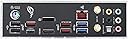
Das ASUS ROG Strix Z290-E Gaming Motherboard kommt mit einem bereits verbautem I/O-Shield und einem stylischem Scwarz/Grau Design. Es wird Gebrauch von steuerbaren RGB Elementen auf der I/O-Abdeckung gemacht welche sehr schön durch ein Glasfenster anzusehen sind.Das Mainboard ist mit für den Preis angemessenen Anschlüssen ausgestattet, wie zb.6x SATA, 2x M.2 SATA/NVMe, 2x Aura RGB, 2x USB 3.1, 2x USB 2.0 und verschiedenste PCIe lanes sowie Lüfteranschlüsse.Das Back I/O bietet HDMI und Displayport, 2x USB 2.0, 6x USB 3.1, ASUS Wi-Fi, verschiedenste Audioasugänge und einen 1Gbit Lan Anschluss.Außerdem sind mit dem Z390 Chipsatz gute Möglichkeiten für die Übertacktung gegeben.Abschließend möchte ich erwähnen, dass es sehr angenehm war auf und mit dem Mainboard zu arbeiten, da es eine sehr clevere Platzierung von Anschlüssen besitzt und somit in kompatiblen Gehäusen gut einsetzbar ist.Gewohnte Asus Qualität: 5 Sterne, auch wenn man einen gewissen Aufpreis für die Marke bezahlt.
User
Amazing
Not damaged and in the best condition
User
Buena Placa Base
Me gusta porque tiene Wifi ACPara mi punto de vista es un poco cara
Trustpilot
5 days ago
2 weeks ago