Buy anything from 5,000+ international stores. One checkout price. No surprise fees. Join 2M+ shoppers on Desertcart.
Desertcart purchases this item on your behalf and handles shipping, customs, and support to Ireland.
๐ Take command of your driveโwireless control at your fingertips!
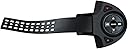
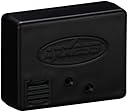
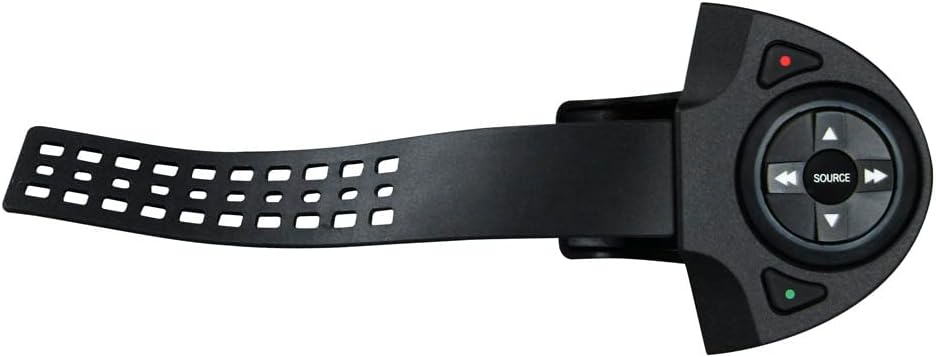
The Metra Electronics Axxess RF Steering Wheel Control Add-On Interface (RFASWC) is a universal wireless module designed to retrofit steering wheel controls to vehicles lacking factory buttons. Preprogrammed with essential functions like volume and track seek, it offers customizable button mapping and mounts flexibly on any steering wheel. Compatible with most aftermarket stereos, it enhances driving safety and convenience by enabling hands-on audio control without complex installation.
| ASIN | B0052HXPAI |
| Customer Reviews | 3.8 3.8 out of 5 stars (64) |
| Date First Available | May 24, 2011 |
| Is Discontinued By Manufacturer | Yes |
| Item Weight | 5 ounces |
| Item model number | RFASWC |
| Product Dimensions | 27 x 19 x 8 inches |
| Warranty | 1 year limited manufacturer |
| Weight | 0.4 Pounds |
M**T
Works great, very happy
Iโve been upgrading my 2000 Ford Explorer and added a BOSS touchscreen stereo. It already had the ability to connect to existing steering wheel controls but, obviously mine does not have any. I thought it was extremely easy to install but, I am experienced with these sorts of applications. My stereo already had a input for steering wheel controls so that made it easy too. It easily mounted to my steering wheel and buttons work right away. I have not tried to reprogram a couple of buttons yet so I will update when I figure that out. I will search YouTube because the written instructions are missing a little something!
A**M
Works Very Well - Try Using Zip Ties.
Let's get some obvious cons out of the way... The included installation instructions leave out some important details - like an image that depicts the location of the LED and Reset Button on the RFASWC Interface. From the front on the Interface, the holes for each look identical, and if the LED doesn't light up, it's difficult to tell one from the other. Please note that the Reset Button is the hole in the middle, under the "X" in "AXXESS". The LED is the hole on the right side, under the "S". On the left side is the USB Port cover. The instructions clearly point out that the red wire is to be connected to a 12 volt accessory wire, and that the black wire is to be connected to ground. However there is a third wire, not mentioned in the instructions, that is black with a light green stripe - please note that this the antenna, so just leave it as is. The rubber strap works to attach the RFASWC Transmitter to the steering wheel, but by no means does the strap keep the Transmitter securely in place. With the rubber strap, the Transmitter is going to wiggle and move whenever you press a button. Also, as pointed out by another reviewer, once you cut the strap, it'll be very difficult to reuse it when the time comes to change the battery, because it'll be too short to thread through the slot in the back of the Transmitter. The first RFASWC that I ordered came DOA - the Interface was inoperable. So as to not waste time, I ordered a second RFASWC before returning the first. Returning the first RFASWC was very easy and free, through Amazon. All I had to do was print out a Return Authorization Label, put the label and RFASWC in the box and tape it shut. In fact, UPS just picked it up from my home today, and provided me with a receipt and tracking number. All that said, now for the pros... Metra Electronics Customer Service was helpful. I called and spoke to a rep who kindly explained that the black/green wire is the antenna - he actually had the product in his hand. I sent an email regarding the DOA Interface and within one day had a 10 email exchange with a rep to troubleshoot. The RFASWC Harness was easy to install. It doesn't get any easier than red wire to 12v accessory and black wire to ground. My JVC radio had a 3.5 mm female connector for SWC, to which it was easy to connect the 3.5 mm male from the Harness. There is an excellent workaround for the rubber strap - use two 7" zip ties, preferably ones that are smooth on one side. You may want to practice first, so buy a bag of zip ties. First take out the screws on the back of the RFASWC Transmitter. Remove the circuit board, rubber buttons and rubber strap. Here's where you may waste a few zip ties practicing... Don't put the two halves of the Transmitter together all the way. With the smooth side of the zip tie facing out, thread the tail end of the zip tie through the front half of the Transmitter, around the steering wheel, into the slot in the back half of the Transmitter, and back through the head of the zip tie, pulling the tail through the opening in the back half of the Transmitter, but don't tighten the zip tie all the way. Remember, this part is just practice to see how to thread the zip tie through the Transmitter. Now attach the two halves of the Transmitter and then tighten the zip tie. If you like the results, cut off the zip tie and prepare to do the procedure again with two zip ties. This time, place the rubber buttons into the halves of the Transmitter and hold them in place from the outside with some tape. I wrapped some self-fusing silicone sealing tape around my steering wheel, where I planned to attach the Transmitter, just to protect the leather and provide some extra grip. Thread two zip ties, tail first, through the front of the Transmitter, around the steering wheel, through the slot in the back of the Transmitter, though the heads of the zip ties and out the back of the Transmitter. Put the circuit board back inside the Transmitter and the secure the two halves together with the two outside screws. Position the Transmitter exactly where you want it on the steering wheel and then tighten the zip ties. Cut off the excess length from the zip ties and screw in the strap cover. I did this, and let me tell you, not only does it look better than the rubber strap, the Transmitter does not move at all... it is very tight. And when the time comes to change the battery, all I'll need are two more zip ties. If you are handy, I highly recommend using zip ties to secure the Transmitter to the steering wheel. The RFASWC Interface paired with JVC radio within seconds. It was very easy to orient the buttons on the RFASWC Transmitter an to marry it to the RFASWC Interface. The steering wheel control works flawlessly for volume, seeking and mute. I have not tried to reprogram any of the buttons. I have a Ford F350, lifted about a foot with leaf springs, riding on 385/65R22.5 super singles, which makes for a very bumpy ride on rough roads. The radio is an aftermarket JVC KW-NT500HDT, which has a touch screen. It was difficult to hold the steering wheel with one hand, and reach over to the radio to press the touch screen with my other hand, and touch the button I wanted. Often with one bump, I'd press the wrong button. This Steering Wheel control makes it much easier for me to control the radio while driving. I'd give this RFASWC 5 stars if there was a better way to attach the Transmitter to the steering wheel, right out of the box. Overall it's still a good product.
T**F
Great product but directions and tech service fall short
Works great, although reprogramming buttons was a bit of work. The directions don't tell you, but you have to hit reset button to make it work and if you need to change it, you have to do that again, but then it works fine. Directions are lacking in clarity, but that is normal when they are written by the engineers who think we should know everything. Called for technical service and the rep kept telling me all the things I did wrong even though I hadn't done anything wrong, however, that was no surprise because previous reviews had said that tech service wasn't very customer oriented.
M**V
AVOID!!!
More garbage from the car stereo industry!! The remote must be very close to the control in order for it to read and even then, it does not always work! I went through two of these. Same garbage. I had to open the remote and change the battery to make sure that wasn't the issue. Didn't help at all. The remote still slides around the steering wheel even with the adhesive. IMPOSSIBLE...let me say that again to be clear....IMPOSSIBLE to custom program. The instructions are not clear in the slightest bit. Even my car stereo installer gave up on it. DO NOT BUY!
J**I
Read this if you want to remap your buttons
This unit does what it says, and to my knowledge is the only aftermarket RF-based steering wheel control solution on the market. It also can work exactly the way you want it IF you know how. Unfortunately, the manual from Metra is missing significant information, and even contains instructions for functions that are not-existent in the unit itself. (Clearly the manual was written entirely separately from the device's development) There simply is no excuse for such avoidable errors - particularly for something this expensive. I would rate 5 stars if not for the trouble in setting up the unit, specifically remapping buttons. The manual references the reset button - but doesn't actually show you where it is. Yes, seriously. The reset button is the pin hole in the middle of the unit - the other, identical-looking pin hole is actually the LED. I recommend replacing the battery before installing on your wheel. Others report that the built-in battery fails quickly, and it looks like it will be difficult to re-install after you cut the rubber band. For just a few bucks, you can get a new Energizer battery here on Amazon. (Size 2032 - always make sure you buy batteries sold by Amazon and not 3rd parties to avoid fakes) For those looking to re-install the unit after cutting, you can tie a string to the end of the band, and pull it through the slot until you latch it to the hooks. OK - now the biggest issue with this unit - remapping the buttons. The remap process in the manual has to be the worst representation I've ever seen in a manual. Make sure you remap the buttons before you put your receiver back in the dash - you really need to see the LED on this unit to do it right. That said, there are 3 key pieces of information not in the manual you need to know to make the remap process work. First - ****You only have one try at remapping the buttons after you go through the initial setup process.**** If you do not remap the buttons properly on that one try, you will need to reset the unit and try again. (Put the igniition in the ON positon and put a paperclip in the reset pin hole and hold for a few seconds until the LED blinks quickly then turns solid) Why on earth this should be needed, I have no idea. But it absolutely is. If you try to remap the buttons again without a reset, you will end up with buttons doing random functions. A stupid and terrible bug in the software. This took me a long time to figure out, so I hope it saves whoever reads this the time and frustration. Second - Simply forget about the section in the remap chapter about assigning the buttons to their default buttons by holding volume down for 25 seconds after putting the ignition on. This function is simply not programmed in to the unit, and nothing will happen if you try it. (I noticed the manual online at Axxess' website doesn't even list this option, though the paper manual my unit came with does) Another stupid, unnecessary error. Last - When you begin the remap process by holding down Vol Up, make sure you then jump to #2 in the remap button legend. So right after you let Vol Up go, you've completed the first command and you're now reprogramming #2 - Vol Down, not #1 Vol Up - that was done once you began the remap process. Make sure you see the LED light for each button as you step through the remaining 17 functions. It's very easy to miss one if you're not looking. Also, see if you can find out any information about your specific receiver's supported functions. They don't always work as the Metra manual indicates. For example, the "Off hook" function on my Sony MEX-N5000BT will actually accept calls, hang up, and initiate the voice dialer. Metra's function list has these as 3 separate functions. (On-hook, Off-hook, and Push to Talk) I actually prefer it this way, but it took trial and error to figure out that I didn't need those buttons separately. It took way too much effort and time, but I now have this set up exactly the way I want in my car. If Metra would just fix the bugs and improve the manual, this product would get 5 stars from me. (Lowering the price would also help, though they have no competition here - so that's unlikely)
K**N
Good!
Super easy to install, just connect the power (red) cable to your stereo's power cable, ground to chassis, and 3.5mm jack to the stereo's swc port! Works great, without updating the device you have plenty of features at the palm of your hand (volume, skip, source, mute, end call) only feature I wish was pre-included was the pause button, but there is a "mute" button which serves a similar purpose as it lowers the volume to like 5%. My stereo unit was a Pioneer double din
I**R
Great idea ruined by horrible button unit.
As other reviews have said, this is a great idea and exactly what I was looking for to add steering wheel controls to my aftermarket radio, but the wheel control is just so poorly designed, and it doesn't take reprogramming! Maybe I got a lemon, but I tried 7 ways from Sunday to reprogram for a different position and it just isn't working. 1st issue, the rubber band mounting strap, how solid would you think it'd be a strap something to your steering wheel with a rubber band? Not very! Other add-on wireless steering remotes use an actual metal bracket that bolts on, why Metra cheaped out here I have no idea. It also comes with double sided tape and instructs you to trim the excess after mounting, so they kind of want it semi-permanent? Remember this item when I get into the battery. As others have said Zip ties work much better so just throw out the rubber band and go with some beefy zip ties. 2nd issue? Reprogramming. Maybe I got a lemon, but the instructions for reprogramming are, within 20 seconds of turning on the ignition, hold down the volume up button, meaning the button you want to be volume up, until the LED on the unit turns solid. Ok, no problem, hold down the button I want to be volume up, and the led starts blinking! Ok, just so I'm not crazy, let me try again but hold down the button that it defaults to volume up, and...solid! In other words, you can't reprogram the volume up, and the orientation it defaults to is like it wants you to mount this on the bottom of your steering wheel. You can shift it about 45 degrees and have the keypad activate the same buttons so on the right side of the wheel with the buttons about 45 degrees off is how I ended up. 3rd issue, battery replacement. Say you get past the first couple issues and get along using it for a while, and then it needs a battery replacement, how would you do this? Unmount it from the steering wheel(cut rubber band or zip ties), unscrew and unsnap the front and back halves of the controller apart, pop the small controller board out of the front half, and then slide the battery out of it's slot on the board, and slide the new battery in. Then resnap/rescrew the casing halves together, and get some more zip ties! For connecting to the radio it really is plug and play, red and black power wires, antenna wire, and remote control wire, super simple. They just messed up so bad on the actual unit you use, and the ability to reprogram. Especially considering it's not the cheapest option out there.
A**R
Must have for aftermarket radio without volume knob
Installed in 2005 chevy silverado that I had replaced radio with aftermarket head unit with no volume knob. I for one don't like not being able to reach over and turn volume up or down quickly without looking when needed. My truck did not have steering wheel controls so I found this one. Really the only company that I found that offers controls for aftermarket radio for vehicles that did not have them from factory. A few reviews stated the strap did not hold tight enough on steering wheel. I found it does you just have to pull strap well past what you easily can,then secure it. Almost need two people, one to hold it while other works on getting strap in place and locking it down. Once I got it tight enough I have been using it now for a few months without issue. Also fits under my steering wheel cover better than I expected. One thing I did find was make sure to test it before putting everything back together. I had to extend antenna wire so that it is located just under my radio behind dash panel. When it was behind radio I found signal was being blocked at times. Like button on back of remote that is for mute. Easy to hit it quick if needed.
Trustpilot
1 month ago
2 months ago