


Buy anything from 5,000+ international stores. One checkout price. No surprise fees. Join 2M+ shoppers on Desertcart.
Desertcart purchases this item on your behalf and handles shipping, customs, and support to Ireland.
⌨️ Elevate your Mac setup with ergonomic precision and programmable power — because your hands deserve the best.
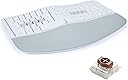
The KINESIS mWave Ergonomic Keyboard for Mac combines a popular wave layout with low-profile mechanical switches to deliver superior typing comfort and durability. Featuring dual Bluetooth and USB connectivity, it supports seamless switching between devices without a dongle. Its powerful browser-based programmability allows full key customization with over 350 actions and macros. Backlit keys with adjustable brightness enhance usability in low-light environments, while dedicated macOS modifiers and hotkeys ensure native Apple compatibility. Designed for professionals seeking ergonomic excellence and productivity, the mWave offers a premium typing experience tailored for the modern Mac user.


| ASIN | B0DYLB3YBJ |
| Antenna Location | Business |
| Best Sellers Rank | #283 in Computer Keyboards |
| Brand | KINESIS |
| Compatible Devices | Laptop, PC, Smartphone, Tablet |
| Compatible Operating System Family | MacOS |
| Compatible Tablet Computer Models | Samsung Galaxy Tab S7 FE 12.4" |
| Connectivity Technology | Bluetooth, USB-C |
| Customer Reviews | 4.0 out of 5 stars 33 Reviews |
| Enclosure Material | Plastic |
| Hand Orientation | Ambidextrous |
| Keyboard Description | Mechanical, Backlit, Programmable, Integrated Keypad, Wired/Wireless |
| Keyboard Layout | QWERTY |
| Manufacturer | Kinesis |
| Minimum Required Operating System Version | Mac OS 14 Sonoma |
| Model Number | KB150M-TAC |
| Power Source | Wired |
| Recommended Uses For Product | Business |
| Style | Mac |
| Style Name | Mac |
| Switch Type | Tactile |
| UPC | 607998150047 |
| Unit Count | 1.0 Count |
J**D
Would be perfect replacement for Microsoft Sculpt if only I could get it in black
I was upset when I accidentally ruined my Microsoft Sculpt keyboard a couple of years ago but positively crushed when I then learned Microsoft was no longer selling them. Proper ergonomics are important for me, but I prefer something that is relatively "standard" rather than any of the truly radical keyboard designs that are out there. I also didn't want to spend hundreds of dollars. After a lot of research, I ended up purchasing the Logitech Ergo K860 (https://www.amazon.com/dp/B07ZWK2TQT) which I liked fine, but not nearly as much as the Sculpt it replaced. Unfortunately the durability on my first K860 wasn't great and I had to replace it only 18 months later. I didn't want to buy from them again, but there just wasn't anything else out there that met my specifications so I moved forward and reordered hoping my first one had just been a dud. Eight months later I was thrilled to learn the mWave had been released and decided to order one despite there being no reviews available yet. I'm glad I did! After a couple weeks of daily usage I've come away very happy with the purchase and feel like this is truly the ideal replacement for the Sculpt. The keyboard feels substantial and I like the negative tilt that can be achieved with the legs it includes. Important to note the tilt angle is "all or nothing" as there are no adjustments possible. A few things really set the keyboard apart from the Sculpt in a good way. The first is the the fact it is mechanical keys rather than the chiclet style. I have become more enamored of the feel and travel of mechanical keyboards in recent years and though I won't claim to be super knowledgable about them this one matches other I own and enjoy in terms of noise level and quality. I have made a point of asking multiple people if they can hear me typing during videoconferences and the answer has always been a no. The keys make noise for sure, as do all mechanical keyboards I'm familiar with, but they are not overly noisy. The next item I love is the backlight. I will often work in a dark room so having the keys lit can be helpful. The lighting has three different levels ranging from dim to pretty bright and the latter is what I'm showing in the picture attached to this review. That picture was taken in a room with a lot of natural daytime light and the backlighting is clearly visible. Frankly, in a dark room it is too bright for my eyes and I go with the medium level. Finally, I love how the keyboard is customizable thanks to what appears to be powerful programming functionality. I have not done more than play around a little with the programming, but it is something I expect to take further advantage of in the weeks ahead. There is only one problem I have with the keyboard and that is I was forced to get it in white since I'm a Mac user. After a few weeks it isn't showing any grime, but I expect that to change over time. They are going to be releasing a kit that will allow you to convert a black Windows keyboard into a Mac keyboard, but that isn't available yet so I decided to just go with the white. If the mWave stands up to extensive usage it will be a great option at what I consider to be a very fair price ($120 as of this writing). If you loved the Sculpt I'm guessing you'll love the mWave
S**T
Good ergonomic feel with classic keyboard layout
Editing review after daily usage. While the spirit and features are excellent, there is still room to improve. The biggest area would be that it is a more compact layout than the older Microsoft ergonomic keyboards. If you have years of muscle memory you’re going to experience a lot of misclicks while you are switching over. Also it makes the arrow keys and shift buttons feel cramped but this is subjective as I am used to a larger keyboard. It would be great if Kinesis made a larger 1:1 variant of the old Microsoft boards with a full numpad and hot swappable keys. —— Absolutely happy with this keyboard. I've struggled to find other ergonomic options which capture a traditional keyboard layout (like older Microsoft ergonomic keyboards), while still providing features such as mechanical switches, programmability, etc. I enjoy the backlit keys, native Mac support, option for Bluetooth or wired, programmability, and optional tenting which does not get in the way (magnetically removed) if you do not wish to use it. The build quality is good and appears well thought out and designed. All the materials feel nice and seem sturdy so far. All in all, it is the keyboard I was hoping someone would make for years and I'm happy to have it.
N**D
The perfect keyboard
They finally made the perfect keyboard for me!!! Comparison to some other keyboards I've owned: Kinesis Freestyle2: has good key physics, but could never quite get used to the "two pieces". They would inevitably get bumped into new positions all the time, making it impossible to develop muscle memory for where my hands should go relative to each other. Also, eventually the connector between the two pieces broke, making the unpredictable positions problem go from bad to worse. Perixx PERIDUO-406: The key action on this thing is terrible. Get a little dust in there and the key seizes up. Utterly frustrating. Microsoft Natural Ergonomic Keyboard: Prior to the Kinesis mWave, this was my all time favorite keyboard. Good key action, great ergonomics. However the big problem with it which is why I didn't go back to it was that it has a built in numeric keypad. Newsflash: most people don't need or want a keypad. Not only is it useless dead space, but if you're right handed, it pushes the mouse/trackball further to the right than needed. Your hand has to travel further. If your desk space is limited, as mine is, it causes your keyboard to also have to be positioned to the left of center instead of being centered on the desk. mWave is the answer to all the problems. And on top of that they were good enough to make a Mac version of it! Thank you!!
A**R
Some flaws, but overall a pleasant keyboard to use
The mWave has a lot going for it. Low profile mechanical switches, a well-loved form factor, easy configuration via the Kinesis webpage, included batteries (and the ability to choose wireless or wired), and backlighting for anyone who needs it. Honestly in this realm, the only complaint I have is that the switches are not hot-swappable, as there are some Nuphy switches I'd have loved to put on this board. There are two drawbacks that I have with this, and only one of them is really worth concerning about. The first is that Kinesis is drawing a LOT of confusion from their keycap/color marketing. They need to either include both operating system modifiers in every purchase, or they need to specify that the white version does not mean "Only Mac" and the black version does not mean "Only Windows". I have seen WAY too many questions about this for them not to have done something about it. The second is the latency. Even on a wired connection, this keyboard feels sluggish in comparison to a lot of modern keyboards INCLUDING other Kinesis products. The Freestyle Gaming board that I have at my desk has none of these issues and it is significantly older than the mWave. I type roughly 120 wpm, and the amount of issues I have with this keyboard keeping up feels downright ridiculous. Thankfully I'm using it at work where I have to slow down when writing code, otherwise this keyboard would be borderline unusable for me. I'm seriously concerned with how it would perform if I was using Bluetooth instead of the wired connection. Words with letters that repeat (like the 't' in letter) most times don't even type the second letter. I'd like to think that this can be resolved via a firmware update, but I don't know for sure. Regardless, I find that the comfort provided by the layout is enough to keep me using this for now. If I could have this exact keyboard but with better responsiveness, I think I wouldn't have to concern myself with buying another keyboard again.
M**.
Awesome value; great ergo keyboard.
An amazing keyboard for what it is -- arguably better built Microsoft Sculpt with mechanical switches, access to the seamless Kinesis customization software, and better connectivity. The switches are quieter than full sized browns. Generally, I couldn't be happier with the keyboard.
A**Z
Almost perfect
This is a very good keyboard. Almost perfect, but some of the layout is non standard. If you’re accustomed to using a keyboard with a 10-key layout, you may have a learning curve. Delete and backspace are conveniently next to each other. Arrow keys are taking me longer to get used to, a standard keyboard has these isolated, but now they’re flanked by page down and shift. They home row is fantastic, they asdf and jkl; keys are nicely beveled. Split spacebar is great
U**D
Low quality
Pretty low quality keyboard, all the keys felt loose and had a bad feeling to typing. The palm rest felt like cheap vinyl. If this was a $50 keyboard I’d understand, not for $120 this is really low quality. I returned it after using it for one day, because it just felt so cheap and bad to type on. The overall shape is pretty good and similar to the MS Sculpt, but the materials are really low quality.
S**A
The one that stuck
I've tried a wide variety of ergonomic keyboards over the years, and this is the only one that really stuck and I enjoy using day to day. It's more ergonomic than a simple Alice layout flat board, and I didn't have to rewrite my synapses to work with it like with some of the split keyboards out there. It's not perfect, and I hate having to switch batteries, but even after trying out other boards since I like this one most.
Trustpilot
2 weeks ago
2 weeks ago