🖥️ Elevate Your Workflow with Precision and Comfort!
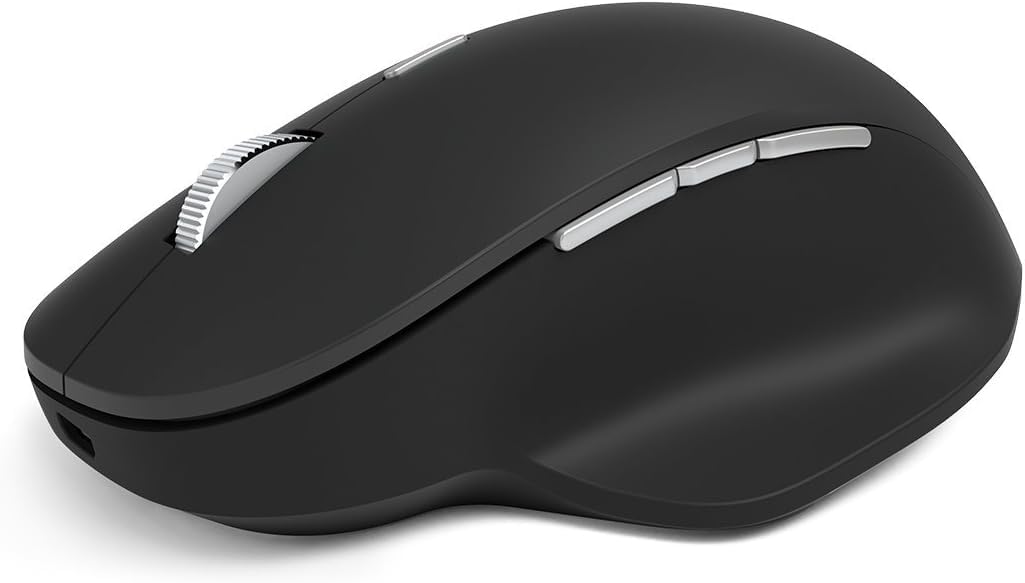
The Microsoft Precision Mouse combines ergonomic design with advanced functionality, featuring seamless multi-device connectivity, patented magnetic scrolling, and customizable buttons, making it the ideal tool for professionals seeking efficiency and comfort in their daily tasks.


| ASIN | B07DRK7HJS |
| Average Battery Life (in hours) | 3 months |
| Batteries | 1 AA batteries required. (included) |
| Best Sellers Rank | #3,304 in Computer Mice |
| Brand | Microsoft |
| Color | black |
| Customer Reviews | 4.2 4.2 out of 5 stars (300) |
| Date First Available | June 29, 2018 |
| Hardware Platform | Laptop, PC |
| Is Discontinued By Manufacturer | No |
| Item Dimensions LxWxH | 5.98 x 4.06 x 2.76 inches |
| Item Weight | 13.4 ounces |
| Item model number | GHV-00001 |
| Manufacturer | Microsoft Input |
| Operating System | Chrome OS |
| Power Source | Corded Electric |
| Product Dimensions | 5.98 x 4.06 x 2.76 inches |
| Series | Microsoft Precision Mouse |
J**R
Works on GLASS!
This is a wonderful step up for a Microsoft Mouse. I last had a "Bluetooth Sculpt Touch" mouse --which had "Bluetrack" technology that worked on everything BUT glass. I know Logitech had this feature years ago, but this is the 1st Microsoft mouse I've had that works well on my glass tabletop, so no mousepad needed ---ever. I have 2 Windows 10 laptops that I use at work. The mouse is amazingly good at auto switching between the two computers. It is not perfect, but there's also a tiny switch on the bottom with an indicator light highlighting which computer the mouse is connected to, and you can easily switch using the button. What is interesting is that you can have different mouse resolutions on each computer. I use one computer for certain programs, and the other for different programs. It is a great convenience to have different resolutions--automatically. Some of my programs work better using smooth vertical scrolling, and others are better with the normal scrolling. There are 3 buttons on the left side and all are customizable. I charge my battery about once a week on a schedule; I haven't tried to find out the maximum battery length. When the mouse is connected to the charging cable (USB--->microUSB) it becomes a wired mouse. The mouse is fairly large, but is perfectly designed to fit and remains comfortable after hours of use. I've only had this mouse a few weeks, but as other reviewers have commented on some reliability issues I decided to invest in the Assurian replacement contract for only about $10 for 4 years of guarantee. I have used Assurian services MANY times for all the phones in my household; when there's an issue they replace. Unlike my iPhone, for the mouse I did not see a service fee for replacement. To sum: this is the best mouse that Microsoft has ever made, and it pairs well with my Windows 10 computers.
R**R
Microsoft precision is a rare gem 💎 mouse
Great mouse with great feel. I felt that outer and bottom of the mouse feel smooth. When i see other cheap mouse it has multiple rough surfaces and it’s hidden by unnecessary stickers. But this one is a precision mouse and the quality is superb. The center wheel is silky smooth and it works with usb or Bluetooth. And I can connect 3 devices at a time. This is one of the rare gem of mouse. I am adding some pictures of it from bottom.
T**J
Rechargable and works well
This is a great product. Its pricey but worth the money.
R**F
Bluetooth 4.0-4.2 REQUIRED
I just got this today. Feels great in your hand and I am sure I will like this mouse. But it only works with Bluetooth 4.0-4.2. I imagine perhaps higher versions too but it will NOT work with Bluetooth 2.0 which is what I have on my computer. It does work plugged in via the cable but I wanted it wireless. There is absolutely NOTHING in the description that this version of Bluetooth is required so buyer beware. I am now having to purchase a USB Bluetooth 4.0 adapter to make this mouse work.
J**N
So close to being great
I love almost everything about this mouse. It feels nice, it's responsive, it has a bit of weight to it, it feels high quality, but there are significant issues with this mouse that I have tried for months to resolve to no avail. I have two of these and I have used both units with multiple Windows 10 systems. The issues I have observed are present with every combination of mouse / computer system, so I am highly confident that the issues I've observed are not due to an individual mouse or computer, but rather are inherent to either the mouse on its own or to the mouse in combination with Windows 10. Issue 1: while wired, the mouse constantly and periodically disconnects and reconnects (usually within a second). The computer will play the "USB device disconnected" sound effect and the mouse will be unusable for about a second until the computer plays the "USB device connected" sound effect. Issue 2: while wireless, the mouse connection will eventually become "choppy". The cursor will still go where you want it to go, but it won't move smoothly. Instead, it will "hop" across the screen in noticeable increments. This issue is resolved by power cycling the mouse and the connection will be fine for another seemingly random amount of time (usually a few hours). Issue 3: while wired (uncertain if this one happens while wireless), the scroll wheel will randomly become nearly ineffective. It still works, but a window will scroll extremely slowly. This issue is resolved by disconnecting the wire and reconnecting it. I have tried every "remedy" for these issues that I can find online. Updating drivers, rolling back drivers, uninstalling drivers, messing with power saving settings... Nothing I have found works to permanently resolve these issues. It's amazing to me that so many issues can exist between a Microsoft mouse and a Microsoft operating system. I would use this mouse for the rest of time if these issues could be resolved.
J**M
A lot better than what I'm used to!
This is the most expensive mouse I have ever owned. Been using it for about a week now and the switching between using it for my laptop and to my PC is as seamless as it gets. The plastic shell, while not something I'd expect on a 100$ mouse, feels far, far more better than the 10-20$ mice I'm used to. The connection on it is so good that I couldn't even see the difference between wired or wireless. No sign of degradation of the connection or hiccups whatsoever. The middle button below the mouse-wheel allows you to switch between wheel-scrolling modes. It can turn to be either real smooth-like or normal. While I like knowing that my mouse has such a feature, the smoothing feature feels far too weird to ever actually use. Would I recommend this? If you use a computer a lot, definitely.
R**Z
Love this mouse!
Love this mouse! Feels good on the hand and works well on screen. Perfect if you use AutoCAD often.
S**I
This mouse is really comfy and great to use. You have a space to lay your thumb and I love that. The battery last a lot of time.
M**D
Very comfortable for long working hours
R**S
Best mousing experience in 20 years - smooth accurate tracking, pleasant palm feel, subtle clicking, elegant multi-mode scrolling, and useful function buttons. Unlike cheaper bluetooth mice, this one connects instantly and never drops out or skips. I had no idea what I was missing until I bought this thing. The battery is rechargeable, and I typically get 6-8 weeks out of it before needing to recharge (and this is using it full-time at work). Recommended!
S**N
Mouse wheel spins without clicking. Rechargeable battery lasts a long time without charging. Bluetooth adapter is not include, so make sure your device has Bluetooth. If not, pick up an adapter for Bluetooth at the same time.
I**F
Mouse is generally fine, and very comfortable, but the wheel button is very sensitive. It depresses at the slightest touch while scrolling, which subsequently changes the cursor to page scroll... highly annoying. Going back to my beachball Microsoft mouse, just wasted $100 on this one.
Trustpilot
1 week ago
2 weeks ago