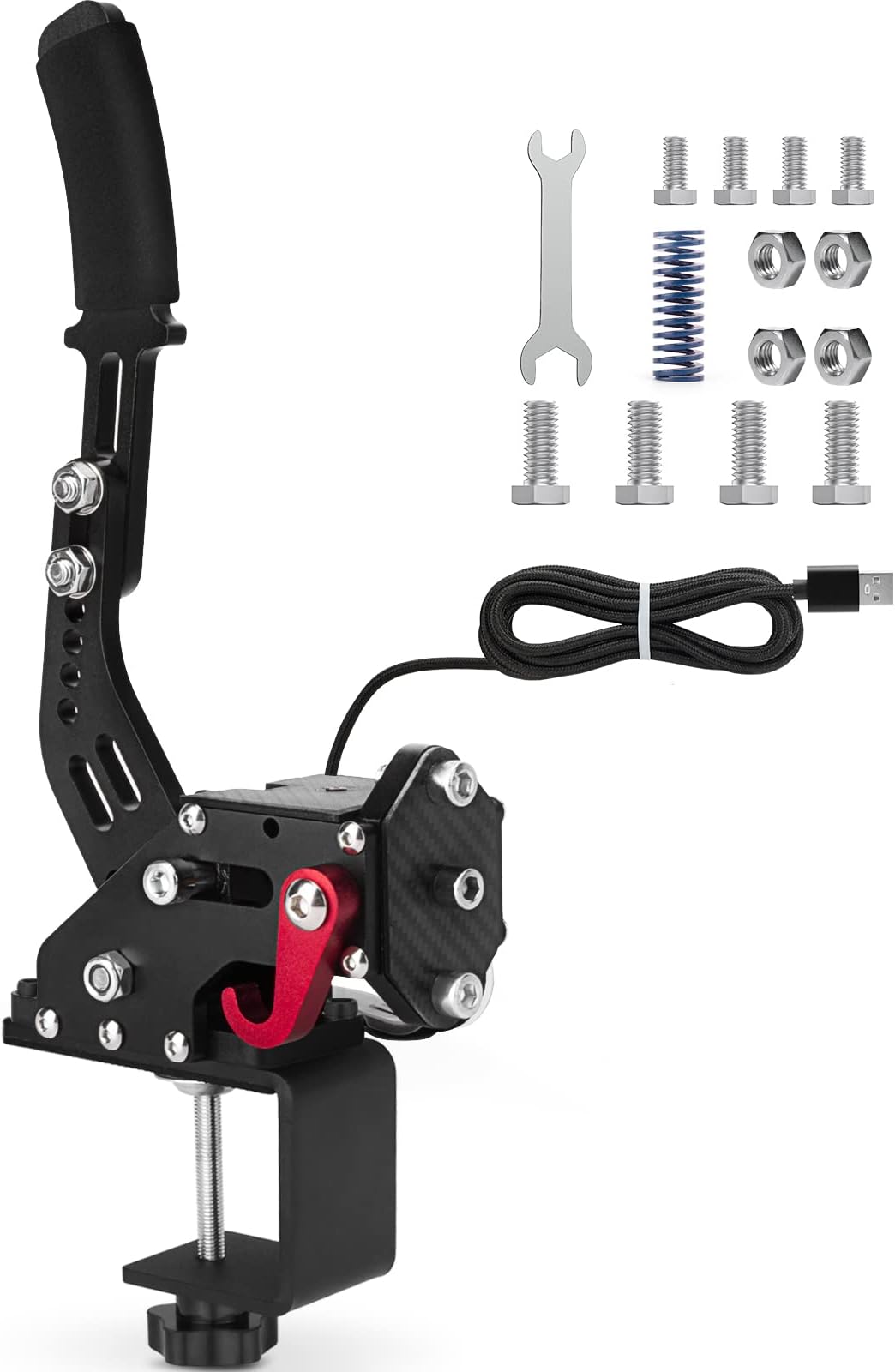
🎯 Master every turn with precision and power!
The 64bit PC USB Handbrake is a compact, all-steel sim racing accessory featuring a 14-bit contactless hall sensor for precise braking control. Compatible with major racing wheels like Logitech G25/G27/G29 and T500, it offers plug-and-play USB connectivity for Windows PCs, delivering durability and pro-grade performance in a sleek, space-saving design.


| ASIN | B07V79MXF2 |
| おすすめ度 | 5つ星のうち4.3 1,226 レビュー |
| カラー | ブラック |
| コントローラーの種類 | Handbrake |
| ハードウェアプラットフォーム | デスクトップパソコン |
| パッケージ商品数 | 1 |
| ブランド | aikeec |
| ブランド名 | aikeec |
| ボタン数 | 4 |
| メーカー名 | aikeec |
| メーカー型番 | SKU014740010 |
| 動力源 | プラグアンドプレイ |
| 商品本体サイズ | 20.3 x 17.8 x 12.7 cm |
| 型番 | 121 |
| 対応アイテム | PC, Windows |
| 対応デバイス | PC, Windows |
| 接続技術 | USB |
| 接続方式 | USB |
| 特徴 | ランブル |
| 特殊機能 | ランブル |
| 色 | ブラック |
R**N
Bad product & Bad seller
The handbrake was already broken after 2 gentle times using it... I contacted the seller and they refuse to send me a new one. They offered a replacement part but they were not able to send it..... bad excuse... Then they offered me a discout of 30%.... wich is absolutely ridiculous... for the combined total i would have been better off buying a way more expensive branded e-brake... NEVER BUY HERE!
J**M
Ignore the bad reviews , sturdy and good quality for the price , go for it!
Honestly ur nit gonna find anything equal to this for that cheap, there were reviews showing it having a bunch of play and rust spots but maybe it was a quality control problem that's been fixed because mines sturdy like a rock. Parts are of good quality too. Very easy to assembly , does offer some adjustments and is plug and play so all in all im happy with it. I dont imagine a 200 dollar one heing much different then this besides from esthetics.
A**Z
Super produit
Super produit, fonctionne parfaitement sur asseto corsa rally !
C**O
Ottimo prodotto e prezzo
Ottimo prodotto
A**N
Is good. What can I say?
Works on PC via USB Type-B. Has a particular input range that's explained in the manual: about the first 20-30% of physical input isn't registered (mine is around 30%, which is an estimation), so 31% through 100-ish% of input is the actual 0% to 100% output in-game; not an issue for me since I can always adjust the deadzones in-game (maybe not possible for all games). Haven't confirmed stated console incompatibility since I don't use console (the hardware won't be recognized by the console, or something along those lines). Even with instructions, the tightening adjustment is confusing—I don't want to over-tighten or unscrew it completely, and would like to know on some level how far I am from either scenario, like maybe an engraved notch and number that denotes how many turns from that point is possible/allowed/recommended, etc... I think it's just that I want to know how far I can push it, and be able to adjust it with some amount of easily repeatable measurable accuracy. Mine has some hang (idk the word for it), in which if I guide it as it resets to its resting position (instead of letting go completely, I hold it, helping bring it to position); most noticeable when done slowly; total hang accounts for about 15-20-ish% of input, so it's negligible, but I still adjusted the deadzones in-game just in case. Oh yeah, assembly instructions were fun—it's only fastening the adjustable lever/handle, and installing the clamp mount system, which is grate. Would suggest a stick-on foam pad for the circular surface of the clamp, just so it isn't metal on metal/metal on wood/etc...
Trustpilot
2 weeks ago
1 month ago