We remain fully operational. Our teams are working around the clock to ensure your deliveries continue safely.

DOWNLOAD THE APP


Customer Services
Copyright © 2025 Desertcart Holdings Limited
DOWNLOAD THE APP
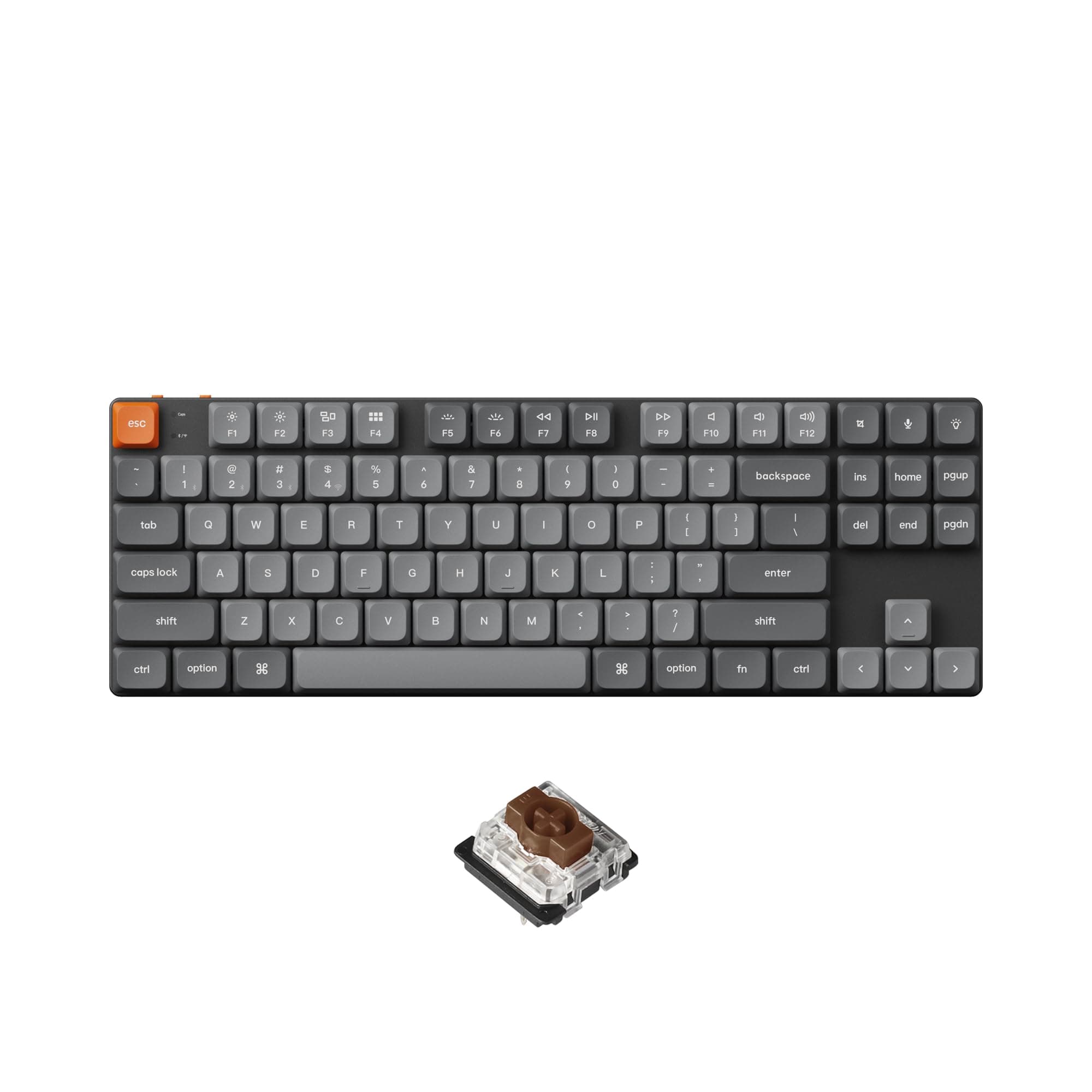

⌨️ Elevate your desk game with the ultra-slim, customizable Keychron K1 Max!
The Keychron K1 Max is a cutting-edge ultra-slim tenkeyless mechanical keyboard featuring hot-swappable low-profile Gateron Brown switches, multi-mode wireless connectivity (2.4 GHz & Bluetooth 5.1), and full RGB backlighting. Designed for professionals and gamers alike, it supports advanced key remapping via QMK/VIA software and incorporates acoustic foam for a quiet, ergonomic typing experience.


| ASIN | B0CRDH99WB |
| Additional Features | Backlit |
| Antenna Location | Gaming, Office |
| Best Sellers Rank | #7,225 in Video Games ( See Top 100 in Video Games ) #423 in Computer Keyboards #557 in PC Gaming Keyboards |
| Brand | Keychron |
| Built-In Media | LSA Profile Keycaps, Gateron Low-profile MX Mechanical Switches |
| Color | Brown Switch |
| Compatible Devices | Computers, Smartphones, Tablets |
| Connectivity Technology | USB-C |
| Customer Reviews | 4.0 out of 5 stars 23 Reviews |
| Enclosure Material | Aluminum |
| Generation | Recent Generation |
| Hand Orientation | Ambidextrous |
| Keyboard Backlighting Color Support | RGB |
| Keyboard Description | Mechanical TKL RGB Backlight Hot-swappable |
| Keyboard Layout | QWERTY |
| Manufacturer | Keychron |
| Mechanical Keyboard Switch Model | Gateron Low-profile MX Mechanical |
| Model Number | K1M-A1 |
| Number of Keys | 87 |
| Number of Sections | 1 |
| Power Source | Rechargeable Battery |
| Recommended Uses For Product | Gaming, Office |
| Special Feature | Backlit |
| Style Name | Contemporary |
| Switch Type | Low Profile Gateron Mechanical |
| Unit Count | 1.0 Count |
| Water Resistance Level | Not Water Resistant |
T**N
A superb low profile keyboard
I’ve tried many low profile keyboards. This is the only one I actually like. Plus compared to something like the logi mechanical mini. This is better in every way, sounds better, feels better, has a better form factor. And better yet, the switches are replaceable. A mild shame Keychron don’t ship this with Gateron Bananas for proper tactility
K**N
My favorite keyboard so far
This is my 2nd mechanical keyboard, my first is a 75% format, this 80% slim version suits me much better.
D**E
No "fn" lock, backlight is useless
The quality is great, feels like old keychron. However, the backlight is fairly useless since the keys are not shine through. I am not sure why this would be an option, but this is my fourth keychron and it's the only one that does not let the backlight shine through. Perhaps the most annoying issue is that there is no longer an "fn" lock like older keychron keyboards. This has been especially frustrating on windows to the point that I may want to return this. I don't want to go into VIA and reprogram the whole thing, I just want the fn keys to work like they do on the old keyboards.
A**R
Great keyboard in all but one respect. The backlighting is purely cosmetic.
With these keycaps, the backlighting is purely cosmetic. You can see the keyboard, but almost no light comes through the characters, so no help there. I've attach a picture and you can just barely make out the letters, but that's because my phone camera really tried to brighten the image. This shows the K1 and my laptop in the background. Otherwise, I love it. The low profile keys have enough travel for me and the feel is really good. I agree with one other reviewer, that it would have been nice to have recess to store the dongle, but that's not really a big deal for my use case.
F**T
querty is not the same
not compatable with my computer
T**R
A Great Low-Profile Quiet Keyboard for Travel
I am very happy with the Keychron K1 Max keyboard. It performs perfectly in its specific use case (more on that below), and lives up to the quality standards I expect from Keychron. This is my second Keychron keyboard. The first is a K8 Pro—with Gateron G Pro clicky BLUE switches. (Which may tell you something about where my preferences typically lie.) As background, my primary keyboard is a 1992 vintage IBM Model M, which I use in a crowded-but-acoustically-tolerant office. At home, I mostly use a Unicomp "New Model M" (retooled since the Lexmark-era "Classic"). So, yes, I am very much a fan of loud mechanical buckling-spring keyboards, which I use almost exclusively for typing, and very little gaming. At last, back to the K1 Max, and my use case for it. I ordered this keyboard specifically for travel. Hence its more-portable ten-keypad-less (TKL) "80%" configuration, just like the K8 Pro. But the K1 Max goes a step beyond in travel-friendliness, with its ultra-slim design. The case itself is thinner (thanks to Gateron low-profile 2.0 mechanical switches), as are the keycaps (which are low-profile spherical-angled double-shot PBT). Even with the ultra-slim design, the K1 Max retains hot-swappable switches (albeit limited to other Gateron/Keychron low-profile MX mechanical designs), replaceable keycaps, RGB backlighting, wireless (both Bluetooth 5.1 and 2.4 GHz) or wired (USB-C) functionality, and remapping using either VIA or QMK. In addition to being slimmer than my Keychron K8 Pro, the K1 Max is also obviously quieter (with its brown, rather than blue, switches), without losing the tactile "bump" (just without the audible "click"). I've finally come to acknowledge situations where quieter is better: working late in a small hotel room with a sleeping companion, for instance. The keyboard arrives in beautiful Keychron packaging, and includes pullers for both the keycaps and switches, cable, adapters, alternate keycaps, and a 2.4 GHz wireless dongle. (Unfortunately, there is nowhere convenient to store the dongle when not in use.) All that said, I am quite pleased to recommend this Keychron K1 Max for your own use.
D**L
A phenomenal keyboard - ideal for travel or home
I have never used a keyboard like this before. Up till now, I have had to choose between a thin but terrible keyboard with low key travel (the Apple ones) and a big, heavy, bulky mechanical keyboard. I can't deny that the Apple one travels the absolute best, but it's an annoying chore to use. I cowork 5 days a week, so while portability is important to me, I still want something that I'm going to want to type on all day for everything from email to coding. So what can I say about the Keychron? I chose the brown switch version, and it feels great without at all being noisy. The keys are such a joy to type on, and the keyboard is much lower profile (flatter) than a standard keyboard. Which is, I was told by an ergo consultant, much better for you. To visualize it, the tops of the keys of the Keychron are roughly level with the frame itself of my DURGOD keyboard. Let's get to the features. Pairing is effortless, with FN+1/2/3 triggering a force pair, but usually it'll re-pair without prompting. It also comes with an RF dongle in the box, which as most people know, is the ideal way to use input devices. You can also connect it hardwired. There are two tiny switches on the edge of the keyboard facing away from you. The one on your left controls basically "Apple Mode" vs "Everything Else Mode", allowing you to easily swap the "Windows/Alt" keys (On a Mac, Windows maps to Command and is supposed to be next to the spacebar). Presumably this might affect the keys sent for certain special keys -- I don't know because I haven't used it with a non-Apple device yet. I'd set this to match the OS you're using, though. Obviously this doesn't need to match what key caps you have attached, but by the way, this unit comes pre-assembled with Apple-style modifier keys and has Windows-style keycaps included in the box for easy swapping as well as a couple color options for a handful of keys. The other switch is maybe my only (tiny) nitpick with the keyboard: It's kind of the power switch. It has 3 positions: BT/Cable/G. G is the wireless RF dongle. BT is Bluetooth, and Cable is Off (or obviously, the position for if you connect the keyboard via a cable). This means that if you use it wirelessly, to switch the keyboard off you have to move the switch into the center ("Cable"). This isn't what I'd have preferred, however, it has not really annoyed me in a week's use because the switch feels good and it stops in the center without me having to try too hard. For transporting it, since it's so much nicer than my old keyboard and I don't want to damage it, I bought a vertical-loading keyboard case on Amazon (hard to find! but under twenty bucks) and I just slide the keyboard into that, in my backpack. === Customization Section === Here's the big exciting part: How does this keyboard do with software customization? The only odd thing I noticed was that the keyboard comes with some documentation which suggests to use the VIA software. I actually tried this, and for me at least, after connecting via USB and 'authorizing' the keyboard, VIA does nothing. The animation just keeps rocking back and forth and no errors come up. However! A little quick googling showed me that the manufacturer provides a web experience for this which looks to me just like what VIA is supposed to do. It's located at launcher dot keychron dot com. This works great and it was easy to configure some keys to do what I want. I'm completely happy with the customization. You can definitely go all out with multiple layers and stuff, but that isn't what I wanted to do so I kept it simple. My ultimate take on this is it's exactly what I didn't know existed but really needed/wanted -- it's my all-day daily driver keyboard now and will be forever. This would make a perfect gift for someone like me, and anyone who can't get it fulfilled as a Christmas List item ought to treat themselves and grab one. I think you'll really enjoy using it.
X**R
My new work buddy.
I'm new to mechanical keyboards. This is just my second one and the first I can tolerate. It's a gateway keeb. It's made me want to dive into the world of fancy/custom keyboards. I don't even know what I want or how to describe it yet. I like the feel of this (I got the Brown switches), but it's strangely small. I'd think that one would want either a fancy mechanical keeb, or an "ultra-slim" one, and this one just misses the mark for either. I think I want something a bit louder and with a firmer feel, and not so compact. However, for slim keyboards this is better than some. The keys are full-sized if not full height (like a lappy), and the layout is not compromised by the slimness. The lack of a 10-key is a slight bother, but no biggie. I have another mech keeb that has a 10-key but is missing the Ins/del/home/end/pgup/pgdn cluster and no right control key (?!) - hated it. I like the electronics in this very much. The ability to be Bluetooth, dongle, or wired is a real plus and lets me bounce around my lab/shop/office with ease. I've had no performance issues with any connection method. I don't think this is quite worth the ~$130 price tag, but it's close.
Trustpilot
1 week ago
2 weeks ago