🚀 Elevate your edge with AI-powered speed and style
The Microsoft Surface Laptop (2024) redefines professional computing with a powerful 12-core Snapdragon X Elite processor, 32GB of LPDDR5x RAM, and a vibrant 13.8-inch HDR touchscreen. Featuring Windows 11 Copilot+ AI for enhanced productivity, real-time translation, and smart recall, it offers up to 20 hours of battery life in a sleek, lightweight aluminum frame. Designed for the modern professional who demands speed, versatility, and all-day performance.


| Standing screen display size | 13.8 Inches |
| Screen Resolution | 2304 x 1536 |
| Max Screen Resolution | 2304 x 1536 Pixels |
| Processor | 1 snapdragon_x_elite |
| RAM | 32 GB LPDDR5x |
| Hard Drive | 1 TB SSD |
| Graphics Coprocessor | Adreno |
| Chipset Brand | Qualcomm |
| Card Description | Integrated |
| Wireless Type | 802.11ax |
| Average Battery Life (in hours) | 2E+1 Hours |
| Brand | Microsoft |
| Series | Surface Laptop |
| Item model number | ZGQ-00001 |
| Hardware Platform | Microsoft |
| Operating System | Windows 11 Home |
| Item Weight | 2.96 pounds |
| Product Dimensions | 11.85 x 8.67 x 0.69 inches |
| Item Dimensions LxWxH | 11.85 x 8.67 x 0.69 inches |
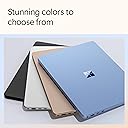
| Color | Black |
| Processor Brand | Snapdragon X Elite (12 core) |
| Number of Processors | 1 |
| Computer Memory Type | DDR5 SDRAM |
| Flash Memory Size | 1 TB |
| Voltage | 26 Volts |
| Batteries | 1 Lithium Ion batteries required. (included) |
M**M
Very impressed with this new copilot laptops for work
I thought i would not be able to use this for work for fears that my intel x86 programs wont work. Im happy to report that everything works well here. All my native intel apps runs smoothly on emulation with this surface 7. Even those old clunky 2018 apps. Im able to print with my brothers printer too. Theres a lot of app updates in the beginning and a few firmware too. After that, you can simply work. Copilot is ok. It is no longer in beta now. Quality is great and screen is a bit smaller than last gen but it occupies a bigger space at the edges. It is finally using 120 hz lcd led panel. Super fast shipping by amz too.
A**R
Brave new world
My new Microsoft Surface Laptop, with Windows 11, Copilot+, Snapdragonx, 32GB RAM, 1 TB Storage is everything I needed, and a few great upgrades. Here’s what I learned: Copilot+ is an AI tool like ChatGPT that requires a computer capable of 45 TOPS (trillion operations per second) so even faster than my wife can point out one of my many flaws. Copilot+ keeps a timeline of EVERYTHING you’ve ever done on your computer, which can be useful if you have a follow-up question. As a CPA with my own business, I need a computer that works fast. Check that box off. I often work in my backyard or from my car, so I need a long battery life. The Snapdragon X Elite (12 core) processor uses power efficiently and battery life is 22 hours. Check. One USB-A 3.1 and two USB-C 4 ports and a 3.5mm headphone jack. I wanted to connect my second monitor, so had to spring for a $17.99 USB C to HDMI Multiport Adapter. It was necessary to “update drivers” to get the speakers to work. A minor hiccup but an easy fix. The laptop started up ‘OneDrive-Personal’ which continually backs up all files to a Microsoft account. There was an issue loading up three files, but Microsoft support did a screen sharing session to figure and fix things. It’s also worth noting the size. I’m impressed with the amount of advanced technology packed into a small laptop, making it convenient for travel. In summary, my new Microsoft Surface Laptop is serving me well.
J**G
Updated: Great laptop with the latest Copilot PC+ capabilities
Update: Microsoft released an updated driver in February 2025, so I'm now very happy with this laptop in all respects. I've not run into other compatibility issues. Very pleased. I like the laptop and the speed/performance; however, I'm SUPER frustrated that the ARM/Snapdragon processor has compatibility issues with my new HP MFP 4301 printer. It's a great printer that works with all my other PCs, but I have yet to find a driver for the ARM processor in this Microsoft Copilot+ PC. I just logged in to return the laptop for a different laptop with an Intel or AMD processor. I would MUCH prefer that Microsoft and HP release a driver that works with the feature of my HP printer. If they do so, I will change my rating. Until then, I'm giving 2 stars max, and I suggest avoiding this until they work out compatibility challenges.
K**.
College Freshman’s Laptop - Great Buy!
Works well for our son as his laptop for college. He likes the touch screen feature but said it can be slightly finicky with the keyboard (he’s had to reset it once) but he’s not a techy person and figured that out easily. I would buy again!
M**A
not as good as the hype.
As a software developer, I purchased this laptop for its advertised battery life due to my past struggles with battery performance of some laptops. After using it for a month, I have the following observations: 1. Android Development: If you are an Android developer using Android Studio extensively, I recommend against this laptop for two reasons. First, to the best of my knowledge, it is not possible to create virtual devices to emulate any Android version. At least, i failed to do it. This necessitates the use of real devices for testing, meaning you would need to have several real phones and tablets available. Second, when I connected my phone (S24 Ultra) as an emulator, the laptop battery drained very fast reaching 5% in about four hours. Although this duration is quite long, I would have preferred if it lasted at least ten hours. This way, I don't need to carry a charger every where i go. 2. Charging Indicator: When charging the laptop while it is powered off, there is no indication of when the battery is fully charged, as the light does not change its color (remains white). To check if it is fully charged, you have to power on the laptop first in order to see the battery percentage. I would expect the light to either turn off or change to green when fully charged. 3. Keyboard Design: The keyboard is good but has two issues. First, it lacks a Ctrl key on the right side, which has been replaced by a Copilot button. As an Android developer, the Ctrl key is crucial for commenting out code in Android Studio. Secondly, it appears that some keys are missing; for example, I do not see the Print Screen key to take a screenshot. Additionally, I wish the power button was located elsewhere to create room for other buttons. 4. Charger Compatibility: [updated 21/11/2024]. Today i managed to charge this laptop with a USB-C charger. I do not know why it did not work before. Maybe there was a software update. 5. [Updated 20/11/2024]: Today, I had an unexpected realization. I use Surfshark as my antivirus and VPN, but I discovered it cannot protect my laptop. Please see the attached screenshot for reference. Consequently, I will need to purchase another antivirus solution for this laptop. 6. [Updated 29/12/2024]: The laptop has two sharp points at the bottom of the screen. When cleaning dust or water spills from the screen with your bare hands, you might get cut. Please refer to the attached screenshot for their exact locations. 7. [UPDATED 30/04/2025]: While moving between office rooms, I attempted to open the laptop, using my other hand behind the hinge for support. Unfortunately, the hinge caused an unexpected pinch (bite), which was not only painful but nearly broke the skin. I strongly recommend revisiting the hinge design for the next release to prevent similar incidents. 8. [Updated 23/07/2025]: Today i wanted to run Python code using Visual Studio 2022. After hours of trying to get it installed, i did a Copilot search only to learn that Python is not supported (see screenshot) on this laptop. They advised me to use VS Code instead. If you are a developer, it may be wise to stay away from this laptop. Just that i am in Uganda, otherwise i would have returned it back.
D**1
Extremely fast (X-Elite CPU) and incredibly small and light
I had a 4-yr old Dell XPS 15 (9510). I wanted something smaller and lighter than the XPS for travel. I originally thought I would basically keep my Dell hooked to the docking station and large monitors and use it as a desktop, and would only use the Surface laptop for carrying around. But, this laptop is so much smaller, lighter and faster than the Dell, and the screen is brighter and higher resolution. So now, the Dell is in a bag in the closet as an emergency backup. This is my primary computer for everything.
C**S
My daughter is happy
If Kid is happy, I am happy
B**U
Creatives beware.
If you are a creative, who uses Adobe products, then avoid purchasing as Adobe products are built for Intel and they have yet to release Qualcomm versions. Premier is the worst affected as performance is super slow, overheats the laptop, and requires using old versions, but even Adobe Reader has issues like being unable to print to PDF when in MS word. Separate from that, the other major issue I have come to notice is that the ports continually power down while in use... which makes using external webcams and mics a nightmare.
Trustpilot
1 week ago
5 days ago