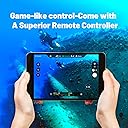
🌊 Capture the unseen. Share the extraordinary.
The PowerVision Powerray Explorer is a waterproof underwater drone equipped with a 4K UHD camera and 12MP photo capability, designed for immersive exploration up to 98 feet deep. Featuring intuitive remote controls, live streaming to mobile devices, and advanced fish-finding and obstacle avoidance technology, it’s a versatile tool for diving, snorkeling, boating, and fishing enthusiasts seeking to elevate their underwater adventures.
| ASIN | B07CTZPGC8 |
| Battery Average Life | 3 hours |
| Best Sellers Rank | #477,618 in Electronics ( See Top 100 in Electronics ) #1,963 in Fish Finders & Depth Finders |
| Brand | PowerVision |
| Built-In Media | Underwater Photography Equipment |
| Camcorder Type | Video Camera |
| Color | White |
| Compatible Devices | Smartphone, Tablet, Personal Computer |
| Connectivity Technology | Wi-Fi |
| Customer Reviews | 2.8 out of 5 stars 26 Reviews |
| Display Resolution Maximum | UHD |
| Effective Still Resolution | 12 mp |
| File Format | JPEG |
| Flash Memory Type | SD |
| Focus Type | Auto Focus |
| Form Factor | Ultra Compact |
| Global Trade Identification Number | 00852123007677 |
| Image Aspect Ratio | 16:9 |
| Image stabilization | Image Stabilization |
| Item Type Name | Powervision powerray explorer underwater drone underwater photography equipment, white (pre10). |
| Item Weight | 12.7 pounds |
| Lens Type | Zoom |
| Manufacturer | Drone Nerds |
| Model Name | PowerRay Explorer |
| Model Number | PRE10 |
| Number of Batteries | 1 Lithium Polymer batteries required. (included) |
| Photo Sensor Size | 1/4-inch |
| Photo Sensor Technology | CCD |
| Screen Size | 75 |
| Sensor Type | CCD |
| Shooting Modes | Underwater |
| Special Feature | Waterproof |
| Style Name | Explorer |
| Supported Audio Format | AAC, MP3 |
| Supported Image Format | JPEG |
| UPC | 852123007677 |
| Video Capture Format | 4k |
| Video Capture Resolution | 4K |
| Video Resolution | 4K |
| Warranty Description | Please refer to the manufacturer's official website for details. |
| Water Resistance Level | Waterproof |
| Zoom | Optical |
C**S
Do not buy
App does not work, reached out to powervision for assistance, called customer support 6 times busy signal each time, 4 emails to customer service no responce, attempted to resolve issues through Amazon customer service, Amazon was helpful reaching out to powervision still no response from powervision, in the process of returning will not buy anything else from powervision
A**R
Too much fun
This is an underwater drone with camera. The drone itself measures approximately 18”x11”x5.5”. It has a built-in camera and 32Gb SD card (not consumer accessible). To use the drone, you attach it to its 165’ tether. The other end of the tether is attached to the “base station”, which includes a Wifi transmitter and whose only interface is a single on/off switch with indicator LED lights to show power and charging status. The base station connects via Wifi to the control unit, which has controls for the drone engines and camera. The control unit also has a mount for your cell phone, which you will need to see the video feed from the drone. To use the drone, you must have the drone itself, the base station, the tether cabling, the control unit, and your phone. You need to download the Power + app to your phone so that you can see the video feed. The Power + app also includes full controls for engines and camera, so you could skip the control unit and just use your phone if you wish. Also included in the box are a multi-head charger, which can simultaneously charge the drone, the base unit, and the control unit, and a paper quick start guide. The box itself consists of a heavy-duty styrofoam case with 2 separate compartments to store and protect all parts of the system and a handle on one side. The box measures 20.5”x13”x9”, just making the cut-off for airline carry-on luggage. I was quite excited to try this underwater drone because I do a lot of snorkeling in the Caribbean and this drone will allow me to get much better footage of the reef. The size of the package is going to be quite a challenge to manage, though. With all the built-in batteries, this has to go as a carry-on, but then what to do with my other electronics that also have to be in my carry-ons? I guess I’ll figure that one out when we can travel again. In the meantime, I took this drone to a local mill pond to try it out. Here in Vermont in March, most ponds are still fully iced over, but there is one pond nearby that is partially clear. It is quite shallow with water flowing past on one side from a stream. Along with the drone, I took a heavy-duty landing net and my fishing waders because, having tried several aerial drones that were complete flops, I didn’t have much faith in this one. To my delight, though, this drone worked quite well. After connecting the drone to its tether and the tether to the base station, I powered up the system, then placed the drone in the water, where it floated quite nicely. With the drone in the water, I unlocked the motors and fired her up. I found that the drone worked quite well and was very responsive to the controls. The video feed shown on my phone was very clear, although it occasionally froze. When it froze, I turned the engines off and waited a few seconds for the feed to come back. After testing the drone on the surface, I took it under the water to explore the pond. It worked quite well until I hit bottom. Then I got a message to clear the engines. I used the tether to gently guide to the drone back to my location, and found that two 1” chunks of gravel had been sucked from the bottom of the pond into the dive engine. I shook them out, then placed the drone back into the water, where it worked fine once again. No, I never needed the landing net or the fishing waders. The drone certainly takes a bit of practice to control effectively, but it’s not overwhelming. I would recommend starting out in a pond that is at least 3’ deep so that the drone doesn’t bottom out so easily. Go slow and steady until you get the handle of the controls. I am going to add a wire mesh screen on the bottom of the dive motor to prevent objects entering that motor again—that really should have been part of the original design. To download your footage, you need to install another app from PowerVision on your computer. Then you connect the drone to the tether to the base station near your computer desk and turn on the base station. You connect your computer to the base station via Wifi and transfer the video files via Wifi. PowerVision recommends that you keep your video files 5 minutes or less each for ease of transfer over Wifi. I’ve found the resolution of the recorded videos quite clear. Overall, this underwater drone is well made and works well. It has a bit of a learning curve, but is not overwhelming.
N**.
Issues with navigation.
This drone is really difficult to control, especially on the return trip. It can only go out as far as the cable lets it, which i'll admit is pretty far, but the fact that a cable is required at all is a hinderance in it's own right. Definitely not recommended for ocean use, but might be fun for a pool or a clear lake as the camera doesn't do too well in murky water.
C**S
Poor Quality
Had to return this product, this item breaks down and the motors did not work well. It was also very heavy and the camera quality was not that great.
R**N
No good. Do not pay it
Do not pay this you get no help to get it to work. 40 email and 60 phone call on one got back to me. Do not pay it.
S**T
Video is very clear and control very well but app needs work
This is a beautiful engineering underwater camera submarine. It look like something out of a Star Trek space ship. Everything is nicely packed within this molded styrofoam case. But there was an issue with the plastic hinge that holds the case together. It easily came off, will need to reinforce it with some glue. The controller has some weight to it because it's solidly built but did not come with a lanyard to hang around your neck so I recommend ordering one like I did. The powerray is pretty easy to control and of course with the base next to you, you don't need to worry about losing connection. You can control it as long as the length of the cable. The cable does float so it can be a pro and con depends how you look at it. Con: If you around area where there are surfers, kayaker, boater etc they can easily run over the cable abs drag your powerray away. Pro: it won't get tangle under the ocean around rocks or and debris. The battery last pretty long and and I love how you can charge the remote and the powerray at the same time with the same charger. The app Vision + connects to your phone pretty easily and records pretty easily with very clear pictures. Problem with the app is I am keep getting an error when transferring to my photo so it's stuck in the app which makes what I recorded useless if I can't download it. My version is 32g and the memory storage is mounted within the base so you cannot just take out the memory card to save to your pc. So the vision app needs a lot of work to fix that. I only recommend using this in calm water like clear lake without too much debris or low current or wave in the ocean.
H**R
Can't Wait Until We Can Travel To Tropical Locations Again!
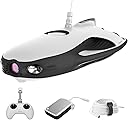
I ordered the PowerRay underwater drone to use when I travel to good snorkeling areas as a way to enhance the experience and have some fun. Since I cannot free-dive very deep, this drone will be great for filming nature at depths that I cannot reach. The kit comes with everything that is needed to operate right out of the box. Included is the PowerRay drone, a wireless remote controller, 165 feet of communications cable, a wireless base station, a three-device charger, a mobile device holder, and a carrying case. The carrying case is custom molded from dense foam which holds each component securely, and that should prevent damage if the case is ever dropped. There are two sides to the case, one that holds the drone, and another that holds all of the other components. The charger can charge all components at one time, or separately. The drone, the controller, and the base station each have a different style of plug, so plugging in the correct charge cord is never a problem. Before operating the PowerRay, you need to create an account either on the PowerVision’s website or through the Vision+ app. I had a problem registering on the app and had to register on the website instead. Once I was registered, I had no problem logging into the app. The app connects to the PowerRay via WiFi through the base station. The controller does the same. Once connected to the base station, the app can control the PowerRay the same as the controller, but it also displays the camera’s view. To connect to the base station, connect your mobile device to the base station’s WiFi and launch the app. Additional mobile devices, if they are running the Vision+ app, can connect to the base station, but they remain in camera view only mode. Only the primary Vision+ connection has drone control. Before being connected to the PowerRay for the first time, there is an activation step that must be done through the app, afterward the app connects directly to the control screen. I do not know if this is the way it is with all mobile devices, or just with my phone (iPhone) or carrier (T-Mobile), but before the app will complete the connection, I was instructed to turn off my cellular connection. This was a requirement for both the primary and secondary phones that were connected. Frustratingly, my iPhone continually has problems linking to the PowerRay. I can connect to its WiFi, but the app continues to display “Device is not connected”. No matter what I do, it does not connect except occasionally by chance. This happens both with an iPhone 6s Plus and, to a lesser degree, an iPhone 12 Pro Max. Using an Android phone, it seems to connect more easily. To set up the PowerRay for use, you need to ensure that all components have sufficient charge for the intended time of use. If either the PowerRay or the base station lose their charge, the drone will stop working. If the controller loses its charge, the connected mobile device can still control the drone. The cable is fastened to the PowerRay and to the base station. As soon as the cable is fastened to the drone, whether the other end is fastened to the base station or not, it turns on. After connecting the cable, the base station should be powered on first, then the controller. The controller will connect to the base station’s WiFi automatically. The mobile device running the app must connect to the base station’s WiFi, then the app will connect to the base station once it is launched. Since none of the components other than the PowerRay and the cable are waterproof, it is important that nothing gets wet. The base station has a rubber fastening strap that allows it to be fastened to an anchor point, or to the pilot. This is a critical step to take since the base station is directly connected to the PowerRay via the cable, so if the drone gets too far away, it will pull the base station into the water. Once these steps are complete, the PowerRay is ready to use. Since I have yet to travel to a tropical location or the beach, I tested the PowerRay in a pool. This is a great place to test the drone since it gave me practical, hands-on experience in operating the drone before using it in a more challenging environment. Practicing in a pool also lets me see what the drone is doing as it is maneuvered. I highly recommend this to everyone before attempting to pilot the drone in the ocean or a lake. There are no instructions provided in the manual on how to actually pilot the drone, other than basic control actions; this is a big miss. There should be some basic navigational information provided. For example, should you descend to the target depth using only the vertical thruster, or use both the vertical thruster and forward thrusters? How about ascending? When I tested the drone, it seemed that the vertical thrusters were too weak to descend and ascend the drone without a lot of effort. They will eventually do the job, but I believe that the vertical thruster is designed to tilt the drone’s nose up or down and the forward thrusters do the actual descending and ascending. I would have expected some basic maneuvering instructions. The above issue aside, operating the PowerRay is relatively straightforward. It was easy to maneuver, and generally stable in its operation. Of course, this was in a still pool, so I cannot comment on how it might operate in a more challenging environment. It took a little time to get use to maneuvering the PowerRay, but I found it fairly intuitive. The thrusters have plenty of power, but they lag the control stick movement when starting from a stop. It may be that the thrusters need to spool-up before they become effective. I cannot comment on how well the drone would do in a current, but it does zoom along quickly at full speed. The maneuverability of the drone is very good. The PowerRay turns on a dime, and once the nose is pointed down or up, it will descend and ascend rapidly. There are two navigation modes, direction-fixed, and depth-fixed. With direction-fixed, the drone is positioned at a specific angle, between +10 and -30, and it will hold this angle while being maneuvered. Depth-fixed will hold the drone at a set depth while it is maneuvered. I only tested the depth-fixed mode, and the drone would hold a set depth fairly well. It was not a perfect hold, but it was relatively accurate. The photo/video quality was good. If you use the camera in murky water, do not expect good results; no camera will give quality images in those conditions. Since the memory card is built into the drone, you must download the images through the app or the PowerView software loaded onto a PC. To retrieve the images, you can download them to the app, where they reside inside of the app. Images do not reside in your phone’s photo album so they must be extracted somehow. Another option for image retrieval is the PowerView software that is loaded onto your PC. I had a difficult time locating the software on the website, but I finally found it after doing a search in the support section. After connecting your PC to the drone’s WiFi, and launching the PowerView software, the images can be downloaded. Using either download method, the download process can be slow if you have a big video file. I suggest that as you are videoing, that you turn the recording function off, then back on, every so often to reduce the file sizes. When using an iPhone, the images can be downloaded to the iPhone’s photo album. Unfortunately, when using an Android phone, there appears to be no way to get the pictures/videos off the app and onto the phone. You can share images from the app to various social media accounts, but I do not want to share images, I want to download them for editing. I contacted the manufacturer about the Android phone download issue, but I have yet to hear back from them. This is basic functionality that should be fixed! Except for some connectivity and image download issues, this drone is a lot of fun. I cannot wait to use the PowerRay in the clear waters of the Caribbean.
L**N
Looks cool but impossible to control and limited functionality
I had high hopes for this device given how cool it looks. Unfortunately you can't judge a book by its cover. The problems here are many. Problem 1: First and foremost this is not a true submarine and is nearly impossible to control. It's naturally buoyant and relies on a thruster to keep itself under water. So variations in current, etc. will impact its position. It won't stay put nor will it stay at a fixed depth even with the button it has to lock it in. You're constantly battling to keep it level. Your footage will constantly be bobbing up and down. Problem 2: The camera output looks decent above water, but you can't see much of anything below the water. I'm in New England and lack the crystal clear seas in other parts of the world. All you end up getting is a lot of dark murky imagery, even with its lights on. I was hoping this might be useful to inspect the bottom of my Dad's boat but the control issues combined with a camera that can't pick up anything useful made it useless for that. Problem 3: The field of view of the camera feels very narrow to me - more than it should be on something like this. Problem 4: It's impossible to know where the drone is pointing when it's under water. You have some sense of whether or not it's level but beyond that it's guesswork to figure out which direction it's pointed at. And more often than not it's getting pushed around by the water. Problem 5: The SD card isn't removable so footage has to be cumbersomely downloaded via Wifi - that means having to hook the entire thing up just to get the footage off of it. It took. me over a half an hour to download 8 minutes of footage. In short this feels like it could use another few years of development. Definitely not worth the high price tag.
A**R
Does not work
Good day...I have e-mailed the company for the past two weeks with no response! This PowerVision does not work and as it sits right now just a very expensive ornament. I need help in settling this dispute. Thanks for your time and look forward to hearing from you. Would like to have a response from Amazon as it was bought through you. Very disappointed that I have not received an answer! Certainly not what I have experienced before from Amazon. Marie Boulanger
K**.
Great product one of the best water drones
PowerVision PowerRay is one of the best underwater drone I have seen so far. It has a clear camera capture and varying illumination adjustments, it also has a smooth movement on water. I however have an issue with base station charging not extending beyond 87% (rather it does not charge to completion 100%). I don't know if it's an unique case that applies to me only. The joystick controllers also discharges so fast in less than 20 minutes despite charging for recommended duration/ hours.
B**J
awesome
have not had a chance to use it yet, but looks pretty awesome!
A**E
im not sure you can trust the product ..
it arived with a beeping that doesnt stop , of oursecthey said it would have to be dhipped to texas to determine the issue.. dont bother buying one.
W**H
Beware if your buying out side usa
Sent it back didn't work. UPS sent me a email saying it was dropped off at the back door of amazon but Amazon's tracker is saying not there yet?
Trustpilot
2 months ago
1 week ago