Buy anything from 5,000+ international stores. One checkout price. No surprise fees. Join 2M+ shoppers on Desertcart.
Desertcart purchases this item on your behalf and handles shipping, customs, and support to Ireland.
❄️ Stay cool, stay ahead — power your rig with precision!
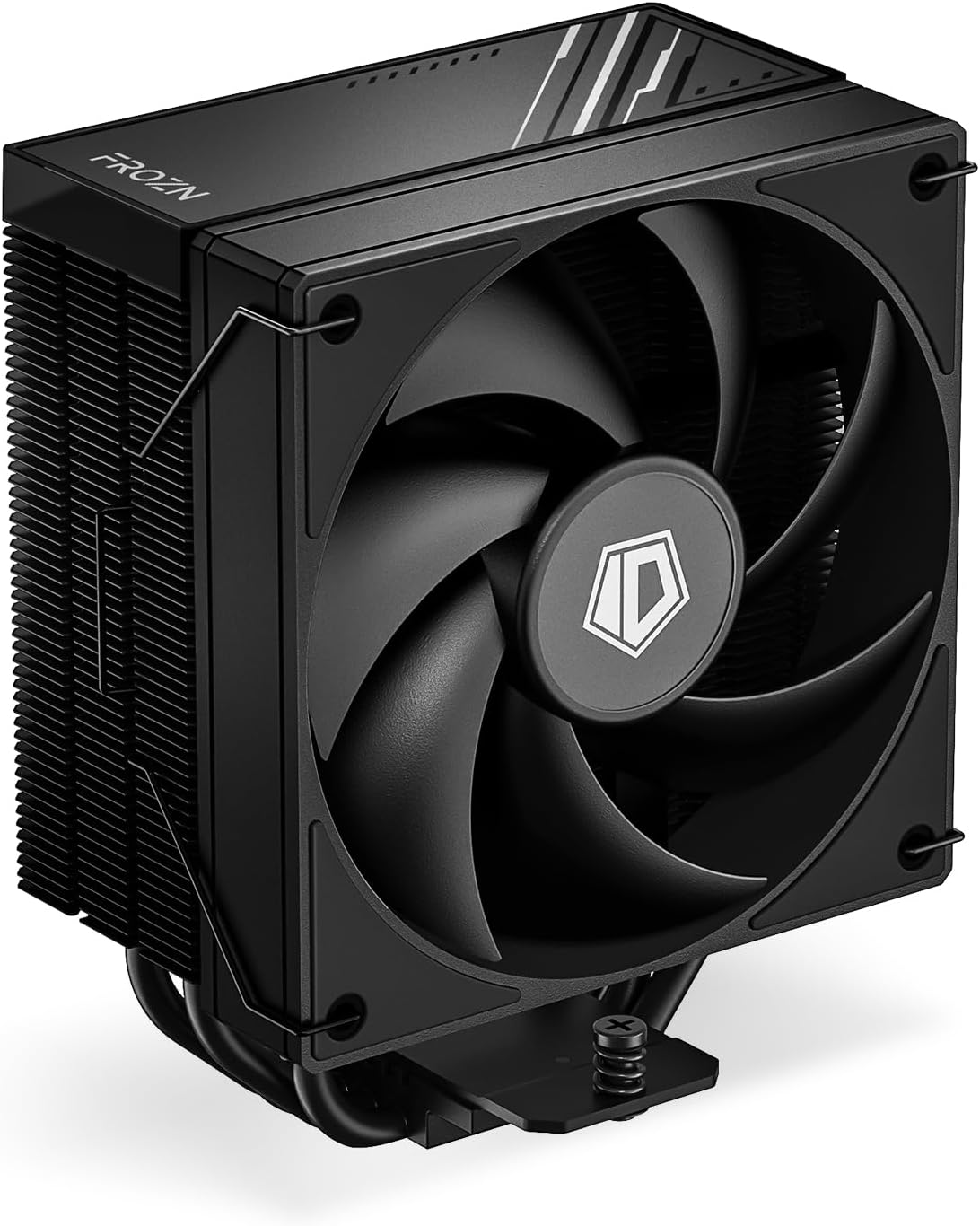
The ID-COOLING FROZN A410 DK CPU Cooler features dual push-pull fans delivering 78.25 CFM airflow at a whisper-quiet 29.85 dB noise level. Built with copper and aluminum for superior heat dissipation, it supports AM5 sockets and includes ample thermal paste for multiple setups, making it a reliable choice for high-performance desktop cooling.


| Brand | ID-COOLING |
| Cooling method | Air |
| Power connector type | 4-Pin |
| Product dimensions | 12L x 2.5W x 12H centimeters |
| Voltage | 12 Volts |
| Wattage | 35 watts |
J**T
Keeps it cool
Cable management was tricky but that's because of my pc case. Looks pretty and works well. Easy to set up. Large and takes a lot of space so check your case measurements. Get Signal RGB if you want to control the rgb on the cooler. I also added a matching fan to the cooler. Keeps my i7-13700 under 60c while gaming. Average low temps while browsing and YouTube is 32c sometimes even 31c. Good for the price. Been happy with it so far.
A**R
good price
building a complete computer system
も**ー
AM5のマザーボードに取り付け
マザーボードにAM5用の土台を装着後、CPUファン本体をネジ2本締めて固定で取付完了です。 手順はシンプルなのですが、最後のネジ2本がなかなかのクセモノでした。 位置が合わず、たった2か所のネジ締めに20分ほど苦戦して取り付けたという感じです。 努力で何とかなる範囲ですが、そこだけ少し残念でした。 静穏、冷却性能には満足しています。 ちなみに付属のグリスは3回分くらいあります。
T**N
Nice budget cooler! Make sure to calibrate fans.
Was a little confused after installing it, as I seemed to be getting the same temps on my i7-4790 as I did with my stock Intel Delta cooler. But, I soon realized it was using the same fan curve my motherboard had dialed in for it. After going into ASUS AI 3 software and running the automated fan tuning, then adjusting my fan curve to 10% at 35°C, 50% at 48°C, and 100% at 68°C my temps are several degrees lower across the board and much more stable. Mind you, I have a very old custom Apevia X-Sniper G case which only allows for 3 120mm case fans. One bottom front intake, one side intake affixed to the acrylic side panel, and one rear exhaust. With only 2 of those useable with the cooler installed due to it's height. Which I think adds to the quality of this cooler. I had to remove my side intake fan due to the cooler's size interfering with it, and tape off the inlet holes to ensure proper airflow and avoid negative pressure. I chose this cooler because it is just a bit shorter than the SE-224-XT, which has very good reviews, to ensure it would fit my case. So it's a great option for those with a minimum clearance of 255mm. Oh! Another important aspect is that I bought an additional matching ID-COOLING AF-125-K fan to utilize a push-pull config on this cooler also. The fan included doesn't have a PWM daisy chain connector, but the AF-125-K does so you can hook them together and they become controllable as a pair via 4-pin motherboard fan connector. Though, according to testing with other coolers, push-pull vs pull config only affects temps by 1-3°C in most cases. I also have 5.25" and 3.5" drive bays fixed to my case which sit flush and directly above my front 120mm intake fan. So my case is a bit crowded and has much less capability for airflow than modern cases. Packaging is very nice inside and out. Manual contents are decent. I easily figured out how to assemble and install it. Though there was an LGA 115X descriptor missing on the first page, it is mentioned elsewhere in the guide. Fan is superb quality, but missing a daisy chain connector. Includes 4 fan mounting brackets to utilize a push-pull config with an additional fan later, and should be compatible with any 120mm fan of typical thickness. My mounting brackets had some paint chipped off of them leaving a rough surface, but not worried about that. The 4 copper heatpipes are sandwiched between what I assume is brushed aluminum. A flat surface and mirror finish. One thing that did catch my eye is that there are a few very small gaps on the edges between the copper and aluminum on the bottom, which tends to catch q-tip fuzz while going to clean it, or could trap residual thermal paste after applying it. But, as far as I know and can tell this doesn't affect the temperature threshold. Though it is a bit concerning that old paste could get dried up and trapped in there. All in all, for the overall quality, aesthetic appeal of the design, ease of installation, and thermal results, I am very happy with this purchase. Where I was close to overheating or receiving temps around 75°C while gaming with a stock Intel Delta cooler, now my temps stay mostly under 70°C even while playing GTAV or RDR2. GTAV saw the largest thermal drop - where it was reaching 80°C it now stays under 65°C even while zooming around in a vehicle. I would highly recommend this cooler for quite possibly the cheapest way to get temps under control via air cooling. Not to mention how versatile it is between multiple generations of AMD and Intel sockets. And with it being just a bit shorter than most standing air coolers, it's sure to fit in almost any ATX/mATX case - even if you're like me and still rocking a case from the mid-2000s.
I**L
BEST AIR COOLER
This cooler performs exceptionally well and has made a noticeable difference in both temperatures and overall system noise. Installation was straightforward, with a secure mounting system and clear instructions that make the process stress‑free even in tighter cases. Once fitted, the cooler sits firmly in place with no rattles or vibration.
Trustpilot
4 days ago
1 month ago