



Zenbook DUO
Product ID: 608609633
Details
- BrandASUS
- CPU ModelCore i9
- ColorInkwell Gray
- Graphics Card DescriptionIntegrated
- Hard Disk Size1 TB
- Model Name
⚡Intel Core Ultra 9 up to 5.1GHz
💾32GB LPDDR5x RAM + 1TB SSD
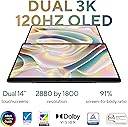
🖥️Dual 14” OLED 2880x1800 120Hz
Desertcart purchases this item on your behalf and handles shipping, customs, and support to Ireland.
🚀 Double the screens, double the impact — work smarter, not harder.
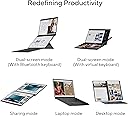
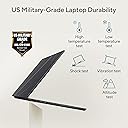
The ASUS Zenbook Duo UX8406MA-PS99T is a cutting-edge dual 14” OLED laptop featuring ultra-fast Intel Core Ultra 9 processor, 32GB LPDDR5x RAM, and 1TB SSD storage. Its innovative detachable keyboard and dual 2880x1800 120Hz displays deliver unmatched multitasking versatility and stunning visuals. Lightweight and military-grade durable, it offers all-day battery life with fast charging, making it the ultimate productivity machine for professionals on the move.


| ASIN | B0CRD6PJDF |
| Audio Output Type | Headphones |
| Battery Cell Type | Lithium Ion |
| Best Sellers Rank | #26,086 in Computers & Accessories ( See Top 100 in Computers & Accessories ) #4,035 in Traditional Laptop Computers |
| Bluetooth Version | 5 |
| Brand | ASUS |
| Built-In Media | UX8406MA-PS99T |
| CPU Codename | Alder Lake |
| CPU L1 Cache | 2048 KB |
| CPU L2 Cache | 8 MB |
| CPU Model | Core i9 |
| CPU Model Generation | 12 |
| CPU Model Number | Intel® Core™ Ultra 9 |
| CPU Model Speed Maximum | 5.1 GHz |
| Color | Inkwell Gray |
| Compatible Devices | External devices (e.g., mouse, keyboard, display, storage, printer) |
| Connectivity Technology | Bluetooth |
| Control Method | Touch |
| Customer Reviews | 4.1 out of 5 stars 305 Reviews |
| Display Maximum Resolution | 2880 x 1800 pixels |
| Display Refresh Rate in Hertz | 120 |
| Display Resolution Maximum | 2880x1800 pixels |
| Display Technology | OLED |
| Display Type | OLED |
| Form Factor | Detachable |
| Graphics Coprocessor | Intel Iris |
| Graphics Description | Integrated |
| Graphics Ram Type | DDR5 SDRAM |
| Hard Disk Description | SSD |
| Hard Disk Size | 1 TB |
| Hard-Drive Size | 1 TB |
| Hardware Interface | HDMI, Thunderbolt, USB, USB Type C |
| Human-Interface Input | Keyboard |
| Item Dimensions L x W x Thickness | 12.34"L x 0.57"W x 8.58"Th |
| Item Weight | 3.6 pounds |
| Keyboard Description | Gaming |
| Keyboard Layout | QZERTY |
| Lithium-Battery Energy Content | 75 watt-hours |
| Manufacturer | ASUS |
| Maximum Display Brightness | 500 nit |
| Memory Clock Speed | 2400 MHz |
| Memory Speed | 6400 MHz |
| Memory Storage Capacity | 1 TB |
| Mfr Part Number | Zenbook DUO |
| Microphone Form Factor | Built-In |
| Model Name | UX8406MA-PS99T |
| Model Number | Zenbook DUO |
| Model Series | Zenbook Duo |
| Model Year | 2024 |
| Native Resolution | 2880 x 1800 pixels |
| Notebook Pointing Device Description | Bluetooth mouse |
| Number of Items | 1 |
| Number of Packs | 1 |
| Number of Ports | 7 |
| Operating System | Windows 11 Home |
| Operating System Family | Windows |
| Optical Storage Device | No Drive |
| Other Special Features of the Product | Portable, Support Stylus |
| Power Device | USB-C and Thunderbolt 4 |
| Processor Brand | Intel |
| Processor Count | 16 |
| Processor Series | Core i9 |
| Processor Speed | 5.1 GHz |
| RAM Memory Installed | 32 GB |
| RAM Memory Technology | LPDDR5 |
| RAM Size | 32 GB |
| RAM Type | DDR5 SDRAM |
| Ram Memory Maximum Size | 32 GB |
| Resolution | 4K |
| Screen Finish | Glossy |
| Screen Size | 14 inches |
| Specific Uses For Product | Personal |
| Supported Monitor Maximum Quantity | 1 |
| Total Number of HDMI Ports | 1 |
| Total Thunderbolt Ports | 2 |
| Total Usb Ports | 4 |
| Touch Screen Type | Capacitive |
| Touchpad Feature | Basic Touchpad |
| UPC | 197105355934 |
| Unit Count | 1 Count |
| Video Output | HDMI |
| Video Processor | Intel |
| Voltage | 240 volts |
| Warranty Description | 1 Year |
| Warranty Type | Limited |
| Wi-Fi Generation | 5 (802.11ac) |
| Wireless Compability | Bluetooth |
| Wireless Technology | Bluetooth |
B**L
Excellent and unique 2-screen laptop
So even though this is last generation's model, it is still an excellent computer. The beauty is that it is seemlessly dual screen, but only when you need it. When you want to use it as a traditional laptop, it looks and feels just like a traditional laptop. But when you need the extra screen real estate, just slip the detachable keyboard off and it automatically and very quickly turns the 2nd screen on and you have twice the pixels to do your work. The laptop is plenty fast for most jobs. You're not going to play AAA games, but this is not a gaming laptop (ASUS actually now has a gaming laptop with this basic design, if Gaming/AI/content creation is your thing). I bought this for my parents, and they love it. It is small and compact, light and the battery lasts quite a while. It has good features, and for office stuff, streaming, web browsing, video conferencing and the like, it is a very useful and unique laptop. Highly recommend it. The only minor gripe, and one that doesn't really have a good solution, is the keyboard is a bit thin and flimsy when separated out for 2-screen work. But that's a minor complaint, and you can always buy a good keyboard if you really need one.
G**E
This will change laptops as we know them
I've expected this form factor for a while now. I saw the writing on the wall 10 years ago and I understood why they couldn't exist then. I was really wondering how the touchscreen keyboard was going to play out when these dual screens start coming to the mainstream and Asus solved that issue entirely on the first try. In order to make the products we dream of we have to work around the battery limitations and up till about 3 years ago, this concept just wasn't possible without making it very thick and heavy. The advancements made in power management have been significant and Intel now offers a powerful 9 Ultra SoC that sips battery usage. I review laptops that are sent to me all the time (not for Amazon) and some have cutting-edge tech but nothing like the Asus UX8406. Asus gets so much right that it is hard to find a fault in anything. They have covered just about every little thing that you could complain about. Since I mentioned the keyboard first, lets start with that. The typing experience is probably the best I have ever tried. You truly sacrifice nothing. The key travel, backlighting, and terrific touchpad that supports gestures all come together to make for an amazing input experience. When disconnected from the laptop, you can burn through the keyboard battery in 45 minutes if you use the backlight heavily. Asus thought of that scenario already and offers a USB C charge port built-in on the side of the keyboard. So if you need to have backlight, you can. The dual 3K 120 MHz displays look as good as you would expect they would. I would easily say that they have no equal as far as laptop displays go. You can crank up the resolution and use Windows zoom to about 150% and get excellent results. On to the new Intel Arc 8 core graphics chip. This thing games! GTAV, Forza 5 Horizon (at the highest resolution), and Ultimate Spiderman are all I've tested but I came away shocked. Its really good. I didn't buy it for games but it's a huge bonus! The Intel 9Ultra and 32GB RAM mean that I'm never waiting for this laptop. It is as fast as you are at commanding it. I have had very few hiccups in performance and since the last BIOS update, I have had zero. My use case is remote IT support and Adobe CC 2024 apps and it handles both exceptionally. Before this laptop, I was using a Surface Studio Laptop 2 and I swear that thing (still under warranty) seems like a relic now. I'm sure that you have your use case in mind if you're shopping for this laptop so I wont gush about the dual screen utility. You probably are like me and are used to carrying a USB monitor or two to create the extra real estate needed for enhanced workflow. Desktop Mode is my go to. There is some decent utility is the included My Asus app and I was surprised how well it worked. RAM dumping. Push one GUI button and dump your RAM. I know you can do this in a command prompt but Asus has this tool and a lot more in the My Asus app. I normally don't give the include manufacturer system app any usage other than driver updates but Asus has something here. To sum it up, I welcome this new category of laptop and look forward to the innovation that will come from this pioneering product. It's great to see a company (or two) breathe some excitement into a market that was all too complacent for way too long.
A**R
A few hiccups but overall GREATEST LAPTOP EVER MADE
After a few months working with this amazing piece of hardware, there are a few minor glitches here and there but overall this is an incredible work horse that massively ups your productivity. I'm someone that has carried around a 2nd screen for years finding productivity increases significantly with a second screen. Now, being able to easily set up a 2-display scenario and code is just a dream come true. This machine makes me want to code, makes me want to work. Or if I'm in off work mode and just want to read reddit in one screen and watch football in the other, that's perfect too. There are a few minor hickups here and there but overall worlds better than any macbook or surface on the market, this is THE machine. --- previous review below --- Haven't found anything really to dislike yet (other than Windows 11 lol, 10 is superior). Was wondering how the build quality would be on the first go of a design like this, and so far it seems good. Stand is sturdy, I can prop it up even on my bed. In laptop mode (one screen) it's a little thicker than the single-screen Zenbooks from the last few years. Screens are pretty and very vibrant. Overall another great product from Asus. Why anyone would buy a Lenovo or HP I will never understand. edit: Install "Explorer patcher" for windows 11 to get the superior windows 10 start menu. Rear hinge is fantastic, much stronger and wider than expected. Dual screen mode will even prop up on a bed. Pleasantly surprised.
S**I
Many great things but a fatal flaw with keyboard typing double characters
This laptop has an interesting design. I've had it for a week now and quite enjoy some aspects of it. However, it has a fatal flaw that is going to lead me to return it if ASUS cannot fix it (which seems doubtful). The keyboard has a chatter problem. Frequently, it will insert double characters from keyboard bounce when typing. Most noticeable is that it will change "the" to thee". I thought my poor typing was just due to adjusting to a new keyboard, but after a while I realized that it was the computer. You can learn more if you search for "thee" "ASUS" and "chatter." You will find others having this issue for ASUS machines, not even just this model. Notably, a plug-in keyboard works just fine. I have now spent hours dealing with ASUS support and trying to figure out what is going on. ASUS is given me a bit of a runaround, saying I need to send the entire unit back for repair, which will waste a lot of my time. I am likely to simply return the unit because other people have done such an exchange and the new unit has the exact same issue. I have asked them to send me a new keyboard to try but as of yet they are unwilling to do that. I will not fix thee typos in this paragraph. I ended up buying a second computer. It has the exact same problem, straight out of the box. I have attached a video showing thee chatter on thee key 'e' (it is making mistakes right now). 'e' is not thee only key that has a problem, but it may be thee most noticeable, as you can see from the paragraph where I have not corrected the problem. It's really a shame, because the dual-screen design is a terrific productivity enhancer, the pen seems good, etc. I've noticed some other little quirky things with the unit when running off the battery, but it is this keyboard issue that is a fatal flaw. By running a piece of special software to detect and help reduce the problem (Keyboard Chatter Blocker), I am able to do things like write this review without typos everywhere. When I turn it off (last paragraph), it's a disaster. Unfortunately, while that program helps tremendously, it is impossible to tune it perfectly. Typing will be disrupted no matter what on this machine. If you care about what you type being accurate and not having a maddening problem every time you type, buyer beware. Search online and you will see other people mention the "thee" problem.
L**N
Functional and versatile
I have had this laptop for 5 months and I absolutely love it. I wasn't convinced at first but now I don't think I could work with out it. I need a double screen for work which meant working in my office all the time. Now I can work off my lap desk on the couch. It came in really handy when I broke my ankle and had to be on the couch elevating and icing for 8 weeks. My work didn't slow down because I had 2 screens! It is very sturdy when using the second screen, the stand is tight. It does get a lot hotter than my last asus with one screen but it is minor issue. The battery life is shorter than other laptops especially when using duel screens. It lasts about 2 hours. The Bluetooth keyboard is fantastic and lasts on batter for several hours. The sound is also good as I am on video calls much of my day and it is always crystal clear. I was hesitant with new technology but I would definitely buy this again in a heartbeat.
G**R
This thing is awesome.
I had to get a Windows laptop to run Dragon Anywhere. I was originally looking at a cheap Dell, then decided that if I was going to carry a laptop around, it had better be decent. I second-guessed my decision to get this laptop, mainly due to its price. Do I really need all this? I do not regret it after using it for 2 months. It has a dual screen, plus you can plug in an external display to get a third (independent desktop, not mirrored.) I like having lots of screen space because I work with a bunch of apps at once. I can pop off the keyboard and I have a second monitor. It also comes with a stylus, so I can draw and take notes. Nebo works great! Then you can have the upper touch screen with apps, plus your writing app on the lower screen, which lays flat on the desk for easy access. One warning, though: the touch-screen displays do not have palm rejection (which appears to be an issue with other Asus laptops as well), so if you rest your hand on the screen while writing, the laptop will get confused. You can fix this by wearing one of those fingerless gloves or by disabling the lower touchscreen in Device Manager. (Touch is different from stylus, so you can disable the touchscreen but still use writing apps.) This doesn't bother me; I'm not used to a laptop with a touchscreen, so I've only used it when I am writing with the stylus. I poke the upper screen to select things since the keyboard is usually off to the side. The stylus is chargeable with the laptop's USBC charger. The only "bad" thing I have run into is the built in microphone is too sensitive. I can't use it for dictation or Dragon tells me it can't understand me, or it puts the wrong words in because any background noise causes a problem. Google's built-in voice dictation doesn't do any better, so it isn't a Dragon issue. I had to get a pair of headphones with a mic, now dictation is almost flawless. Speaking of a mic though, the laptop has two USBC ports (one of which is for charging it), a USBA port, an HDMI port, and a headphone jack. The USBC port on the keyboard is just for charging it, you can't connect anything to it. If you don't plug in a lot of stuff, ports won't be a problem, but I use a USBC hub just so I only have one thing to plug in. It does not have a card reader slot. The keyboard connects to the lower display with a row of small pins that keep it charged. It can also be charged via the USB charger. It's backlit even when detached from the laptop. (White only, sorry, no pretty colors on the keys.) One thing I did find out: I read a few reviews of this laptop that said it does not use a chipset that supports Copilot. I don't use Copilot myself, but it does work on this laptop. There is no dedicated Copilot key on the keyboard (which for some is a blessing) but alt+space activates it. Overall, definitely worth it. It's a bit thicker and heavier than other laptops because of the second screen, but I guess Asus accepts that. It comes with a backpack to carry it. :D
B**C
Most impressive
I am a daily MacBook Pro user. Here is my biased assessment. PROS: I am impressed with this laptop. It is very well built. The dual 3K screens are very bright. The GeekBench 6 score is 12,700 which beats my M1 MacBook Pro. It feels very fast. The keyboard is very light and works well. I can connect this laptop to my dual LG Ultrafine displays using the dual Thunderbolt ports. It will power one of the Ultrafine displays at 5K but will power them both if the resolution is set to 4K. So I get 4 screens connected in this configuration. The screen navigator detects all 4 screens and allows apps to be sent to any display easily. CONS: A few times I've had to restart the laptop to get it to recognize both LG displays. I don't know how long the battery on the keyboard/trackpad will last. It appears to only run a 4 or 5 hours on a full battery but it accepts USB-C power. I recommend this laptop. It is my favorite piece of hardware. Using dual 3K screens is a game changer. It makes this laptop a pleasure to use.
N**1
Asus does it again!
I love gadgets. I am a first adopter of new tech. And I FREAKIN LOVE this computer. I have the Asus Duo with the 12 inch second screen that sits below the main screen. And I thought it could not get better than that as the second screen, albeit smaller, was such a convenient and useful component. But this 2 screen solution is a total game changer. Why? First of all the quality of the screens is amazing. They are so clear and bright. The form factor and versatility of the screens makes work easier. I do a lot of writing and researching information. The ability to work between screens all in a portable space gives me far more productive time as I travel and work remotely. The screens rotate with ease and the ability to do the share function has already paid for itself. Not only that but the cost, for what you get is amazing. I don't think I could ever go back to a mono-screen lump of plastic. This well made, two screen productivity machine is my new best tool for being productive.
F**N
Ürün tipi
Çok zarif yenilikçi ve kompakt bir bilgisayar fiyatı biraz daha iyi olabilir yada ürünle beraber belli bir sürelik Office, creative cloud üyeliği hediye edilebilirdi. Satıcıya da çok teşekkür ediyorum hem çok hızlı hemde çok iyi paketleme yapılmış şekilde gönderimi sağladı
J**Y
awesome dual screen laptop
dual screen works well if you needs to split screens. in built kick stand was helpful but wish the keyboard had more travel.
E**L
Süper
Olay budur
A**O
Muy lento y con Lag el Portatil
Me tardo en llegar mas de lo esperado, y el portátil va con mucho lag, se supone que tiene el procesador mas rápido pero se traba en muchas aplicaciones y mas cuando se usa la doble pantalla, creo le falta optimización a la computadora, esperaba mejor rendimiento por el precio y por lo que se supone ofrece.
Trustpilot
2 weeks ago
1 month ago