Buy anything from 5,000+ international stores. One checkout price. No surprise fees. Join 2M+ shoppers on Desertcart.
Desertcart purchases this item on your behalf and handles shipping, customs, and support to Ireland.
🚀 Elevate your home network—fast, smart, and unstoppable!
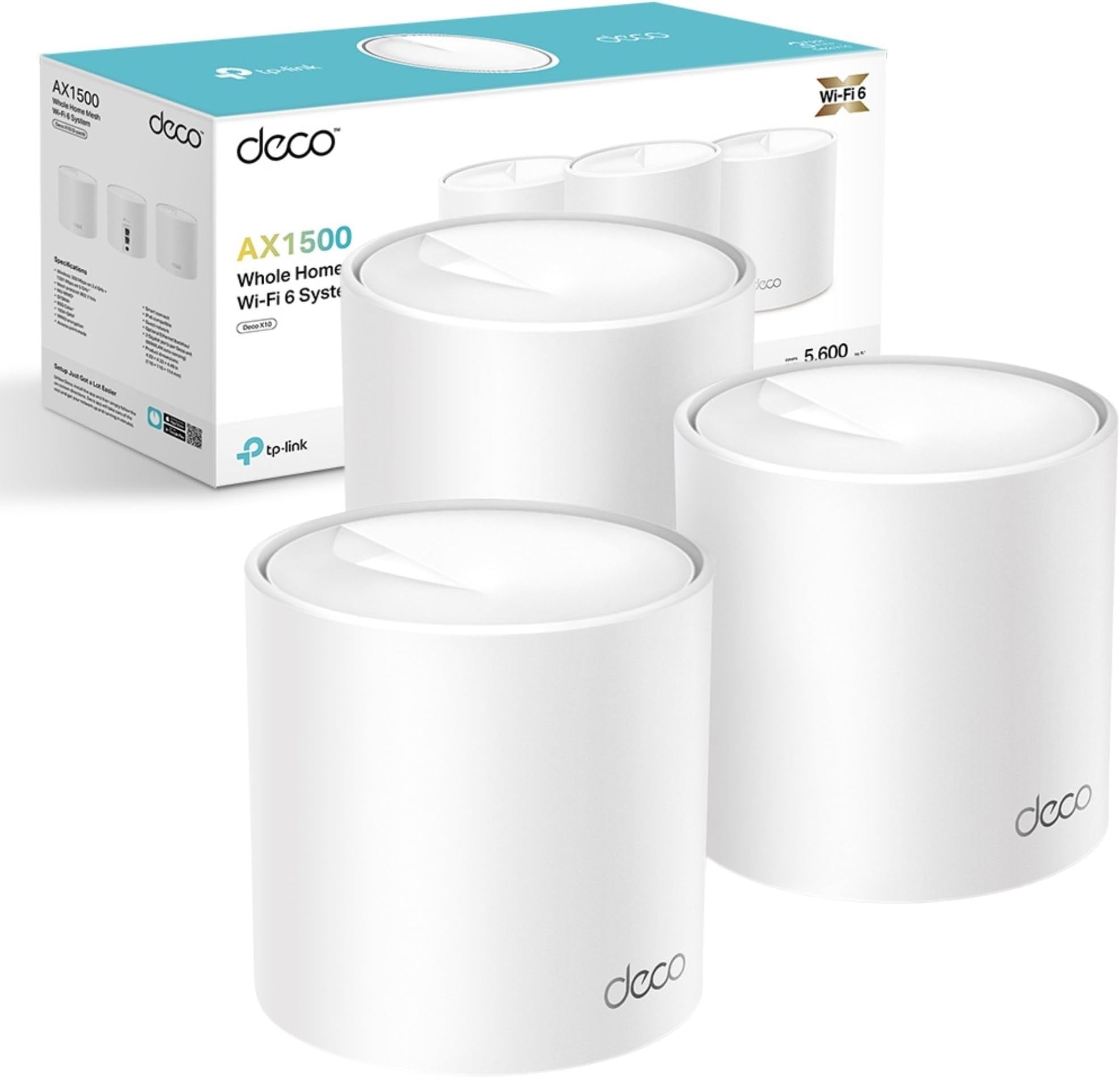
The TP-Link Deco X10 (3-pack) is a Wi-Fi 6 mesh system delivering AX1500 speeds up to 1500 Mbps and seamless coverage up to 5600 ft². Featuring OFDMA and MU-MIMO technology, it supports multiple devices simultaneously with ultra-low latency ideal for gaming and 4K streaming. Easy to set up via the Deco app, it offers unified network roaming and robust parental controls, making it perfect for busy, connected households seeking reliable, high-performance Wi-Fi.


| ASIN | B0CPMBLJW2 |
| Antenna Location | Supporting multiple devices: such as smartphones, tablets, laptops, smart TVs, and IoT devices |
| Antenna Type | Internal |
| Best Sellers Rank | 317 in Computers & Accessories ( See Top 100 in Computers & Accessories ) 1 in Whole Home & Mesh Wi-Fi Systems |
| Box Contents | 1 Quick Installation Guide, 1 RJ45 Ethernet cable, 3 Power adapters, Deco X10(3-pack) |
| Brand | TP-Link |
| Brand Name | TP-Link |
| Colour | Classic White |
| Compatible Devices | Gaming Console, Tablet, Smartphone, Smart Television, Streaming Device |
| Compatible devices | Gaming Console, Tablet, Smartphone, Smart Television, Streaming Device |
| Connectivity Protocol | Wi-Fi |
| Connectivity Range | 5600 Square Feet |
| Connectivity Technology | Wi-Fi |
| Control Method | App |
| Country of Origin | China |
| Coverage | 5600ft² |
| Customer Reviews | 4.5 out of 5 stars 10,466 Reviews |
| Data Transfer Rate | 1201 Megabits Per Second, 300 Megabits Per Second |
| Frequency | 5 GHz |
| Frequency Band Class | Dual-Band |
| Frequency band class | Dual-Band |
| Is Modem Compatible | No |
| Item Weight | 1200 Grams |
| LAN Port Bandwidth | 1000 Mbps |
| Manufacturer | TP-Link |
| Manufacturer Part Number | Deco X10(3-pack) |
| Maximum Upstream Data Transfer Rate | 1201 Megabits Per Second |
| Model Name | Deco X10(3-pack) |
| Model Number | Deco X10(3-pack) |
| Model name | Deco X10(3-pack) |
| Number of Ports | 2 |
| Operating System | Linux |
| Other Special Features of the Product | Alexa Compatible |
| Security Protocol | WPA2-PSK, WPA3 |
| Special feature | Alexa Compatible |
| Wi-Fi Generation | Wi-Fi 6 |
| Wireless Compability | 802.11ax |
| Wireless communication standard | 802.11ax |
D**S
Works Perfectly, 4G Internet Users - Read Here!!!
Firstly, really easy next day delivery from Amazon as per the usual standard. The TP Link Deco devices were purchased not only to help boost the wifi signal around the house for a couple of deadspots, but to provide a better wireless signal generally. In January 2019 we decided to get rid of conventional broadband and fibre solutions and move to 4G home broadband. We purchased a TP-Link MR6400 4G Router and a 12 month sim only Unlimited data from Three. Initially we were super impressed with the speeds and the reliability of Mobile Internet as a home solution. We were excluded from any phone line issues that people in our street still tackled with standard broadband providers, or issues with the lines direct to older houses. We live in a good area for broadband generally with a steady 30mbs download, however the further away you are from the FTTB (Fibre to the box) the worse your internet was, we were these people im afraid and usually got a consistent 15-20mbs. However we noticed after a few months, speeds were slow, ping response from the 4G box was rubbish. Initially doing some reboots of the box resolved some issues, but not all. We have recently just moved to EE unlimited sim only data plan hoping we would see a dramatic difference, to no avail. Albeit inconsistent due to the 4g Router issues, the speed is faster with EE at up to 90mbps. So i came to the conclusion that the 4G Router must have an internal issue that effects the wifi signal it sends out, effecting the speed. I purchased these and as previously mentioned above, they arrived in great time. The box is well packaged and the product itself seems a good standard. Plug and play standards meaning i simply unboxed, power lead and ethernet into the back of my 4G router and hey presto. Download the iOS or Android app and go through the simple step by step instructions. Renamed the Deco to the name of my already implemented wifi (Dans Fibre), and all my devices previously linked to the router that was called (Dans Fibre) just linked to the Deco. (This also saves alot of time not going through all those devices you have and pairing to a new wifi name with a new password) 10 minutes and my first deco was out the box and receiving 4G EE mobile data and sending it out to the house. Signal and ping speeds were massively better, however i needed to route into the 4G Router 192.168.1.1 and turn off the wireless which then allowed the Deco to be the only wireless signal we could see. Which proved my theory right about the box having an internal issue. Ping speeds were back down to a healthy response instead of the randomly fluctuating 200ms 178ms etc. Im happy with low 30ms ping speed. Continuing with my setup i placed another one upstairs and paired via the app, bang fast reliable internet upstairs. These really are simple to use, and albeit i know my way round most computer technology, im definitely not a network guy, but seriously these were an absolute breeze, and have temporarily fixed my internal wifi issues. I will still need a replacement 4G router, but that will only make things better. For what these are designed to do, they do a fantastic job. It boosts the signal around the house really well, and the intelligent switching between Deco units to provide the best signal is great. Ive only scratched the surface with some basic use, but i like some of the built in features within the app that let you prioritise device bandwith and speed, and parental controls, guest networks etc. Its great to see who is using what also including who is using all the bandwith downloading netflix 24/7. If you have home broadband or a 4G solution, this will work just fine. My situation may be different to yours for use, it may be the same. But i couldnt find any reviews that related to using in a 4G Environment. I hope this review helps other would be 4G Solution people. Roll On 5G!!!
D**I
TOTALLY SUPERCHARGED my Virgin SuperHub!!
**** Overview **** I should be working, but I’m taking time out to write this elongated review of the Deco M5 X3 for good reason. Read on…. I purchased the Deco x 3 after reading a review here on Amazon stating that it worked great with Virgin Superhub 3. I carried out additional research and the Deco was listed as the best to buy on a few websites, especially for the price. I took the plunge and eagerly awaited it to be delivered 2 days later after suffering a seriously bad wifi connect for 2 months. In the past week, it became even worse and I decided I had to make the move to fix the issue. Packaging Upon receiving the package, I admittedly wasn’t particularly ecstatic to see that it was in its cellophane covered retail box without any Amazon other packaging. I usually save boxes for my gear and like them to be in good condition if I resell, but as luck would have it, there wasn’t any damage worthy of note. More to the point, I’ll be damned if i’m selling this any time soon due to it’s astounding performance! The box is well presented with the 3 ‘Deco’ nodes on the front with PC Pro ‘Recommended seal as well as Amazon Alexa and IFTT logo assuring that the product will work with those devices and service. There’s also a sticker on it which assures that the hardware will work with any broadband provider which definitely gives peace of mind. There a ‘HomeCare’ 3 year free service emblem too, which I believe relates to virus protection. Opening the box, you’re greeted with the 3 futuristic looking dish style ‘nodes’. Beneath this tray, is a row of 3 power adapters, ethernet cable and a Quick Start Guide. The presentation is immaculate and resembles that of Apple. It looks like quality and feels like quality which gives assurance of a quality product from the get go. **** Product **** Each node is a circular disc, around 2.5cm in height and 12cm in diameter with a small multicoloured LED in the centre. The nodes design suggests the form of a radar which I thought was quite innovative. They are fairly light, they look like part of the ‘Deco’. Ports on the back include power and 2 ethernet. Power adapters and cables are high quality, as is the supplied ethernet cable. **** Setup **** On the top tray, there is a clear, simple instruction to download the app from the Apple or Android store. A quick search and I had the app installed within a minute or so through my then slow wifi. The app is very basic and to the point. It requests the user to create an account (or login if you have an account) choosing email and password. You then confirm on that email address. After this, it prompts the user to plug one of the 3 nodes (it doesn’t matter which) into the modem / router and then plug it in using the power adapter. The light on-top of the node lights up and signifies its state: Yellow - Start up Blue Pule - Ready for setup Blue Solid - Setting up Green - All is well. Red - Issue The app shows a 3D plan of a property and prompts you to select one of three which matches your home best - one floor, two floors and 3 floors. The diagram shows how you should consider spacing the nodes too. After asking which room the node will be placed in, the app then connects to the node through your router / modem and the lights change according to the state. After going from all stages (apart from red) from yellow to green, it notifies the user that it’s successfully connected. The user is then given the option to name their network and apply a password to access within wireless devices. It then gives the user the option to add another TP Link product. In this case, there were two more to add so I added the second in the same way and the third. Each was a breeze just like the first. There was a notification for a firmware update, so I ran that and it installed and rebooted all devices within 4 minutes. Although the product comes with a Quick Start Guide, this wasn’t necessary. The app makes things simple. This setup process was a godsend, since i’m not tech minded and I always prepare for things like this to just fail to work. It was absolutely childsplay! Approximately 20 mins to unbox and set up! **** Speed & Coverage **** After installing the first node in my office (connecter to the router), I ran a set eager to see what effect it had and to my amazement, on my 100 mbs connection, after testing my wifi previously and getting a mere 8 mbs, I was clocking in 105 mbs- through the air! It’s clearly solved a huge problem with pertaining to Virgins Superhub 3! What’s more after installing the next two in the same way - one in the lounge and one in the kitchen at the rear of my flat, the speeds, as I moved around with my iPad (after connecting with new Network and password) were almost the same minus a few meg. Delighted! I reached for the TV remote for my new 60 inch OLED LG which was previously bottlenecking with it’s capability and my previous poor wifi, entered network and Password and booted dup Netflix. It painted the screen immediately with all content. I clicking into a movie and it played after a second and fast forwarding was done equally as quick. Despite it previously pixelating and buffering often throughout media, it is now working perfectly! General Internet browsing on iPad and iPhone is notably faster. Whats more….At the very end of a flight out stairs, outside, on a level below, I have full strength WiFi in my GARDEN which i didn’t have previously. RESULT! Streaming tunes in the summer! Full Strength literally everywhere where I will go throughout the vicinity of my entire 2 bed upstairs flat with downstairs remote garden. **** Experience **** Netflix, Amazon Video and Apple TV would take a while to load and the content would often be pixelated and buffer, however now it’s as slick as butter. General Internet browsing is so much more effective and enjoyable now too. I click and something happens - usually a near immediate download of a web page or stream of a video, stable as can be. **** Alexa **** To use Alexa with the devices, you need to install the relevant skill. This is not mentioned in the app, but I’m told it is mentioned in the quick start guide. Searching ‘TP-link Router’ within ’Skills’ in the Alexa app and clicking ‘Enable to Use’, the skill is downloaded. You are prompted to log in to your TP-link account to enable the skill. You do so, by clicking ‘Authorise’ once logged in. The Alexa app prompts to find new devices to which we accept. It then discovers the TP-Link router. Clicking ’Set up Device’ and ‘Done’, the Deco will be shown in ‘Devices’. You can then add it to any room Although I’m an ardent Alexa fan as an owner of a ‘Smart Home’ I wasn’t aware of how these devices would work with Alexa. Having searched for the skill however, the page informs us that Alexa allows us to: * Enable Guest Network when friends come over * Activate WPS to add new devices to the network * Turn off the routers (‘nodes’) LEDS at night * Check the Internet connection speed you’re getting from your provider * Prioritise online applications or devices at those important moments Primary commands (at time of writing): ‘[Alexa] Turn off the LED’s’ ‘[Alexa] Enable night mode’ ‘[Alexa] Enable my guest network’ * I haven’t managed to get Alexa to work with any commands as yet, but will report back. **** Summary **** As a Virgin Superhub 3 user, I’m over the moon with this! As an owner of a two bedroomed flat, I did consider that this package might be overkill. Seeing the performance, I could have possibly done with only two, but the pricing for 3 and the availability here on Amazon (x2 were only available for delivery in a few weeks) promoted me to buy the Deco M3 X 3. This hasn’t only changed the way I entertain myself, but also my actual work which pays for this kind of stuff. I can now work much more faster and more efficient. With this considered, it’s one of the best investments I’ve made in years. I wish I had of bought this much sooner. My fear of tech, error and complications always deters me, but as mentioned, this could not be more simple. It products like this that give me the confidence to spread my wings and buy more. Running circa 106 mbs - That’s a 98 mbs increase! Very pleased! Thoroughly recommended!
P**L
***UPDATED REVIEW***Great mesh coverage — but beware the 100 Mbps Ethernet cap
***UPDATE AFTER 3 MONTHS OF USAGE*** TP-Link Mesh Extender was such a colossal disappointment I felt compelled to warn others. The WiFi constantly drops off without warning – not just on one device, but across everything in the house. It defeats the entire purpose of a mesh system, which is supposed to offer seamless, reliable coverage. The range is laughably poor. Even standing just one room away from the extender results in pitiful signal strength and slower-than-dial-up speeds. And before anyone suggests it – yes, I placed the units exactly as recommended by TP-Link’s own setup guides. The problem is, those “recommended” spots are completely impractical (like halfway up the stairs or in the middle of hallways) and still don’t deliver anything close to advertised performance. TP-Link touts impressive speeds and “whole-home coverage” – but what you actually get is a glitchy, frustrating, underpowered system that feels like it was rushed to market without proper testing. You’re better off using your mobile data. Awful product. Waste of money. Do yourself a favour and look elsewhere. ***DISREGARD THE BELOW REVIEW*** - I HAVE HAD THESE FOR 3 MONTHS NOW SO THE REVIEW ABOVE IS UPDATED. I bought these Deco E4 units to improve WiFi coverage across my home, and they do a great job in that regard. Setup is simple via the app, and the mesh system works well for seamless roaming between rooms. Signal strength is strong, even across multiple floors. However, there’s a major limitation you should know about: the Ethernet ports on the E4 units are only 100 Mbps (Fast Ethernet). This means if you use one of these units as your main router (connected to your modem), your internet speed will be capped at around 100 Mbps — even if your actual broadband is much faster. The good news is, I solved this by replacing the main unit with a Deco M4 (which has Gigabit ports). Once I made the M4 the primary router and used the E4s as satellites, my speeds jumped dramatically, and the whole system worked flawlessly. ✅ Great value for mesh coverage ⚠️ But make sure your main unit has Gigabit Ethernet ports if you want full-speed internet Ideal if you’re pairing with other Deco models — just don’t expect fast speeds if you’re relying on the E4 alone as your main node.
C**W
Very simple to setup, but you have to change the Wi-Fi on everything you own
UPDATE: Changed to Sky Q because they force you too from Sky HD. The TP Link really struggles to cope as Sky Q has its own mesh for three units. Downloads, BNC iPlayer and Netflix failed to connect via TP Link Deco 5. I had to use my Amazon Fire stick on Virgin router to watch Netflix. Downloading a program on TP Link Deco 5 took 24 hours each episode. BAD! I reverted the Sky Q back to the Virgin media hub and it now functions. BUT, a power cut and it went back to TP. So block sky from connecting to TP in the app. ————————————————- Original review now. Very simple to setup, but you have to change the Wi-Fi on everything you own. This would be an issue for less bale homeowner, especially if disabled or much older, it take as lot of time and the Meross WI-FI ambient light no longer functions on the mesh or with Alexa.. Yes, everything needs to be ported and in the case of TV's and Sky, entering passwords is a right pain from the remote. It seems to work very well once setup Note the initial instructions are confusing about turning your modem off, well they meant the wi-fi and just use it as a signal decoder, not Wi-Fi I guess. Badly worded as you need a decoder on the end of the line to function. The first unit plugs into you existing Decoder or Modem ( mine is a Virgin cable system, so not a modem technically, via the phone line would be an ADSM modem). The only way to set these up is via a smart phone and the app, it is straightforward once you have registered your self on the app. The first Deco is slow to set up, the 2nd and third ones piggyback onto the first one and they remember the password. Tip: is you use a suggested password, like ~!8"^%*/ etc, oit is near impossible to type it on a sky remote and sky won't use my USB keyboard, the two Sony Tv's did however. There is no WPS button on the Deco M5, but is it asks you if you want to use WPS. HOW? Update WPS is hidden in the phone app. In use the network is good, I added a brick built front extension and the Ring Doorbell (which is mandatory) would not work when re-positioned due to the brick twin walls. My Existing TP link Wi-Fi extended AS 1900 could get a send a signal out; so Amazon laid y my package out in the rain, instead of using my parcel bin, and no Ring doorbell signal did not help. I have mounted the 2nd Deco C5 on a table near the extension, 50% signal, it was better yesterday, weirds how it changes for no reason. It will have it's own power supply in the extension when wired up. Now how does one mount it away from the all-fingers grandson? Buy a wall mount, well they are cheap plastic and ship from China, slowly at £10 each for simple plastic plate with 3 clips. Honestly, they cost pennies to make, so include them in the box. I have already paid enough guys! Frustrating, but essential. I will experiment with a windowsill siting to see if the signal to the porch is better, maybe from above is the answer. If so, I will update this.
C**N
Solid Mesh WiFi System Even A Non-Technical Person Can Install
Whilst our house isn't that big, trying to get decent wi-fi coverage throughout has been difficult. With the main telephone jack located in the study at one end of the house, the signal from the ISP provided router (a BT Homehub) would drop out alarmingly by the time you reached the other end. Previous efforts to boost signal strength using powerline systems or wi-fi booster had been partially successful but inelegant and problematic. I was looking for something that would give us a stable, uniform wi-fi network that was easy to set up and maintain and also user friendly. A mesh system seemed to be the way to go. Having looked a various options in detail on-line I went for the TP-Link Deco system. Not only were online review generally positive, but I was also familiar with other TP-Link products, such as their wi-fi enabled smart sockets and smart bulbs, all of which I had found worked well. I went for the triple pack to give me a primary hub, a second hub for the ground floor and one for the first floor. Having used the Deco now for a couple of months I could not be happier with the way it has performed. Set-up was ridiculously easy, with the Deco App on my mobile walking me through each step clearly and logically and checking as we went along that everything was working as intended. Nothing failed to complete and the new network was up and running in next to no time. Since then I can't report any fault or outages. Even when we changed ISP a few weeks later and swapped modems from the Homehub to a Fritzl Box the Deco system linked up without and fuss. Best of all, because we weren't relying on the wi-fi router built into the new modem we didn't have to reset all our many devices. The network management App also works very nicely, showing you exactly what you have connected to your network at any time and allowing you restrict or prioritise access for specific devices with just a couple of easy to follow steps. Adding new devices using WPS also no longer involves rushing from device to router in order to press a button; you can do it all through the Deco App whilst standing next to the device in question. I haven't played around with functions like parental controls yet, but from a quick look they seem relatively straightforward to operate. In terms of looks, the Deco units are nicely low profile and unobtrusive. One of the things that made me reject the mesh systems offered by BT and others was the sheer size and prominence of each the hubs. Lying flat, only more than a few centimeters high at their tallest point and with a single LED indicating each hub's status, the Deco units don'r draw the eye and are easy to mask behind other objects. You can even set the Hubs to 'night mode' which automatically turns off the LEDs after a certain time of day. All in all, the Deco system has provided exactly what I wanted; a stable, uniform wi-fi network that provides coverage across our house and is easy to manage and maintain. The hardware may not be cheap, but you get what you pay for in terms of performance and user friendliness. Highly recommended.
N**K
Absolutely superb, super easy to set up. Gives me max speed all over a 4 bedroom, 2 floor house.
1 month after installing: still superb. I cannot fault it. I also love the parental controls which allow me to create profiles for each of my children and assign their wi fi devices. I can then set an age limit for content, set a bedtime on their wi fi connection and also cut the wi fi connection to all of their devices if I need to. ....... Original review: I got a mesh system because our router is downstairs (about 10m away) and my home office is upstairs at the back of the house so our 56-60 Mbps wi fi download speed sitting next to the router was approx 0.3-3 Mbps by the time the wi fi signal reached my office. Wi fi and internet connection were unstable, lots of web page loading errors and web meetings frequently froze. With the Deco M5 system I'm getting a rock solid 50-54 Mbps download throughout the house from a ~56Mb max speed service. In total we have about 20 wi fi devices with 12-14 of them actually using wi fi bandwidth at any one time. The speed is not impacted by this level of use and dual band mesh seems to be perfectly adequate (I also looked at tri-band systems with a dedicated backhaul but decided the additional cost was probably not worth it - so far this is the right decision). I bought the 3 node Deco M5 system but have found that 2 nodes in our size of home gives equal performance with one node connected to the router as the main unit and the other node positioned downstairs at the back of the house. Set-up was incredibly easy. I downloaded the Deco phone app and it walked me step by step. No network knowledge needed so long as you know which is the LAN port on your router and can plug the supplied cable into it. After that, it's just tapping your phone screen. I had all three mesh nodes set up within 15 mins, I moved each device over to the mesh wi fi network, switched off the wi fi coming from the original router so that devices could not connect to it again and everything has worked perfectly. A great system if you just want something that just works and is easy to setup!
N**N
Great for 3-4 bed house with wifi deadspots
If you are using the router from your ISP and have around 15-20 devices in the house, with 5-10 being used at any one time and suffer from wifi deadspots and drop out, then I would definitely recommend the Deco M5 3 kit Mesh system. However, if you perhaps have a more complex set up, you might want to do more research as I couldn't say whether or not it would do the job. We have a talktalk router which is upstairs as our phone point is there (don't ask!). My teenager's room is right next to it but complained that they kept losing connection and couldn't do their homework or talk online to friends. Devices would drop out constantly and we would have to reboot the several times a week. The router was obviously not coping as we added more and more devices, so much so that I honestly thought of getting talk talk to send another router. However, I hesitated as I felt it would just be 'more of the same'. I'm so glad I did as this system (so far) has been absolutely ideal. Firstly, before you do anything I would advise that you watch the set up video (search on youtube if you can't find the link on the product page). You then need to download the deco app to your phone, register your email address and complete the registration when you get the email. Don't start the set up or plug anything in until you've done this as this step is very important! Once you have downloaded the app and registered, open it up and start the set up and it will guide you through the process. You will first need to name your new network and give it a password. Make sure you make a note of this as you will need to reconnect all mobile devices, tv's etc to this new network once you are up and running. The first deco device you set up will be your main one and this needs to be placed near your router, as it is the only one that will be physically connected to it (it doesn't matter which one you pick for this as they are all the same). You do need to turn your router off before plugging everything in (the app will show you what to do) and then turn everything back on. The app will then tell you if the first deco has been 'found' and set up successfully. With the next device, again use the app but set the next deco up using a plug socket near the router and first deco. I initially tried to do this in the location I wanted the 2nd deco to be but the app couldn't connect with it so I moved it near the router and retried. This worked but you might have to do this a couple of times. When this was set up I moved the 2nd deco to where I wanted it and then plugged it back in and I could see on the app that it was back online. The app also allows you to select the room where you have placed the devices eg lounge, bedroom, kitchen or custom name your own (you can change this at anytime). It also asks you to pick a house layout that is similar (again watch the video as it walks you through the app). You can also change the layout at any time. Do the same for the 3rd device ie place near your router to set up and once found by the app you can then unplug and take it to the location you want. When finished setting up all 3 (all should have green lights), reconnect all your mobile devices and tv's etc to the new network. Your phone will ping when each new device is connected. Finally, once every device has been connected, you can use the app to optimise the network. What this does is to spread the device load around the deco mesh system so that there's less strain on any one deco or the router. So far it's worked brilliantly, and we have a strong wifi signal in pretty much all the deadspots. One slightly 'cautious' note: I did use one of them for the room with my office space but even though it was right next to my pc it wasn't getting the speed I needed so in the end I've connected it to my pc using an ethernet cable with fantastic results. Our laptop and Macbook though work absolutely fine with the deco mesh system wifi so I think this is more due to the wifi adapter on my pc as it's never really been right! Overall, well worth the investment and the issues around our house have now been officially solved!
P**Y
Works well, does what it says on the tin
I've often told people who comment on Facebook about bad wi-fi signals and have always told them to get themselves a Mesh router but never actually done it myself. I'm on Virgin 250 and have terrible problems with speed and constant drop outs of wifi so I bit the bullet and practiced what I preached. I scoured Amazon and finally decided on this one. I have a Virgin Superhub 3 and had massive problems when putting it into modem mode. What I didn't realise at the time, when you put it into modem mode and you want to go back into the router, it changes the IP address. My internet stopped working completely and the TP Link although connected had no internet. I came back to this very page and read some of the reviews and discovered that you don't actually need to put your router into modeum mode. When I eventually got everything working again, all I did was log into the router and disable both the 2.4 and 5Ghz signals, did an update and once that was done, I switched off my router and back on again and the same to my two ethernet switches. It then worked seamlessly. Don't mess around trying to put it into modem mode!!! I am only using 2 of the 3 units in this pack in a 3 bedroom semi. The signal is full strength and much much faster than it was before. Only been on for 2 days but no drop outs and maximum signal., I highly recommend this product which is why I have given it 5 stars. I have only given 3 stars for tech support as I didn't have to contact them. I will update this if it all goes badly wrong, but so far it's brilliant. Easy to set up if you don't mess around with your router too much, stable and a fast good signal. If you're having wi-fi problems, get this!!
D**R
UK plugs only
The product is sold for delivery Belgium, but cannot be used, due to UK standard plugs, not compatible with Belgian power outlets. This is NOWHERE mentioned explicitly!!
J**N
Recommend this product to everyone I talk to
Great WiFi product
U**1
جهاز تقوية لشبكة النت المنزلي
منتج رائع حل مشكلة النت لدى في البيت بشكل كبير كنت أخشى من عدم فعاليته كمنتجات اخرى كثير ولكن عند تجربته اثبت فعاليته وقوته واصبحت شبكة النت ممتازة في كل البيت
P**N
item review
item just as advised
T**S
Niet kopen in Nederland. Verkeerde stekker
Geen NL stekker aan adapters
Trustpilot
2 weeks ago
2 weeks ago