Buy anything from 5,000+ international stores. One checkout price. No surprise fees. Join 2M+ shoppers on Desertcart.
Desertcart purchases this item on your behalf and handles shipping, customs, and support to Ireland.
๐จ๏ธ Print smarter, live freer โ the last printer you'll ever need!
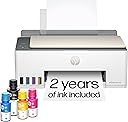
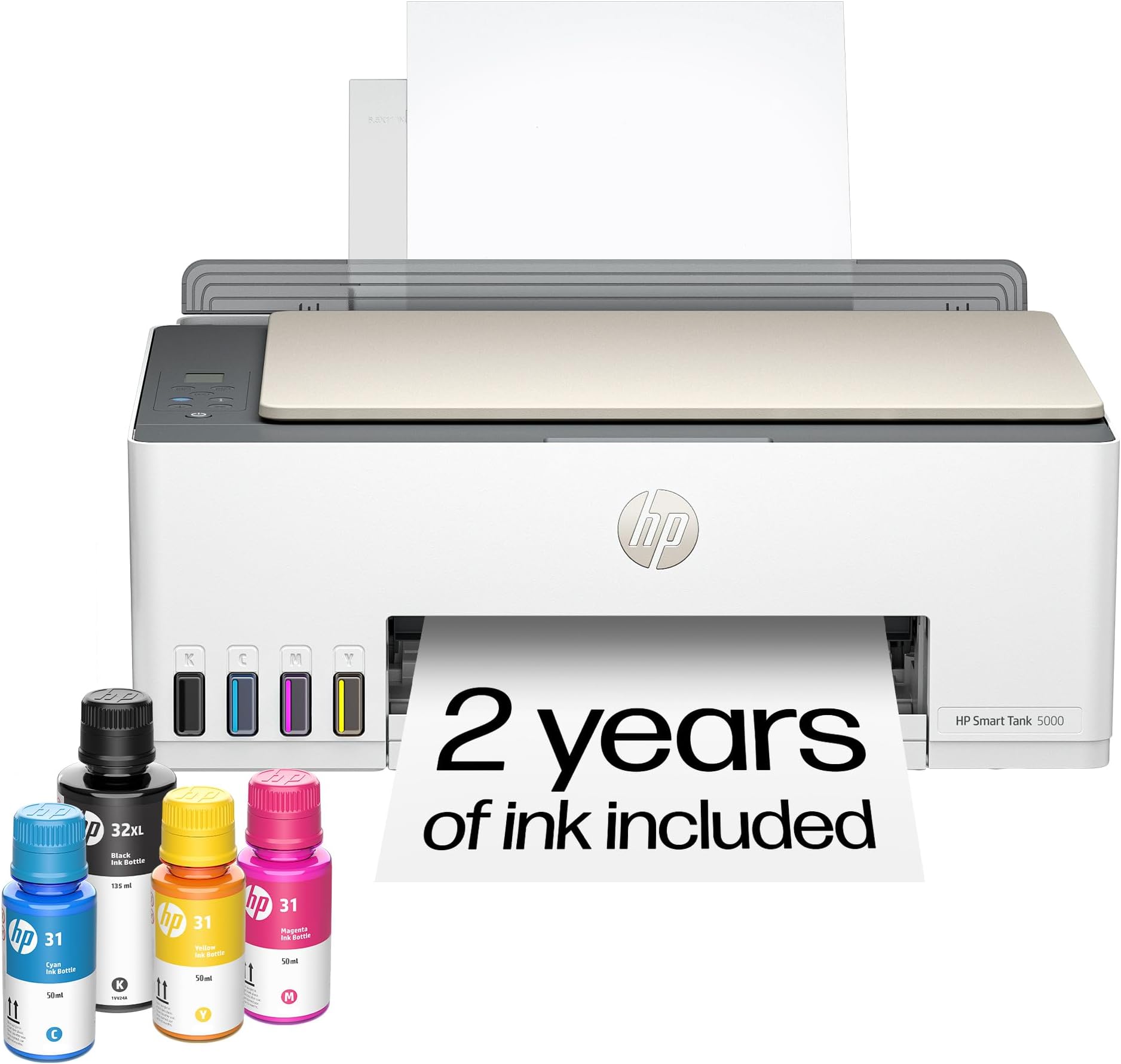
The HP Smart Tank 5000 is a wireless all-in-one ink tank printer designed for high-volume, low-cost printing with up to 2 years of ink included. Featuring cartridge-free refillable tanks, AI-enhanced print optimization, and seamless wireless connectivity, it delivers sharp text and vibrant color prints with minimal maintenance. Ideal for home and home office use, it supports printing, scanning, and copying with reliable performance and mess-free ink refills.


| ASIN | B0CC7TVR2F |
| Additional Printer Functions | Copy, Scan |
| B&W Pages per Minute | 10 ppm |
| Best Sellers Rank | #1,418 in Office Products ( See Top 100 in Office Products ) #5 in Ink Tank Printers |
| Brand | HP |
| Built-In Media | HP 31 Cyan Original Ink Bottle (50ml); HP 31 Magenta Original Ink Bottle (50ml); HP 31 Yellow Original Ink Bottle (50ml);, HP Black Printhead; Regulatory flyer; Warranty flyer; Power Cord., HP Smart Tank 5000 All-in-OnePrinter; HP 32XL Black Original Ink Bottle (135ml);, HP Tri-color Printhead; Setup Guide, Reference Guide, Ink Caution flyer; |
| Color | white |
| Color Depth | 24 bpp |
| Color Pages per Minute | 5 ppm |
| Compatible Cartridge | HP 32XL 135-ml Black Original Ink Bottle 1VV24AN; HP 31 Cyan Original Ink Bottle 1VU26AN; HP 31 Magenta Original Ink Bottle 1VU27AN; HP 31 Yellow Original Ink Bottle 1VU28AN. |
| Compatible Devices | Laptops, PC, Smartphones, Tablets |
| Connectivity Technology | Wireless |
| Control Method | App, Touch |
| Controller Type | Amazon Alexa, Android, Hand Control, iOS |
| Customer Reviews | 3.8 out of 5 stars 3,476 Reviews |
| Display Type | LCD |
| Dual-sided printing | No |
| Duplex | Manual |
| EU Spare Part Availability Duration | 2 Years |
| Hardware Interface | USB 2.0 |
| Initial Page Print Time | A4 Black 14 sec; A4 Color 21 sec Seconds |
| Ink Color | Black, Cyan, Magenta, Yellow |
| Item Dimensions D x W x H | 17.11"D x 6.19"W x 14.23"H |
| Item Type Name | Color Laser Printer |
| Item Weight | 14.2 Pounds |
| Manufacturer | HP |
| Maximum Copies Per Run | Up to 99 copies |
| Maximum Copy Resolution Black and White | 6000 x 1200 dpi |
| Maximum Copy Resolution Color | Up to 600 dpi |
| Maximum Copy Speed Black and White | 10 ppm |
| Maximum Media Size | 8.5 x 14 inch |
| Maximum Print Resolution Black and White | 1200 x 1200 dpi |
| Maximum Sheet Capacity | 100 |
| Maximum print Resolution Color | Black (best): Up to 1200 x 1200 rendered dpi; Color (best): Up to 4800 x 1200 optimized dpi colo Dots Per Inch |
| Model Name | ST 5000 AIO |
| Model Number | 5D1B6A#B1H |
| Model Series | Smart Tank 5000 |
| Number of Drivers | 1 |
| Number of Licenses | 1 |
| Number of Trays | 1 |
| Other Special Features of the Product | Auto Power On, Borderless Printing, Energy Star, Network-Ready, Refillable Ink Tank |
| Output sheet capacity | 30.0 |
| Paper Size | 3 x 5 to 8.5 x 14 Inches |
| Print media | Envelopes, Glossy film, Glossy photo paper, Paper (plain) |
| Printer Connectivity Type | Wireless |
| Printer Output Type | Color |
| Printer Type | HP Thermal Inkjet |
| Printing Technology | HP Thermal Inkjet |
| Processor Count | 1 |
| Resolution | Black 1200 x 1200 rendered dpi; Color 4800 x 1200 optimized dpi color (When printing from a computer and 1200 input dpi) |
| Scanner Type | Flatbed |
| Series Number | 5000 |
| Special Feature | Auto Power On, Borderless Printing , Energy Star, Network-Ready, Refillable Ink Tank |
| Specific Uses For Product | Home and home office |
| Total USB 2.0 Ports | 1 |
| Total Usb Ports | 1 |
| UPC | 197497529463 |
| Unit Count | 1.0 Count |
| Warranty Description | 1 year warranty |
| Warranty Type | Limited |
| Wattage | 3023 watts |
J**M
Tanks A Lot!
I recently started working exclusively from home, and needed my printer on a daily basis. I thought it would be alright paying $35 for an ink cartridge, as long as I just used black. Then the cartridges were lasting all of 6 days, and it was getting ridiculous. I didn't even know that these printers were an option. So in my research I wanted to stick with HP, because I already had all the software on my computer. I am also pretty frugal, so I went with the cheapest one that had good reviews, and hoped for the best. Looks like I chose wisely. After using this printer for a month, I have nothing but good things to say about it, and it has already paid for itself in ink alone. It sounds like a printer. It's not quite, but it's really not too loud. It is not a speed demon, but I don't need it to be the fastest. I am fine with how fast it will print. You can pay more for a faster printer if that is important, but I just let it do it's thing while I continue to work. The pages look great! Everything is crisp and clean. Even the ocassinal photos that I could not print before come out looking just like the picture. Set up was a breeze, especially since I already had the software installed. And setting up the wifi was as simple as connecting any other device. I have had zero issues with lost connection from the printer. On two occasions the printer showed offline, but it turned out to be the laptop that missed it when I turned the printer on after the computer, and it was fixed with a restart. If I were to remove a star it would be for the amount of paper that you can load. But it is still more than the last printer, so I will leave that star right where it is. I have been through two reams of paper so far, with no sign of low ink. This is the best printer I have ever had, and absolutely the cheapest to operate.
T**N
It Shouldn't be this Hard to get some support!
** update** this review should be posted. Users should know how difficult it is to get a hold of HP support! I finally found a phone number for HP support, but only once I started the return process to amazon. I was finally able to get past the computer generated android and talked to a human being. after 1 hour and45 minutes they finally resolved the issue. (A networking issue). I will refrain from returning the printer for now. Original review: It shouldnโt be this hard to talk to a human at HP printer customer support! Iโve done everything I can possibly do to get some support from HP either human or droid with no luck. I ordered and received a HP 5000 ink tank printer. I followed the setup and it all went well. The printer connected to my network and I completed the HP setup, except for the last item, a test print of a โThanks for buyingโ page. It wouldnโt print. I checked and rechecked everything. All was as it should be, but the print job just sat in the queue with a status of โPrintingโ. Except if doesnโt ever print. I can make a copy of a document and it prints out, I can scan a document to my PC. It just wonโt print! Iโm sure it would be a simple solution if I could just talk to a knowledgeable human for 10 minutes, but NO, HP makes it IMPOSSIBLE to do that. I tried to use chat to get help, but that was a complete waste of time. My problem was not one of the multiple options it asks you. I finally asked to talk to a human. It said if I wanted to get a phone number to support, I had to create an account and sign it to get itโฆ. I did so, and did NOT get a phone number. Just more useless suggestions that did nothing and oh, did I want to use chat to get help? Over two hours of trying to get a hold of someone or find a number that works on the internet, Iโm giving up. Iโm going return this thing to Amazon. I donโt need the hassle and frustration. If a company canโt make it fairly simple process to get someone to help to solve a simple problem, too bad for them, they just got a brand new printer returned on them. Iโll try an Epson printer next and see how that goesโฆ.
K**S
Ink tanks last so much longer than standard printer ink
This printer is amazing and the ink tank levels so helpful. Before, I was buying ink constantly. I have had this printer for a year in January and am still not out of ink that came with the original purchase. Sometimes it is hard to connect through bluetooth and we have to retry to connect it, but it's been well worth the money spent.
R**S
igh-Value Printer with Long-Lasting Ink and Hassle-Free Everyday Performance
The HP Smart Tank 5000 is a fantastic all-in-one printer that really stands out for its efficiency, low operating cost, and ease of use. If you print regularlyโwhether for work, home, or schoolโthis is one of those devices that quickly proves its value. One of the biggest highlights is the ink tank system. Instead of constantly replacing cartridges, you get refillable tanks along with up to two yearsโ worth of ink included. That alone makes a huge difference in both cost savings and convenience. Refilling is clean and simple, with minimal mess, and you donโt have to worry about running out of ink unexpectedly all the time. Print quality is excellent for everyday use. Text comes out sharp and clear, making it great for documents, forms, and reports. Color prints are vibrant and consistent as well, which works well for presentations, basic graphics, and even occasional photo printing. It may not be a high-end photo printer, but it definitely holds its own for most household or office needs. The wireless functionality is another big plus. You can print directly from your phone, tablet, or computer without needing to plug anything in. The HP Smart app makes setup and operation very straightforward, allowing you to scan, copy, and manage print jobs easily from your device. Speaking of scanning and copying, those features work smoothly and are easy to access. Itโs nice having everything in one compact unit without needing multiple machines. The controls are simple and intuitive, so you donโt spend time figuring things out. Reliability has also been strong. It handles regular use without jams or errors, and it starts up quickly when needed. The overall build feels solid, and itโs designed for consistent everyday performance rather than occasional use. What really makes this printer stand out is the long-term value. Between the included ink, efficient usage, and reliable performance, itโs a great investment that saves both time and money over time. Overall, the HP Smart Tank 5000 is a dependable, user-friendly printer that delivers great results while keeping operating costs low. If you want a practical all-in-one solution with excellent ink efficiency and modern wireless features, this is definitely a smart choice.
A**R
Worth the price
LOVE having the option to refill the ink as needed. The only negative is that for a few months I couldn't figure out why it stopped connecting to my Wifi and went without being able to use it wirelessly. I had to obtain a wire because it didn't come with one. I scoured all the "Help" options HP provided but none were at all helpful. Eventually I moved it and in completely disconnecting and reconnecting, somehow it works again. Don't know what was different and hoping it doesn't glitch again because when it works, it works well. It takes a few moments from hitting print to getting your paper and it makes a lot of sounds but the print is good when it's done. I would recommend it.
C**N
A few months old, and firing on all cylinders... Our gamble paid off...
Printers are a tough investment, but this one has been an unfaltering addition to my school work for months. It sits on an elevated rolling laptop stand, my MacBook on top of that (separated by a piece of non-slip drawer/cabinet liner that prevents scrapes and sliding), and it's as sturdy as a rock. A couple of things to note upfront: It's louder than anticipated. You'll hear it from the living room during wireless printing, which is noticeable at first, but you adjust. It's not the speediest. It's perfectly fine for my personal and family printing needs (a few pages to a dozen or two for study material or odd jobs). For photo output, it's sharp but not "masterclass"โdefinitely better photo printers exist. However, for black and white or grayscale, it delivers. Color printing is also sharp and doesn't bleed, with reasonable (though not lightning-fast) speed. If outright speed is your priority, look elsewhere. ### Wireless Connectivity I use a Mac, a Pi 5, and Windows 11 Pro with WSL2. They all connect perfectly with zero issues on my home network. It even seamlessly switched from my old ASUS Wifi 6 router to our new Amazon Eero system. I can print from anywhere on the network, even from my Pi across SSH. This printer delivers wonderfully on the wireless front. ### Ink It claimed 2 years of ink, and so far, it's mostly full. I print a fair amount, mostly in grayscale or black, but color charts for networking are sharp and readable. The kids and wife hit this thing all day, and it never gives them issuesโsomething I've never been able to say about a wireless printer before. While I'm not typically an HP fan, this device has been a rockstar from Day 1. ### Setup & Durability Loading the ink and setting it up was fast, easy, and uneventful. My hardest job was walking to the trash can to dispose of the funky adapter from the print heads! I've had zero dried ink or printhead issues; it calibrated perfectly the first time and prints everything with precision. Its wireless connectivity, durability, ease of setup and use, and minimal vibrations are all well-balanced, providing a full, uneventful printer that does exactly what it's supposed to, when it's supposed to. This holds true across multiple operating systems and even after switching networks. My wife thought the cost was worth the gamble compared to other alternatives, and she was right. Zero issues with this printer. If this review remains unedited, know that I'm still having a completely happy, issue-free experience. I would absolutely buy another if needed for a college dorm or similar.
A**S
Hulk Smash
This printer is awful. I got it set up no problem. The problem is that it only prints when it feels like it. It constantly does not recognize that there is paper in it. I'm currently attempting to print a six (6) page document and it cannot handle it. I have had to cancel the print job three times. On this, my fourth attempt, I have managed to get it to print three pages, but it has given an error after every single page because it doesn't recognize the paper. Mind you I am using perfectly flat, straight from the package, copy paper. Oh joy, page four just came out and it stopped printing half way down the page. Moral of the story? Save yourself money and frustration. Spend your money elsewhere, or like me, you will be reminding yourself to take deep breaths and that Hulk smashing the printer is a bigger mess than it is worth. 0/10 do not recommend.
G**R
Great Printer
I have been using this printer for 2 or 3 months and found it to be an excellent replacement for my old one that died on me. It was fairly easy to set up. You do have to install the print heads but any problems I had was more about my eyesight than any complexity with snapping them into place. I have never tried printing wirelessly because it sits next to my computer and I just reused the USB and power cord from my old printer. Everything was setup and ready to go in less than an hour. It prints fast and clearly. It also makes good copies from the scanner. As a rule I only print out a few copies a day and they are mostly black and white. Ink capacity has not become an issue. Many people have problems with the installation instructions that come with equipment nowadays and these are pretty typical. A few small pictures with limited print instructions but I had no real problems figuring things out. It would be nice if the LED window was backlit for better viewing but not a big deal. I definitely recommend this printer.
W**H
Affordable good quality ink tank printer
We have owned a few printers over the last 30 or so years. Most have been HP and we have always liked them and had good luck with print quality and features. The one sticking point has always been cartridge cost and reliability. And they have never worked well refilling them. Our last printer was a Canon and we will never buy one again. I had been watching the ink tank printers but price was the stumbling block. With the 5000 series the ink tank printers they are finally affordable. This printer makes very nice crisp prints in both letters and pictures. It does scan, the tray is direct feed from the rear top of the printer making it nice if you make water slide decals or anything similar. Super easy to set up and install the software, print heads fill tanks etc. Once on your network it just powers down and waits for the next time you tell it to print. The printer appears to be a winner and now we just have to test it for long term reliability of print heads etc. But as it stands we are impressed and do recommend this if you are tired of the small amounts of ink in cartridges and the high cost.
G**R
efficient product
Easy to install. good quality product
K**T
Good when it works...
Returning as the printer only works intermittently and unpredictably. When it did print the quality was good, but slow. Would not recommend to purchase.
J**.
Great printer
Great printed works well although setup was a bit of a pain because t after that all good
M**.
Prints well
Took too long to get set up over all great for photos
Trustpilot
2 weeks ago
2 months ago