Buy anything from 5,000+ international stores. One checkout price. No surprise fees. Join 2M+ shoppers on Desertcart.
Desertcart purchases this item on your behalf and handles shipping, customs, and support to Ireland.
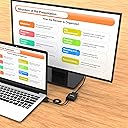
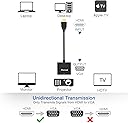
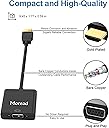
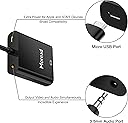
Product description The Moread HDMI to VGA adapter with audio provides a cost-effective and easy solution for connecting a desktop, laptop, or other devices with HDMI port to a VGA display such as monitor, projector or TV. Important Notes * This is NOT a bi-directional adapter and it cannot transmit signals from VGA to HDMI * Supports low-power HDMI devices such as SONY PlayStation 4, Apple MacBook Pro with Retina Display, Mac mini, and Apple TV * To work with low-power HDMI devices, please plug the included USB to Micro USB cable into the USB port of your computer/wall charger and the DC port of the HDMI to VGA adapter Stable Signal, Reliable Connection Full High Definition Supports resolutions up to 1920 x 1080 @ 60Hz (1080p Full HD) / 1920x1200 Audio Support Plug the included 3.5mm audio cable into the audio port of the HDMI to VGA adapter and the port of your audio output device What You Receive 2 x HDMI to VGA Adapter 2 x USB to Micro USB Cable 2 x 3.5mm Audio Cable Exclusive Moread unconditional 12-month Money-back Specifications Input: HDMI Male, Micro USB Female Output: VGA Female, Audio Female Audio Support: Yes Installation: Plug and Play Review: Does a fine job, plug and play, the separate HD audio output plug is a bonus. Makes older displays useful again for projects. - 5 Stars. A truly "plug-and-play" plug. No drivers required, at least on my linux and Windoze PC's. I picked this item up because I have access to several older monitors, very good quality display for their day, but lower resolution, and only accepting VGA input. The little monitors are perfect for DIY projects, Raspberry Pi setups, secondary displays for HTPCs or dedicated audio player setups, second little screen to display weather forecast or your stock market/cryptocurrency ticker or security camera footage...you get the idea. I've been picking up these great little used VGA monitors for around $6 each. The shopkeeper just said "no one wants anything that won't take HDMI input anymore." So, not only does this inexpensive adapter allow me to plug HDMI output into any of these VGA monitors, it even comes with a headphone jack to tap into the HD audio output that's contained within the HDMI output! There's also a micro usb port in the adapter to provide additional power, presumably for the audio jack, maybe if you wanted to listen to headphones or something. The USB power jack is not necessary for the HDMI video to VGA video to work. The overall build quality and construction feels sturdy. This doesn't feel like a cheap no-name adapter from China that's going to fail after a few weeks, intuition tells me it'll last. If I have any issues down the line, I'll report back. It more than pays for its self by making cheap displays compatible with modern hardware. FYI - this product only works in one direction: HDMI signal to VGA display. If you're looking for the reverse you'll need a different product. Review: Works fine - Worked as specified to connect an older VGA display to my laptop as a second monitor.


| ASIN | B075N8CXTJ |
| Best Sellers Rank | #27 in HDMI-to-VGA Adapters |
| Brand | Moread |
| Color | Black |
| Compatible Devices | Desktop, Laptop, Monitor, Projector |
| Connector Type | HDMI |
| Current Rating | 1 Amps |
| Customer Reviews | 4.4 out of 5 stars 1,038 Reviews |
| Finish | Gold,Hdmi,Projector |
| Item Dimensions | 9.45 x 1.72 x 0.6 inches |
| Item dimensions L x W x H | 9.45 x 1.72 x 0.6 inches |
| Manufacturer | Moread |
| Mfr Part Number | HDMI2VGAAP-A-B-2 |
| Model Number | TSPB-2V1AD-B |
| Number of Items | 2 |
| Number of Ports | 4 |
| Package Quantity | 2 |
| Power Plug Type | No Plug |
| Specific Uses For Product | Monitor,Projector,Tv |
| Warranty Description | Exclusive Moread Unconditional 5-year Warranty |
| Warranty Type | Extended |
A**S
Does a fine job, plug and play, the separate HD audio output plug is a bonus. Makes older displays useful again for projects.
5 Stars. A truly "plug-and-play" plug. No drivers required, at least on my linux and Windoze PC's. I picked this item up because I have access to several older monitors, very good quality display for their day, but lower resolution, and only accepting VGA input. The little monitors are perfect for DIY projects, Raspberry Pi setups, secondary displays for HTPCs or dedicated audio player setups, second little screen to display weather forecast or your stock market/cryptocurrency ticker or security camera footage...you get the idea. I've been picking up these great little used VGA monitors for around $6 each. The shopkeeper just said "no one wants anything that won't take HDMI input anymore." So, not only does this inexpensive adapter allow me to plug HDMI output into any of these VGA monitors, it even comes with a headphone jack to tap into the HD audio output that's contained within the HDMI output! There's also a micro usb port in the adapter to provide additional power, presumably for the audio jack, maybe if you wanted to listen to headphones or something. The USB power jack is not necessary for the HDMI video to VGA video to work. The overall build quality and construction feels sturdy. This doesn't feel like a cheap no-name adapter from China that's going to fail after a few weeks, intuition tells me it'll last. If I have any issues down the line, I'll report back. It more than pays for its self by making cheap displays compatible with modern hardware. FYI - this product only works in one direction: HDMI signal to VGA display. If you're looking for the reverse you'll need a different product.
N**Y
Works fine
Worked as specified to connect an older VGA display to my laptop as a second monitor.
R**Z
Setting up on a Lenovo Ideapad with Windows 10
Had some difficulties - at first - with Out of Range messages. The following fix worked: From "Intel Graphics Settings" right clicking on the desktop, found that this device supports: 720x480 1024x768 1280x720 1280x800 1280x960 1360x768 1920x1080 all at 60p Hz The one that worked for me was 1024x768, 60Hz. That choice of resolution needed to be made in 2 places: First, for the Desktop Active resolution, set it at DisplaySettings by right clicking on the desktop. Next, for the Active signal resolution, set it clicking on Advanced settings, selecting "Display adapter properties" for your external monitor and choosing from the Adapter tab's "List All Modes." Worthwhile product, good quality and at a great price.
R**E
Works with Mac mini M1 (2020) โ Read this on how to use it correctly
I have two older monitors that I wanted to use with my PC laptop and a new Mac mini M1 (2020). My monitors have dual inputs (DVI & VGA). The PC laptop is a work computer, so it got the DVI ports and that left me with the two VGA ports to make it work on the Mini. I tried a bunch of different connectors and cables that would take the Miniโs outputs of HDMI and USB/Thunderbolt and convert them to VGA. I finally settled on this connector and the same brandโs adapter for Thunderbolt/VGA. I will warn all here that I initially wanted to use two of the Thunderbolt/VGA adapters to take up both ports on the Mini. I didnโt find out until after I tried it that it wonโt work. I searched Appleโs support site and found that in their usually subtle phrasing that you cannot run two displays using both TB ports. If you want to run two displays on this Mini, one HAS to be HDMI and the other HAS to be Thunderbolt. I will also warn that you HAVE to use the power cable that comes with this to a USB port to provide enough power for this adapter to display an image on the monitor. I tested with using the Miniโs USB port directly and a USB hub plugged into the Miniโs USB port and BOTH worked just fine. Notes: these adapters are well built and donโt feel cheap at all. For the cost, why even bother with Appleโs overpriced adaptersโunless you need the additional ports they offer?
P**N
Excellent low cost HDMI to VGA adapter
I used this HDMI to VGA adapter to convert the digital HDMI signals from both a Blu-ray player and a Roku stick to an older Dell projector with analog VGA input. It worked very well with both sources without any problems. For the Roku stick I needed a female to female HDMI adapter which is not included. The projector was able to handle many different resolution settings. With the Roku stick I got a slight noise in the image when using 1080p resolution. Changing it to the native resolution of the projector of 720p it cleared up. I didn't need a separate power supply for these two sources but it is good that it can be added for some devices that don't have enough power on the HDMI output. There are no adjustments on the adapter. If the display or projector needs a different resolution you have to change it at the source. Most devices can be changed from auto to a fixed setting such as 720p. I connected the 3.5mm jack audio output with a cable to a separate speaker. I had no problems. This is an excellent product especially considering the very low price.
M**A
Works great
Good value for the money. It work exactly for what I needed it. Would definitely buy again if needed.
M**4
HDMI Output Off Laptop Converted To VGA Video And Separated Sound - Works Well
I had a situation where a new laptop only had a HDMI output. No older VGA. Sometimes when I give PowerPoint presentations the Public Works people that are my audience only have a monitor I can hook my laptop into that has VGA connectors on it - no HDMI. This converter works well to take that HDMI output signal off my laptop, split out the HDMI video signal to VGA video, AND has a second output to take HDMI sound if that is important to you (was not needed by me) and split it off to a RCA 3.5mm female jack that you could route to speakers or other listening device. I've been using it for 3 months now and it works flawlessly. I had an expensive Thunderbolt USB C hub from Lenovo that had VGA output off of it. It cost $129 and gave me intermittent dropping VGA problems. Not one dropped VGA signal with the Morehead HDMI to VGA video and sound (USB AC Powered) adapter.
F**S
Doesn't work with Macbook Pro as claimed.
Claimed to work with Macbook. Second adapter I've bought that doesn't work. The cable does NOT transmit. The screen is a white flashing static when put through my AVR receiver. I then found out that some of these do not work with low-powered HDMI sources (such as Macbook, PS4, etc.) Weird. So I tried on my Xbox which it is claimed to work on. This signal transmitted but it would go out at the slightest move or even application changing on the Xbox. For instance, games on the Xbox worked but when I switched to Netflix on the Xbox, the signal cut out. I tried on a Toshiba laptop. It worked as stated above. Intermittent signal. I would definitely look for another adapter that claims to work with low-powered HDMI sources. I'm still looking myself.
G**G
service and quilaty
good as advertised
A**U
It is not functional.
It is not functional. Cheap quality item received. It doesn't have AUX port.
V**N
Frankly, don't buy it. Stopped working after a month.
Trustpilot
2 months ago
1 month ago