Buy anything from 5,000+ international stores. One checkout price. No surprise fees. Join 2M+ shoppers on Desertcart.
Desertcart purchases this item on your behalf and handles shipping, customs, and support to Ireland.
๐จ Unlock your inner artistโno skills required, just pure creative flow!
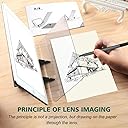
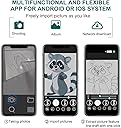
The Yuntec Optical Drawing Board combines a premium PMMA lens with a smart app to project and trace images effortlessly on any opaque surface. Designed for beginners and kids, it supports multi-device activation and unlimited image imports, all housed in a durable, portable ABS frame. Perfect for stress relief, skill-building, and personalizing your gear with custom sketches.
| Manufacturer | Yuntec |
| Country of Origin | USA |
| Item model number | GXHB-900 |
| ASIN | B07K8BVWC6 |
J**N
My Response to the Negative Reviewsโฆ
Since no one has eyes, hereโs the instructions for bad reviews that have problems with, with pictures: 1.) Make sure itโs set up RIGHT! Look at the cover. 2.) Have ceiling or lamp LIGHT ON and adjusted as well as your phone light for the right opacity for tracing. 3.) If right handed, ANGLE and LEAN your eyes to the left through the screen. If left handed(like me), the opposite. (Yes, you have to LOOK THROUGH the screen!! Thatโs the very point of the indraw. I canโt believe ppl leave bad reviews for that. Itโs like being pissed you have to use your pencil like a pencil.) 4.) PEEL off film from screen 5.) (this is for all online orders) If product is damaged or missing, ORDER replacement!!! 6.) Have the stand in the SAME PLANE as the paper. Not below or away. Iโve used something similar in 3rd grade school, pre-iphone era, Except you trace a hard copy image. I can still do the same, example shown. If kids can do it, pre modern technology, so can you. My video wonโt upload, but itโd show the ease of the indraw. Perfect size, perfect function, good durability, and low price!
T**K
Great for 'tracing' and making sketches
Simply put, this is very good for what it does at this price point. I purchased it to make outline sketches for watercolors. I did not need detail, just proportion and form, and found that I could get a fair amount of detail anyway. For those with concerns about the app, it is not needed, you can use any picture. For those that could not nee the image, make sure you are looking through the glass at your paper, and tracing the reflected image from the screen. You may need to adjust the lighting of your room or screen, there needs to be more light in the screen (brighter), but you still need to have light in the room. For those concerned with 'scratches', the plate comes with two protective films that are easily scratched to keep it safe when shipping; take both of them off. For those concerned about the color, yes, the polarized plate has a tint, which is normal. TIPS: adjust screen brightness based on room brightness; you need a balance. You can move the image around on the screen and line up the paper to make drawings that are larger than the screen image. Turn off auto rotate on your screen to keep alignment where you need it; this can only be done in some apps like Gallery. Overall, exactly what I needed for travel and getting proportions right for sketches.
C**S
Not worth it
First of all, the app needed to make this product work has not provided details about its privacy practices and handling of data to Apple. Since you have to use your cell phone or tablet, this was a red flag for me since the developer was from another country. Next the projected image is about the size of your cell phone screen. Way too small to be very useful except for the most basic of images. You can try to piece the image together or sketch one section at time, but I doubt that would result in a great image. While it's not terribly difficult to figure out how to put it together, there are no directions. And the app seems to decide arbitrarily that the file format of the photo you're trying to use is not supported. Took two photos of same image, same time, same iPhone. One was fine. The other was invalid format. Not worth the frustration. Deleting the app and returning it. Very disappointing.
S**K
Don't expect to become an "artist"
There is a lot of hype on what sketch lenses can do. Especially cheap ones. There are pros & cons depending upon what you need. If you're looking for a magic wand to turn you into Davinci, then take some classes instead. If you already know the fundamentals of art, and you're looking for something to assist you with technique, this sketch lens may be a nice little "trainer" for your needs. Let's review the Pros: 1) Simple to setup 2) Decent quality (for the money) 3) The lens is clear (don't forget to remove the film on the lens from BOTH sides) 4) You don't have to use tracing paper (a few sheets are included) in fact, you probably shouldn't. I found using a solid white paper or artist paper allowed me to see the lens image much clearer than the thin tan tracing paper they supplied in the package. Let's review the Cons: 1) The position of the lens (once you have it in the holder) is not accurate. Moves around too much, and was difficult to have full range of motion when drawing underneath the lens. Often the lens, cut off my subject's head or feet because the lens could not comfortably accommodate a standard size piece of paper. Therefore, you have to make concessions with whatever it is your trying to draw, from either your tablet or phone. I used my iPad, and it proved to be a bit too awkward. You may have better luck using a phone instead. Again, you can make it work with a tablet, it's just more awkward in doing so. 2) You may need to flip/rotate your image before using the lens. Otherwise, using the lens will be the opposite of the image from your device. This is not really a con, I just found it annoying. 3) You will only see the image as bright as your device can make it. Direct light over your device and lens will remove the lens' reflection from your paper, rendering it useless. 4) This lens projects your image at a sharp angle. So whatever your drawing, your subject(s) may be at the angle that your lens projected on to the paper. If you don't know how to self correct your perspective, this may be a little annoying to you. All in all, I gave this three stars because I understand the purpose of a sketch lens, and it performed its duties as such. But, this sketch lens could have been designed better, with a few extra notches in the stand to adjust the angle of the lens or the angle of the device. This alone would have allowed for a better perspective of its projected image on to the paper, making it easier to use.
S**G
Optical Drawing Board
I was curious about this product. It doesn't do what an opaque projector does, because it doesn't enlarge or reduce an image. However, if you're looking to trace an image same size (and in reverse), this amazing little lens on a slant works very well. Once I figured out that my image would be mirrored, I had to mirror my source drawing by scanning it, flipping it (in a graphics program) and printing it out back to front -- if I wanted my final drawing to be the same orientation as my original. Even though it's designed for screens such as a phone, it will work from a printed image. I make sure I have a lamp shining on the image for extra clarity. I'm very happy with this device for my own graphics needs. It would be great for kids tracing off a phone image. It's a simple little gadget that can be pulled apart and stored in its own little folder. For larger images, I break my original sketch apart into sections and just move the optical drawing board around on a larger piece of paper. I have no idea how it works, but it's a clever little device, and quite inexpensive.
Trustpilot
1 week ago
3 weeks ago