Desertcart purchases this item on your behalf and handles shipping, customs, and support to Ireland.
🔗 Unlock your workspace potential with Rosonway’s powerhouse USB hub!
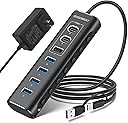
The Rosonway 7-Port Powered USB Hub (RSH-A107C) is a high-performance USB 3.2 Gen 2 hub featuring 7 ports—3 USB-A 3.2 (10Gbps), 2 USB-C 3.2, and 4 USB 3.0 ports—designed for professionals needing fast data transfer and multiple device connectivity. Its robust aluminum housing, individual port switches with LED indicators, and a dedicated 12V power adapter ensure reliable, stable operation and device safety with surge protection. Compatible across Windows, Mac, and Linux, it’s the ultimate solution to eliminate port scarcity and streamline complex setups.


| ASIN | B0BXRY4QZ5 |
| Additional Features | Fast Data Transfer, Plug and Play, Powered, Surge Protection, USB-A 3.2+2 USB-C 3.2 +4 USB-A 3.0 ports, 2 in 1 USB cable |
| Best Sellers Rank | #138 in USB Hubs |
| Brand | Rosonway |
| Cable Length | 3.3 feet |
| Color | Black |
| Compatible Devices | Cameras, Gaming Consoles, Laptops, Macbook, Tablets |
| Customer Reviews | 4.1 out of 5 stars 1,338 Reviews |
| Data Transfer Rate | 10 gigabits_per_second |
| Enclosure Material | Aluminum |
| Hardware Interface | Thunderbolt , USB, USB Type C |
| Item Dimensions L x W x H | 5.7"L x 1.8"W x 0.9"H |
| Manufacturer | Shenzhen Rong Sheng Hui Electronics Co., Ltd |
| Minimum Required Operating System Version | Windows 10 |
| Model Number | RSH-A107C |
| Number of Items | 1 |
| Number of Packs | 1 |
| Number of Ports | 7 |
| Operating System | Linux, Mac OS, Windows |
| Special Feature | Fast Data Transfer, Plug and Play, Powered, Surge Protection, USB-A 3.2+2 USB-C 3.2 +4 USB-A 3.0 ports, 2 in 1 USB cable Special Feature Fast Data Transfer, Plug and Play, Powered, Surge Protection, USB-A 3.2+2 USB-C 3.2 +4 USB-A 3.0 ports, 2 in 1 USB cable See more |
| Total USB Ports | 7 |
| Total Usb Ports | 7 |
| Unit Count | 1 Count |
| Warranty Description | 18 months warranty for non-human damage |
S**N
Nice unit. (Updated.. still happy with it)
Only had this 1 day. It wouldn't install on my Desktop to the USB-C 10Gb ports but after some investigation, discovered that's a driver issue on my motherboard and Win-7. It did however install perfectly on the USB-A 5Gb port. That's not a problem as I'm using USB-A 3.0 Drive Devices. I attached 4 drives to the 5Gb ports on the hub and everything powered up and attached without any problems. I also tested doing a backup from one of the now Hub mounted drives to another external USB drive and that all seemed to work flawless at speeds comparable to what I normally see when doing backups. Overall, very nice unit, solidly made, switches a nice feature, comes with PSU. I like the unit for its sturdiness. I like the ability to turn the ports off/on individually It works fine on a USB 3.1 port even though I have a USB-C device plugged into the 10Gb port so no issues there. I like it came with a separate PSU which I'm using Overall, pleased that it's working fine just disappointed to discover that my Motherboard is using an ASMedia 3.2 processor which doesn't appear to support external Hubs.. or at least ASMedia does have not care to provide a Driver for Win-7. The Hub appears to install ok but after much testing and powering OFF/ON, every time I connect it, Windows gives a loud Beep (The one that indicates a device has been attached/detached) every 1.5 SECOND!!!! even if there's no devices plugged into the Hub. Fortunately the 3.1 ports on my Motherboard use an Intel USB support chip so that seems to handle an external Hub without issue and it more than satisfies my current USB speed devices I'm using. UPDATE 02/13/25 ~~~~~~~~~~~~~~ I had a quirk occur which is NOT a defect but in case you hit the same. I had a USB port "Enabled" (Blue light lit) on the Hub but had no device actually configured on it. Every time I booted I would "lose" the last Internal Hard Drive. It just would not show up. This happened 4-5 times in a row. Once I realized and Disabled the port and I've never had a problem again. This could easily be a quirk of my Motherboard during it's hardware scan so I'm not blaming the hub at all. Just thought I'd mention it. As for the USB drives now connected to the Hub, they all continue to work flawlessly. Really pleased with the Hub as it provides the additional USB devices I needed in one nice easily locatable place (rather than having to keep scurrying behind the server on my hands and knees :-) Speed is great (Copying to and from devices on the Hub).
M**L
My 1-Year Review: The Rosonway 7-Port Powered USB 3.2 Hub (RSH-A107C)
My 1-Year Review: The Rosonway 7-Port Powered USB 3.2 Hub (RSH-A107C) Since purchasing the [Rosonway 7-Port USB 3.2 Hub]in February 2025, it has served as the reliable backbone of my home office for the past year. When managing a dual-PC docking station setup, the biggest challenge is often port exhaustion and the physical clutter of switching peripherals. This hub hasn't just solved that; it has done so with a level of build quality that is rare in today’s accessory market. --- The "Docking Station" Solution My primary use case was to consolidate a variety of essential USB devices into a single node that connects to my 2-PC docking station. This includes: * **Audio/Visual:** My webcam and conference speakers. * **Inputs:** Wireless mouse and keyboard dongles. * **Miscellaneous:** Various thumb drives and charging cables. The hub has worked **perfectly and without fail** throughout my entire year of ownership. In a setup where I frequently switch between a work machine and a personal PC, the stability of this hub is its greatest asset. I haven't experienced any of the "ghost" disconnections or hardware handshake issues that often plague lower-end USB expanders. Build Quality: Sturdy and Tight The physical construction is where the Rosonway truly differentiates itself. The aluminum chassis isn't just for show—it gives the unit a weight and "tightness" that feels professional. * **No Rattling:** There is zero sense of looseness in the internal components or the ports themselves. * **Reliable Connections:** After a solid year of daily use, the ports remain snug and secure. High-Speed Performance Because this is a **USB 3.2 Gen 2** hub, it offers up to **10Gbps** data transfer speeds. While my mouse and keyboard don't need that bandwidth, having the 10Gbps USB-A and two USB-C ports available means that when I need to move large files from an external SSD, I’m not throttled by the hub’s architecture. Why the 12V Power Adapter Matters One of the reasons this hub is so "very reliable" is the included **12V power adapter**. Many hubs try to draw power solely from the host PC, which leads to failure when you connect power-hungry devices like conference speakers or external hard drives. By providing its own power, the Rosonway ensures that every device stays online and performing at its peak. --- Key Takeaways My Experience | **Reliability** | 100% uptime over 1 year of daily use. | | **Build** | Industrial-grade aluminum; sturdy and durable. | | **Utility** | Consolidates complex peripheral setups into a single connection. | | **Control** | Individual switches allow for easy "hard-killing" of webcams for privacy. | Final Verdict If you are looking for a high-quality aluminum USB port expander to streamline a multi-PC or complex home office setup, this is a five-star investment. After 12 months of testing, it has proven itself to be a durable, high-performance solution for anyone dealing with the "port drought" of modern computing.
T**O
This is what you need! Fast , Reliable, Quality
I purchased this unit for a new home setup involving multiple MacBooks (4), over a dozen mobile phones, a few tablets, a Surface Pro, and a few other hubs and docks I am testing out. This Powered USB Hub Rosonway 16 Ports 100W USB 3.0 Data Hub Aluminum USB Hub 3.0 Splitter with 12V/8.3A UL Certified Power Adapter and Individual On/Off Switches RSH-A16 (Black) is the first hub I've been impressed by since a 2.0 Anker Hub in 2015. It was to be my phone Hub for my setup; however, in my confusion, I got it mixed up with another unit Rosonway builds and had to exchange. That being said, I still wanted to try it out to see if it was worth sticking with the brand for future upgrades. The unit itself is a high-quality all-aluminum body, housing what appear to be LED lights running down one side that indicate whether the ports are engaged. The lights, conveniently next to their corresponding USB port, easily blend behind a mirrored finish during the day and are surprisingly neither too bright nor too distracting at night. The other side has buttons for each port that are easy to switch off, with a very smooth press and release. I personally would prefer a button that requires more deliberate force, because I found myself toggling the buttons accidentally. But that's just me. Also in the box with the hub were the power supply and a 4ft long USB 3.0 detachable cable - both quality built. Installation was easy. It was a simple plug and play operation straight out of the box, with no cause for confusion. In my setup, there were never less than 8 iOS devices connected at all times. While connected, these devices all maintained 100% charge even when removing and installing apps, data, and OSs. Speeds were in-line with what was stated; the only thing I regret was the fact that they were not high enough for my current build at 5Gbps speeds. The 3.1 10Gbps is actually the unit I need, so I'm looking forward to testing that one once it arrives. Overall, this Hub is very well built. It delivers on what it promises, and would've fit all of my needs had it been 10Gbsp instead of 5Gbps. I look forward to trying many more devices from the Rosonway family. Deleted User. io
G**N
Very useful "at-home" or "extended-travel" accessory for a laptop
I got this hub because (1) I was tired of accidental USB-cable disconnections during big file transfers from my laptop to my external hard drives and (2) I thought it would be convenient to have more than my laptop's measly three USB Type A ports available at the same time. Mission accomplished on both counts. Key Points: • The bundled USB 3.0 Type B to USB 3.0 Type A cable that I received is not actually 4 feet long. It's a meter long, which equates to around 3 feet 3 inches. If you actually need that extra 9 inches for some reason, don't count on getting it. (It's possible that the manufacturer had a supply problem with 4-foot cables and temporarily replaced them with meter-long cables, but still — don't count on getting a 4-foot cable.) • I actually ordered a separate 4-foot-long USB Type A to USB Type C cable at the same time I ordered this, and that's what I have been using since day one. (Even though I haven't abused them by any stretch of the imagination, my laptop's USB Type A ports are prone to accidental disconnects if you breathe wrong or look at them funny. The laptop's Thunderbolt 3 / USB Type C port has been rock solid so far.) • Is the hub's power-supply brick bigger than it needs to be? I was lucky and the brick ended up fitting in the power-supply bracket of the guitar stomp-box pedalboard I mounted the hub on, but it's a pretty big power supply. • The blue LED indicators for each of the hub's 16 ports are very subtle. You need to look at them pretty close to head-on to tell whether they are illuminated. This will be a plus to users who don't like being surrounded by lots of lights, and a minus to users who want to be able to tell which ports are on without sticking their head directly in front of the hub's light panel. I wouldn't mind more visibility from a side angle, but for my purposes, it works fine as is. Besides, the push-push port-power buttons stay depressed when they're in the "on" position, and that's easy enough to spot from a side-angle view. • This is almost certainly a Windows 10 issue rather than a problem with the hub, but you're asking for trouble if you boot your computer, or connect the hub to your computer, with multiple hard drives attached to the hub and powered on. When I booted my laptop with four external USB hard drives connected to the hub and powered on, my laptop went into a POST loop. (It wasn't really a boot loop, because the computer never got that far. I never got beyond the splash screen that displays while the Power On Self Test is running before the computer would restart.) And once my computer was booted and I was fully signed in, if I connected the hub to the laptop with multiple drives powered on, Windows wouldn't recognize most of them. The solution is to make sure all drives connected to the hub are powered down before you do a cold boot, and to safely eject and power down all drives before doing a reboot. Then, once the computer has finished the start-up process and you're signed into your account, power on the drives in staggered fashion, one at a time, with a pause in between. I don't know whether this is strictly necessary, but I wait until Windows has recognized the drive I just powered on before powering on the next one. It takes a little extra time and effort, but if you do it, everything works. (BTW, I don't know whether this problem occurs with devices *other* than external hard drives. For example, maybe it doesn't happen with thumb drives.) • The hub's USB 3.0 Type B port (the one for the cable that goes to the computer) could possibly be a little on the loose side. I've had one accidental disconnect with this hub, and that's where it occurred. All in all, this hub has made my life a whole lot easier. I mounted it on a small guitar pedalboard, along with the four 2.5" "portable" hard drives I use for daily archiving and backup. As needed, I can connect any or all of my four 3.5" drives, and all seven of my thumb drives, and still have a port to spare! And most importantly, I've had no accidental disconnects at the drive level, something that used to constantly plague me. (I did have an accidental disconnect of the entire hub, once, but that was half my fault. If the hub's USB 3.0 Type B port had been a bit tighter, maybe the cable wouldn't have pulled out, but then again, maybe it would have anyway.) Bottom Line: I'm pretty happy with this hub and would get one again, should the need arise.
N**R
Excellent product - Build quality and Versatility
I have used this product for about 2 weeks at this point and so far this is definitely a step or two above my previous USB hub. So far, I have used 5 devices connected to the hub at the same time and I have not run into any issues or experienced any lag. Instead of trying to list all the features of this product, I will call out specific things about this product that I think should be considered when buying this product. Build Quality: The first thing that I noticed taking out the USB hub from the box was its excellent build quality. The aluminum construction, seamless design and good weight gives a solid confidence about the product even before plugging it in. This is also a lot more compact than the previous product that I had (see pic for comparison) Versatility: This provides 4 USB-A ports and 3 high-speed USB-C ports giving a wide range of options to plug in. It also has a USB-C to USB-A adapter built into the side that connects to your computer (see pic). This has helped me with using the hub on both my new macbook and the old one which does not have usb-c. The ability to do both USB-A and USB-C on both sides of the hub was the main reason I was in the market for a new hub. On/off switch for each port: My previous hub had an on/off switch for each port. But the improvement that I see is that this hub requires a long press to turn off the port. This is a great design since I have accidentally bumped into the toggle switches and turned off devices on my previous hub. Turning the port on is just a short press on this device. This is a small feature and I am sure it is not something someone would decide on a product, but this to me shows an eye for detail on the product design which gives me confidence about the product. Con: My external monitor (via usb-c) did not work when I plugged into the hub. It works when I plug it in directly to my laptop. At this point I am not sure if this is a limitation of the hub. This is something that I am planning to test a bit more. For now I am directly connecting the monitor to my laptop. Devices I have tried on the hub: webcam (logitech), keyboard (kinesis freestyle pro), wireless mouse (logitech), scanner (epson), usb storage sticks.
A**D
Get This One - UPDATE
If you're looking for a hub that has both USB C and USB A ports, this Rosonway is of much better quality than the Uni product, which kept shorting out and had to be returned. The Rosonway has a heavier metal frame, has more ports and comes with a 3 foot cord that provides far more flexibility than the 1 footer on the Uni. It can also be plugged into either the computer's USB C port or the A port since it comes with an attached adapter. The on/off switches are a good addition if you want to keep a drive plugged-in but don't want it to boot-up on every re-start of the computer. Worth the extra cost. UPDATE: I had a problem when I used the power supply while the unit was plugged into a Thunderbolt 4 port on a Mac Mini M2 Pro. Basically the unit stopped working altogether and got computer messages saying a USB device was using too much power. Once I disconnected and got it operating again, the USB-A ports were no longer working with older USB2 thumb drives, which they had been prior. They would only work if plugged into a USB port on the Mini. Tech support was great. They worked it out to get me a new unit which works fine with it plugged back into the Thunderbolt 4 port. Still a great product that I recommend for all the reasons stated above - but maybe not with the power supply attached in a similar setup.
T**E
A Versatile, Economical; Powered Hub
It is very attractive and has a solid feel. The LED lights are bright enough to easily see and it makes it easy to turn a device on and off without unplugging. There is enough space between the slots so it is easy to plug in cords. The 3.2 hubs(2 C and 1 A, 10GB) are conveniently placed and grouped. For me having 2 USB C slots was a welcome change to my previous hubs that were all USB A. They get enough power from the included transformer to charge my watch and phone, as well as an external hard drive. The four 3.0 USB A slots are 5 GB transfer and were fast enough for my tasks. My printer is plugged into one of these and there are no issues with data transfer. The hub is powered by a 24 watt transformer which is sufficient. The transformer cord is about a meter long. The dual cable for plugging in to your computer is very handy. One small problem is that when you are using the USB C plug, the USB A plug is hanging out there in the way. This is not the case when using the USB A plug as you plug the USB C into the USB A keeping out of the way. Also, the hub to computer cord is permanently attached to the hub. It would be better, imho, to have it be removable. Its functionality, appearance and price make it a good choice for a powered hub with both USB C and USB A slots.
S**T
Nice features, good support, parts may need some QC
This is a nice hub. It overall works as expected. The build quality is nice, it feels sturdy and looks sleek. Both the hub and power adapter are silent, no electrical hiss or whine. FUNCTION: - The ability to turn ports on/off is great for having external hard drives (you have to eject them from the computer first, of course), which I use 2 for redundant external storage and 1 for Mac Time Machine. - The hub also works fine with my Focusrite audio interface (recording/playback), my iLok, etc. - I am able to daisy-chain my Dell monitor's built-in USB hub as expected and even run my mouse receiver off of that! So no latency issues whatsoever. LIGHTS: - The lights are steady on for USB 3.0 Devices, flash during disk read/write, and flash constantly for USB 2.0 Devices like my keyboard. - They are a good brightness - not too bright. - It would make more sense for the indicator lights to be on the side with the buttons, but this is not a huge issue. ISSUES: The main issue I had with my hub is that after a few weeks, the button on port 4 stopped working, so this port would not stay "on" - I contacted support via email who was very responsive - they offered to replace the device for free, either immediately or anytime during the extended warranty (I registered the product after purchase which extends the coverage period). I will probably take them up on this offer towards the end of the warranty. Secondly, if I forget to disconnect an external drive before shutting down my computer, the hub will power off with the computer, sort of hard-stopping the drive, and then moments later power back on in stand-alone mode, again kinda jolting the drive awake... this is of course primarily user-error, but it would maybe be better if the hub didn't turn the drive off and on again and instead just stayed powered. I should also note that the product box came a bit beat up from Amazon (the brown shipping box was fine). But I'm willing to bet this happened in the Amazon distro center and isn't the fault of the manufacturer. The product was fine inside. I wrote this review after using the hub consistently for ~7 months, and other than that one port button going bad towards the beginning, there have been no other issues! I would recommend you buy it.
I**L
Excelente
Ya tengo un rato usando el dispositivo y funciona genial. Lo ocupo para editar video en MacOs con SSD y la velocidad de transmisión excelente. Puertos suficientes.
F**S
Não funciona USB 3.0, apenas USB 2.1
Apesar de ser anunciado como um hub USB 3.0, essa funcionalidade não funciona - mesmo nas portas onde está escrito USB 3.0. Elas apenas funcionam no modo USB 2.1. Não compre se espera velocidades USB 3.0.
A**G
Speedy hub.
Works well, have used it for a long time now. The speed matches what it is promised.
N**N
Absolutely good (Using for 1 month now)
I've connected 6 HDDs (couple of them that are decade old) plus my phone to my MacBook. Works like a charm. I don't usually have continuous and large data copy operations. So, not sure how it'll hold up in such cases. For intermittent data read/write, works perfect.
B**A
Pleasantly Surprised
WOW was I pleasantly surprised when I opened the box! This USB Hub is awesome and is approximately 5 3/4" long and 1 3/4" wide and a 1/2" deep. Perfect for my desk space and for travel. I also like the on/off switch (on is a click and off is a held click). A previous review said it ... make sure the cord clicks into the unit or it does not work. I am very Very happy!
Trustpilot
2 weeks ago
5 days ago