Buy anything from 5,000+ international stores. One checkout price. No surprise fees. Join 2M+ shoppers on Desertcart.
Desertcart purchases this item on your behalf and handles shipping, customs, and support to Ireland.
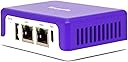
🛡️ Power up your network security with Firewalla Purple SE — tiny device, massive protection!
Firewalla Purple SE is a compact, high-performance cybersecurity firewall designed for home and business networks. It delivers up to 500 Mbps intrusion prevention, smart parental controls, ad blocking, and a built-in OpenVPN server/client—all managed via a sleek mobile app. Compatible with most routers, it offers flexible deployment modes and deep network analytics, providing professional-grade protection without monthly fees.


| ASIN | B0BYMN4YZ3 |
| Antenna Location | Cyber,Security |
| Antenna Type | Internal |
| Best Sellers Rank | #13,482 in Electronics ( See Top 100 in Electronics ) #102 in Computer Routers |
| Brand | Firewalla |
| Built-In Media | Ethernet cable |
| Color | Purple |
| Compatible Devices | Personal Computer |
| Connectivity Protocol | Ethernet, Wi-Fi |
| Connectivity Technology | Ethernet |
| Control Method | App |
| Controller Type | App Control |
| Coverage | All devices on the home network |
| Customer Reviews | 3.8 out of 5 stars 517 Reviews |
| Data Transfer Rate | 500 Megabits Per Second |
| Frequency | 64 GHz |
| Frequency Band Class | Dual-Band |
| Has Internet Connectivity | Yes |
| Has Security Updates | Yes |
| Is Modem Compatible | No |
| LAN Port Bandwidth | 100 Mbps |
| Manufacturer | Firewalla LLC |
| Maximum Upstream Data Transfer Rate | 500 Megabits Per Second |
| Model Name | Firewalla Purple SE |
| Number of Ports | 1 |
| Operating System | Linux |
| Other Special Features of the Product | WPS |
| RAM Memory Installed | 3 GB |
| Router Firewall Security Level | High |
| Router Network Type | Wired and Wireless |
| Security Protocol | WPA2-PSK |
| Smart Home Compatibility | Not Smart Home Compatible |
| Special Feature | WPS |
| UPC | 850015548093 |
| Unit Count | 1.0 Count |
| Wi-Fi Generation | Wi-Fi 5 |
| Wireless Communication Standard | 802.11ac |
| Wireless Compability | 802.11ac |
R**.
Much easier setup than Netgate4200 and Netgate6200
I was shock how small this firewalla compared to the Netgate6200 and Netgate4200. So far does not heat up for something so tiny. I bought Netgate4200 for $609 and Netgate6200 for $1,000. And I could not connect the 2 pfsense firewall. I was trying to connect for 2-3 weeks until I gave up. Had issue with connecting to firewall and return them. I’m not a tech wiz. I only know how to build computer gaming rig. But not knowledge about coding. When I tried Firewalla and it’s easy to setup. At first I had issues connecting the firewalla trying to integrate it to my spectrum internet. I had to turn off mode and router. And after it turns back on it was easy. I was able to increase the upload speed and download speed without problems. Also was able to turn on Adblock feature. I did not even need to connect my phone to firewalla or my router to setup firewalla. I just download the apps on my phone and scan the QR code on firewalla. And it connected with the phone apps without me connecting my phone to WiFi. That’s how easy to setup the firewalla with my spectrum modem and router.
R**N
Zero support..died after 10 months.
For about 10 months my Firewalla box worked great. It was easy to set up and the app was easy and effective. About a month ago it died. It would no longer connect to anything. I’ve reached out to Firewalla by email on four separate occasions now. Zero reply! Watch out! At over $200 a pop….I feel it should last more than 10 months! I have an update. Firewalla finally got back to me. After they asked me to do a bunch of troubleshooting which I did over the course of two days, they asked me to buy another piece of equipment to re-flash my unit. I refused. I shouldn’t have to buy a piece of equipment to fix a product that is under warranty. At first they said it wasn’t under warranty…then I sent them proof and they agreed. After being thoroughly frustrated with troubleshooting, I asked them to take this unit back and ship me a new one. They would not do that. I had to ship my old unit back so they could test it and maybe fix it and maybe send it back. It’s really too bad. I loved it when it worked, but my review stays the same. Great when it works….if it doesn’t….good luck. Unless you are very tenacious and keep after Firewalla “customer service” you will be out your $200+. If they somehow redeem themselves…I will change this review….but at this point…I’d never buy another one.
B**R
Overall great consumer firewall with potentially useful business applications.
Received this network firewall about a week ago and let me just say it is really well done. It's small size and simple setup (assuming you check your router against their incompatible list of routers on their website) make it rather approachable. I also like how the app you use with it has a well thought out interface that doesn't overwhelm you with information but let's you get deeper insight into your network by navigating the easy to use app. I do wish they would have better means of customizable content filters for groups of devices not all or individual devices. This thing is tiny but oh so powerful up to 100mbps. I have 83 devices currently and it seems to handle it fine. I contacted their support and received help after 5 on a Saturday which was impressive granted it was over email. They provided me with a solution to work around a newly discovered bug with firewalla. It was nothing major for home networks but essentially I had too big of a subnet mask for it to scan devices. The scariest thing about this is it spends all its time collecting alll this data that you may not even be aware is possible to obtain via the network. Monitoring and alarming features work exceptionally well except turning off some notifications such as abnormal activity doesn't turn off abnormal uploads. Having several cloud based cameras renders a lot of these types of alarms. Also I will add that having the map, Whois, and ips really help identify what's happenening with a device and potentially stop it. I noticed also it doesn't block certain activity on its own you have to tell it to allow or block activity. It is working great with my eeros 2nd gen. Can't wait for the firewalla Blue to get more performance out of our internet seeing as we are paying for 300mbps. I think it is definitely a cool new product/startup I also think given everything it gathers it may be concerning as to privacy implications in regards to protecting its database.
A**S
Good idea, but not for a complex environment.
Its OK, but for someone like me with an above-average network (utilizing a LAN-based DNS server, VPN tunnel, honeypot, etc, lol), it was not very comparable. While this would work OK for a normal home network, especially with kid and such (give the provided monitor / censor tools), it is not versatile enough to configure for a more 'complex' environment. The biggest issue I had was that, while I like the Suspicious Upload monitor,, I wanted to selectively disable it for a few nodes, while still monitoring for suspicious uploads on other nodes. This is not possible. It is a global on/off for monitored nodes. While you can select which nodes to monitor, you can't select WHICH features to monitor independently.
D**.
Great product offering by a consumer friendly and supportive company!
Basic setup was quick and simple. The capabilities and information provided by this box are far beyond what’s provided in its sales documentation. Firewalla Tech Support is highly responsive and helpful. While I would like to see these boxes have a much faster throughput, this box provides affordable and professional quality home (and small business) network protection that most anyone can use and benefit from without having to be an IT professional. Be mindful that you will occasionally find things that need follow up as you gain user time with this device. For example, after using Firewalla’s default settings when we enabled the blocking of all video sites, we found that our Apple devices stopped auto-updating their apps and the Apple App Store became unreachable. With the help of a quick email assist from Firewalla Tech Supoort, we learned that Apple uses an itunes server for both their video AND app updates. Firewalla was blocking itunes since we had enabled the blocking of all video sites. Armed with that information, we then easily customized Firewalla’s default video block settings to allow access to the itunes server and we restored normal app updating for our Apple devices. Firewalla quickly showed us which devices were our network’s biggest data hogs. It also flagged several suspicious uploads going to certain web servers. Thanks to Firewalla, we put the data hogs on a diet and closed the door on the suspicious uploads. Our home network is now performing more efficiently and is certainly more secure. As soon as I can get my hands on the Firewalla Blue box, I’ll have my small business network outfitted in like manner as my home network. I’m eagerly looking forward to using Firewalla products for many years to come.
Y**!
Yosemt
Muy bueno
W**H
DO NOT buy! Totally waste of time and money!
Do not buy this trunk! I bought it to monitor my kids internet activities. It worked fine for a couple of days and then acted like crazy. It randomly prevented a device from internet or browsing some website. My kids could not write their homework on their school iPad. I had to shut it down. After the summer as the new school year started, I thought I should give it another try so I plugged it back in. And it shows “pairing timeout” and asked me to check the license. Who knows what license it meant! So I emailed their support. They checked for two days and told me the file system crashed and asked me to take the SD card out and reflash it myself. Not being a technical person, it took me some time to figure out how to take the card out. Anyway, I managed flashing it again and it worked for another couple of days and fell apart again. I rebooted, restarted and it didn’t work. So I flashed it again as last time. It didn’t even work after flashing! Long story short, this is NOT a production quality product. The price is ridiculous to its quality. I would not buy it for half or quarter the price. Because it is a totally waste of time and money!
F**L
Excellent home firewall
This has been a great little firewall that I’ve used for 2.5 years. Very easy setup and easy to manage. Manageable by a non-techie but has advanced features for the more technical. Great support. My questions have been answered personally and reasonably promptly by knowledgeable people at this smaller sized company. They’ve helped me to re-setup the device when needed. 100mbit may not be that fast but when you actually test the speed of your “high speed” connection, you may not be getting more than that anyway. (In my other house I get 300mbit on my advertised “gigabit” connection from FIOS. I got the Firewalla Blue for that network.) I’ve not noticed it slowing things down, ever. Heavy internet users for work VPNs and video conferencing, streaming etc. I’m a web tech professional so I would likely notice if this device were causing me issues. I do notice it trapping bad activity, blocking ads, and doing its job as advertised. Sorry I didn’t submit this review earlier. I’ve been very happy with this. Will buy another Red or Blue for a third location soon.
M**D
Parental control
Works as described. Best parental control firewall
A**N
Fantastic easy to use consumer level cyber security
This is a truly great cyber security tool for consumers as super easy to use. For UK folks first buy an adapter US type A to UK. Then as typical FTTC customer with BT like SmartHub cannot be used in bridge mode so it will be your router so use the Purple in Bridge. Next, if like me you have a Mesh unit downstream of the BT Smarthub you will need to run the Mesh in Access Point (e.g., Bridge mode) or if your Mesh does not support bridge mode you will see only the Mesh as one unit on the Purple. Even in this double NAT with both BT and Mesh acting as routers the Purple SE in bridge still is worth having for sure but to get per device visibility the downstream mesh must be in bridge and to get full control of devices (eg segmentation and priority) you need any upstream device to Purple to be in bridge just acting as a modem. But even stuck in the middle of a double NAT (two routers) the Purple SE still does full visibility and control of in and out flows with blocking and alerts, ad block and vulnerability scans. You add full device visibility if any downstream router is in bridge and add full device control and segmentation (vlans) if any upstream router is in bridge.
B**)
has no wifi
Product description is a bit confusing because the purple edition is normally indicating that it has wifi capabilities, but this one doesn't.
J**Z
Buen producto complemento para administrar tu red
Muy buen producto, llevo 4 días usándolo y firewalla a monitoreado mi red, puede bloquear la mayoría de los anuncios, me alerta si un dispositivo en mi red está jugando en línea, si hace descarga inusual, puedo bloquear contenido para adultos, puedo crear una vpn (open vpn) y agregar mis dispositivos a ella, puedo activar alerta si un nuevo dispositivos se a unido a mi red. Puedo escanear puertos abiertos en la red. Lo malo es que no puedo monitorear mis dispositivos que están en mi sub red, es decir que están en un router que puse para extender mi red wifi.
I**Z
Muy bueno
Una maravilla no redujo la velocidad de mi internet de 150Mb descarga y 10Mb subida. Me permite analizar todo lo que está pasando en mi red, me bloquea los anuncios y bloquea páginas maliciosas.
Trustpilot
1 month ago
5 days ago