Review: Five Stars - Excellent product. compatible with Windows 7 and 10. Automatically install the drivers when plug in. Review: Extended Screen Flickers - There seems be be very little or no support for this Docking Station, I use docking stations for all my laptops and they are all Dells, recently I started the using the Vostro Range and it did not fit in with the regular Dell Latitude Type Docking Station. However all the Dell Laptops works with this docking staion with one minor annoyance. The Extended Display display flickering after prolong use, say 6 or 7 hours of use. I thought it was most likely due to drivers specifically the Display Link Drivers, and I have not been able to find the latest drivers for this unit other than the ones that are supplied with the purchase of this product. I have tried it with Windows 7s, Windows 8.0, 8.1 and Windows 10, they all flicker. If the extended display is used with the proper Dell Docking Station NO Flickering is noticed. If anyone knows where I can find updated drivers for Display Link, please comment on my review. So, I'm afraid no 5 Stars, 4 is generous in my instance an experience.
| ASIN | B0117NWSAI |
| Brand | Odoga |
| Brand Name | Odoga |
| Customer Reviews | 3.8 out of 5 stars 50 Reviews |
| Global Trade Identification Number | 00811345025838 |
| Hardware Interface | HDMI |
| Hardware interface | HDMI |
| Item Weight | 12.3 Ounces |
| Item weight | 12.3 Ounces |
| Manufacturer Part Number | UG39DK4-WS |
| Model Number | Walkie Talkies for Kids |
| Total HDMI Port | 1 |
| Total HDMI ports | 1 |
| Total USB Ports | 3 |
| Total USB ports | 3 |
| UPC | 811345025838 |
U**R
Five Stars
Excellent product. compatible with Windows 7 and 10. Automatically install the drivers when plug in.
P**G
Extended Screen Flickers
There seems be be very little or no support for this Docking Station, I use docking stations for all my laptops and they are all Dells, recently I started the using the Vostro Range and it did not fit in with the regular Dell Latitude Type Docking Station. However all the Dell Laptops works with this docking staion with one minor annoyance. The Extended Display display flickering after prolong use, say 6 or 7 hours of use. I thought it was most likely due to drivers specifically the Display Link Drivers, and I have not been able to find the latest drivers for this unit other than the ones that are supplied with the purchase of this product. I have tried it with Windows 7s, Windows 8.0, 8.1 and Windows 10, they all flicker. If the extended display is used with the proper Dell Docking Station NO Flickering is noticed. If anyone knows where I can find updated drivers for Display Link, please comment on my review. So, I'm afraid no 5 Stars, 4 is generous in my instance an experience.
I**H
Works well for me
Windows 10 automatically installed the drivers for the device without any further installation required. The images on both extended screens are stable, I'm using the HDMI and DVI connections with two 1600x900 resolution screens. Having used USB2.0 video cards in the past and knowing how laggy they were, I was concerned that this would be too but it isn't, it works really well. The network card seems to work well too. It's nice just being able to plug just one cable into my laptop and have everything available to me.
A**O
Could be better!
It does what it should, it is just weird that they didn't fix the audio issue and also the multi display issue with Mac. I use it with my Macbook 12", two screens and ethernet cable. It doesn't switch off the main screen of the laptop when I plug it to the macbook. the sound is all disturbed if I use the audio port of the docking. Sometimes it gets stuck if I unplug the macbook, the two displays will still show the desktop. All in all it's ok, but they need to work harder on quality of product (it looks a bit cheap) and also on software/driver that you can actually configure.
A**S
Works with Windows 10
Excellent. Worked correctly out of the box, fully loaded with Windows 10.
J**L
Very practical!!
this product is good, easy to set up just followed the instruction. It works very well with my drawing screen tablets/ monitors. To watch Amazon video isn't perfect some works fine other not good with iTunes it doesn't work at all sad!! Anyway my Mac doesn't have enough USB so this resolve few problems of mine. Isn't perfect some little adjustment but overall I'm happy with it. Service was great, well packed everything as describe. thank you!
G**Y
Good quality for price. Functions perfectly but could be slightly better designed
Good value and product works out of he box without issue. Was packaged well too. Only small gripe is that the horizontal orientation of the box means that cables can sometimes force the box to "lift" from the table making it a bit unsightly.
P**L
Three Stars
Lags quite a bit. Video is very jerky. Screen locks up from time to time.
C**N
Buen producto
Funciona muy bien la Ăşnica pega es el adaptador de sistema UK a Europeo de corriente que viene no cabe en los enchufes estándar, compre uno en la ferreterĂa y listo.
C**.
Fa il suo dovere, ma con qualche limite!
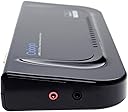
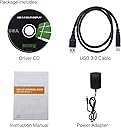
Il prodotto arriva nella sua scatola, con tutti gli accessori elencati nella descrizione. L’alimentatore ha la spina americana, ma in dotazione c'è anche l'adattatore per le prese europee/italiane, che genera un'accoppiata abbastanza ingombrante (dovrete ricavare uno spazio dedicato sulla presa o sulla ciabatta). L'adattatore è molto leggero e dà l'idea di rompersi facilmente, ma in alcuni mesi di utilizzo non ha ancora dato problemi. Le dimensioni della docking station sono contenute per altezza e profondità , ma molto generose in lunghezza e non poteva essere diversamente, considerata l’abbondante dotazione di porte. Può essere posizionata solo in orizzontale: non ha una base che gli permetta di stare in verticale. Presenta delle intacche sulla parte superiore per espellere il calore generato dall’elettronica interna; sulla parte inferiore è presente un tappetino in gomma ricoperto da una pellicola che protegge la parte adesiva: una volta rimossa, può essere attaccato ad una superficie liscia. Vi sconsiglio di attaccarla sotto il piano della scrivania perché l’adesivo è di scarsa qualità e rischiate che cada, come è successo a me. Fortunatamente i cavi corti hanno impedito che si schiantasse al suolo! La finitura delle plastiche è nero lucido. L’installazione è molto semplice: una volta collegati il cavo USB 3.0 al notebook (quello in dotazione non è molto lungo, quindi dovrete posizionare il portatile abbastanza vicino alla ODOGA e i monitor di conseguenza) e l’alimentazione (non avendo un pulsante di accensione/spegnimento, se vorrete spegnerla, dovrete brutalmente staccare l’alimentazione), si accenderà il led blu al centro del frontale e non dovrete far altro che installare i driver dal CD in dotazione. Quelli forniti non sono l'ultima versione, quindi vi consiglio di fare un salto sul sito DisplayLink e scaricare i driver aggiornati. L’utilizzo non dà grandi problemi: la visualizzazione sui monitor collegati è molto buona e non si presenta nessun effetto scia allo scorrimento del mouse o all’attivazione di animazioni veloci, nemmeno con i videogiochi; saltuariamente si possono verificare sfarfallii dei monitor. L'audio, una volta collegato, viene riconosciuto come dispositivo USB. Come già accennato, monta un chip Display Link, che, come riscontrato da me e da numerosi commenti di altri utenti in forum specifici italiani ed esteri, provoca un elevato uso di risorse delle CPU che purtroppo gli ultimi aggiornamenti driver non hanno risolto. Devo dire che per me, avendo un portatile con i7 versione desktop, non crea grossi problemi, se non una lieve rumorosità aggiuntiva dovuta all’aumento del tempo di funzionamento delle ventole ad alto/medio regime; per chi invece avesse un PC un po’ datato o non molto prestante, questo difetto potrebbe pregiudicarne l'utilizzo. Durante il funzionamento emette un lieve ronzio, quasi impercettibile, ma in ambienti particolarmente silenziosi lo si potrebbe notare. Un ultimo appunto: le prese USB 3.0 per la ricarica veloce non ricaricano velocemente. Molte funzionalità , quindi, ma anche alcuni difetti che in situazioni specifiche ne possono comprometterne l'utilizzo. In conclusione: un oggetto economico rispetto a docking station più blasonate (tipo Dell) che permette di avere una configurazione multimonitor, di tenere in ordine la scrivania ed estendere la dotazione di porte del proprio portatile.

B**U
Rien Ă redire
Fait le job, me sert au bureau à brancher deux écrans et la connexion Internet à mon portable sans avoir des câbles dans tous les sens. Une fois le pilote téléchargé, reconnu sans problème et je passe la journée à la débrancher rebrancher pour aller en réunion, sans problème de reconnaissance "à chaud". L'alimentation est au format anglo-saxon mais il y avait un adaptateur dans la boite me concernant.
W**T
No complaints here!
You can't beat this product for the money. There are lots of USB ports including 3.0 ports. As well, HDMI and DVI and the DVI port comes with a DVI to VGA adapter in the box. It also comes with the USB cord, so nothing extra is needed. NOTE: We use similar docking stations at work (that cost twice as much) and had the same issue with them, wherein this product requires a lot of drivers to install on your PC. Windows update has no problem finding them, but you sometimes have to unplug and replug in the docking station in order to get them all to install. Once you do, however, no issues! But I ran into that so I thought others might want to know. My only complaint is I wish there were more audio ports, as my laptop only has one for both mic and speakers; I was hoping to be able to hook up my Logitech 5.1 channel speakers to the doc. But the needed standard in/out/mic audio ports are not found on this dock so I am not able to do this. I don't really see this as a reason not to buy this product since, especially anywhere close to this price range, none of the other docking stations include these inputs/outputs either. But I thought it worth noting and would be a great value-add. With the number of USB ports on this device plugging in a USB sound card won't be an issue. My favorite thing about this docking station is the fact it includes both an HDMI and a DVI port, many docking stations included an HDMI and a VGA. Also, it uses the standard DisplayLink drivers which means you can connect it to Windows, Linux, or Mac without issue.
Trustpilot
3 weeks ago
1 month ago