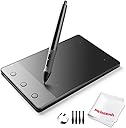


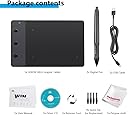
Huion H420 USB Graphics Drawing Tablet Board Kit
Product ID: 5034960
Details
- BrandHUION
- Connectivity TechnologyUSB
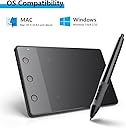
- Operating SystemWindows
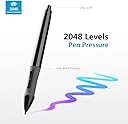
- Pressure Sensitivity2048 levels
- Special FeaturePen
desertcart.com: Huion H420 USB Graphics Drawing Tablet Board Kit : Electronics Review: Great Product, Good Customer Service from Lightwish - I was very excited to receive this item ever since I started looking into digital painting. I was amazed to find a product like this for so cheap, and it seemed appropriate for someone who hasn't used a digital drawing device before. Upon ordering it, there were some difficulties. The first shipment failed to reach me at my apartment (for reasons still unbeknownst to be) -- though on desertcart, it was listed as delivered. I contacted Lightwish through the desertcart feedback option (because unfortunately, the China Post does not take calls in English) and was eventually able to get another shipped to me. The customer service representative was very helpful and prompt, and I was able to get another unit shipped to a local UPS store within a week. Upon receiving the device and opening it up, I was really impressed. I was so excited, I didn't even read the instruction manual. I inserted the CD, installed the driver in just a minute, plugged the pad in, and it was ready to go. It essentially just replaces your mouse. which, at first felt like I was driving a car for the first time, but which I eventually got used to. It took some getting used to as far as holding the pen appropriately and not pressing the two buttons on the side. Immediately, I launched my totally outdated Photoshop 7, praying that I wouldn't have to update to use my new device. Astoundingly, the tablet not only works well in Photoshop 7, it appears to take full advantage of some default features of the program. For example, by default, one of the pen buttons switches the cursor to an eraser, and the flow of the brush can be changed to use the full range of pressure settings on the pen (which I only discovered recently) making it feel much more like an actual pen or pencil. I haven't fully learned all of the applications of the hardware, but so far, even with just a simple brush tool on Photoshop, I have been totally astounded by how this product augments my artistic abilities and expedites the painting process. I will continue to update as I learn more about it. Also, watch out for eye strain -- I am not sure yet, I think I may have developed some soreness in my eyes from the first week of using it. It couldn't hurt to take breaks/do exercises in between drawings. Review: B-E-A-Utiful - This definitely came in in a timely manner, much quicker than it said it would. I was slightly taken aback by the small size (this is my first graphics tablet), so once I installed it and got situated at my desk, I sat down for a few hours. It definitely took some getting used to. With never having used one before, I wasn't aware of how the whole buttons/mouse thing worked, but it certainly got easier the more I used it. I've read in the reviews and some of the answers that one should not buy this tablet for drawing. But I did exactly that. And I am in love. The small size makes it great for traveling and fitting it in my bag. The size does not mess with your sketch. Overall, I'd buy this again. Here's the fifth digital art I've ever made with this! :D
| ASIN | B00MGLD3E6 |
| Active Surface Area | 4 inches x 2.23 inches |
| Additional Features | Pen |
| Brand | HUION |
| Built-In Media | USB Cable |
| Compatible Devices | Personal Computer |
| Connectivity Technology | USB |
| Customer Reviews | 4.0 out of 5 stars 1,543 Reviews |
| Display Type | LCD |
| External Testing Certification | Não aplicável |
| Item Dimensions L x W | 4.41"L x 6.95"W |
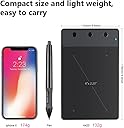
| Item Weight | 10.56 ounces |
| Manufacturer | Huion |
| Mfr Part Number | Lightwish-H420 |
| Model Name | h420 |
| Model Number | H420 |
| Operating System | Windows |
| Pressure Sensitivity | 2048 levels |
| Screen Size | 2.23 inches |
| Special Feature | Pen |
| Specific Uses For Product | personal |
| Target Audience | Teacher |
| UPC | 601706972938 061111191988 710382907599 700254094434 702334860731 |
E**P
Great Product, Good Customer Service from Lightwish
I was very excited to receive this item ever since I started looking into digital painting. I was amazed to find a product like this for so cheap, and it seemed appropriate for someone who hasn't used a digital drawing device before. Upon ordering it, there were some difficulties. The first shipment failed to reach me at my apartment (for reasons still unbeknownst to be) -- though on Amazon, it was listed as delivered. I contacted Lightwish through the Amazon feedback option (because unfortunately, the China Post does not take calls in English) and was eventually able to get another shipped to me. The customer service representative was very helpful and prompt, and I was able to get another unit shipped to a local UPS store within a week. Upon receiving the device and opening it up, I was really impressed. I was so excited, I didn't even read the instruction manual. I inserted the CD, installed the driver in just a minute, plugged the pad in, and it was ready to go. It essentially just replaces your mouse. which, at first felt like I was driving a car for the first time, but which I eventually got used to. It took some getting used to as far as holding the pen appropriately and not pressing the two buttons on the side. Immediately, I launched my totally outdated Photoshop 7, praying that I wouldn't have to update to use my new device. Astoundingly, the tablet not only works well in Photoshop 7, it appears to take full advantage of some default features of the program. For example, by default, one of the pen buttons switches the cursor to an eraser, and the flow of the brush can be changed to use the full range of pressure settings on the pen (which I only discovered recently) making it feel much more like an actual pen or pencil. I haven't fully learned all of the applications of the hardware, but so far, even with just a simple brush tool on Photoshop, I have been totally astounded by how this product augments my artistic abilities and expedites the painting process. I will continue to update as I learn more about it. Also, watch out for eye strain -- I am not sure yet, I think I may have developed some soreness in my eyes from the first week of using it. It couldn't hurt to take breaks/do exercises in between drawings.
V**A
B-E-A-Utiful
This definitely came in in a timely manner, much quicker than it said it would. I was slightly taken aback by the small size (this is my first graphics tablet), so once I installed it and got situated at my desk, I sat down for a few hours. It definitely took some getting used to. With never having used one before, I wasn't aware of how the whole buttons/mouse thing worked, but it certainly got easier the more I used it. I've read in the reviews and some of the answers that one should not buy this tablet for drawing. But I did exactly that. And I am in love. The small size makes it great for traveling and fitting it in my bag. The size does not mess with your sketch. Overall, I'd buy this again. Here's the fifth digital art I've ever made with this! :D
L**A
Great tablet for beginners
I got this tablet last week and have been using it to draw every night since! The driver was easy to download for those who don't have a CD drive. Pressure sensitivity settings are available to adjust through the driver along with settings for the express keys. So far, I have used it with Adobe Photoshop CC and it works great. The 2048 levels of pressure sensitivity allows for some nice fluidity in lines (though, for those who've used higher-end tablets with more levels will definitely notice a difference). The size of the tablet is convenient and portable. I have a small desk so it's perfect for my workspace. It takes a few days to get used to drawing on such a small surface but I was able to get accustomed to it pretty quickly. Can't say much about the durability just yet but, so far, it hasn't given me any trouble. Haven't quite found a use for the express keys besides using one as an escape key but I know others use it to save, undo, etc. Overall, a great first tablet for beginner digital artists and at a great value too. I included one of the first drawings I made using the tablet.
A**Y
The pen didnt work after a couple of use but good otherwise
Bought it as a gift for my brother and he loved it. He has been using it alot and hasn't complained about anything yet so I am guessing it is working good. Update: I asked him about the product and he said the button on the pen had actually stopped working after a couple of use but he just hadn't told me about it. Kind of disappointed but well I learnt about it too late to contact the seller or return it.
G**A
The design of this model in particular is great. I was impressed the minute I opened the ...
I used to purchase VisTablet pads for basic design work which were very efficient and inexpensive. Unfortunately, that brand disappeared. What was my plan B? Well, afer researching a bit and trying a couple of brands such as Bamboo and another one I can recall at the moment, I ended up finding Huion. The design of this model in particular is great. I was impressed the minute I opened the box. It is user friendly and did not require special installation of drivers to make it work if you use Windows 7 or above in your system. The pad is sturdy and compact and I loved the fact that I was able to use old battery-operated stylus that I had from my former Vistablet device. The pen design is good. I found unnecessary the use of a clicker to turn the pen on and off since, after testing it a bit and correct me if I am wrong, it will consume the battery charge mostly if you leave it on top of the pad. Other than that, I loved it.
S**S
Very jittery and poor experience
I have a professional Wacom Intuos Pro for professional work, but I needed a tablet for quick meeting presentations where it can be plug and play and I came across this tablet. given the price I decided to give it a try. its a small plug and play feather weight tablet. The pen is powered by a AAA battery and has a on/off. button. The end of the pen cannot be used as a eraser (like a wacom pen). The tablet would work great for a left handed person, as the usb port plugs on the left side. There are no drivers so I cannot rotate the tablet inputs, its a minor inconvenience. The major problem with this tablet is the result is very jittery. The cursor doesn't stay planted, it jumps few pixels up and down within the confines of the input box of the surface. the Tablet is very sensitive to how far off the surface of the tablet the pen tip is. The tablet reads inputs when the pen tip is about 1/4" off the surface. This creates a rather horrible drawing experience. The resulting poor experience due to jitter and reading inputs when the pen tip is not in contact with the surface, is not worth it even if the tablet was free. i tested in on 2 laptops and a pc with fully charged "aaa" battery. If the manufacturer can correct this issue with the input, i am happy to update my review. It could have been a great tablet if it just worked.
D**S
Just What I wanted
For starters, this was a quick fix for Mouse Hand Cramp when at the computer 8 hours + a day. The pen has a light touch and I can click to fields on a large software program I am required to use. I can switch between tablet and mouse easily when necessary. Also, was very surprised how compatible the pen was with Word in Windows 10, Adobe Acrobat and Windows 10 itself. I am able to take handwritten notes in Word while on the phone, saving the step to scanning to PDF if notes taken on paper, after speaking with a client. Also, was able to make jpeg snips (Snipping Tool) in Windows 10 and annotate my snips with a few handwritten comments. All in all, a great value.
M**C
Disappointed that Tablet no Longer Works
The cable that comes with this tablet doesn't fit completely into a USB slot or the slot that comes with the tablet, making the pen act up quite a bit while drawing. When it was new it didn't have too much of a problem, but now every few minutes I have to unplug and replug the device to get it working again. That is if I can get it running at all. Most of the time now it doesn't recognize it being plugged in. When it did work it worked wonderfully, but sadly it didn't last a very long time. I used it occasionally and was careful to handle it nicely, so I'm disappointed it didn't last longer.
S**.
It's cheap, it works, I love it!
I am studying maths for the GCSE and any time I do my exercises (every day) I find myself wasting a lot of paper unfortunately since all the expressions, graphs, geometric shapes etc I have to practise with require a lot of space where to write/draw them. So I came up with this solution of the computer pen and it works greatly! It's cheap, I can write directly on the virtual past exams papers instead of having to copy every time the shapes etc on my actual paper (I have a lot to study and by not having to draw everything I save a lot of precious time) and the best thing is I don't use all that paper anymore! I love it and I hope it will keep on working as it is working now. (Only complaint sometimes the buttons on the lower part of the pen can be a bit in the way when you want to use it)
J**C
exelente
belle tablette graphique beau design utilisation facile
C**R
Produto muito bom mesmo.
Produto excelente. Atendeu todas as minhas necessidades e superou minhas expectativas. Pequeno, discreto e muito fácil de usar. Compatível com vários aplicativos windows e linux. Uso no dia-a-dia. Achei melhor do que muitas outras que existem no mercado e possuem preços bem mais altos... Recomendo.
R**F
Gutes osu Tablet und optimierungstipps
Vermutlich für jeden der osu spielt das beste Budget Tablet kleine Empfehlung bzw. Eigentlich n must have ist der hawku Custom Treiber der lags und stutters weitestgehend fixed also 7 digit ist locker machbar wie ew höher aussieht weiß ich noch nicht
L**A
Ottima scelta per principianti
Il prodotto funziona perfettamente come descritto. Leggero, funzionale e facile da usare. Consigliato per cominciare a imparare.
Trustpilot
2 days ago
2 weeks ago