Buy anything from 5,000+ international stores. One checkout price. No surprise fees. Join 2M+ shoppers on Desertcart.
Desertcart purchases this item on your behalf and handles shipping, customs, and support to Ireland.
🔧 Fix your HDMI headaches with Lindy’s CEC-less adapter — because your devices deserve peace of mind!
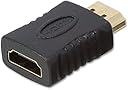
The Lindy HDMI CEC Less Adapter disables the HDMI CEC Pin 13 line to prevent erratic device behavior such as random power-ons and switching. Featuring gold-plated Type A male-to-female connectors, it maintains high-quality signal transmission while solving compatibility issues with popular HDMI-CEC protocols like EasyLink, SimpleLink, and Anynet+. Lightweight and backed by a 10-year warranty, this adapter is a must-have for any professional AV setup seeking seamless control and uninterrupted peace.
| Asin | B00DL48KVI |
| Best Sellers Rank | 6,506 in Electronics & Photo (See Top 100 in Electronics & Photo) 98 in Audio & Video Adapters |
| Guaranteed Software Updates Until | unknown |
| Item Model Number | 41232 |
| Language | English, English, English, English, English |
| Manufacturer | LINDY |
| Product Dimensions | 15.01 x 11 x 0.99 cm; 10 g |
User
It does exactly what it is supposed to do and solved my problem.
The product appears to be good quality and does what it is supposed to do, thus I consider it as value for money.5 stars given for "remote control" is to give a full a full 5 star review but isn't really applicable to this product, unless you consider its purpose is to block remote commands over HDMI.Picture quality shows no degradation, I wouldn't expect it to, but in my case it was only being used on a 1080p connection.It certainly solved my problem which was as follows:My television has 3 HDMI ports.Originally port 1 was connected to a Chromecast and port 2 was connected to an AV receiver with a Blue-Ray player connected to it.When the AV receiver and / or Blue-Ray player were turned on the television would automatically switch to the correct HDMI input and I could control the AV receiver and Blue-Ray player using the television's remote control via the HDMI link, thus avoiding me needing to use all the individual dedicated remotes.I connected a device to the third HDMI port and the previous functionality ceased - the television no longer automatically switched to the AV receiver / Blue-Ray player and I could no longer control them via the televisions' remote control.Hence I suspected that either the new device, a security recorder, which obviously needs to be on 24/7, might be sending CEC commands that were preventing the AV receiver and Blue-Ray player establishing a CEC link or that the lengthy 15m HDMI cable to it was picking up interference and causing a similar issue.I fitted the CEC blocker at the television in the connection from the security recorder and problem solved.I am a little disappointed in those that designed my television as even if you manually forced it to switch to the correct HDMI input it would still not give priority to CEC commands from that source.
User
Stopped annoying HUMAX bug
I have a HUMAX Freeview box (Aura) that, when it does an overnight update, switches the TV and soundbar on. So at some ungodly hour of the night the TV is on and blaring away meaning getting up ro turn everything off. Unfortunately, the HUMAX doesn't turn everything off after an update, it turns itself off again but not anything else.Adding this stops this happening. The ONLY downside is that you have to turn the TV on and then something else. I have an LG TV, an Amazon Fire Cube, a JBL Sound Bar and a Sony BluRay player fed into the HDMI ports. If I turn the TV on I have to press the Humax on button on the remote. If I turn the Fire Cube on, it turns everything on, including the Humax. Can't be bothered to try and recable everything again (been doing that for a year to stop the Humax bug). The gizmo WORKS and we have had NO disturbed sleep since fitting it. Best money I've spent recently.According to HUMAX, it's all working as it should (meaning it doesn't turn everything off after an update but DOES turn everything off if you use the remote. Go figure that logic).
User
Cured my Bravia Sync issues
I recently bought this device to cure a problem between my Sony Bravia TV, Sony BluRay/Surround Sound and a Microsoft Surface Dock. I have the dock (which uses a mini display port) connected to the TV via a minidisplay - HDMI adapter. However, I found that whenever I had everything connected up in this fashion, the TV stopped recognising and using the Surround sound system via Bravia Sync. It was like the Surround sound was broken or invisible to the TV even though still plugged in. This was happening even with the Surface Dock switched off completely. As long as it was connected to the TV, then the Bravia Sync stopped working.After some searching on the net, it appears that mini display ports use a particular pin on an HDMI cable and that messes with the Bravia TV Sync facility. This particular adapter removes that pin, which doesn't affect HDMI in any other way. So, with this adapter fitted between my Surface Dock and the TV, this problem instantly disappeared, so now I can have all devices plugged in and working as expected.So this device worked great for me in curing the Sony Bravia Sync issue caused by mini display port from the Surface Dock. I knocked a star off as I thought it was a little expensive at just under £10. Does the trick though!
User
Still! Does a good job,
I had actually ordered one of these a few years back, and at some point looked at it and thought would did i need this for and then got rid of it,Anyway My new Zidoo Z20 Pro, and it appears its switching on randomly possibly due to intermittent HDME CEC signals, so after some searching this was recommended, so i was surprised when amazon said i bought it a few years back as mentioned above,Works perfectly no more random switching on, and it doesn't interfere with the signal at all
User
HDMI CEC Less Adapter Fixed My Virgin Media Stream Box Dropouts
I purchased a Lindy HDMI CEC Less Adapter after it was suggested on a forum as a possible fix for the very frequent audio dropouts and black screen issues I was experiencing when watching TV via a VM Stream Box.The adapter arrived promptly, was well packaged and appeared to be of high quality. I removed the existing HDMI cable from the Stream Box (which connects to the TV), plugged the CEC-less adapter into the HDMI port and then connected the HDMI cable to the other end of the adapter. After restarting both the TV and the Stream Box, I selected content on one of the streaming apps and waited… and waited… right through to the end of the film - no dropouts at all! 😅It has now been 24 hours of heavy TV viewing and I’ve experienced no further issues. It’s finally fixed by this little beauty! 🙏🏻It’s incredible that such a simple solution resolved a problem that had become a daily frustration, especially with no resolution from VM. Why isn’t this fix more widely publicised, given how common this issue seems to be?
User
Waste of time
Simply doesn't work .
User
Sony Bravia ARC solution
Needed two CEC less adapters for sky Q and another device where HDMI CEC signals were disrupting my Sony Bravia tv and Sony soundbar ARC functionality. Finally found an improved solution without using an optical connection. ARC now working.
User
Fixed problem of losing sound between TV & Sonos beam
I had a problem with my Sonos beam dropping sound connection with my TV. I asked Copilot and one of the things it suggested was 1. HDMI-CEC Conflicts From Other DevicesThis is extremely common and often overlooked.Some set-top boxes, game consoles, or streaming sticks send out conflicting CEC signals, which can break the ARC/eARC connection and make the TV fall back to its internal speakers.Fix:Use a CEC-less HDMI adapter on the problematic device.I purchased this item and connected it the HDMI from my dvd player and it has fixed the problem
User
Fantastic small device that made a HUGE difference for me!
I have had a lot of problems with my Samsung TV, connected to a Sonos AMP through HDMI (E-ARC) AND a Google TV Chromecast on another HDMI input. I have had two different problems.1. Everytime I turn on the TV the external sound with Sonos is not discovered until I unplug the Chromecast. Unplug and plug in, then the sound is through Sonos as I want as default.2. I cant change the volume through the TV remote.With this device plugged in between the Chromecast and the TV, both of these problems have been resolved.
User
CEC deleted
Awesome time saver for CEC issues
User
Probleem met Sonos via ARC opgelost
Probleem met Sonos geluidsset opgelost door deze adapter op de 3 andere HDMI aansluitingen te plaatsen. Sonos blijft nu goed via ARC verbonden. Top!
User
So far, it did what I wanted it to do.
I have a Samsung QN65Q7FAM TV and a Samsung HW-M550/ZA sound bar. The other day when I tried using an optical audio cable from my TV to my sound bar and not an HDMI cable, the Dolby digital 5.1 sounds a lot better than it did when using the TV ARC connection. Only problem? I lose all of the neat HDMI-CEC (Any-net +) stuff when using optical over HDMI. What happens when I use both HDMI ARC and optical? The TV automatically defaults to HDMI making my optical connection useless.And then I found out about this little doohickey. It actually does allow me to use both the TV ARC and an optical cable together, but now it routes only the audio through the optical cable without trying to default through the HDMI.The only bad thing is- I had to practically turn off all the TV smart features(which I don’t use anyway) because even though now when I go to turn the TV off, my soundbar doesn’t turn off immediately like it did before. It actually has to wait about five minutes before it figures out there’s no incoming signal but, after everything‘s been turned off for a while, when I go to turn on my TV whether I’m using the TVs remote or my Apple TV’s remote, the TV still does turn on the soundbar and after turning off my TV smart features, I don’t have to go into my TV settings anymore and change the audio output from the TV speakers to the soundbar so all in all, this little adapter does work. Unfortunately, it’s not exactly like it was when I was using the TV ARC but for everything else I can do, I’ll take it.Not only that, being that I found out my TV can’t properly pass Dolby digital 5.1 to my sound bar using an HDMI cable- even if I go into my Apple TV settings and change the audio output fromLPCM to Dolby digital 5.1; the only way to properly do that between the TV and the sound bar is through an optical cable.
User
100%
Funktioniert prima bei Fire TV-Sticks. Löst physisch das CEC-Handshake-Problem. Jederzeit wieder. A++++
Trustpilot
1 month ago
1 day ago