Desertcart purchases this item on your behalf and handles shipping, customs, and support to Ireland.
⌨️ Elevate your typing game — comfort, control, and style in perfect harmony!
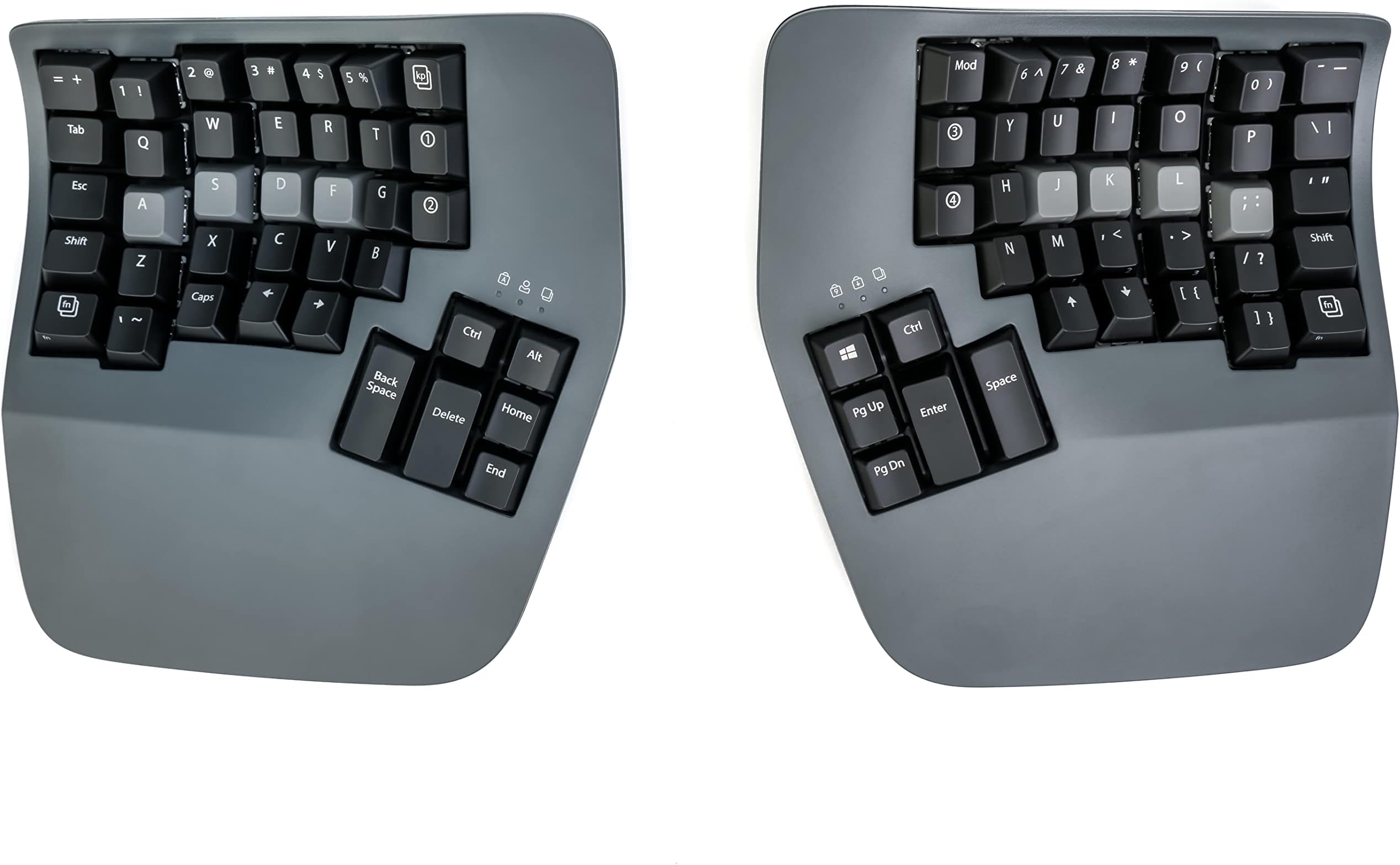
The KINESIS Advantage360 is a professional-grade split ergonomic keyboard featuring concave keywells and vertical column layouts designed to reduce hand and wrist strain. It offers adjustable tenting for personalized comfort, mechanical Gateron Brown switches for tactile feedback, and Bluetooth connectivity for a clutter-free workspace. With integrated palm supports and thumb clusters for frequently used keys, it optimizes typing efficiency while promoting a natural, healthy posture.


| ASIN | B0BCHMGZMD |
| Antenna Location | Ergonomic Typing |
| Best Sellers Rank | 53,091 in Computers & Accessories ( See Top 100 in Computers & Accessories ) 822 in Keyboards (Computers & Accessories) |
| Box Contents | Bridge Connector, Charging Cable, Extra Keycaps, Keycap Puller |
| Brand | Kinesis |
| Brand Name | Kinesis |
| Button Quantity | 87 |
| Colour | Dark Gray |
| Compatible Devices | Laptop |
| Compatible Operating System Family | Windows |
| Compatible Tablet Computer Models | AAUB P30 |
| Compatible devices | Laptop |
| Connectivity Technology | Bluetooth |
| Connectivity technology | Bluetooth |
| Customer Reviews | 4.0 out of 5 stars 179 Reviews |
| EU Spare Part Availability Duration | 3 Years |
| Enclosure Material | Plastic |
| Global Trade Identification Number | 00607998360026 |
| Hand Orientation | Ambidextrous |
| Item Dimensions L x W x H | 38.1L x 20.3W x 7.6H centimetres |
| Item Type Name | Keyboards |
| Item Weight | 3.2 Pounds |
| Keyboard Description | The Kinesis Advantage360 Keyboard is a professional split mechanical keyboard with concave key wells hollowed into a bowl shape to reduce hand and finger extension, keeping your wrists straight and perpendicular to the house row. The keys are arranged in vertical columns, better reflecting the natural movement of the fingers. The keyboard features two pronged key wells, which moderately raise the … |
| Keyboard Layout | QWERTY |
| Keyboard description | The Kinesis Advantage360 Keyboard is a professional split mechanical keyboard with concave key wells hollowed into a bowl shape to reduce hand and finger extension, keeping your wrists straight and perpendicular to the house row. The keys are arranged in vertical columns, better reflecting the natural movement of the fingers. The keyboard features two pronged key wells, which moderately raise the side of the thumb of the hand, offering a more neutral posture and reducing stress. Built-in palm supports reduce stressful wrist flexion, while thumb clusters include frequently used keys such as Enter, Space, Backspace and Delete. The Advantage360 Professional uses the Gateron Brown stem low-force tactile key switches. Keyboard description The Kinesis Advantage360 Keyboard is a professional split mechanical keyboard with concave key wells hollowed into a bowl shape to reduce hand and finger extension, keeping your wrists straight and perpendicular to the house row. The keys are arranged in vertical columns, better reflecting the natural movement of the fingers. The keyboard features two pronged key wells, which moderately raise the side of the thumb of the hand, offering a more neutral posture and reducing stress. Built-in palm supports reduce stressful wrist flexion, while thumb clusters include frequently used keys such as Enter, Space, Backspace and Delete. The Advantage360 Professional uses the Gateron Brown stem low-force tactile key switches. See more |
| Manufacturer | Kinesis |
| Manufacturer Part Number | KB360-PRO-GBR |
| Mechanical Keyboard Switch Model | Gateron Brown |
| Model Name | Kinesis |
| Model Number | KB360-PRO-GBR |
| Number of Items | 1 |
| Number of Keys | 76 |
| Number of Packs | 1 |
| Number of Sections | 1 |
| Power Source | Corded Electric |
| Product Features | Ergonomic, Hotkeys and Media Keys, Split Keyset Design, Wrist Rest |
| Product Warranty | 3 year manufacturer |
| Recommended uses for product | Ergonomic Typing |
| Series Number | 360 |
| Special feature | Ergonomic, Hotkeys and Media Keys , Split Keyset Design, Wrist Rest |
| Style Name | Bluetooth |
| Switch Type | Mechanical |
| Theme | Ergonomic Typing |
| UPC | 607998360026 |
| Unit Count | 1.0 count |
| Water Resistance Level | Not Water Resistant |
I**N
Comfortable ergonomic keyboard
This keyboard is awesome! I've gone through a bunch of other keyboards over the years from cheap Dell ones, Keychron mechanical keyboards (great keyboards for normal layouts), Unicomp IBM Model M and was skeptical at first about this, primarily as I've never touch-typed.. can type fast with numerous fingers but mostly looked at the keyboard. This Kinesis has taught me to touch type too now, within a few weeks. I remapped a few of the keys due to programming needs, but it's so comfy and allows me to sit in a better position. It's not cheap, bit if you're looking for a split ergo keyboard, I'd highly recommend it!
N**E
I love this keyboard.
I have been a Kinesis user for about 13 years. I started with Kinesis Advantage over to Kinesis Advantage II and now I have Kinesis Advantage 360 pro. This is the best keyboard from Kinesis yet.
A**D
Very happy
First time using a Kinesis keyboard. The build quality is really nice. However, a few things let it down. There is no software for configuring the keyboard, you need to edit the QMK files and use GitHub this could be a big barrier for some people. There is a web configurator but is very limited in the number of features QMK features it supports Not wrist wrists rest are included. The default keycaps are very slippy. on the positive, the key well is very nice, the keys just line up with my fingers. typing on the 360 is a very nice experience.
J**D
Fastest return I've ever made
I'm a software engineer - so I have a fair idea on what I'm doing when it comes to basic connectivity. This keyboard simply refused to pair via bluetooth. I tried to overlook the quality issues: - loose power button on the left side - loose tenting mechanism - "broken" keys (the felt as if they'd been hammered) Overall, I'm incredibly disappointed in this (nearly) £700 keyboard. Would not recommend!
V**M
Great keyboard
It took me ~ a month to get used to the keyboard, but now I love it. Something that it pushed me to do is to use right fingers to type certain keys. Also I feel a bit more efficient after I started to use VIM motions with the keyboard almost everywhere - magic.
D**Y
Junk
This keyboard is awful. Nearly 1000 dollars and you have to use a janky fork of a GitHub repository to change anything.
D**K
Very well designed keyboard
I bought used keyboard, but I arrived in totally new condition. I just missed one tool part to remove keys, but that is ok, I got it 180 EUR cheeper than new one. Small price to pay :D When starting with this keyboard you really need to use all 10 fingers, and I need to relearn typing. Its not the same as ordinary keyboards.
G**D
Adv360Pro. Very very good with minor caveat.
I purchased the Kinesis Advantage 360 keyboard a few weeks ago, and I am confident that it will be my go-to keyboard for a long time. The keyboard is incredibly comfortable to use, and I was able to easily customize the keys with the Kinesis graphical keymapping tool. Although the build quality is decent, I felt that the default ABS plastic keycaps that came with the purchase were of low quality. Fortunately, replacing them with Kinesis PBT keys made a significant difference. Initially, I had a Bluetooth connection issue, but after troubleshooting, I haven't experienced any problems since. Although the keyboard comes with a higher price tag, I believe that it's worth the investment. If you work on a computer a lot, just like with investing in a high-quality chair, it's essential to prioritize ergonomics and comfort. I recently started feeling a tingling sensation, soreness, and sometimes minor pain in my wrists while typing on a regular keyboard, which led me to research ergonomic keyboards. I'm thrilled that I found the Kinesis Advantage 360 because it has significantly reduced my discomfort and improved my typing experience. But even if you don't have any problems with your wrists/hands, I still think this is a great keyboard to consider. It took me about a week to get used to the keyboard layout, but with daily practice, typing at least thirty minutes to an hour each day, I was able to return to my average typing speed of 90wpm. Three weeks in, I feel like I am in total control of this keyboard, including all the special symbols, without even looking at the keys. I have never felt this level of control with a regular keyboard. While I changed the mapping for the hotkeys, I left the key mapping alone for the majority of the keys. Some of the special symbols, such as equal/plus, back tick/tilde, and curly brackets, were challenging to get used to, but with plenty of practice, I have significantly improved. It's worth noting that it's normal to experience some frustration when using a keyboard like this, but I believe that anyone can come to appreciate it with practice. There is a good chance that you might run into Bluetooth connection issues with this keyboard at some point, but be aware that this is a normal thing for any type of bluetooth electronics. For me, after troubleshooting, the Bluetooth issue has not returned yet, but it is very infrequent and minor enough that the benefits of this keyboard outweigh the potential downsides.
C**.
Gran producto, dejaron de dolerme las muñecas.
Llego en tiempo y forma.
Trustpilot
1 week ago
1 month ago