Buy anything from 5,000+ international stores. One checkout price. No surprise fees. Join 2M+ shoppers on Desertcart.
Desertcart purchases this item on your behalf and handles shipping, customs, and support to Ireland.
โก Elevate your network gameโfast, silent, and built to last!
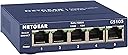
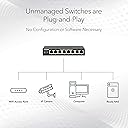
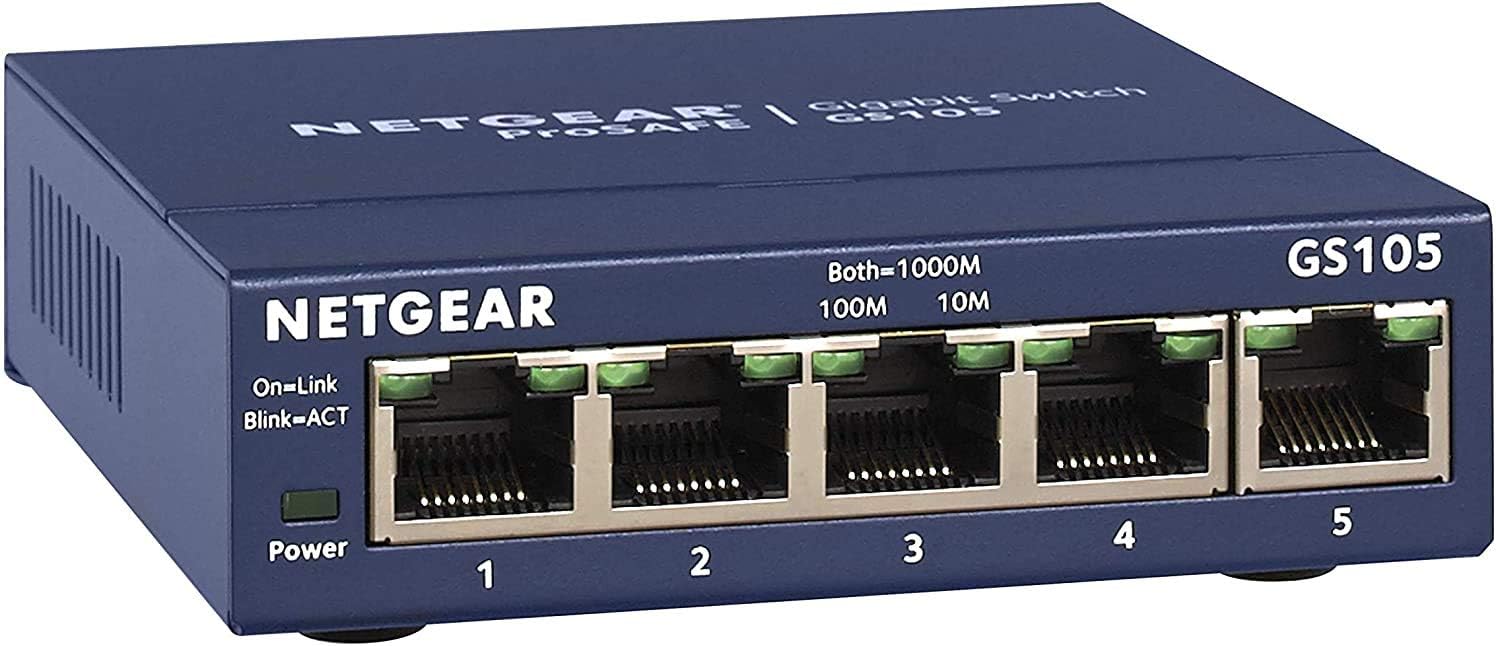
The NETGEAR GS105 is a 5-port unmanaged gigabit Ethernet switch featuring 1 Gbps full-duplex speeds, a robust metal enclosure, and silent operation. Designed for effortless plug-and-play use, it supports both PC and Mac OS, includes a mounting kit for flexible placement, and comes with a manufacturerโs lifetime warranty, making it the perfect upgrade for expanding wired connectivity in professional and home environments.


| ASIN | B0000E5SEQ |
| Best Sellers Rank | 4,096 in Computers & Accessories ( See Top 100 in Computers & Accessories ) 30 in Network Switches |
| Box Contents | Mounting Kit |
| Brand | NETGEAR |
| Brand Name | NETGEAR |
| Case Material Type | Metal |
| Color | blue |
| Colour | blue |
| Compatible Devices | Computer, Laptop, Printer, Server |
| Compatible devices | Computer, Laptop, Printer, Server |
| Country of Origin | China |
| Customer Reviews | 4.7 out of 5 stars 2,462 Reviews |
| Data Transfer Rate | 1 Gigabits Per Second |
| Global Trade Identification Number | 00606449029703, 00606449035995 |
| Included components | Mounting Kit |
| Interface | RJ45 |
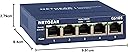
| Item Dimensions L x W x H | 9.9L x 9.4W x 2.8H centimetres |
| Item Part Number | GS105UK |
| Item Weight | 0.26 Kilograms |
| Manufacturer | NETGEAR |
| Manufacturer Part Number | FBA_GS105UK |
| Model Number | GS105UK |
| Number of Layers | 1 |
| Number of Ports | 5 |
| Number of ports | 5 |
| Platform | Windows |
| Product Warranty | 1 YEAR |
| Product dimensions | 9.9L x 9.4W x 2.8H centimetres |
| Switch Type | Network switch |
| UPC | 606449035995 778888261928 606449029703 803982764058 606449029697 |
| Unit Count | 1.0 count |
| Upper Temperature Rating | 50 Degrees Celsius |
D**J
Ideal solution for providing additional ethernet ports/connectivity.
NETGEAR GS105UK 5-PORT GIGABIT UNMANAGED ETHERNET SWITCH. (NOTE:- Please be aware that multiple different types/models of these Netgear switches are all foolishly grouped together under one single product review. Unless the review CLEARLY states the SPECIFIC model, you could be reading a review for a completely different model to the one you're looking to purchase)!!! ADDITIONALLY - Before I mention anything else, IF you do purchase the "GS105UK Unmanaged" - You MAY NEED to connect your router to PORT 5. (There's been conflicting info online regarding this issue for YEARS. Worse still, there's multiple versions of the GS105 as it's been in continuous production for years, in different variations, & released in countless nations. Some versions/variants ARE different to others!! (My last Netgear GS105 also inexplicably required the router in port 5 for example). Netgear's aging installation diagram shows the modem/router connected to a centre port. Many sources say it just doesn't matter which port, whilst others say the router must be connected to port 5!! (However, IF I don't use port 5 for my router on my switch & I connect another device there instead, it drops all other connections. Router in port 5, everything works exactly as it should regardless of connecting/disconnecting any other ports). With that out of the way.... As with many, I have an ever increasing number of devices in my home with internet connectivity that include ethernet. Router manufacturers insist on limiting available ethernet ports to 4 or in some cases only 2 & it's just not enough. If you just need additional ethernet ports without any other hassle, an unmanaged switch is an ideal solution. I've been networking PC's since the latter 1990's at a home/semi-enthusiast level or setting up for others. I've always prefered my static devices such as desktops, gaming consoles, TV, miscellaneous devices, (frequently laptops as well) to be hard wired for security, speed, & reliability, especially with some of my devices constantly file sharing, streaming, etc. My previous unmanaged switch recently died after many years solid service. I settled on another unmanaged switch for my current needs & for most who simply need extra ethernet ports, an unmanaged switch is all that's required. Given the low cost of these devices now, if I find a managed switch would be more beneficial I'll purchase one as required. I'm reasonably tech savvy, since installing the switch I've used a number of the most common tools freely & readily available for testing my home network for any issues. Thus far this new Netgear switch has performed admirably & I haven't run into any problems at all, (other than the port 5 nonsense). I've recently purchased a new router & swapped out all of my old ethernet cabling as well. I'm very happy with the performance of the switch & the entire network. The switch is very well made & they now have a full metal enclosure, (my last one was plastic). They are easily wall mountable for keeping the switch & all the additional cabling as tidy as is possible. The ports are all solid & to date I've only had one older Cat6 cable where the connector failed to lock in place. All of my newer Cat6a cables lock in securely, (which is just as well as it's considerably thicker than the 14 year old Cat6 it's replacing & the Cat6a is not particularly pliable). Otherwise, it's incredibly simple to use. Power up, connect your ethernet devices & that's it, no software or configuration necessary. (If you require greater control/options, purchase a managed switch)!! Each port simply has a pair of green lights to visually confirm the status of individual ports. The product is supplied in retail packaging with a quick start guide, (if memory serves the quick start guide hasn't changed in years). A power supply is also included, & a couple of small screws & raw plugs for wall/surface mounting. It's a good idea to register your switch on Netgear's website for warranty purposes, etc. Compared to a managed switch they are very simple but highly effective, they do their job perfectly well. I would happily recommend the GS105UK & gladly rate this updated metal variant at 5/5.
M**E
Perfect, hassle free and works a treat!
With so many of these on the market I decided to take the plunge and opted for this product as NETGEAR is a well-known name. I am quite knowledgeable on PC matters but this is simply a 'plug n play' item, just connect 1 Ethernet cable (not supplied|) in to your Router and the other into port 5 of the item and that is basically it; all you have to do now is connect your cabled items into either your Router or the Switch. It is quite small, metal, very sturdy and well-made, it also comes with screws and wall-plugs should you wish to have it on a wall; I ran speed tests connected to the Router and the Switch and there was no drop in service at all, as I run a small network in my house I connected these items to my Switch and the rest in to the Router. If you need to connect more items than what your Router will let you then this little gem is a must!
M**F
Doctor Who's not the only one with a cool blue box
If you're reading this review then, either (a) you don't know what an Ethernet switch is but are intrigued, or (b) you know what one is and want to know if the Netgear GS105 is a good example of one. If you fit into the latter category, an Ethernet switch like this is basically a hub that allows several devices (in this case up to four) to connect to one port on your router, handy if you have a 4-port router but five or more connected devices. On the surface the GS105 seems about as simple as switches come - a small, blue metal box with a power socket on the back and five Ethernet ports on the front. Each port has two green lights above it that helpfully light up to tell you the connection speed of the device at each port - one light for 10 Mbps, the other for 100 Mbps and both for Gigabit speeds. To use the GS105, you do nothing more than plugging one end of an Ethernet cable into your router (none come with it, unfortunately) and the other end into one of the ports on the front of the GS105. Then plug your connected devices (PC, games console, PVR, etc.) into the other ports on the switch, plug it in and you're done! It really is as simple as that. You can leave the GS105 sitting on your desk when it's in use, or you can attach it to a wall using screws and plastic rawlplugs - the manual says that none are supplied but there were two of each with mine. Once connected, each of your devices will have a connection to the internet, provided your router is itself connected of course, as well as a connection to each other for networking purposes. You'll need category 6 Ethernet cables to take advantage of full, Gigabit-speed networking; a lesser category may work but it isn't guaranteed, and with the lit port lights you can see whether or not your cable is giving a full-speed connection or not. But if you don't have any suitable cables, it's well worth buying some for gaining the benefits of Gigabit speeds. In the relatively short time I've had it in use, my GS105 has proved completely reliable and extremely useful. I regularly stream movies from my network storage drive to my PS3 and PC, and the increase in speed from 100 to 1000 Mbps has been noticeable. Additionally, saving large files between devices now happens faster that ever before, a boon when I copy files from one place to another, as I often do. Just bear in mind that a network is only a fast as its slowest part, so make sure all of your components, including the router, are Gigabit-capable and set up properly to take advantage of it.
S**.
Great product , But if youโre not computer minded read my review
I bought this product to increase the number of ethernet ports I needed on my wireless Rueter. I am going to be honest with you I was very green when it came to computer and accessories, Just in case you are the same as I used to be. Even though this device says it is a five port gigabit , You only get an additional four extra ethernet ports. one of the ports which is the fifth one obviously has to be plugged into the Rueter. Perhaps it sounds silly to someone who understands computers but when I read it and it was telling me this was a five port gigabit device I thought you had an additional five extra ethernet ports The overall feel and build quality is very good sturdy and strong, and is easy to mount on any surface, I mounted mine underneath the desktop was perfectly silent and I am well satisfied with this device. This was very easy to set up just plug and play no software needed. Great product especially for the price. The power lead cable is the usual length that you normally receive with most items now.
L**K
Great product for more Ethernet ports.
Fantastic little product. I have Google WiFi and it has only one Ethernet port so I needed more ports to plug in my devices. I must say I'm very happy with this. It's simple plug & play. Plug in my devices via ethernet, my Chromecast Ultra, PC and any consoles then connect it to my Google WiFi then to router. I've used it for a good while now and haven't had a drop in speed. It's small enough to fit in tight spaces or attach to the wall. Okay the downsides are it doesn't come with an Ethernet cable, it says it's a 5 port switch bit it's only 4 and finally the power port for the power adapter is on the opposite side of where the Ethernet ports are! I know nit picking but it would of been nice if all ports where on the same side that way it fits cleanly into a corner. Other than that I can't complain. It does what it's meant to and for a great price.
S**M
Works flawlessly
There's not much more I can say than has already been said about this product. It's a breeze to setup, simply plug it in, and away you go. To add something new, I'll add a little simpler explanation of what it does. This enables you to share one ethernet port among four other devices, whilst also allowing network connectivity between those devices. For example I have a single RJ45 CAT6 ethernet output from my main wireless router (a fabulous D-Link DIR655) to my study. Within my study I have a PC, network printer and frequently add one or two laptops. I have used the Switch to 'split' my single ethernet connection into the four, so that each device can have its own high speed link. They can each also participate in all network functions across my wider network. Basically think of it as a multiplug or a USB hub but for networking. If you're running out of ethernet sockets, and want to hard-wire more devices, this is for you. Why the four stars? Well, I think that the positioning of the sockets on the box itself makes it little difficult to arrange on a desk - the power's at the back while the ethernet sockets are at the front. Granted this is the way the professional devices are designed, but for home use, a different format would be more suitable. However, this is no reason not to buy this very useful device. UPDATE (12 July 2013): I have two of these and have been using them for, what, over three years now (one is remotely daisy-chained to the other). They are permanently on and have worked perfectly without failure in all this time. Have upgraded my rating to 5 stars in light of this.
P**D
Solid Piece of Kit
Bought this to replace a Netgear Fast Ethernet Switch that had been in service for 12 years. Unfortunately the power adaptor for that one was thrown out accidentally (although it was all still working perfectly) so I used the opportunity to upgrade to a gigabit switch. The construction is the same as the old switch, and is reassuringly solid and old school. A friend here saw the old switch and said "They don't make them like that any more", but it turns out that in fact they do. Apart from the construction, there isn't a lot to say about the switch. It worked out of the box and was set up and doing its thing in under a minute. And based on my past experience with Netgear I expect it to be going strong until Ethernet becomes obsolete. I can't comment on performance because I haven't taken the time to run speed tests, and since the weak link in my home network is the wireless N router, I am sure the switch isn't the bottleneck. The unit can be wall mounted and although the instructions noted that the screws and wall plugs were "not included" they actually were included. If you are in the market for a solid, no-nonsense 5 port switch, I believe this is a very good buy.
B**T
Good design and seems to work without issue
I love the metal design of these switches! Seems to work without issue. Replaced an older switch that may have caused network instability.
P**N
Lieferung
Ich habe mehr Service erwartet. Nach langem hin und her Gerรคt funktioniert nicht.
A**R
It works well
Not much else to say, it works just fine.
Trustpilot
2 months ago
4 days ago