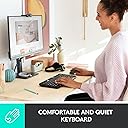
⌨️ Power your productivity, wirelessly and worry-free!
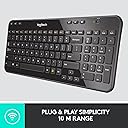
The Logitech K360 is a sleek, compact wireless keyboard designed for Windows users who demand space-saving efficiency without compromising on functionality. Featuring a full number pad, 12 programmable F-keys, and a robust 3-year battery life, it offers reliable 2.4GHz wireless connectivity with a 10-meter range via USB Unifying receiver. Perfect for professionals seeking a clutter-free desk setup with customizable controls and seamless compatibility.


| ASIN | B0055JDM06 |
| Antenna Location | Office |
| Best Sellers Rank | 307,019 in Computers & Accessories ( See Top 100 in Computers & Accessories ) 5,006 in Keyboards (Computers & Accessories) |
| Box Contents | Maus |
| Brand | Logitech |
| Brand Name | Logitech |
| Button Quantity | 104 |
| Colour | Black |
| Compatible Devices | Laptop, PC |
| Compatible Operating System Family | Windows |
| Compatible Tablet Computer Models | AAUB P30 |
| Compatible devices | Laptop, PC |
| Connectivity Technology | RF Wireless^USB required |
| Connectivity technology | RF Wireless^USB required |
| Customer Reviews | 4.4 out of 5 stars 1,734 Reviews |
| EU Spare Part Availability Duration | 3 Years |
| Enclosure Material | Plastic |
| Global Trade Identification Number | 05054814457173 |
| Hand Orientation | Ambidextrous |
| Item Dimensions L x W x H | 38L x 15.6W x 2.5H centimetres |
| Item Weight | 480 Grams |
| Keyboard Backlighting Color Support | Single Color |
| Keyboard Description | QWERTY |
| Keyboard Layout | QWERTY |
| Keyboard description | QWERTY |
| Manufacturer | Logitech |
| Manufacturer Part Number | 920-003082 |
| Mechanical Keyboard Switch Model | Taktil |
| Model Name | Wireless Keyboard K360 |
| Model Number | 920-003082 |
| Number of Batteries | 2 |
| Number of Keys | 12 |
| Number of Sections | 3 |
| Power Source | Battery Powered |
| Recommended uses for product | Office |
| Series Number | 920003082 |
| Style Name | Logitech |
| Switch Type | Tactile |
| Theme | Home Office/Productivity |
| Water Resistance Level | Not Water Resistant |
P**6
An Excellent Keyboard at a remarkably low price
I have been using an MK710 keyboard with my desktop for some years. It has plenty of bells and whistles but, as I am not a gamer, many of the functions were never used. For some time I have found the keys too soft, too close together and too high profile. It was common to accidentally press two keys by glancing off one to the adjacent key. I was looking for a new keyboard with well spaced keys, low profile and a firm touch giving a definite feeling of resistance against a moderate force and finally, one that would also take up less desk space. I first bought a keyboard direct from China at £10. It was fairly near to what I had in mind but was erratic in performance and turned out to be too small for comfortable, regular use. Perhaps not surprising at such a low cost. I had visited the Logitech website several times, looking for something suitable but seemed to end up browsing the MK and G series keyboards only. It was while looking up the LifeHacker.com website that I came across the K series. Seemed to be just what I wanted. I ordered it for delivery to France and received it two days later ! It has turned out to fulfill virtually 100% of my notional spec. It's a decent size, has clear, well marked keys, good spacing between adjacent keys with nice, low profiles. Setting up took about two or three minutes out of the box. I had other equipment connected to a Unifying USB Receiver. This didn't recognise the keyboard at first, so I plugged the Receiver that came with the keyboard into a second USB port. Logitech software immediately recognised that I was using two receivers and gave me the opportunity to remove the new one, which I did and, after following the simple options menu the new keyboard had been added to the original receiver. Ready to use ! It is well designed and laid out for a medium sized keyboard and has plenty of extra functions. Nothing that, as a non-gamer, I miss from my MK710. I chose the black version as I didn't fancy the Victorian wallpaper version and from previous reviews I am glad I did. I can understand that 'professional' typists at speed might not find it comfortable but for me it has been a completely satisfactory buy. Excellent design and quality that we have come to expect from Logitech. Highly recommended !
A**S
The best product for the price, but the glossy finish is a fingerprint magnet
The delivery came the same as expected by amazon. The keyboard itself is very compact and very solid feeling, doesnt look and feel cheap like most of the competitors at this price. The buttons are very well designed and the pressure is consistent, but you will get a "buoncy" noise when you put your hands on the letters, this might be due to the rubber like materials used for the keyboard. Overall perfomances are top notch... no missing letters, no wrong typo, no loose of connections. This is the bigger plus of this product: The Logitech Dongle really does it's work amazingly well. I got a case put at my feet and the keyboard is placed on the upper desk. Had no issues in connecting the device (which is plug and play), and never had any troubles at all. The only downside I can think of is the glossy finish which looks cool when you first get it, but in the end you will realize it's a fingerprint magnet, even tho it's pretty easy to clean and keep it sparkling. Another thing worth notice is that the button isles are very small and so it's very difficult for dust and other kind of stuff to fall underneath the buttons, so it's definitely a plus. A very well product, you cannot go wrong for the price, but the glossy finish is a bit demanding
S**S
Nice keyboard
Good sturdy keyboard and good WiFi connection
A**R
Unifying concept
The 360 (and 340) are great keyboards and compliment the superb Logitech mice well. The keyboard is compact, responsive, easy on the eye and pretty well laid out. The battery lasts for ever and it is reliable as well as cheap. What more could one ask for? Not a lot really, but one thing that does make me think is the concept of Unification. I run quite a bit of Logitech stuff over three computers and the idea of having a single dongle is brilliant, but on my faster machine, I still have to use three dongles as incompatibility exists and it is a pity that Logitech could not actually get a universal dongle for all of their kit. I have a dongle installed for each of their G700 Mouse, H800 headset and of course, keyboard and mouse. I am not complaining - far from it - but a universal dongle would free up not only USB sockets, but a bit of the ever more crowded local RF environment. This keyboard is a smashing bargain and I cannot rate it highly enough. For under twenty quid it will cut the mustard and in some style too.
P**D
An Excellent Keyboard at a good price.
My original K360 (which I’d had for many years) started playing up when some keys stopped working and others being registered as if the key was being held down. I really liked the keyboard so I ordered a replacement. The K360 keyboard is compact considering that it has a number pad on the right hand side and just like my previous one feels solidly constructed. I like the feel of the keys and the fact that they aren’t clicky is a bonus for me. Other reviewers don’t seem to like this aspect of the keyboard, but it works for me. Some other reviewers said that the dongle was missing and I was disappointed when I opened the battery compartment and saw that the slot where you can store the receiver if needs be was empty. However I found the receiver in a small slot in the box that the keyboard comes in. Easily missed if you’re not careful. So don’t throw away the box until you have found the receiver! It worked straight out of the box as soon as I switched it on with the receiver that was already plugged into the PC. Logitech unifying technology is brilliant. My only gripe was the finish of the top plate. My original one had a matt black top plate and the new one a glossy black one which shows every finger print. No worries though, I peeled the plate off the old one and laid on top of the new one. Voila! Personally I rate this keyboard highly and it’s good value for money.
D**D
Great keyboard but let down by the fold out legs
I've owned this keyboard for a few months now and it has been great overall. The keys feel a little on the firm side but it is a pretty fast keyboard, so anyone who does a lot of typing will appreciate this. Being a computer science student who does his fair share of programming, I am pleased with the typing speeds I can get from this keyboard. The Unifying receiver dongle that comes with it works well and installs almost instantly with Windows Vista and 7 (and I would imagine 8 and XP). The dongle is very small and can be paired with other wireless Logitech devices that carry the Unifying logo. Now the let down about this product is the legs. They appear well thought in that they have rubber non-slip padding to keep the keyboard stable while in use, but the design lets them down in that they are made in a 'W' shape so that the legs can be flexibly maneuvered if they need to be removed or re-inserted (I'm unsure why this would be necessary, since they are designed to fold away). It is this design that is their flaw. I like to have my desk clear when writing assignments and so fold the legs back in and place the keyboard to one side when I do this. I have to date, however had to glue both legs each on one side as they have split on one side of their 'W' shape from some light general use, just casually folding them in and back out again occasionally between uses. I have just noticed the keyboard feeling unbalanced a little and lo and behold the other side of one of the fold out legs has split. From a manufacturer like Logitech I expected much better quality and so have to say that I am a little disappointed. I have been using only Logitech peripherals now for a few years and until now have found them to be faultless. For £20, the least one could expect are legs that last. 3 stars Logitech. Good compact keyboard but disappointingly poor quality legs. Caution to those buying: keep some super-glue handy if you don't like your keyboards flat.
J**Y
Functional good value wireless keyboard
Very impressed with this keyboard, it's pretty compact but very comfortable to type on, some positives: + Nice compact size yet large enough to touch type full speed accurately on. + Nice action on the keys, they are raised above keyboard base and have a comfortable amount of travel on them. + Keyboard feels very solid, heavier than other wireless keyboards I've had before but is actually a bonus when typing away from the desk as it helps it stay more stable. Feels like it will last, unlike the microsoft wireless desktop keyboard which felt flimsy by comparison. + On off switch - not all wireless keyboards feature this but can only be good for battery consumption. + Laptop style Fn button which allows access to further functions (such has on off or email) through F1-12. Not massively useful to me, but some may appreciate it. + Media keys at the top, play back forwards, mute vol -+, fairly standard but always useful. + Unifying receiver, is tiny, installation is very easy and works with the same receiver from my mouse. There's a compartment in the battery cover for the spare receiver. And some negatives: - Keys have a plastic coating feel, the keypress action feels quality but the keys themselves not so much. - The lettering appears to be stuck on to the keys, can make out a dark outline where they've been added if you look very close. Potential here for commonly used keys to lose they're lettering but this is just speculation. - Home and end keys are in the wrong place, located above the number pad, which does take some getting used to. Same for the arrow keys which have been moved to save space. Overall I'd recommend it, nice good quality keyboard at a reasonable price from a reputable brand. Some concessions on key placement to obtain the compact size whilst still using normally sized keys, but is perfect for me - I needed a keyboard that would equally comfortable to type on a desk and on a lap and this is certainly that.
M**R
Excellent First 'PC' keyboard
Bought this for my young daughter's first 'Windows PC'. Essentially, being just six-and-a-half, she's completely new to 'QWERTY keyboard and mouse' inputting devices normally associated with the humble desktop personal computer... but in my bid to give her more user interfacing scope than just the new-school 'tablet screen swiping' ability synonymous with her generation, I was looking for something that would be small but easy to get to grips with and not be too daunting to look at and learn... but eventually - as she grows into it - be as functional as you'd expect of any media-biased PC keyboard. Yes, I know... it sounds like I'm trying to drag my poor little lady back in time to a place where glowing vacuum tube valves ruled the mysteriously large rear of the telly and Bakerlite 'chicken-head'-style knobs were the strange-but-agreeably tactile controls to Granddad's guitar amp... but I think it's important that the kids of today familiarise themselves with Christopher Latham Sholes and Douglas Engelbart's life-changing communication creations... Anyhoo... Despite it's compact size, the K360 has well-spaced and clearly demarked 'island' type keys and a numerical keypad. I found it immediately easy to touch type on (and kiddie found it equally as easy to index-finger prod). It also features versatile 'FN' (function) keys so you can easily control anything from media playback to PC standby. And of course, it's completely wireless... and in the usual Logitech manner, it pairs easily with the Unified Receiver and performs flawlessly. Downsides...? None in this application... other than unfortunately, it's finished in a 'polished black' so while it may look really nice, it properly attracts dust and filthy finger marks. More so if the regular end user is six. Otherwise, I recommend it as it's brilliant... and totally engaging for Little Miss who's learning to use it... which reminds me... I must find out the answer to her question as to why the letters aren't in alphabetical order...
Trustpilot
2 weeks ago
5 days ago