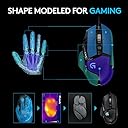
🎮 Elevate your game with precision, power, and style — the G502 is your ultimate FPS weapon!
The Logitech G502 Proteus Spectrum is a wired gaming mouse engineered for pro-level performance with a 12000 DPI optical sensor, 11 programmable buttons, and customizable RGB lighting. Its adjustable magnetic weights and hyper-fast scroll wheel offer tailored comfort and precision, making it a top choice for FPS gamers and professionals seeking both accuracy and style.


| ASIN | B019DVCW3E |
| Antenna Location | Gaming |
| Are Batteries Included? | No |
| Are Batteries Required | No |
| Box Contents | USB / 11 button or scroll / Windows |
| Brand | Logitech G |
| Brand Name | Logitech G |
| Button Quantity | 11 |
| Colour | Black |
| Compatible Devices | Gaming |
| Connectivity technology | USB |
| Country of Origin | China |
| Customer Reviews | 4.6 out of 5 stars 8,732 Reviews |
| Enclosure Material | Plastic |
| Global Trade Identification Number | 05099206062320 |
| Hand Orientation | Right |
| Hardware Platform | PC |
| Item Weight | 0.13 Kilograms |
| Manufacturer | Logitech |
| Manufacturer Part Number | 910-004618 |
| Model Name | G502 (Old Version) |
| Model Number | 910-004618 |
| Mouse Maximum Sensitivity | 12000 Dots per Inch |
| Movement Detection | Optical |
| Movement detection technology | Optical |
| Network Connectivity Technology | USB |
| Number of Batteries | 2 AAA batteries required. |
| Number of buttons | 11 |
| Operating System | Mac |
| Pattern | Corded |
| Power Source | Cable |
| Product Features | PC Mouse^PC / Mac^4-ways |
| Product Warranty | 2 years |
| Range | up to 12,000 DPI |
| Special feature | PC Mouse^PC / Mac^4-ways |
| Style Name | Proteus Spectrum |
| Theme | Gaming |
| Unit Count | 1.0 count |
A**N
Unrivaled precision and endurance.
Rating: 5 Stars As a devoted user of the Logitech G502 Proteus Spectrum RGB Tunable Wired Gaming Mouse since 2018, I feel qualified to share my experience with this exceptional peripheral. Pros: 1. Precision Performance: With a maximum DPI of 12,000 and customizable sensitivity settings, the G502 delivers unparalleled accuracy, whether you're gaming or performing intricate design tasks. 2. Customizable Features: The ability to tune weight and balance, along with programmable buttons, ensures that the mouse adapts perfectly to your preferences and playstyle. 3. RGB Lighting: The dynamic RGB lighting adds a touch of flair to your setup, allowing for customization to match your gaming rig's aesthetic. 4. Durable Construction: Despite years of rigorous use, the G502 shows no signs of wear and tear, demonstrating Logitech's commitment to quality and longevity. 5. Vomfortable Ergonomics: The ergonomic design and textured grips provide exceptional comfort during extended gaming sessions, reducing fatigue and improving performance. Cons: None to report. The Logitech G502 Proteus Spectrum has exceeded my expectations in every aspect, leaving no room for criticism. Great value for money. In conclusion, the Logitech G502 Proteus Spectrum RGB Tunable Wired Gaming Mouse stands as a testament to Logitech's dedication to innovation and performance. With its precision, customization options, and durability, it continues to reign supreme as a top choice for gamers and professionals alike. If you're seeking a reliable, high-performance gaming mouse, look no further than the G502 Proteus Spectrum. I can 100% recommend. 5+ years of almost daily use now and I don't think I will be looking for a new mouse anytime soon.
A**E
G502 (Weighted Version) - an FPS Gaming Must Have!
I can only compare this product to my other mouse - Logitech G600. This mouse is only superior to my main in FPS game but it's undescribably better at it. My main mouse definitely limited my performance in FPS games and I must say this one is a must have for any kind of FPS game. (I've only tested it on CS:GO, Modern Warfare [2019] and Overwatch but the difference between all those games makes me believe this is an all-round great product for any FPS titles across the board.) This is a great product and so is the complimentary logitech software. Wasn't expecting anything less, as it's a solid product, as most other products are from Logitech (At the right price ofc). Was definitely surprised by the effect this had on my performance. The weights are perfect for matching the weight of my main mouse so that I don't have to keep getting used to either whenever switching between them. Personally I've noticed putting more weight on the side that's last to be raised is most effective. However, this doesn't vary with me as I tilt the mouse onto my thumb when doing flicks. Once you get used to the button layout and the design it's very comfortable however, the buttons on the left of the left mouse button are very difficult to get used and sometimes I'll press one by accident - the default setting for this either increases or decreased DPI making it very irritating at times but you can change this using the Logitech app. The only real con for this mouse is that when I do 'flicks' the mouse wheel shakes about making unnessecary noise however due to my playstyle I rarely do flicks therefore it isn't annoying. Possibly the other con for me was that the mouse has to be on a surface to move as the laser doesn't pick anything up the moment you raise it slightly but after a few matches I've gotten used to this and woudn't say it's bad thing as it actually helps me with presicion and accuracy. The G-Shift function in the app doesn't seem to work the same way it does on my G600 but I cannot imagine finding use for it in FPS gaming anyway. Also to begin with the mouse actually felt horrible on my mouse mat but after a few minutes it became much smoother and now its probably smoother than my main. In terms of maintenance and cleanliness it does look like it'd be difficult/annoying to clean however, I cannot say for sure as I've only been using it two weeks. Overall I'd say this mouse is a must for FPS games but that's about it. My other mouse is much better at everything else game/general-use related. I got this at a discount and I'm definitely happy with the product however, if I was looking to completely swap out mouses I'd probably be disappoint as I don't spend most of my time on a computer playing FPS games.
A**Q
Great mouse as usual with added RGB feature now.
I had the logitech g502 Proteus core mouse before this one. Now the mice are almost identical - except 2 things. This one has RGB lighting and the blue accent portion on the left is now a black colour.. I gave the g502 standard mouse an amazing review as the best mouse I've used: "I can tell you this mouse is amazing. The customization and the accuracy is unreal. Yes you can go upto 12000 DPI but why would you? I currently use it at 2700 DPI for the game I play but it has a button perfectly placed near your thumb so you don't accidentally press it but can easily reach it when you need to. This button allows you to switch between 2 DPI settings on the fly so great for FPS games if you're trying to snipe someone and need to lower DPI quickly for better accuracy. The mouse also has a really solid feel and fits perfectly in my hand. The added optional weights is a great at helping getting the mouse suited to your needs. And the optical sensor on it is amazing." This has exactly the same sensor so I knew what to expect. The added customisation for the same price was was too tempting for me. This mouse still has the added options of changing your DPI on the fly with upto 4 presets. The mouse wheel still has 2 modes which are both amazing and easy to use. All in all I still love this mouse with now added RGB lighting to match with any setup. I also picked this up on the amazon easter deal including the wireless Logitech G933 RGB headset. I got both for £151. Now considering the heaset alone is £170 and this mouse is £70 - I practically got the mouse for free with another £20 off! Quality from Logitech - you'll never need another mouse again.
K**L
This mouse offers a very nice and streamlined attempt at a high end peripheral at ...
The G502 was a long thought out choice to upgrade from my old and trusty R.A.T. 7. This mouse offers a very nice and streamlined attempt at a high end peripheral at a strong price point. Pros: Tons of buttons Incredible sensor Attractive RGB Free-spinning wheel Price compared to competitors Cons: Just doesn't feel wide enough A little on the heavy side (without its optional weights) Design: The Proteus brand has been out for a few years now and the only difference between this and the earlier 'core' version is the addition of RGB lights into the Logitech symbol and the sensitivity lights along the side. This looks great and can be changed to your tastes instantly through the included software. My only gripe here is I wish more of the mouse lit up! It is such a cool effect and is just too understated. You can also sync it with your other Logitech peripherals so that the lights match on all your devices. My only true problem with the entire mouse is it just feels very small for what it is. I have fairly large hands and the width/height is almost too cramped. It can be quite tough between the index and middle finger on the buttons and my pinky just flops around aimlessly on the mousepad. Perhaps an optional tray to hold your pinky could stop this but it really is a minor gripe all in. Function: Much has been vaunted about the sensor in the Proteus series and feeling it first hand is pretty awesome. The R.A.T. was hardly a slouch with 6000~ dpi but the 12000 dpi this can hit gets you across the screen crazily fast. Its not just the numbers that are impressive, the mouse feels very smooth and responsive at all times and has never hitched yet. There are numerous reviews showcasing what the sensor is capable of online for interested parties. There are numerous buttons on the mouse which are all programmable (except one very special button). All the buttons are well placed and with practice you can hit them all without having to stare at the mouse first. The 'sniper' button and the 2 buttons located directly left of the left mouse click are fairly light and can be accidentally pressed quite easily. I especially love that you can even alter the profile control if you need an extra button for a game. The aforementioned button you can't program has an incredible function: It unlocks the mouse wheel and allows it to spin completely freely. This is awesome for scrolling through documents and websites which has became the sad dominant function of my PC these days. When the wheel is locked it has a strong and heavy click to it but using too much force will overcome the friction of the locking mechanism. I am not too sure of how well this will last in the mouse but considering how long the G502 has been out it shouldn't be a problem. The software is very well designed and changes functions in the mouse (such as levels of sensitivity and the colour function) in real time. You can store up to 3 profiles on the mouse itself (which will work on any computer) or you can store and use an indefinite amount on your PC. A really neat feature of the program is it can scan for installed games and will automatically bring up control lists for games stored on the Logitech website. This was very useful for DOOM where you can just drag commands (such as glory kill) onto any programmable button on the mouse and it will store it for when you play the game. It's an amazing feature and I would almost recommend the mouse on that alone. There is also a function that lets the mouse scan the surface you are using it on which lets it calibrate itself for maximum efficiency. I can't really comment on it but between bare table and the mouse mat the mouse worked smoothly and without fail. The only extras you get with are 5 3.6g weights that you can attach to the bottom of the mouse through a very well designed magnetic door. These add a weighty oomph for people who'd like that but I prefer without using any of them as the G502 is already a bit too heavy for my taste. Conclusion: All in you have an impressively engineered mouse with a ton of well designed functionality and gimmicks. Shame about the size.
R**Y
opinions and use of the logitech g502 proteus spectrum
the mouse fits very well in the hand. Very good ergonomics (small to medium sized hand) the mouse looks really cool like some futuristic weapon tech the sensor accuracy is excellent the logitech gaming software for the mouse is great. Everything is customizable down to the rgb lighting (which can be switched off if desired however I personally have it on), polling rate, dpi (dpi has up to 5 profiles and can go up in stages of 50 from 200 to 12000 however I find 1500 to 3000 enough) and all 11 buttons on the mouse. the software is flawless so far. can even customize some buttons to use as copy, paste and for other web browsing uses which is nice the placement of the buttons is good however this is subject to opinion. buttons are never pressed accidentally and there is the option to disable the extra buttons if wanted can store specific setup profiles both on the mouse and game specific some people say the base weight of the mouse is heavy however I found the base weight of the mouse is very nice with the option to add 5 extra weights each 3.6g if wanted which uses a magnetic locking system. with the extra weights the mouse can be a bit rougher to glide which is probably to be expected and using no weights the mouse if far smoother on the mouse mat. option to upgrade mouse feet is there I believe all of the buttons/clicks and scroll wheel work very well and are very nice (not too light to press/click accidentally) both mouse clicks are rated at 20 million tested on moba, fps and battle royale games which the mouse was absolutely fine on all of them however am personally not fussed as a mouse is a mouse the braided cable is nice some complaints I've seen is of a scroll wheel "rattle" from side to side which I was skeptical of purchasing because of however realistically the rattle/clicks don't happen unless I force it to happen, will see how it goes in the long run, due to the nature of having a left and right click of the mouse wheel this is likely to happen when shaking the mouse however maybe could have been made a bit more secured? all down to opinion however it isn't a problem at all. The option of having a left and right mouse wheel click is a nice feature imo I like the fact the mouse has 11 buttons I know of other people who use the same mouse and they think its amazing so can see why its a popular mouse not perfect however the mouse is very good and recommended also going by other online reviews as well
M**H
Quality all rounder with few flaws, a joy to use but other options might edge it for online FPS
Love using this mouse. For general use I use this and for single player games. However for BF1 I use the G402, which is doesnt have the quality build of the G502, but is very similar in shape. They both suit a fingertip grip, which I have, the G402 is marginally more comfortable for my larger hands, as just slightly wider at the back end, giving better pinky support. The G502 has a thumb rest though and better scroll wheel. The G402 is lighter though and tracks brilliantly and for BF1 it has the edge. I can "lock on" to a target just a bit quicker, however, the G502 is still very good. The G403 is too small for me and feels the worst build, but it in the right hands it will match the G402. I just love the feel of the G502, it's build quality and scroll wheel, so that is my main mouse now. It is a heavier than the G402 and that coupled with the tracking make the G402 slightly better at online FPS, The G403 is too light for my taste, although others will prefer that and lighter still.. If you want a good quality all rounder, the G502 is ticks the boxes, If you are a hardcore online FPS player, I would go G402, as it has a similar shape, is the right weight for me and tracking is sublime. If you have smaller hands and you online game and you have more of a palm grip then look at the G403, which does have weights. Certainly on the G502 and G402 I don't use the weights. The G402 can be had for a bargain price around £30, so bang for buck it is a winner and has the best sliders, but there is no doubt you could be happy with a G502 for a long time, especially if online FPS is not so important, because it is still very capable FPS wise.
S**S
Great on my second try
Well I haven't used a Logitech mouse since 2008; the infamous MX518 served me for many months until I discovered the Intellimouse 3.0. What I have mentioned are 2 classic mice, used by old school FPS gamers (and some of my friends still swear by them until this day). This years been quite an eventful year for me, with a whole lot of mouse experimentation so let me break it down. I play a lot of arena shooters where tracking is an absolute must, there are some games where you can get away with slightly less accurate mice but those are not the ones I tend to play, as I await Overwatch I play Quake Live quite a bit and things such as my average railgun accuracy are important. So, I returned to Quake with my Deathadder Chroma, this mouse was solid but something feels "off" about it, this is not the comfort at all, as the Deathadder is one of the most comfortable mice I used, but this never translated into my railgun at higher sensitivities, at ultra slow sensitivity the Deathadder was amazing, coming straight out of CS:GO that seeemed ok but Quake is much faster, something had to change. In came my Intellimouse 3.0, to my grand surprise this was available on Amazon UK, I instantly bought 2 of these, knowing how faulty they are, however I was not aware about the polling rate issues on Windows 10, I can get it to its trusty 500hz, and it's still by far the best mouse I have ever used, however it's not suitable for LAN events and to be honest, it's quite a hassle setting my USB to 500hz every time I booted up my PC so I had to let go of the past, and I moved on. Enter Steelseries rival, I managed to snag this for a good 39 euros, it shipped from sweden in less than a week and I coulda swore it was my IME 3.0 if not for it randomly spinning out of control sometimes ingame, also my palms sweated quite a bit! If you hadn't noticed by now I am a certified palm grip user, I have above average sized hands and I like to totally consume my mouse in my grip, so when I tried the G502 the first time, I tried to force a palm grip, it did not work at all for my hand size, I instantly returned the mouse! Now my Steelseries was allowing me to have some very good games on Quake, however it kept spinning and spinning way more than I would like, I think this is more to do with a mousepad issue as on my table it did not spin at all, however I much prefer a mousepad to a table so I had cravings for the G502 again since DA and IME3 were out of the question. ..Actually I lie, I looked for a Zowie EC1-A first but that seems to be very hard to find, so back to the G502. Adjusting my grip this mouse became awesome, I do not hit the godlike accuracies I sometimes achieved with the IME3 or Rival but I can play consistently at a close level, this is achieved with a Palm/Fingertip grip and I believe that without a few months weening I will not be able to reach such accuracies, but the mouse itself? Performs flawlessly. No spinning about, no random malfunctions when trying to twitch shoot that even my beloved IME suffered from. The only real gripe about this mouse is that it doesn't really feel like a premium product, and it was priced quite premiumly, at a hefty £67 just a few weeks ago. At the time of this review however it is at £50 and compared to other gaming mice available at this price range, well just get it.. I will repeat though, if you have above average sized hands and like to palm grip, you're going to have to compromise so keep that in mind.
R**E
Absolutely amazing mouse
I'm very happy with this mouse, I bought it for gaming primarily, as I just bought a new PC as well. The mouse is extremely accurate, which shows in games such as CSGO. I love the mouse wheel, I'm not bothered too much about the free spinning - I still find it useful sometimes if I want to scroll far however it's more of a gimmick, but I love the weight of the wheel and the clickiness. When I was deciding whether to get this mouse or not I heard that the mouse wheel was sometimes a bit too hard to spin and sometimes your finger slipped off. I don't find this the case at all, I have very good grip on it and I find it a pleasure to use. I also love the RGB lighting, it can do some cool effects and can be customised to match your gaming rig. Another useful feature is the memory in the mouse. You can have multiple profiles stored in the mouse and can switch between them with the click of a button. This also works on machines that don't have the software installed. So if you are using somebody else's PC, you can still use your own profiles. It has 11 buttons on it altogether, and all of which are fully programmable, this means you can set up macros to keys or set a key to change your DPI, you can even set up shift keys to give you access to more macros. The only bad side of the buttons is that I quite often press the left hand side button with my thumb by mistake. Luckily I only have it set to temporarily change my DPI, so it doesn't really affect me. But if you had that button set up for something else it could be annoying. This doesn't however mean I should take away a star, as the issue can be overcome and it isn't a big enough issue in the first place. This is an extremely good mouse, and a relatively cheap price too. I would definitely recommend to anyone, even non-gamers, I can see that it could increase productivity also. Thank you Logitech for making such a great mouse!
D**N
The best mouse ever
This is a really good mouse and is 100% real You can also download its software from support logitech and can edit the colours and buttons,etc. I personally think that this mouse is the perfect for games like csgo and fortnite and many more
H**N
Mükemmel
Oyuncu iseniz bunu kullandıktan sonra diğer mouselara mouse demiceksiniz. FPS MOBA ve MMORPG oyunlar için harika, istediğiniz makroyu istediğiniz tuşa atayabiliyorsunuz. DPI çok yüksek kullanıyorsanız, yanında gelen ekstra ağırlıklarla hareketi daha kontrollü hale getirebilirsiniz. Bileğiniz ergonomik pozisyonda kalıyor, diğer mouselar gibi düz ve sabit kalıp omzunuzu çıkarmıyorsunuz.
C**.
Más que un ratón, un amigo de juego, fiel desde hace muchos años.
Hace 7 años (Noviembre del 2018) que compré este ratón Logitech G502, y, aunque hace un año tuve que cambiarle las almohadillas de mouse, por el desgaste de tanto usarlo, sigue como el primer día, funcionando perfectamente, cómodo, preciso, de lo sigo utilizando en un de mis PC Gaming. Una compra muy acertada, Logitech siempre ha sido una marca sobresaliente, de calidad, no barata pero merece cada euro gastado, por lo menos a mí siempre me ha dado los mejórese resultados. Super recomendado.
D**N
Super Maus/Mäuse! /Vine-Update G502SE Hero siehe unten
Ich habe mir diese Maus als Ersatz für meine Nacon GM300 geholt, da ich mein Logitech Setup komplettieren wollte und etwas wertiges suchte. Da mir die G903 Lightspeed zu dem Zeitpunkt zu teuer war und ich mir aber keine Features aussparen wollte, wurde es die G502. Die G502 ist ein wahres flexibles Wunderwerk, gerade was die Eigenschaften angeht. Da ich schwere Mäuse mag, habe ich direkt alle verfügbaren Gewichte eingesetzt. Die große Aufsitzfläche ist sehr gut fürs Gleiten geeignet. Die Maus ist eher schmal gehalten. Geeignet ist sie für Große Hände als auch für kleine Hände, da die Druckstärke über die gesamte Länge der Maustasten (ob nun vorne oder Hinten) exakt dieselbe bleibt. Das Kabel ist hochwertig gesleevt und lang genug, um Kabelmanagement zu betreiben. Innovativ ist das Raster für das Wertige/wuchtige Mausrad. Kein ewiges auf und abscrollen mehr: einfach Rastertaste drücken und das Rad mit einer Bewegung bis zu 44sekunden von selbst durchdrehen lassen. Nun aber zum Manko: es gibt zu wenige Beleuchtungszonen und zu wenige Einstellungen in der Logitech Software. Meine alte Maus hatte 5 verschiedene Beleuchtungszonen und deutlich sinnvollere Optionen. So fehlt mir die Möglichkeit, Mausmakros aufzuzeichnen und eine "Doppelklick-Funktion". Dahingehend ist man in der Software sehr eingegrenzt. Hier ist in der Maus viel mehr möglich, wenn man sie nur lässt. Allerdings ist sie mein Preis-Leistungs Favorit. Da ich mich jetzt aber vom Kabel verabschieden möchte, steige ich nun auf eine G903 um. Dennoch verbleibt mir die G502 als Zweite Maus, wenn Funk Probleme macht :) //Update: Mir wurde vor kurzem die Special Edition (G502SE) zum Testen angeboten. Da dachte ich direkt an meine alte G502 und holte den Rentner zum direkten Vergleich aus der Ruhestandsschublade. Zu meinem Überraschen hat die Alte G502 zwar an Glanz verloren, aber nicht an Bedienbarkeit. Somit kann ich einen direkten Vergleich von Alt zu Neu ziehen! Viele der oben genannten Punkte kann ich so übernehmen wie sie Oben stehen. Die Maus hat exakt dasselbe Gehäuse beibehalten, mit dem Unterschied, dass die Special Edition weiße Akzente und ein titangraues Mausrad besitzt. Ein gewagtes Design. Neu ist allerdings der HERO-Sensor, der sich im Gegensatz zum alten Sensor deutlich smoother steuern lässt, sprich, er reagiert schneller und erkennt kleinere Bewegungen. Außerdem wurde an den Switches rumgefummelt, was mir eher missfällt. Diese haben eher einen taktilen Auslöser, der etwas mehr Widerstand leistet als die smoothen Knöpfe der alten G502. Die Maustasten lassen sich auf der vollen Länge nicht mehr mit der gleichen Kraft betätigen. Das Kabel wurde hingegen "verdünnisiert" und hat ein feineres, haustierbeständigeres Sleeve bekommen. Dies ist Balsam für meine Nerven, da der Bewegungswiderstand durch das Kabel verringert wurde. Softwareseitig bin ich zwiegespalten wie Ying und Yang. Einerseits wurden durch das L.G Hub viele Neuerungen und Verbesserungen hinzugefügt, die meine oben genannten Beschwerden bezüglich der alten Software hinfällig machen. Man kann nun Makros aufnehmen und so ziemlich alles über die Maus steuern! (Mediaplayer, Tastatureingaben/-Befehle, Rechner runterfahren) Das Problem ist jedoch die Stabilität der Software: Ich musste sie gefühlt alle 2 Starts neuinstallieren, weil sie meine Geräte nicht erkennt und dementsprechend keine Profile lädt und ich im Dunkeln sitze. Updaten geht ebenfalls nicht. Schade finde ich es auch, dass die Schwarz-Weiße Special Edition vom G Hub nur als normale schwarze G502 Hero erkannt wird. Aber das ist eine andere Geschichte. Fazit 2.0: An sich ein wahnsinnig gutes Gerätchen mit außergewöhnlich gut genutztem Potenzial. Aktuell (24.11.2019) sogar für 39,99€ zu haben. Wer für wenig Investition eine zuverlässige Maus für Lange Zeit haben will, sollte schnell zugreifen!
V**1
Une souris parfaitement optimisable, programmable et personnalisable !
Cette souris dispose de 11 boutons programmables avec un temps de réponse d'1 ms. Voici les boutons modifiables : - 2 boutons classiques : clic droit/clic gauche. - 3 boutons sur la molette : clic centrale, molette directionnelle droite et gauche (c'est d'ailleurs un système vraiment génial). - 3 boutons près du pouce de la main. - 2 boutons près de l'index. - 1 bouton sous le bouton de débrayage, en bas de la molette. Mes 2 dernières souris : Une Logitech G402, qui fonctionne d'ailleurs toujours... Puis une Razer Naga, avec laquelle j'ai eu d'énormes problèmes de fonctionnement et que j'ai dû la changer 2 fois sous la période de garantie, une vrai poisse ! (Je n'avais jamais eu de problème de souris auparavant...). Je suis donc revenue chez Logitech, sur des valeurs plus sûres pour moi. Parlons un peu plus de cette souris Proteus Spectrum G502 : - Logitech a réussi à trouver un très bon compromis entre ceux qui ont des grosses mains et des petites mains ! Elle est bien ergonomique avec une surface antidérapante, et très légère sans les poids. - En effet, on dispose de 5 poids de 3.6 grammes en forme de chevron (à utiliser si besoin), pour adapter et améliorer son centre d'équilibre. - Le capteur est optique, atteignant une résolution de 12000 dpi. On peut ajuster le DPI et se servir de cette souris pour de la bureautique, du multimédia, et le Gaming sans aucun problème. - Par ailleurs, la souris s'adapte très bien à plusieurs surfaces (neutre, rigide ou tissu) en utilisant et en modifiant sur l'assistant Logitech (logiciel gratuit en français, à télécharger sur le site officiel Logitech, GAMING Software). - D'ailleurs, il est extrêmement simple de paramétrer les profils (6 profils de base avec un système d'importation/d'exportation), les boutons programmables (avec les commandes ou par "clic"), l'éclairage 16.8 millions de couleurs (couleurs personnalisables DPI + Logo de la souris), ou le pointeur (taux de rapport et accélération). Je l'avais acheté avec l'offre Amazon d'un tapis de souris G440, et c'est un pur bonheur ! Je ne regrette absolument pas mon achat, c'est un excellent rapport qualité-prix pour l'une des meilleurs souris (voire la meilleure) sur le marché. Le seul reproche que j'ai à faire personnellement, c'est d'avoir mis un des boutons du pouce (celui du bas) un peu loin. Après elle est magnifique, très fonctionnelle et vraiment très agréable à utiliser ! Ma note : 18.5/20. Merci de m'avoir lu jusqu'au bout. J'espère que cela vous aura intéressé. Bonne journée. Vava31. ___________ Photo 1 : Le packaging de la souris G502 Proteus Spectrum. Photo 2 : La souris vie de profil, avec les boutons du pouce et de l'index. Photo 3 : Le compartiment pour les poids et le capteur optique. Photo 4 : La boite avec les poids en chevron. Photos 5 et 6 : Mise en place des poids. Photo 7 : L'assistant Logitech pour définir la surface utilisée pour la souris. Photo 8 : Visualisation de boutons programmables. Photo 9 : Le système d'éclairage de la souris.
Trustpilot
3 weeks ago
1 month ago