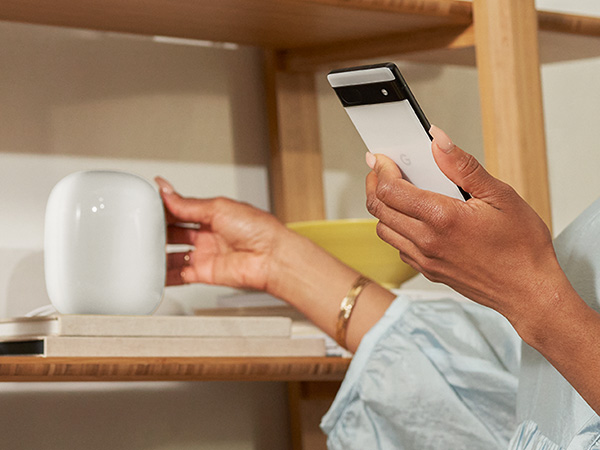
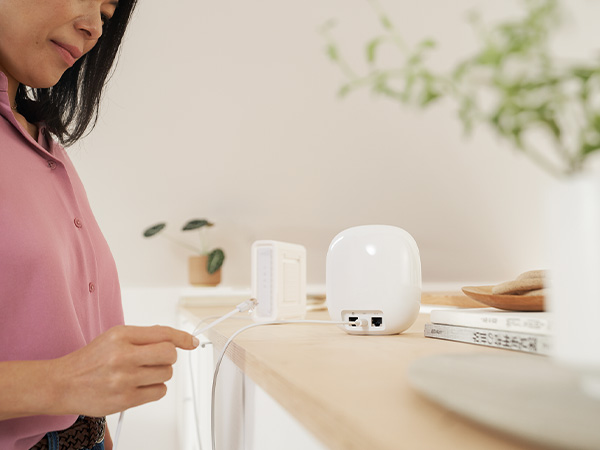
๐ Elevate your home network to pro-level speed and coverage โ donโt get left buffering!
Google Nest Wifi Pro is a premium mesh Wi-Fi system featuring Wi-Fi 6E technology that delivers up to 2x faster speeds than Wi-Fi 6, covering up to 6600 sq ft with a 3-pack setup. It intelligently optimizes network performance, prioritizes critical tasks, and offers advanced security features to keep your home connected and protected. Ideal for professionals and families seeking reliable, future-ready internet throughout their entire home.


| ASIN | B0BCQS55N6 |
| Antenna Location | Home |
| Antenna Type | Internal |
| Best Sellers Rank | #2,488 in Electronics ( See Top 100 in Electronics ) #17 in Whole Home & Mesh Wi-Fi Systems |
| Brand | |
| Built-In Media | Wifi router/extender |
| Color | Multi-Color |
| Compatible Devices | Works with devices you have today (laptops, phones, etc.), it also has the tech to make the most out of the next generation of phones, laptops, and more Compatible Devices Works with devices you have today (laptops, phones, etc.), it also has the tech to make the most out of the next generation of phones, laptops, and more See more |
| Connectivity Protocol | Wi-Fi |
| Connectivity Range | 6600 Square Feet |
| Connectivity Technology | Wi-Fi |
| Control Method | App |
| Controller Type | App Control |
| Coverage | Up to 6600 square feet |
| Customer Reviews | 4.0 out of 5 stars 2,401 Reviews |
| Data Transfer Rate | 1 Gigabits Per Second |
| Frequency | 6 GHz |
| Frequency Band Class | Tri-Band |
| Has Internet Connectivity | Yes |
| Has Security Updates | Yes |
| Is Modem Compatible | No |
| Item Dimensions L x W x H | 5.16"L x 4.65"W x 3.35"H |
| Item Weight | 6.26 Pounds |
| LAN Port Bandwidth | 1 Gbps |
| Manufacturer | |
| Maximum Upstream Data Transfer Rate | 1000 Megabits Per Second |
| Mfr Part Number | G6ZUC |
| Model Name | Nest Wifi Pro |
| Model Number | G6ZUC |
| Number of Antennas | 2 |
| Number of Ports | 2 |
| Operating System | Custom firmware |
| Other Special Features of the Product | WPS |
| Router Network Type | mesh |
| Security Protocol | WPA3 |
| Smart Home Compatibility | Smart Home Compatible |
| Special Feature | WPS |
| UPC | 193575032917 |
| Warranty Description | 1 year manufacturer |
| Wi-Fi Generation | Wi-Fi 6E |
| Wireless Communication Standard | 802.11ax |
| Wireless Compability | 802.11ax |
W**.
Upgrading from Google Wifi, Nest Wifi to Nest Wifi Pro
The only reason why I am upgrading is because my IPS gave me deal for 1 GBs. I had 200 MBs and that was more than enough for me. I had Google Wifi (gen1) for about 5 years. No problems except I had to buy extra pod to strengthen the signal (i live in condo and i have brick walls). So the signal from my balcony room (storage with concrete walls) was poor to my office. I bought nest wifi and everything was working good (connection was great / good) between nest wifi (router gen2) to 2 google wifi (gen1). I notice that after I got 1 GBs from ISP my speed was still the same 100 MBs on wifi. When I disconnected gen 1s (routers) my speed next to router (testing on iphone 14pro) was 560 MBs. If I would probably just switch my old 2 google wifi (gen 1) to Nest Wifi (gen2) I would be just fine. But since I live in condo I was like let me try that new 6Ghz. So I bought Nest Wifi Pro 3pk. Signal between 3 of them is great. If I would just use 2 it would be โGood signalโ. I live in 1500 sqft apt, but my main router is basically in concrete storage (maybe I will drill a whole and put that router inside apt and give update). Speed next to Nest Wifi pro (gen3) router seems to be the same as Nest Wifi (gen2) what I am trying to say is I wouldnโt upgrade if all my previous pods were Nest Wifi (gen2). I wouldnโt expect more than 600 MBs on this routers based on my research online. What I like about google is steady speed, and they are upgrading software for this Nest Wifi Pro (so in future it will get better) Wifi speeds: Shed 500-600 MBs download / 22 MBs upload wifi speed Workout Room about 300 MBs Office 150-300 MBs Overall I donโt play a lot of games. Tried for CS 2 and ping was good, no lags in game. Streaming videos for 6hrs no buffering problems. Overall: If are upgrading from Google Wifi yea thats upgrade. I would not suggest upgrading Nest Wifi (only if you experience network problems or want to see if wifi will be stronger but I donโt see this wifi hitting more than 600 Mbs). Who needs more than 1 GBs internet. Design: I donโt really care about it but looks like nice stone (gen3). If its goes about power connector I am not a fan of it. Gen 1 had better in my opinion because if you connect to multiple plug connector it easy. Missing: Nest WiFi pro use 1 GBs Ethernet/WAN speed (that wire entry) while competition use 2.5 GBs Ethernet/WAN speed. On the other hand who use Ethernet anymore? Gaming desktops and maybe playstation. But going forward I believe it will be all Wifi at some point. Signal: Seems to be better than Google WiFi (gen 1 and gen 2) Software: I had recently update on this which means google is working on this router. Maybe It will get better in future. Installation: Very easy on Google Home app. If you use the same wifi password and name, all your devices will connect automatically. However 3rd took me about 5 tries but finally was added. Price: Very Good compare to others. If you need 4pk see costco. Update from 14 January 2024: I found that moving modem and router from my storage/heating closet to open (without obstruction of concrete/brick walls) inside apartment made increased speed of 400-600 Mbps per second. The farther away pod goes 400+ Mbps. (On 1gb internet for comcast) I donโt see any issues with this system. I changed my 4 starts to 5 stars.
J**M
Horribleโฆ..then works great once I solved the issue
Bought this when it first became available. Just received this afternoon 11/4. Tried setting up but both access points would not connect. Spent 1 hour on the phone with support and they finally said to me โtheyโll kick this up to a senior engineer but, if I can I should return it to Amazon as it appears defectiveโ. So Iโm returning it after spending 2+ hours trying to setup and on the phone with support. Just to give background I am very familiar with google products as I have the original google wifi. Worked flawlessly till they passed a firmware upgrade on this past summer. Since then have had to restart all the routers once a week. The next one I order better work. Will update once I get and successfully setup. Update 11/26 - got the system to work by hooking each wifi point up to the router with internet first. That allowed each wifi point to load whatever updated software it needed as well as connect to the system. I was then able to disconnect each point from the routers internet via Ethernet cord move it to where I wanted it and then it reconnected to the main router. The system now works perfectly and is super fast! Love it!!! But, canโt say the same for google support. They should know how to make the system work and be able to troubleshoot it if someone calls, like me, and the fact that they werenโt able to is not goog sneed for me or anyone in the future if something happens. Now that this works I can recommend it and say itโs fairly simple to setup. Just connect each point to the router when initially setting up so they can each get setup. Hope this helps everyone!
S**L
Unreliable, unintuitive, and unsupported. Typical Google garbage.
I used to rave to people years ago about how simple and forgettable the original Google routers made connecting to the internet. I lived in an apartment complex with many senior citizens who were paying Comcastโs ridiculous monthly fees for their modem/router box of junk and convinced them one buy one to just buy a cheap modem and set up those bad boys and the troubles vanished in a snap. It was a day and night difference, and that experience gave me hope that Google was making a turn for the better on their products. Even after the first Google Nest upgrade I was thoroughly impressed with how much better my home internet had gotten. When this updated model came out, I got the day and night difference again, but only in the wrong direction. Choppy signal, horrible range between any of the devices in our home, and constantly required us to completely shut off the routers just to try and regain signal. The setup was also painful and even the Comcast guy over the phone was so confused why it wasnโt working properly. I assumed it was Comcastโs fault cause hey, it usually is. But I can squarely say that this was on Google. Hell, even our CABLED ETHERNET worked faster BEFORE and AFTER switching routers. To top this all off, the app is so horribly useless and offers so few controls. Not because itโs trying to keep your life simple, but because it stops Google from being able to collect your data is you finagle something here and there. I couldnโt even set up proper security controls. And theyโve clearly abandoned the app because thereโs just no improvements over the years Iโve owned these devices. After switching to the Unifi Ubiquiti router and spending all of 3 seconds on setting it up, our internet is screaming fast. I finally had enough bandwidth to actually write reviews on Amazon again after so long, just because Google has taken a back seat to engineering and been on the forefront of collecting data to sell it back to you. Highly UNRECOMMENDED. Youโre better off just burning your cash because itโll at least keep you warm and look kinda cool.
C**H
Super easy, huge coverage
In 2020 had our household number of devices skyrocket due to laptops, pads, smart tvs, and got a TPLINK high end, multi-band (3) wifi system...and had routine troubles with wifi crapping out, not reaching around the house, rolling restarts of every device, just a general pain. Finally the WIFI just stopped altogether after 2.5 yrs, and it was time for something else. This system is AMAZING - lots of dinged reviews are for compatibility with older systems, hodge-podge setups - maybe that's a problem, but for us it was perfect. I LOVE the REDUNDANCY built into the system: Got the three pack, one for each floor. If any of the units bites the dust, I can physically connect ANY of the three to the ISP line and it becomes the main node, and my house can survive on two (probably even one). Bought three as it was much cheaper per unit (130/each vs 180 each alone). I was worried during the setup that it said that they should not be placed more than "2 rooms" apart, but had no problems putting one per floor, opposite ends of the house. My worst node is "good" vs "great". Setup took a little while to find the internet, just let my phone do it's thing for 5minutes and it was done. Each unit took another 5 or so, so in <20 minutes, the whole house was covered! The WIFI is AMAZING - even though I had a "high end" system from 2.5 yrs ago, they've improved the signal, so now we get WiFi6 throughout not just our whole house....but our entire property as well. No more cutting out in the driveway or garden! Got to take down our extender, which caused problems because of the different network name - now just one name EVERYWHERE. Folks have complained that there weren't multiple Ethernet jacks per unit (lists two, but one is in, one is out), but if you can get cheap ethernet splitters to go off of that if needed. So for us, absolutely perfect! Only ding would be the price ...an unexpected $400 to keep the house going, but could have probably made it work with fewer units, and I'm cheap, so anything would have been too much.
B**.
Great Mesh Router, Poor Network Configuration Instructions and Troubleshooting
I am giving this Nest Wifi Pro 6e router 4 stars due to installation issues, lack of clear installation or configuration instructions in the Google Home app, and inadequate trouble shooting support from Google. First is my review of the Nest Wifi Pro 6e router, and then I provide a brief explanation as to my installation/configuration issues. Review: I live in a three story house, and I have 500mbps down and 500mbps up service from my ISP. Upon succesful installation/configuration, I am getting almost in the mid 400mbps on the mesh wireless network. When connecting an ethernet cable as a backhaul, I was getting close to 500mbps on the top floor of my house. Pros: - Tri-band router - Unlike the 2nd gen nest wifi router, each node in the nest wifi pro 6e allows for ethernet connection - Better square footage coverage per node thus requiring less nodes - May use 6ghz band for backhaul to free up 2.4ghz and 5ghz bands Cons: - Nodes no longer have google assistant speaker Installation/Configuration Issues: I recently upgraded to this Google Nest Wifi Pro 6e from the dual band 2nd generation Nest WiFi mesh network , as after 5+ years, it was showing its age. My internet speeds and connection were starting to suffer. Note that I have added many devices to my home network over the past 5 years, which is a contributing factor. I was considering a WiFi 7 router but given the cost and how few devices currently can take advantage of wifi 7, I decided to give the Nest Wifi Pro6e a try. The first two weeks after successfully installing the Pro 6e mesh network, I experienced intermittent drop in internet coverage and my google apps including google home, youtube, nest, etc... were consistently erroring when loading. I use Verizon as my ISP and I have had the same configuration for the past 5+ years, so it was baffling why all of the sudden I was having these internet issues. Upon several unsuccessful chats with Google support, I finally figured out the issue. My Verizon cable modem/router is an internet & TV combo modem/router. Originally my internet service was connected directly to the Verizon modem/router combo and it was set in bridge mode, and my 2nd gen nest wifi was connected to the Verizon modem/router downstream. Strangely enough, after 5+ years of having this configuration, it was apparently the cause of my issues. Therefore, I tried connecting my internet service directly to my new Nest Wifi Pro 6E and then connected the Verizon cable modem/router downstream. This worked, my internet problems were finally resolved. I would have rated this product 4.5 stars or even 5 stars, but I am only giving it 4 stars as Google does not provide clear installation or network configuration instructions in either the Google Home app or on their website, based on the ISP or ISP equipment involved in setting up a home network.
B**N
Easy to use. Solid performance.
Purchased the 3 pack to cover my 4800 sq ft house. Looked at several systems but these ended up being on sale so I gave them a shot. In the box you get three units and power cords. I was a little disappointed they only gave you one Ethernet cord but not a big deal. Each unit is smaller than I expected. They blend in really well around the house. Setup was easy. The home app.walks you through everything. I set it up with a wired back haul and they worked with no issues. Each node setup quick without any issues. Speed and reliability are good. No issues since I started using it. I only run a 300/300 internet so this is plenty fast for me. They have decent features but if you are looking for power user status I would go elsewhere. These are more the plug and play type systems. Overall I would recommend these to anyone who needs a cheap and reliable system.
P**R
Delivers more than it costs to purchase
So far (about a week in) the experience is being great, and above my expectations. This system is minimalistic, but is focused on delivering reliable and fast internet and making its coverage reach very good . Zero issues so far, super-fast Netflix/Prime Video and other streaming services' load time and performance. Netflix loads instantly in 4K. Speed tests are stellar too. My multiple outdoor Ring cameras work flawlessly and show good live stream and fast. Ping time is not the greatest I've ever seen (10-20ms typically), but can't observe any adverse effects of it. I do not do online gaming. These guys know how to squeeze maximum performance out of modest hardware. They do it through well-designed, optimized and constantly perfected software. The units themselves are small, nice-looking, but unobtrusive.
M**E
Not bad but over priced
Our 5 year old Netgear Orbi started acting up so I gave this Google WiFi router a try. I had read reviews about it before but was never a fan due to the limited ethernet ports and non existent USB port. I also thought it was over priced. Over the last year I've added a few Google Nest cameras and figured now was the time to round out the Google ecosystem.. While set up was super easy with the Google Home app (I had already been using it for a while), the internet speeds were not as fast as with our previous routers. (I had also briefly used Verizon's Fios router and extender but set up was difficult and their app horrible). I did enjoy using the app and was able to easily do a lot like set up parent controls, run speed tests, test the network, and see what devices were active. After several days of working fine, the router started randomly dropping the signal. Devices would lose connection but then reconnect within a few minutes. This went on several times over the course of 2 days. I reset it a few times and checked with our ISP, who indicated there were no outages. I ran to of all places...Google...and found several threads of people having the same issue. The common theme was Google was aware of the issue but refused to provide a fix. We recently increased our speed to a Gigabit and have a lot of wired and wireless devices. However, each router (we had the 2 pack) is supposed to be able to support up to 100 devices. My guess is the router was either faulty or couldn't actually handle all the traffic. I'm not ruling out grabbing an updated version some day if and when our Netgear finally craps out (I got it back up and running). However, I didn't want to take a chance on this fairly expensive router after it exhibited problems barely a week into using it.
R**I
Cumpre muito bem com o que promete
Muito bom
S**D
ู ุณุชุญู
ุงุณุชุนู ูุชู ู ุจูุชู ูู ุฏู ุณูู ูุงู ูู ูุงููู ุงูู ูุณุชุงูู ุงู5 ู ูุชุฌ ุฌุฏุง ู ู ุชุงุฒ ูุณุฑุนู ุงูุชุฑูุช ุฌุฏุง ู ู ุชุงุฒู ูุงุจููุฏ ู ู ุชุงุฒ ุงูุถุง
J**G
Ready to setup, solid performance
Ready to setup and solid performance. Only downside is that with some Galaxy phones the wifi needs to be disconnected sometimes. Don't know if it's Samsung or Google wifi that's the issue but the office jag never had problem on other access points
A**K
Device not working properly
Used product , device not working properly etc ..
A**F
Not worth it
Worst then previous generation!
Trustpilot
2 weeks ago
1 week ago