Buy anything from 5,000+ international stores. One checkout price. No surprise fees. Join 2M+ shoppers on Desertcart.
Desertcart purchases this item on your behalf and handles shipping, customs, and support to Ireland.
⚡ Power, Portability & Performance — All in One Sleek Hub!
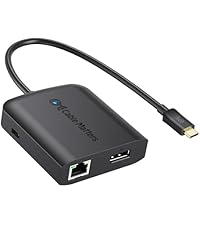
The Cable Matters USB C Multiport Adapter is a compact, bus-powered hub that transforms a single USB-C or Thunderbolt port into a powerhouse workstation. It supports stunning 8K HDR DisplayPort output, delivers up to 60W charging, and includes fast Ethernet plus dual USB 2.0 ports. Designed for professionals on the go, it’s compatible with a wide range of premium laptops including MacBook Pro, offering seamless connectivity and workspace expansion without the clutter.


| ASIN | B06Y5N3YCD |
| Additional Features | Play, Plug |
| Best Sellers Rank | #520 in USB Hubs |
| Brand | Cable Matters |
| Color | Black |
| Compatible Devices | Keyboards, Laptops, Monitors, Mouse, Tablets |
| Customer Reviews | 4.1 4.1 out of 5 stars (478) |
| Data Transfer Rate | 480 Megabits Per Second |
| Enclosure Material | Plastic |
| Hardware Interface | Thunderbolt, USB |
| Item Dimensions L x W x H | 3.5"L x 2.3"W x 0.6"H |
| Item Weight | 79.38 Grams |
| Manufacturer | Cable Matters |
| Mfr Part Number | 201046-BLK |
| Model Number | 201046-BLK |
| Number of Ports | 5 |
| Operating System | macOS 12 Monterey |
| Total Usb Ports | 2 |
| UPC | 818707020494 |
N**S
Great if you have DP or mDP display
This compact hub works well. I needed it for the DisplayPort adapter mostly, which delivered full resolution output without issue. If you have an older DL-DVI display (ACD 30") like I do, you'll also need the (Apple DL-DVI -> Mini DisplayPort adapter) + (mDP -> DP adapter, I used one from Togonn).
E**H
Actually does work
I tested up to 4k160hz, it works exactly as advertised.
M**S
Only 4k@60hz dongle under $100! (with a few caveats)
Only dongle in this price range or even close to it with 4k@60hz support. Pros: - Unique and smart implementation in regards to ports in this price range for a single cable USB-C dock. - High response rate on the DP port with 4k 60hz capability. I did a lot of browsing for a dock and this function is not found at this price (not even close). It may be a very good choice for gaming if you run a high refresh display from a gaming laptop with a Thunderbolt port like I do. Cons: - This behavior is very rare but drivers are sometimes are inconsistent; it has a built in ROM with a driver if needed but it only shows up sometimes and the display will behave erratically if you for example have another setup at work with a different dock like I do. - Power delivery is minimal, will only charge light powered laptops at 60W and this includes the USB 2.0 ports, don't expect to run anything but a mouse and keyboard (tried a laptop cooler as a test with usb pass-through but it wouldn't power the mouse connected to the cooler). - Biggest caveat for me is the network speed is only 100mb versus the more common gigabit which limits file sharing on my home network. - You need a separate charger for power delivery to your laptop, but that's normal for most USB C dongles. For reference, I use it with my Lenovo T480 and an MSI gaming laptop (no power delivery on the MSI).
D**O
2560x1440 at 144hz with no problems UPDATE: PD failed after a couple of weeks
I have a DELL S2716DG monitor (which is mostly for gaming on my windows pc) that works flawlessly with this adapter. I'm very impressed with the functionality and price. I have the 13" MBP power adapter running the pass-through, keyboard and mouse in both USB ports, and then obviously display port from adapter to monitor. No lag, no hangups, no drivers required, just plug and play. The product is very lightweight, which I suppose is a plus and a minus. It doesn't feel super substantial or durable, so time will tell how it holds up months and years from now. For now, though, it works perfectly. Highly recommended. ** UPDATE: Unfortunately the PD failed after a couple of weeks. If it simply failed to charge it wouldn’t be that big of a deal, but it actually drained my mbp battery twice overnight. From 100% battery, plugged in and sleeping, to a complete drain. Not even sure how it managed to do that. But it’s pretty upsetting, since it’s bad for the battery’s health to drain it completely like that. Not happy. Stay away.
S**B
Works great, but not perfect.
I have this adaptor connected to a Iomega KVM switch, enabling me to switch between my gaming PC and my 4k monitor. I bought a cheap adaptor that had more bells and whistles, which failed and is being returned. This one is the same price. While I don't get as many ports and not as clean of a layout, this one actually works. Here is how it could be better: 1. If the ports could all be on one side, or two sides, it would be much cleaner. Having plugs sticking out of all sides is not ideal...but also not a deal breaker. 2. I have two USB-C enabled laptops, a MacBook and a Dell. I will unplug this adapter from one and plug it into the other. When I do this, the wired network port fails to grab an IP from DHCP. Unplugging the USB-C passthrough power from the adaptor to power cycle it ends up fixing it. I gave up on that and just run wireless. 3. This one took me a while to figure out. When switching from my PC to a laptop using my KVM, I have to make sure the KVM is switched to this adapter before plugging the USB-C port into a laptop. If not, the display won't work. Overall, none of this is a deal breaker for the price.
W**I
solid USB C hub for displayport displays esp for Macbook 12
If you have a need for a USB-C hub with a displayport to interface with a display, this is the cheapest and most featured hub you will find. I had a need to connect my mac laptop (macbook 12 with a single USB C connector) to a display that had a Dual DVI connector. I also had a displayport to dual DVI adapter, so this would also work with the apple cinema display, or anything up to 8k. It has 100 MBps ethernet, 2 USB 2.0 ports and a USB c power passthru. Due to the fact that USB C has 4 data lanes and anything more resolution than 1080p HDMI uses more than 2 lanes, all 4 data lanes are used to drive the displayport up to 8k. That means you only get USB2 ports, not USB 3. So forget about all the hubs that advertise displayport and USB 3, those cannot get you beyond 1080p resolution on a USB-C connection. The 2 USB 2.0 ports are sufficient to drive a keyboard/mouse and power a displayport to dual DVI adapter. BTW, you will also need to purchase a male displayport to female minidisplayport cable to adapt to Apple cinema or other minidisplayports. FInally, the ethernet needs a driver to work on macs, and it isnt simple to find. You need to go to the support on the cable matters, look up the driver link for windows, and it links to a realtek page where u can download the driver for windows, macs and unix. It took me several months of looking to find this adapter for my Macbook 12. I bought several that made claims and didnt work. There is nothing else like this available. It has been rock solid. Hope this saves people a LOT of time.
T**Y
Most USB-C dongles use the DisplayPort alt-mode of the USB-C specification to handle the display outputs, but usually use internal converters to HDMI. Unfortunately, they only wire the pins for HDMI 1.4, which can only run 4k displays at 30 Hz. This is due to the limited pins in a USB-C cable. If you want to run DisplayPort or HDMI 2.0, then you can't have USB 3.0 (unless you use thunderbolt). I needed to run this on a Lenovo Thinkpad with only 1 USB-C port, so having USB-PD passthrough was a much so that I could charge while having a monitor plugged in. This is the only dongle I found, with DP, and USB-PD passthrough. The 2 USB 2.0 ports are an added bonus, and work for a mice and keyboard. The Ethernet also runs from the USB bus, and is a 100Mbit one. It is picked up by the RTL Linux Kernel driver (though sometimes it disconnects after you suspend/resume the laptop). Overall, it works for my use!
C**T
Ein USB-C Port replicator oder Dock zu finden das volle Ausflösung, HDR und Freesync unterstützt ist nicht leicht bis eigentlich unmöglich. Dieser Hub kann es! Da die Übertragungsrate von USB-C neben dem vollen Displayport-Signal nur noch USB 2.0 durchlässt und CableMatters nicht zaubern kann, ist eben nur noch ein USB 2.0 Hub integriert. Für Maus, Tastatur und Webcam reicht das aber aus. Sehr nervig ist die Kabellänge die einfach viel zu kurz ist. Ein abnehmbares Kabel wäre wirklich wünschenswert gewesen - es gibt durchaus USB-C Kabel, die die volle Bandbreite über mehr als 5 cm übertragen können.
W**I
Due to the fact that this dock only has USB 2.0 ports, it means more bandwidth can be allocated to the video, so this is the first dock that I have been able to find which will support the full capabilities of my monitor (Asus Rog XG349C). It has been working flawlessly with both my Macbook Air M1 as well as my Razer Blade 14 (3070 model). The only downside is the form factor is a bit ugly on the desk. I have tried extending it with USB C cables so I can mount it under my desk and only have the one cable above my desk, but often see intermittent blanking of the display with any 10GBps cables I have used. More recently have tried a more extensive USB 4 cable and while it's still infrequent, the problem has been coming back every now and then. Without the extension cable in the equation, it never happens with the dock plugged in directly however.
L**.
I just wanted to thank Cable Matters customer service for directing me to this product. I've tried All Dell, Lenovo, Pluggable, etc. TB4 and USB4 docks to get my AMD 6800U Laptop to work with the docking station, but none of them worked. The laptop has USB4 and USB3.2 with USB-C. I'm happy to report that this dock or adapter works with Neo G9 monitor at full 240hz without any problems. This means this dock supports 4lane DP with DSC. Also, the Realtek LAN adapter is showing its GBE, not 100mbit. Device Manager shows Realtek 8152 which is GBE. It might be bottlenecked by the USB 2.0 throughput but it has the hardware to saturate the USB 2.0. Lastly, Power Deliver works with 65w charger that Laptop came with. My next purchase was going to be Caldigit to try but this does everything I need. Highly recommend!
D**I
I have a Dell 49" ultrawide monitor that supports display output via usb c (with power delivery), dvi, hdmi, dp. It runs at an awkward 5k resolution (5120x1440). It's a beautiful monitor but, its a pain when you need to share a screen (apps and web apps) via video conferencing so, I need a 2nd monitor because my laptop only supports display via usb c. This solved multiple problems. Usb-c from the monitor to the hub provides power to the hub and connected usb devices. DP from the monitor to the hub provides display out-in. Connecting the usb-c from the dock to the laptop provides power to the laptop, display at 5k and access to 2 connected devices that also require power (headset blu-tooth usb connector and webcam). Works as advertised.
Trustpilot
1 week ago
2 days ago