Buy anything from 5,000+ international stores. One checkout price. No surprise fees. Join 2M+ shoppers on Desertcart.
Desertcart purchases this item on your behalf and handles shipping, customs, and support to Ireland.
🔍 See the unseen, wirelessly and worry-free!
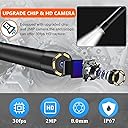
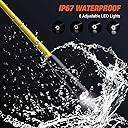
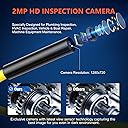
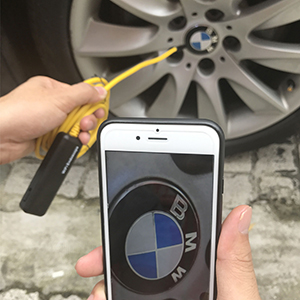
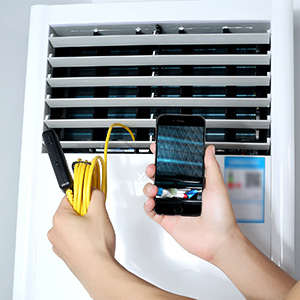
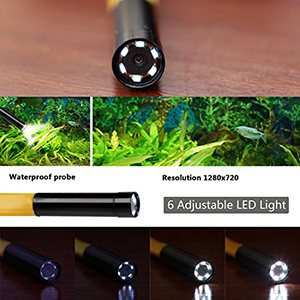
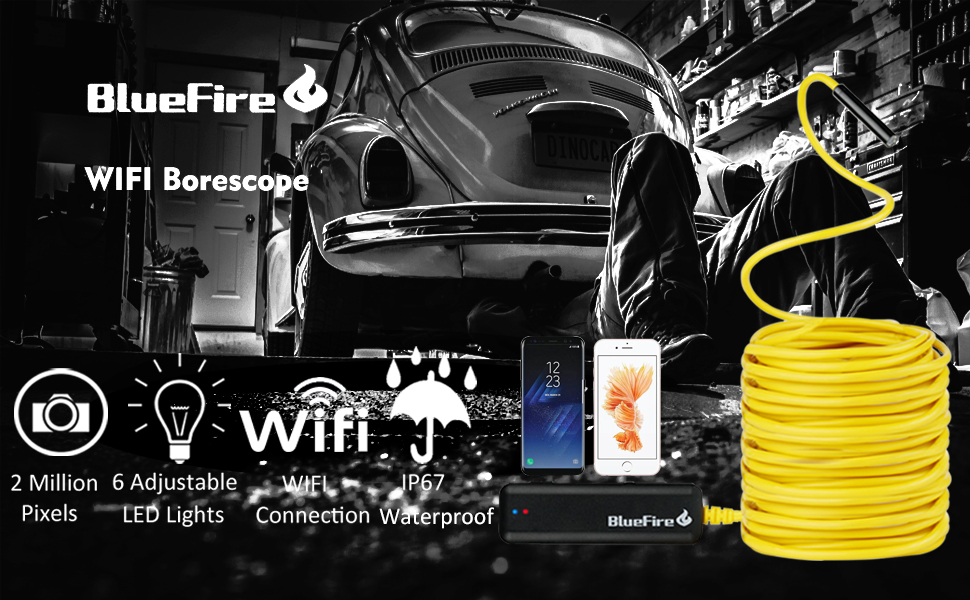
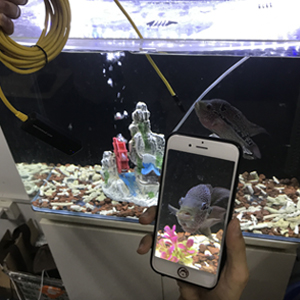
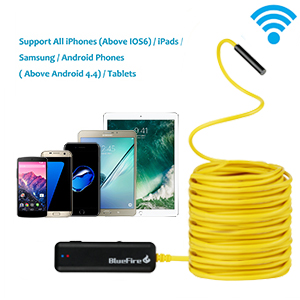
The BlueFire Semi-Rigid Wireless Endoscope offers a 2MP HD camera with adjustable LED lighting and three resolution settings, delivering crisp real-time images via WiFi to iOS and Android devices. Its IP67 waterproof semi-rigid cable allows precise navigation in tight, wet spaces, making it ideal for professional-grade inspections without the clutter of cables.


| Best Sellers Rank | #196,575 in Industrial & Scientific ( See Top 100 in Industrial & Scientific ) #8 in Endoscopes |
| Customer Reviews | 3.9 out of 5 stars 1,862 Reviews |
M**.
Worked GREAT - FINALLY, after I figured out the instructions.
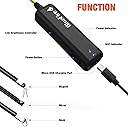
Revised from 2 stars to 5 stars I received a new unit from the manufacturer promptly along with an email urging me to try the new one. My original problem was primarily due to poor documentation and my misreading of it. The PRODUCT IS GREAT! The SOFTWARE IS GREAT. The documentation is ... not so great - confusing. The instructions are poorly written by a non-native speaker, so here I am helping out North Americans: 1) Before you do anything, download the app with either the QR code (very handy) or at Google Play or the Apple App Store. DO NOT OPEN THE APP YET*****. 2) So you are sure the device has enough power, charge the endoscope at the mini USB charger port on the opposite side as the camera. After 15 or 20 minutes, you certainly have enough battery to test the device. 3) Turn the power on at the device. The slide switch is on one of the the long and narrow sides next to the charging port. The blue light indicates that the WIFI is communicating. The other light is red when the unit is on and green when the battery is charging. They are all off when the unit is off. The green LED comes on if the unit is off and charging on the mini USB charging port. 4) To communicate with the device, go to your PHONE's WIFI center and find the Jetion_???? SSID. This is your first sign on which you can change later. the password is 12345678. 5) Open the app you just installed ONLY AFTER YOU HAVE SIGNED IN TO THE Jetion_???? WIFI network. 6) The endoscope light is controlled from the roller wheel on the same side as the ON/OFF switch. Roll it Toward the switch for brighter, away for dimmer. 7) NOW OPEN THE APP - VOILÁ, you are looking through your endoscope. SOFTWARE CONTROL: If you press the gear Icon, you can CHANGE the name of the SSID and CHANGE the password if you wish. The top line changes the SSID - I changed mine to endoscope and also made the password endoscope since I was not worried about security. Use the red "X" in the upper left hand corner to go back to the endoscope screen. PHOTOS & VIDEO on iOS: Works REALLY well. When you give it access to your photos, it neatly puts them with your other photos and videos. Very convenient. Original Review: Received this unit and it worked as advertised for an iOS 10.3.3 iPhone 6+ ONCE. I shut it down and attempted to reconnect with the wifi and it would not connect. It was as if the password had changed itself. I tried over and over in the course of two days. RETURNED. ***** This happened because I accidentally changed the password because I opened the app before I knew the gear changes the password, it is not the place to sign in. You sign in on to the device your phone's WIFI settings, not the app settings. The device automagically works when you are on its WIFI.
J**Y
Good quality - tricky to use in tight spaces
The camera pairs with my iPhone easily. The picture is good and the light is plenty bright. I have used it to explore the joist cavities between my first & second floor looking for paths to pull ethernet cables. The camera works great, but the 30' cable makes it a bit unwieldy, especially when trying to rotate the camera. The cable is pretty stiff, but tends to sag after about 4 feet or so. I suppose that is not much worse than the average tape measure, but still kind of challenging. Taping it to a fiberglass wire fish rod helps with that. I was not able to make the 90 degree mirror work. All I could see was a big blue spot. I may have been doing it wrong, I don't know but I found it easier to just bend the cable 90 degrees and feed it into the hole that way. Have not tried to catch anything with the hook yet, but I can see it and around it. It does take some getting used to interpreting the pictures - I never know which way is up until I spin it around and look at all sides. All in all, it does what it says and does what I need it for.
J**N
Turns "I Have No Idea What's In There" Into "Oh, That's What's In There"
I had a drainage issue behind a wall, and my options were: call a plumber and pay a small fortune, or buy this and maybe figure it out myself. I chose the snake camera. Best decision. Setup is genuinely simple once you know the trick: connect your phone's WiFi to the camera's own network signal first, THEN open the app. If you try to connect from inside the app it can be confusing, going through your phone's WiFi settings first makes it click immediately. First-time setup takes about three minutes. The 33-foot semi-rigid cable is the real selling point of this version. The semi-rigid design means you can shape and steer the camera rather than having it flop around uselessly. For walls, pipes, engine bays, HVAC runs, and crawl spaces, the length and steerability together make it genuinely useful. Image quality at 2MP is adequate for most inspection tasks. The six adjustable LED lights around the lens handle dark spaces well. The best focal distance is about 3-8 cm from the object, so get it close to what you're inspecting. The IP67 waterproof rating on the camera head means pipes and wet environments are fair game. Note that the WiFi module box is not waterproof, so keep that end dry. Battery life runs a few hours on a charge, which is usually more than enough for a single job. The companion app (WiFiView) works, though it is basic. Video and stills both save to your phone. For the price, this is a remarkably capable tool. It paid for itself the first time I used it.
E**Z
This thing freezes A LOT
I would not recommend this device. While it is an endoscope, and it is semirigid, and it does function (at times) this thing has issues. First: it gets stuck a lot. The camera and LEDs are fairly large, and like to get stuck even when pushing through a wide, drilled hole. Second: the instructions are very poor. You meed to turn the device on and connect to its WiFi network to get video. While it has a USB Micro adapter, it's just for charging and cannot be used as a direct connection. Third: it freezes. A LOT. I'm not sure what causes the freezing, but it seems like bumps or lighting changes. Maybe loose wire inside? Anyway, when it freezes, you have to turn off the device. Which your phone then connects to regular WiFi. Then you turn thebdevice back on and switch networks again. Thrn you might get picture back, and if lucky it works. If not, you repeat this cycle over and over and over until you want to throw it away. I cannot recommend this purchase.
K**N
Was decent while it worked. Software support is terrible.
So I bought this unit to help me do some work in ducts and in walls. It actually worked fine for that purpose while I used it. It was a bit hard to maneuver once it was in more than 5 feet or so but otherwise I had no complaints about the image quality or ease of use from the software side. The wifi connection using an app seemed like a strange way to do it but it worked and I was happy enough up until the point that software stopped working. Sometime this past year the software simply stopped running. The moment I would try and open it the app on my phone it would immediately close and report that it had crashed. Uninstalling and reinstalling the software did not help at all and attempts to reach the company wouldn't yield a response. I decided to give them some time to resolve the problem and update the app but here we are quite a long time later and the app still doesn't work and there's still no update to resolve the problem. If you read the reviews of the app in the play store you will find this is not an uncommon issue. It seems the app does the same thing to most people out there and, as such, the apps rating has sunken to 1.6 stars. Sadly I have not been able to find any other software that will let you use this device and without the software the endoscope is effectively useless. Near as I can tell the device still works just fine, but sadly that doesn't mean a thing if I can't run the software required to actually see what it sees. Avoid this one and go with a unit that connects via USB or has its own screen. They may cost more but at least you're much less likely to run in to this problem. (Edit: I increased the review to 3 stars because the unit itself does a great job aside from maybe lacking rigidity once you get so much out, but the software issue is the main problem. Well, I found that you can get newer versions of the software if you hunt it down in the Google Play store and not just rely on the one linked on the paperwork with the unit. It would seem when they release a new version they just put a whole new version on the Google Play store instead of simply updating the existing ones. So there IS newer versions out there that do work on newer devices, it just seems you have to hunt them down.)
P**T
Great quality for the price
Depending on what you are planning to do with this, it will either be sufficient or insufficient for your task. We purchased this to look into our pipes as our bathroom sink has a major clog. We had previously watched the plumber stick a camera into both our toilet and vents when the toilet got clogged so for the price I figured this camera was worth a try. While we couldn’t see what was clogging our sink drain, we were able to look into every vent from the roof, we were able to discern that the snake we were sticking in the drain might have been going in one of two directions (i.e. up the vent or down to the main line), and also looked at the pipe structure under the house (not easy since our house is on a hill and the crawl space is sloped). All in all, the camera is easy to use, gives pretty good images, lights up dark places well (see photo of one of our sludgey pipes. can’t imagine a darker place than a vent 25 ft down or so), and fits almost anywhere. You can capture still images or video from the app you use to view from the camera. The app is pretty self explanatory, no bells or whistles but you don’t really need any with a device like this. Start up is almost plug and play so long as the camera is charged and you can locate the wifi easily. I have no problem with either. I did notice that at first use the camera seemed to be fully charged yet turned off when we were using it. No problem, I just connected it to a battery pack since we wanted to use it right away.
P**Y
Works great, makes you want to think up new uses for it once you have one
Easy to use--synced up with my Android phone right away, and I tried it on an iPad as well, to get a larger screen. Both worked great. I bought this specifically to look in a vanity drain that was clogged, where I was having trouble getting the auger to drop. If someone made this with some replaceable cutting tools on the end I could have cleared the clog using this alone, but of course this isn't a medical device to remove polyps. The picture was good, the lighting was perfect inside a drain pipe, and I couldn't be more pleased. I also used it through a small hole in a wall cavity to make sure I wasn't about to cut some 110 volt wires, and it was very useful there as well, although perhaps not as entertaining as snaking around bends in pipes. Great price for an excellent little tool, and the fact that you use your own screen makes this affordable. Highly recommended.
G**D
Useful for many skills / trades / HOMEOWNERS
This is a great scope for all walks of life. From an auto mechanic to a home owner that wants to verify his downspouts don't just go into the ground at the side of his house or only a few feet out (ME!). AS OTHERS MENTIONED, this is semi rigid but don't expect to be able to fish this through something 30' away. It will just crumble into a ball behind your wall, engine etc. You will need to tape this to something like a cabling 'fish tape' which can be found here at amazon.com or your various big box hardware stores (not the little ones). Electricians use fish tape to 'fish' wires into tight spaces and through pipes. It's a coil of wire much like a coat hangar wire but has more flexibility and rebound to it to be wound up into a 'reel'. Tape the boroscope on the fish tape and start fishing! :) Overall the picture quality was pretty good. It's all about your technique on how you attach it to the fishtape and how the camera is angled once into it's tiny spot. I do wish this had more of a fish eye lens/wide angle to see more but it's fine. Only complaint would be that getting connected, launching the app etc is a pain. If you need to scope multiple areas like I did with my downspouts going into the ground, I had to keep shutting it off then reconnecting to save the battery which with a full charge will only last about 10 minutes. 10 minutes goes fast when you are fishing in and out of areas , moving it around a lot, trying to actually see in the areas you are scoping to get a 'big picture' in your head as to what you are looking for. Durability , we shall see. Only used it a few times but suspect I will accidently step on the little plastic black box on the end and smash it. I also see the wire eventually needing some electrical tape to repair it. Overall I think this will last but will it still function. That's remains to be seen as this may be like many items made in China, simply throw away items that are not meant to last 10 years or even a lifetime. I like to buy things that will last but sometimes you just don't have an option. And for 40 bucks, I cant really complain but will when it breaks..
M**A
Fácil de usar
Quede gratamente sorprendido por lo fácil de echar a andar... funcionó perfecto con mi iPhone XS
A**N
Hi quality and the endscope camera
Wasn't expecting miracles, however this product is high quality :) worked flawlessly sinks with Wi-Fi to your phone it has a lovely feature to “flip the screen” so I have to work bending the cable around to find the right angle, worked every time flawlessly I’ve used it 12 times now back in its case ready for next time, I can highly recommend this product don’t pay top dollar this is a nice little unit works beautifully, if you want to view something even 4 feet away you’ll see that no problem but it works best within 5 inches to about 2 feet with HD Nice clear shot footage can highly recommend this camera - Andrew P
J**S
Bueno pero deberia tener mejor imagen
Es lo que ofrecen, pero segun la resolucion que ofrecen esperaba mejor imagen
P**R
Good item, not suitable for intended use
Delivered early. I followed instructions and installed the app on my phone..After installation there was an 'Open' button on the phone. I pressed it and arrived in the 'settings' screen for the BlueFire Endoscope and I was unable to carry out the next step in the instructions. I failed to notice that the instructions referred to 'Settings' on the phone, not on the device. I should not have pressed the open button. I corrected my mistake but didn't get a picture until I discovered I had to allow full screen mode in settings on the phone. The picture was excellent. I then attempted to use the device to view inside a drainage pipe, underground.. The lights were not sufficiently bright to give a useful image although I can imagine it being useful in other situations.. I was able to return the item.
J**O
Unusable without the scopeview app
After having this for a few months and having reset my phone, the endoscope is no longer usable. After lots of searching I learner you need to download an app called scope view which has nothing in common with the device called Bluefire or the wifi called Jetion.
Trustpilot
1 month ago
1 month ago