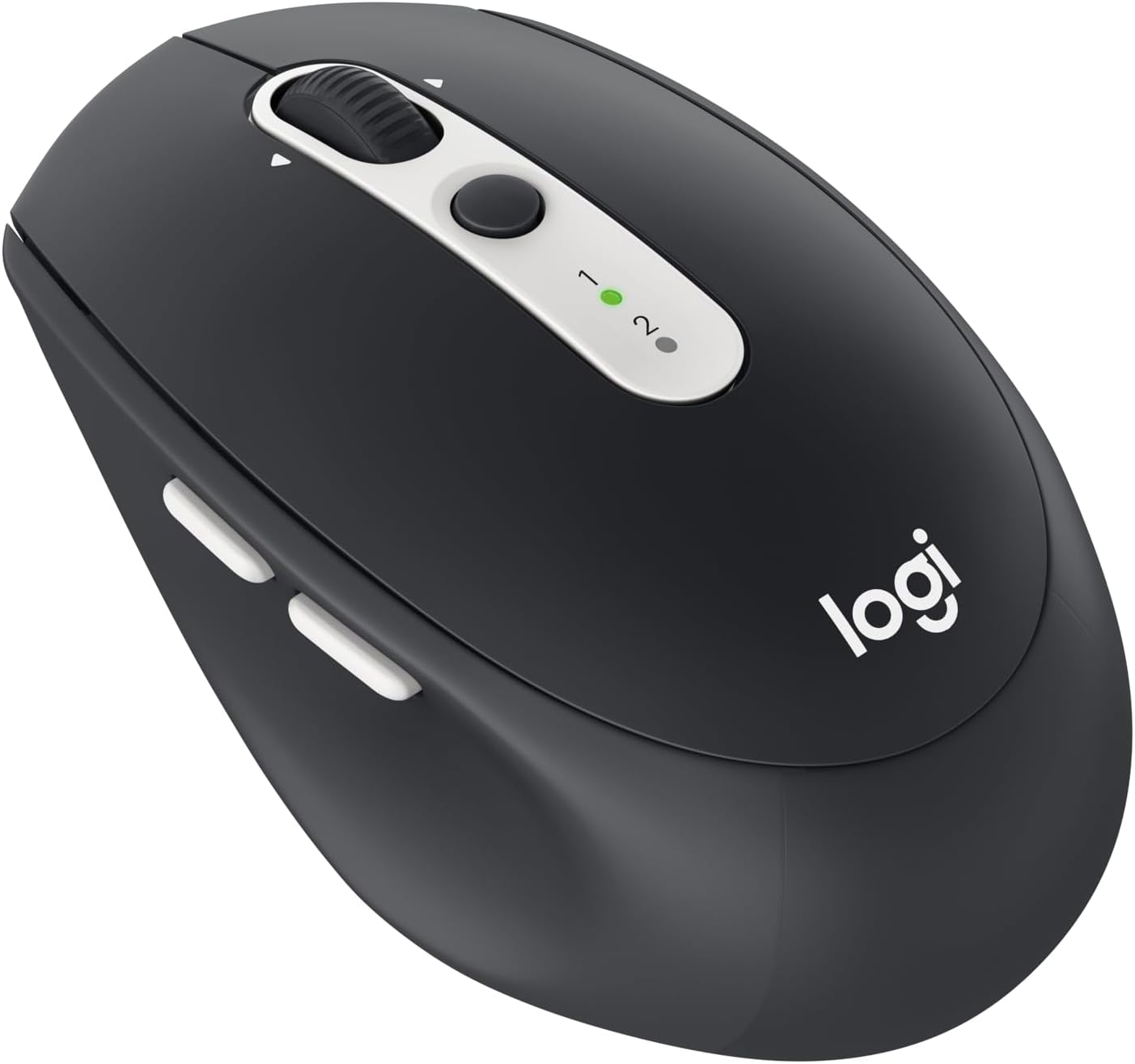


Logitech M585 Wireless Mouse, Graphite
Product ID: 44900342
Details
- BrandLogitech
- ColorGraphite
- Movement Detection TechnologyOptical
- Special FeatureWireless
📶Dual wireless: Bluetooth & 2.4 GHz
🔄Easy-Switch between 2 devices
🔋2-year battery life
🖱️ Master multitasking with the mouse that keeps up with your hustle!
The Logitech M585 Wireless Mouse in Graphite is a versatile, dual-connection device featuring Bluetooth Low Energy and 2.4 GHz wireless technology. Designed for professionals juggling multiple devices, it offers seamless switching between two computers, a long-lasting 2-year battery life, and precise 1000 DPI optical tracking. Its ergonomic design and extra navigation buttons enhance productivity, making it a top choice for efficient, on-the-go work setups.


| ASIN | B072M4YLN6 |
| Additional Features | Wireless |
| Antenna Location | Office |
| Are Batteries Included | Yes |
| Are Batteries Required | Yes |
| Battery Average Life | 2 years |
| Best Sellers Rank | #1,988 in Computer Mice |
| Brand | Logitech |
| Built-In Media | 2 AA batteries, mouse, user guide |
| Button Quantity | 5 |
| Color | Graphite |
| Compatible Devices | Personal Computer |
| Connectivity Technology | Connection Type: Bluetooth Low Energy and 2.4 GHz wireless connection Wireless range: 10 m 7Wireless range may vary based on user, environmental and computing conditions. Easy-Switch, 2 channels, USB |
| Customer Reviews | 4.6 out of 5 stars 3,974 Reviews |
| Enclosure Material | Graphite |
| Global Trade Identification Number | 00097855129031 |
| Hand Orientation | Right |
| Hardware Platform | Laptop, PC |
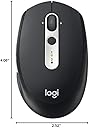
| Item Dimensions L x W | 4.06"L x 2.52"W |
| Item Type Name | Logitech Wireless Mouse M585 Multi-Device with FLOW Cross-Computer Control and File Sharing for PC and Mac, Graphite (910-005012) |
| Item Weight | 0.22 Pounds |
| Manufacturer | Logitech |
| Mfr Part Number | 910-005012 |
| Minimum Required Operating System Version | Windows 10 |
| Model Name | 910-005012 |
| Model Number | 910-005012 |
| Mouse Maximum Sensitivity | 1000 Dots per Inch |
| Movement Detection | Optical |
| Movement Detection Technology | Optical |
| Number of Batteries | 1 Lithium Polymer batteries required. (included) |
| Number of Buttons | 5 |
| Operating System | Windows 10, 11 or later, Linux, Chrome OS, macOS 10.5 iPadOS 13.4 Android 5.0 later |
| Power Source | AC |
| Range | 10.0 meters |
| Special Feature | Wireless |
| Style Name | Mouse |
| UPC | 097855129031 |
| Unit Count | 1.00 Count |
| Warranty Description | 1 - year limited warranty |
V**1
⭐️⭐️⭐️⭐️⭐️ Great Bluetooth Mouse!
The Logitech M585 Wireless Mouse is an excellent Bluetooth device. It easily switches between two devices with the touch of a button and has an impressively long battery life. Smooth, reliable, and perfect for multitasking!
S**N
Comfortable and compact full-feature mouse. Bluetooth connection resolved!
The M585 Bluetooth mouse is the perfect size for comfortable all-day use with my medium sized hands. Although I use a fingertip style grip on the mouse, it is also comfortable using the whole-hand grip. Large hands may find this mouse uncomfortably small, but it is a good size for most. The top plate is smooth matte plastic, whereas the sides are a softer tactile plastic. I considered purchasing the Logitech MX Anywhere 2 (not 2S) - one of Logitech's premium mobile mice - but decided on the M585 instead for several reasons: 1. Similar form factor, but a more supportive higher arch 2. Same connectivity features (Bluetooth or 2.4GHz unifying receiver) 3. Similar forward/back button placement (a must) 4. Traditional scroll wheel (ratcheted) 5. Same Flow options, and ability to switch between two computers 6. Price Other Bluetooth mice I considered were: 1. Logitech MX Anywhere 2S - flat form factor and too expensive 2. Logitech Triathlon - similar features but too big 3. Microsoft Sculpt Comfort - flat form factor and fingerprint-prone glossy finish The Logitech M535 is the basic version of this mouse without thumb buttons, Flow software, or multi-channel wireless. Overall I am very happy with this mouse. The only feature I had to sacrifice versus the MX Anywhere 2 was the less precise tracking sensor (1000 DPI) instead of the Darkfield laser that has up to 1200 DPI and works on more surfaces. Note that the MX Anywhere 2S has up to 4000 DPI and is more recommended for gaming. I use the M585 for casual gaming though with no problems. I have found the optical sensor to work well on almost any surface except glass. As stated above, the scroll wheel is also different, but I prefer the standard wheel of the M585. While I wanted a lighter colored mouse, I was concerned the matte grey would look cheap. I am happy with the color in person though: not quite silver, but not ugly either. It gives off a cool retro vibe. I haven't been able to get Flow working between two computers, but it's probably a network issue at work. For me it is enough to have one mouse in front of two PC's and easily toggle between each one (for which no software is required). The mouse clicking is a little louder than some. If you like a quieter mouse I recommend looking at the M590. At the time of this review, they are not widely available. BLUETOOTH PROBLEM: I did have some issues connecting with Bluetooth a second time. The mouse connected flawlessly to my Windows 10 ASUS Laptop the first time. While tinkering with different unifying receivers on several PC's, I clicked "removed device" in mouse settings in order to reset everything and swap channels 1 and 2. Afterward I was unable to reconnect the mouse again via Bluetooth! The M585 uses Bluetooth 4.1 technology (Smart Bluetooth), which can create compatibility issues with some older systems. This was not the issue however. After going through seemingly every Bluetooth troubleshooting guide on the internet, I figured out the problem was simple! I needed to make the mouse actively connect again, but there was seemingly no Bluetooth "connect" button on the mouse itself. BLUETOOTH SOLUTION: Hold down the top button until the green LED begins blinking very quickly to put the mouse into active Bluetooth mode. The blinking is about 3x per second, as opposed to the typical 1 second blinking. This allows other devices to temporarily recognize the mouse over Bluetooth and establish a permanent connection.
D**L
A seamless bridge between systems
I own both an iPad Pro and a Samsung Galaxy Note 10+, both have the ability to use mice, and both I can carry around with me on a daily basis. But the idea of carrying two mice around kinda killed any thoughts I may have had for using a mouse. But this mouse w/ the press of a button just switches between systems in a moment. So nice, quick and easy to set up. If I'm sitting at my desk at home, I can use it to switch between my Windows 10 desktop and iPad, or switch between my iPad and phone. This is also pretty useful, if not necessary for anyone using Samsung Dex software for their phone. Ergonomically, it's about a standard sized mouse, it won't comfortably fit in your pocket, but it's very easy to safely place in a backpack w/ out being too bulky. It comes with a good scroll wheel, right & left click buttons and two additional buttons by where your right thumb should lie. Depending on the system, those extra buttons can be programmed to do interesting things, whether it be go back and forth on a page, or a one button screenshot. I prefer ergonomic vertical mice for long sessions in front of the computer, but when using a mouse portably, you generally don't end up leaving your hands on the mouse itself for very long periods of time. Couple this with a good bluetooth keyboard that can switch between 2-3 devices and you're all set. You have the power to sit and be productive and mobile.
P**R
On windows 7, install in safe mode...
9/9/23 So far so good. Dongle worked right away. After a reboot... now, the description says the software doesn't install on Windows 7... this is true, but it tries anyway. I got some blue screens, but when I booted into safe mode it successfully installed the logi unifying receiver it came with, and has been fine since. It is small, but I actually like that, though I suspect hours of use on any surface will hurt, and I highly suggest a mouse pad. Switches between the dongle w/ Windows 7 and Bluetooth with windows 11 instantly. On win11, I have a 4k TV and a 1080p TV for monitors and it goes from 1 side to the other in one movement, and scrolls really fast, but I haven't tried the software to tweak it on win11 yet. It's more than I expected, for the $ I'm happy.
F**F
Very good, ergonomic, not too expensive Bluetooth mouse for 2 computers
I was really happy to find this mouse - like so many other people, I've been working from home due to the covid pandemic, and I was getting super frustrated using my work laptop and my own laptop (with two of its own screens!) at the same time, with two different mice. This Bluetooth mouse works seamlessly between the two computers with a push of the button and less than one second of lag time. It also took less than five minutes to download drivers and set up. No lag time at all for moving and dragging items between screens on the same computer, and the pointer is accurate when switching between computers and returns to the correct spot each time I switch. I don't accidentally hit the switch button at all, which was something I had worried about at first. My only "complaint" is that like all Logitech mice, I find that the wheel is too "light" for my taste. I prefer one that requires a little more effort to move and registers stronger clicks as it moves. Microsoft mice work better for me in that way. But that is a tiny personal issue about a mouse that on the whole is a very good value and has performed really well for my current at-home work needs.
J**A
Solid mouse love it; Used for 6 months and clicker has issues
This mouse has an excellent laser that both works on most surfaces and tracks quickly and accurately. The only mouse I've found that tracks the same is the M505 (now discontinued). I absolutely love this mouse, it's my new favorite for both casual use, work, and gaming. The weight is comfortable in my hand. The ability to pair with 2 computers makes it ideal for multi tasking. I used this device maybe ~8 hours every day (so ~1000 hours to date). However after so much (so little?) use, the left clicker is having issues holding the click down. This makes it really difficult to play certain games, and makes basic drag and drop functionality problematic. I did undo the screw and test the clicker - seems like the issue isnt dirt buildup or anything else. Honestly a bit sad the device failed so fast.
P**R
Hi quality and well suited to task
This is an excellent mouse, but it is obviously unnecessary unless you require it for two computers. I normally use a desktop computer at home, but sometimes I need to open up a laptop for particular features or data. I prefer a mouse to other pointing devices and don't have room for a second one on my desk, let alone the desire to dig one out and attach or link it. The M585 works perfectly with the USB receiver on the desktop and Bluetooth for the laptop. Mouse size is a subjective preference, but I like one small enough, as this is, that I can rest the heel of my hand on the desktop and control it with a precision grip. It's size and shape, which I like, are clunkier than I want for portability, so I keep a Microsoft Arc in my case. If you need its distinctive feature, this is a high-quality piece of equipment you will probably like.
D**0
Smooth transition between devices and set up was as easy as 1,2,3
For someone who has their personal laptop set up next to their computer at work this device is a godsend. No more back and forth between two different mice and I don't have to worry about my company's group policy locking my desktop out because I didn't touch the mouse for a whole 5 minutes. Setting it up was super easy and since I already had a logitech dongle for my work keyboard plugged in I just connected it to that. On my laptop I have it connected via bluetooth. The smooth transition between the two devices of the mouse pointer is almost indistinguishable as though my laptop was a third monitor on my work desktop. There is a slight hiccup as it goes from one to the other but very acceptable. One of the main selling points to me was the additional buttons on the mouse for forward and back. Saves me so much time. Also as with most Logitech mice, the device works smoothly on just about any surface. Mousepads be damned. As a matter of fact, it seems to work worse with a mouse pad. My only complaint and I am well aware that this is a nitpick, is that the click of the buttons is a bit loud. I can understand how it can annoy some people. But overall this mouse at $30 is a friggin steal. UPDATE: 8 months later and I am STILL using the generic battery that came with the mouse. The power consumption on this thing is phenomenal and please keep in mind that I use the mouse all day at work and then I take it home and use it a little bit at home in the evening and on the weekend. Point being is that the mouse is not being used once a week.
G**O
Ratón de excelente calidad para usarse en cualquier lado a buen precio!!!!
Lo escogí porque me va a permitir usarlo en mas computadoras aparte de mi PC de escritorio donde estoy escribiendo esta reseña, cuando me toque revisar dichas computadoras, el nanoreceptor incluido me va a permitir conectar dicho periférico a través de una conexión USB disponible, y que dependa de una batería AA me va a posibilitar poder usarlo hasta que se le agote la vida útil. Lo conecté a mi PC usando Bluetooth que dispone de la versión 4.2 y no he encontrado problemas de conectividad y de retraso de la señal. Lo mismo puedo decir cuando lo conecto a través del nanoreceptor. Se siente cómodo y practico, y el botón de enmedio abajo de la rueda de selección es el selector de conexión. Lo recomiendo si se va usar en varios PC aparte de la principal, y mas en estos tiempos de riesgo, para evitar tocar cosas de manera innecesaria.
W**N
Logitech is the standard
Logitech mouse is the standard to get Wired or Wireless
L**G
A very nice mouse to use
A very good quality mouse which is extremely nice to use. The pointer is ver precise.
T**R
Super cool mouse!
This mouse has a cool feature of being able to c&p from one laptop to the other. It was easy to connect to both computers using the blutooth function. It feels great in my hand, and reliably moves my cursor. Very happy with it.
Z**X
Produto de qualidade
Ficou perfeito para minha necessidade de uso para mais de um notebook e outros equipamentos. Alternância de equipamentos precisas e instantâneas. Arraste e cliques, precisos e suave. Fiquei muito satisfeito. Uso com facilidade em window, Linus e Android. Podemos usar diretamente somente Bluetooth para os dois equipamento e se preferir ainda tem um conector de conexão compacto que fica guardado no próprio Mouse evitando perder. Show !!
Trustpilot
2 weeks ago
4 days ago