Buy anything from 5,000+ international stores. One checkout price. No surprise fees. Join 2M+ shoppers on Desertcart.
Desertcart purchases this item on your behalf and handles shipping, customs, and support to Ireland.
๐ Elevate your network game with TP-Link EAP670 โ where speed meets smart cloud control!
The TP-Link EAP670 is a high-performance Wi-Fi 6 AX5400 ceiling-mount access point featuring blazing dual-band speeds up to 5400 Mbps, a 2.5G Ethernet port with PoE+ for easy installation, and seamless cloud management via the Omada app. Designed for professional-grade home or office networks, it supports mesh networking, seamless roaming, and advanced wireless technologies like OFDMA and MU-MIMO. Backed by a 5-year warranty, it delivers reliable, scalable, and secure connectivity with zero extra cloud management fees.


| ASIN | B09ZV19DBP |
| Antenna Location | Home |
| Antenna Type | Internal |
| Best Sellers Rank | #448 in Computer Networking Wireless Access Points |
| Brand | TP-Link |
| Built-In Media | Ceiling/Wall Mounting Kits, EAP670, Installation Guide, Power Adapter |
| Color | White |
| Compatible Devices | Personal Computer |
| Connectivity Protocol | Wi-Fi |
| Connectivity Technology | Ethernet |
| Control Method | App |
| Controller Type | Switch |
| Coverage | Wide Area Coverage |
| Customer Reviews | 4.6 out of 5 stars 330 Reviews |
| Data Transfer Rate | 5400 Megabits Per Second |
| Frequency | 5 |
| Frequency Band Class | Dual-Band |
| Has Internet Connectivity | Yes |
| Is Electric | Yes |
| Is Modem Compatible | No |
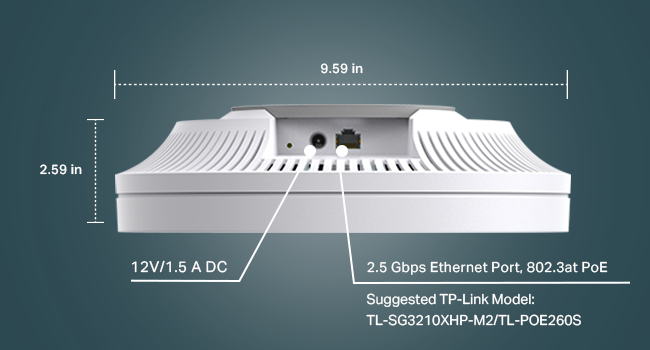
| Item Dimensions L x W x H | 9.59"L x 9.59"W x 2.59"H |
| Item Type Name | Access Point |
| Item Weight | 0.79 Kilograms |
| LAN Port Bandwidth | 5400 megabits per second |
| Manufacturer | TP-Link |
| Maximum Upstream Data Transfer Rate | 5400 Megabits Per Second |
| Mfr Part Number | EAP670 |
| Model Name | EAP670 |
| Model Number | EAP670 |
| Number of Antennas | 12 |
| Number of Ports | 1 |
| Operating System | Omada OS |
| Other Special Features of the Product | WPS |
| Router Network Type | Wireless Router/Access Point |
| Security Protocol | WPA-Personal, WPA2-Personal, WPA3-Personal |
| Special Feature | WPS |
| UPC | 840030707155 |
| Voltage | 12 Volts |
| Warranty Description | Limited Lifetime Warranty |
| Wi-Fi Generation | WiFi 6 |
| Wireless Communication Standard | 802.11ax |
| Wireless Compability | 802.11ax |
L**I
Powerful Performance and Seamless Omada Integration
The TP-Link EAP670 delivers powerful Wi-Fi 6 performance with ease of use and comprehensive features. My experience with this access point has been nothing short of exceptional, and it has seamlessly integrated into my Omada ecosystem. Here's a breakdown of what makes the EAP670 a top contender for your home network. Effortless Omada Integration: Discovering and managing the EAP670 was a breeze. The Omada ecosystem provides a user-friendly interface that makes configuration and monitoring a breeze. This seamless integration saves valuable time and simplifies network management. VLAN-Aware for Enhanced Network Segmentation: One of the most valuable features of the EAP670 is its VLAN awareness. This allows for easy segmentation of your network, creating separate VLANs for IoT devices, kids' devices, and your main network. This enhances security and privacy within your home. Whole-Home Coverage with One Access Point: I was amazed by the EAP670's ability to blanket my entire house with strong Wi-Fi 6 signal, even with just one access point. This eliminates the need for multiple access points and reduces clutter. No matter where I am in the house, I enjoy consistent and fast speeds. Mini PC Running pfSense: A Powerful Combination: Utilizing a Mini PC running pfSense as the router proved to be an excellent choice for my Omada setup. This powerful combination offers a high level of control and flexibility, allowing for fine-tuning of network settings and advanced features. Highly Recommended for Omada Networks: If you're looking for a high-performance, easy-to-manage access point for your Omada network, the TP-Link EAP670 is the perfect solution. Its robust features, VLAN awareness, and whole-home coverage make it a standout choice. When paired with a Mini PC running pfSense, you can create a powerful and customizable network that meets your every need. Overall, the TP-Link EAP670 earns my highest recommendation. It's a powerful, versatile, and user-friendly access point that stands out in the crowded Wi-Fi 6 market.
R**D
Significant Upgrade with Reliable Performance
I recently switched to the TP-Link EAP670 from my previous Ubiquiti UDM setup and have been thoroughly satisfied with the performance. The installation was a breeze, thanks to its straightforward built-in web interface, which seamlessly integrated with my OPNsense router. One of the standout features for me was the Power over Ethernet (PoE) capability, allowing me to position the access point more centrally in my home. This resulted in significantly better Wi-Fi coverage. Coupled with Wi-Fi 6 technology, I've experienced faster speeds, making the most of my gigabit internet connection. In terms of reliability, the EAP670 has been rock solid. I haven't encountered any drops in connection, which is a critical factor for my daily usage. While I haven't delved into many of the advanced features like Mesh support, OFDMA, or MU-MIMO yet, primarily because I currently use only one access point, the overall improvement in network performance is undeniable. I would definitely recommend the TP-Link EAP670, especially for those looking to upgrade from older systems like Ubiquiti UDM. It offers a notable improvement in both coverage and speed, making it a worthy investment for a reliable and efficient home network.
L**E
Whole home WiFi with no dead zones!
The TP-Link EAP670 Omada WiFi 6 AX5400 Access Point has significantly upgraded my home network. The installation was easy, especially with the ceiling mount design, which keeps it out of sight while providing great coverage throughout my house. The WiFi 6 performance is impressiveโspeeds are faster, and it handles multiple devices without any drop in connection quality, thanks to features like MU-MIMO and OFDMA. Seamless roaming between rooms works perfectly, making it ideal for large spaces. I love that it's powered via PoE+, eliminating the need for extra cables, and the integrated cloud access through the Omada app allows me to monitor and manage the network effortlessly from anywhere. The build quality feels solid, and it blends in nicely with my ceiling. Overall, the EAP670 has made my network faster, more stable, and easier to manage, making it a great investment for high-performance home or office WiFi.
I**R
Easy to setup
I already have an internet router, just needed a Wifi AP. I work in the Wifi industry. Wifi radios having more spatial streams will provide better range and speed since more antennas in general offers greater spatial diversity and transmit beamforming. This product, the EAP670 is a so-called 2+4 (6 stream) 802.11ax AP. The 2.4GHz radio is 2x2 MIMO and the 5GHz radio is 4x4. This is a nice configuration. Signals in the 2.4GHz band propagate farther vs 5GHz. 2.4GHz performance can increase Wifi coverage to areas that a 5GHz radio may not reach. Because the EAP670 uses 4x4 MIMO for the 5GHz radio, and the 5GHz Wifi has significantly more bandwidth than 2.4GHz, the 5GHz coverage on this AP is very good in testing in my 1400sqft home. I tested with 80 and 160MHz configurations with 11ax iPhone, iPad and MacBook. It works pretty well and the throughput is maxing out my 500Mbps internet connection. Overall the EAP670 is a good value. I knocked off 1 star because the Wifi configurability, while it is pretty good, could be better. It allows enable/disable of OFDMA--not sure why. Does not appear to allow configuration of MU MIMO. Does not give Wifi stats like channel utilization and does not show ranking of channels However this product does allow use of 5GHz DFS channels. This is a plus. Many retail products only permit non-DFS channels to be used. This allows you to select from quite a few more channels that may be less congested (or totally clean). This could improve your Wifi performance. Overall I'm happy.
W**A
Excellent foray into prosumer networking
While I'm no networking engineer, I do know my way around a network or two. I had been wanting to upgrade my home Wi-Fi from my aging Asus AC68U, but didn't want to futz around with Unify after the dismal performance I had with their "AC AP Pro" unit (less speed at the same distance as my Asus). Plus after Unify eliminated their free cloud management, I opted for TP-Link Omada after hearing good things about it on various forums. Extremely satisfied with the range, speed, and latency over my Asus's built in Wi-Fi. Mind you, the router itself is perfectly capable of handling the symmetrical gigabit speeds when wired, but over wireless, it is easily bested by the EAP670. I bought this to get more coverage in my house (3200 square feet, 1600 for each floor) and help with latency while I use Steam's remote play on my S23 Ultra and Razer Kishi. One unit covers my whole house and yard, but I might add a second unit for their mesh. Fortunately, TP-Link still offers free cloud management, but if you want to run the controller yourself, you can either buy the controller or just download the software and run it on basically anything (Windows, Linux, etc.). Really happy I went with TP-Link Omada!
K**S
Exceptional Performance and Reliability!
I recently installed the TP-Link EAP670 in my home office, and I couldnโt be happier with its performance. The setup was a breeze, thanks to the intuitive interface and clear instructions provided by TP-Link. Once up and running, the EAP670 has provided exceptional Wi-Fi coverage throughout my entire house, even in areas where I previously experienced dead zones. The dual-band connectivity ensures fast and reliable internet speeds, perfect for streaming 4K videos, online gaming, and video conferencing without any lag or interruptions. Iโve been particularly impressed by its ability to handle multiple devices simultaneously without sacrificing performance. Not only does the EAP670 deliver on performance, but it also boasts a sleek and unobtrusive design that blends seamlessly into any environment. The built-in security features provide peace of mind, knowing that my network is protected from potential threats. Overall, I highly recommend the TP-Link EAP670 to anyone in need of a reliable, high-performance Wi-Fi solution. Itโs been a game-changer for me, and I couldnโt be more satisfied with my purchase.
G**N
Great tech support via chat.
Purchased 2 EAP670's access points for my home. These are usually business access points but they were replacing ceiling mounted, POE boxes that were in the house before. This was the best system I could find to replace them. Setting up the first EAP was easy -- typical sign on through a device-driven network and it extended my range around where the access was. The 2nd access point needed some more work. I didn't get a TP-Link controller (just a POE switch) that has the software to manage multiple EAP. That's when I went to the TP-Link Omada site and chatted with Darcy. She was great -- walked me through the process to download the software I needed to configure my network. Once the software was downloaded she walked me through the steps to get it all set up. System is working really well -- over 600 mps download speeds within 20 feet of the EAPs. Tails off I move away but better than what I had before. I also like that this system worked with my present cable modem/router. Saved on another piece of new equipment.
S**L
Powerful and flexible
I set this up in my new apartment. It's only about 600sqft that I'm covering but it could easily handle more (I wanted overkill and I got it). There are 24 apartments in the building and 3 buildings in the complex so lots of interference, but it's rare to see a signal drop. I'm on a spectrum 400mbps plan and consistently hit that over wifi with my Samsung S21. I even have the power on the AP turned about halfway down so as not to cause problems for my neighbors. I also added VLANs to my network and was able to keep my older devices that don't support modern encryption and IOT devices separate from my main devices, and a separate network for my work laptop. (For anyone wondering the rest of your network needs to support this as well if you want to make use of VLANs). The TP-link makes it easy to assign an SSID to a VLAN. I like that it includes a power adapter in the box, so you don't have to run out and buy a PoE injector or a PoE enabled switch. The app is useful as I have a bunch of hidden SSIDs and I always forget the passwords for them, but you can log in on the app and find it in the settings. I'm running this standalone without any other APs, Omada switches (I have a couple old netgear ones at the moment) or a controller, so I can't comment on roaming or the rest of the Omada ecosystem, but first impressions are favorable. Only consideration (not a con just something to keep in mind) is it is relatively large, but personally I think it's a worthy trade off for the performance.
H**H
Bad faulty product and bad return process
I bought this and it never worked! and the return process was horrible by Amazon and their team
M**P
Mismatched supported wifi bands
Does not contain the proper 5ghz wifi bands for Australia! Not sure how these can be sold here legally.
A**R
Great coverage, simple to set up
I got this access point mostly because I needed something that could handle streaming VR to my oculus quest 2 headset without significant lag. This has done the job perfectly and more. Instead of going with a consumer router, which I haven't had the most incredible experience with, I chose to try this out. It has been perfect. The coverage is great, reaching quite a bit out into my yard, which has allowed me to extend my security cameras. I'm pretty pleased. If you are using this as an access point, there is no need for a controller. Simply plug it into your existing network using an ethernet cord and off you go. The app is pretty barebones. Set your username and password, WiFi network name, and you're done. If you want more intricate settings, they can be accessed by going to the IP address of the access point, but it is probably not necessary for most people. All in all, I am satisfied with this purchase. I'll probably be looking into other TP-Link products in the future.
M**E
My Wifi performance is amazing now
I purchased two TP-Link Omada WiFi 6 AX5400 2.5G Access Points (EAP670) for my new 3500 sq. ft. house, and I am thoroughly impressed with their performance. The signal strength is excellent throughout nearly every corner of my home. One standout feature is the power over ethernet capability, which allowed me to place the access points in optimal locations that I might not have been able to otherwise. This flexibility has been incredibly convenient and efficient. Setting up the Omada system can be quite in-depth and may not be suitable for those who aren't technically inclined. However, once everything is configured, the speeds are fantastic, especially when paired with my 1Gbps fibre internet. The coverage and speed have significantly enhanced my internet experience. After some initial adjustments with my Bell internet service provider settings, the uptime of my system has been rock-solid. The reliability and performance of these access points have truly exceeded my expectations. Overall, I highly recommend the TP-Link Omada EAP670 for anyone seeking robust and reliable WiFi coverage, especially in larger homes. Just be prepared for a bit of setup effort if you're not tech-savvy.
S**V
The V2 version is outstanding
I had tried the V1 before and while I liked the performance of the device I returned it since I couldn't get comfortable with the massive size of the access point. I do have EAP660HD for most of my IOT devices, which I had hidden in a slowed space. For my media devices I needed EAP670 for its 4X 5GHz antennae. I contemplated if I should get it again, after almost 3 months. Finally compromised on my expectations related to aesthetics since I was already invested in Omada eco system and this was the only thing I needed. Once I got the package, I didn't realize that they updated the access point and reduced it to 50% of its earlier size. All my issues with the cosmetic looks were immediately addressed. Couldn't be happier. The access point was adopted right away by the controller and I was in the game in less than 10 minutes. At this point, I'm leaning on selling my eap 660HD and getting another 670. The newer iteration looks this good.
Trustpilot
1 month ago
2 weeks ago