Buy anything from 5,000+ international stores. One checkout price. No surprise fees. Join 2M+ shoppers on Desertcart.
Desertcart purchases this item on your behalf and handles shipping, customs, and support to Ireland.
🚀 Elevate your Raspberry Pi vision game with pro-level clarity and adaptability!
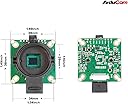
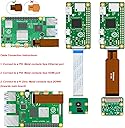
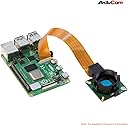
The Arducam for Raspberry Pi HQ Camera features a high-sensitivity 12.3MP IMX477 CMOS sensor delivering 4056x3040 resolution images. Compatible across all Raspberry Pi models including Pi 5 and Zero 2W, it comes with a C-CS lens adapter and tripod mount for versatile use. Designed for advanced imaging and AI applications, it requires simple config tweaks for optimal performance, making it a must-have upgrade for serious Pi photographers and developers.


| ASIN | B09YHN5DBY |
| Best Sellers Rank | #1,272 in Single Board Computers (Computers & Accessories) |
| Brand | Arducam |
| Built-In Media | IMX477 camera |
| CPU Manufacturer | ARM |
| Compatible Devices | Raspberry Pi 1, Raspberry Pi 2, Raspberry Pi 3, Raspberry Pi 4, Raspberry Pi Zero, Raspberry Pi Zero 2W |
| Connectivity Technology | VGA |
| Country of Origin | China |
| Customer Reviews | 3.4 out of 5 stars 46 Reviews |
| Included Components | IMX477 camera |
| Item Dimensions L x W x H | 1.5"L x 1.5"W x 0.72"H |
| Manufacturer | Arducam |
| Model Name | Arducam for Raspberry Pi High Quality Camera |
| Operating System | Linux |
| Processor Brand | ARM |
| Processor Count | 1 |
| RAM Memory Technology | LPDDR2 |
| Total Usb Ports | 4 |
| Warranty Description | 6 Months |
| Wireless Compability | Infrared |
J**L
I had issues but the seller contacted me and helped me resolve the problem.
When I got this HiQ camera it would not work though I tried it with several different pi boards. I gave up and gave it a bad review. Fast forward, the seller contacted me and showed me the error of my ways, gave me the magic settings you have to make in a config file. After that the camera connected and works fine. If you buy this, be aware that it is not plug and play like a regular picam. You must change settings. If you have issues the seller will help you resolve them.
P**5
Just plain old doesn't work
Connected to a Raspberry Pi 3b+ and a 4b fresh install of raspberry OS bookworm.. Didn't work on either device.. double checked to make sure that the ribbon cable was correctly installed, and libcamera kept on saying *** no cameras available *** Per the product description this camera should have worked right out of the box.. Yeah, Sorry, but that a Big NO.. what a POS
L**G
Didn’t work with Octoprint
I used on my rasp with octoprint and it didn’t work well at all, the camera it self with raspbian does work great.
J**C
Works great with minimal configuration on RaspiOS
Purchased this as an afordable alternative to the Raspberry Pi brand HQ Camera, Arducam's 16mm telephoto lens, and a generic 1/4-20 tripod. The camera works by changing 2 lines in the boot config file for RaspiOS. Go to camera documentation on the Raspberry Pi website for complete instructions, but essentially changing "camera_auto_detect=1", from 1 to 0, and adding a line beneath "dtoverlay=IMX477". The actual file is different between Bookworm and Bullseye. This camera works successfully for higher quality photos and as streaming security camera, using a Raspberry Pi Zero 2W, 3B+, and with a RPi 4. I have not tried it with the original Zero. The more powerful the Pi the quicker the image is processed, and less frame drops when streaming. To first configure the lens properly, it is helpful to have the Pi hooked up to a monitor. Then once physically it can be used headlessly. For the Arducam lens the proceedure involved using the C-CS adapter, setting the apateur to the lowest setting, adjusting the near-far setting to the most sharpest image (it will still be fuzzy), then rotating the whole lens assembly as if to remove it, but stopping only when the camera is in perfect focus. Then tighten the locking screw. Other lenses may be different. Some other lenses appear to have a bezel for adjustment, some it is manually screwing in or out the whole lens assembly as described above. Depending on application, I found it helpful to purchase longer cables if not using a camera lens to Pi mounting plate. (Not supplied with camera).
A**N
Not Working
Tried this on Octoprint & Raspberry Pi OS and couldn’t get it working no matter what I did Raspberry Pi 3B+ never recognized the camera did everything on direction page no good!
R**5
Camera worked great until it didn't.
Camera worked great until it didn't. I made sure to change "camera_auto_detect=0" and added "dtoverlay=IMX477". It used to work just fine for a couple days, and now the pi won't recognize it anymore. I swapped out my Pi, the cables, tried every different orientation of the cables just in case I somehow mixed them up.. nothing. junk. Don't buy Arducam, just get the Raspberry Pi branded camera and save you the headaches.
R**K
Unstuck!
Arducam has been very helpful and provided me with a replacement camera for the Arducamp 12.3mp camera that I unfortunately had to return. My plan is to use this camera by adapting the ribbon cable to a usb converter to plug into any compatible device. Many thanks!
S**J
Works as expected, looks good for the price
It works and is compact
Q**R
Veraltete Produktseite, unklare Infos, Bildquali top
Sehr gutes Bild, frustrierende Erfahrung drumherum Kurze Zusammenfassung für alle, die's eilig haben: Sehr gute Bildqualität, solides PCB, aber zu viele Ärgernisse rund drum. Was stört: - Wer die Kamera mit dem Raspberry Pi 5 verwenden will: Die Amazon-Produktbilder zeigen noch die alte Version mit 22-Pin-Anschluss am Kameramodul, geliefert wurde mir die Version mit 15-Pin. Ob das immer so ist, wird nirgends klar kommuniziert. - Backfocus-Einstellung ist eine Zumutung: Das Objektiv lässt sich zwar auch ohne Backfocus-Ring festziehen, aber dann ist keine Feinjustierung mehr möglich. Die mitgelieferte Schraube ist dafür keine echte Alternative – sie hinterlässt bereits nach moderatem Anziehen leichte abdrücke am Objektiv oder Adapterring. - Dokumentation: dünn gesät und schwer bis gar nicht zu finden. - Im CS-Mount waren noch Öl- oder Fettreste aus der Produktion. Was passt: + Die Bildqualität ist sehr gut. + Mehr mechanische und elektronische Verbindungsoptionen als bei vergleichbaren Produkten. + Einrichtung unkompliziert: Keine Treiber oder sonstige Bastelei notwendig, zwei Einstellungen in der config und ein Reboot reichen aus - wie bei jedem anderen Drittanbietermodul auch. Fazit: Wer mit einem Variofocal-Objektiv arbeitet, für den spielt der fehlende Backfocus-Ring wahrscheinlich überhaupt keine Rolle. Wer hingegen auf präzise Feinjustierung angewiesen ist, sollte das im Hinterkopf behalten.
C**N
logicielle ilbcamera pour IMX477 non stable
le logicielle libcamera pour IMX477 qu'on dois utiliser pour Raspberry Pi est instable, pour prendre quelque photo c'est OK, mais prendre plusieurs sans arrêt ou une longe vidéo: le logicielle fige ou plante (intermittences; minute ou plusieurs heures), probablement le concepteur de libcamera vas un jours corriger le problème.
Trustpilot
2 months ago
1 month ago