


Type Smart, Live Better! 💻
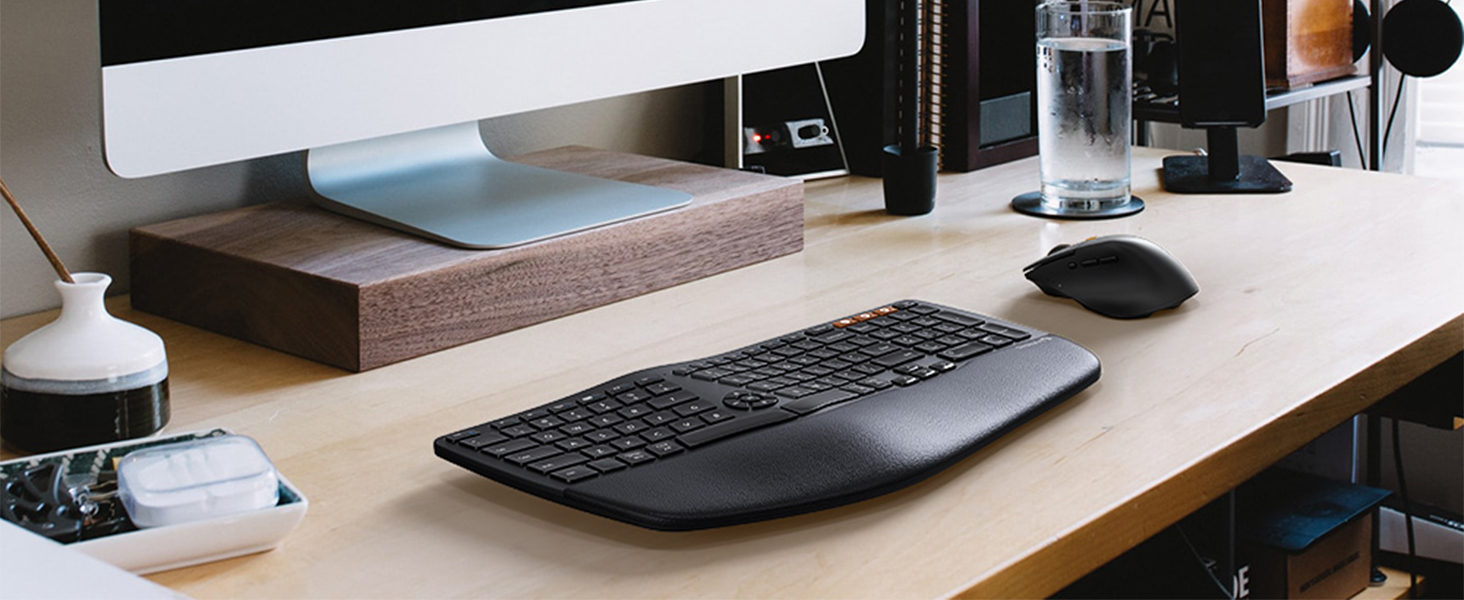
The ProtoArc Ergonomic Wireless Keyboard Mouse Combo (EKM01) is designed for comfort and efficiency, featuring a split key-frame for natural wrist positioning, a cushioned palm rest, and the ability to connect to up to three devices simultaneously. With rechargeable batteries and a sculpted mouse for precision control, this combo is perfect for professionals seeking ergonomic solutions for their workspace.




| ASIN | B09T3F7DZN |
| Antenna Location | Office |
| Best Sellers Rank | #1,992 in Computer Keyboard & Mouse Combos |
| Brand | ProtoArc |
| Color | Black |
| Compatible Devices | Laptop, Personal Computer |
| Compatible Operating System Family | Android, Windows |
| Connectivity Technology | Bluetooth, Usb |
| Customer Reviews | 3.8 out of 5 stars 533 Reviews |
| Hand Orientation | Ambidextrous |
| Keyboard Description | Ergonomic |
| Keyboard Layout | Dvorak |
| Manufacturer | ProtoArc |
| Mfr Part Number | Protoarc B09T3F7DZN |
| Minimum Required Operating System Version | Windows 7 |
| Model Number | Protoarc B09T3F7DZN |
| Movement Detection | Optical |
| Number of Batteries | 1 Lithium Polymer batteries required. (included) |
| Number of Keys | 105 |
| Number of Packs | 1 |
| Operating System | Windows |
| Other Special Features of the Product | Ergonomic, Rechargeable |
| Power Source | Battery Powered |
| Special Feature | Ergonomic, Rechargeable |
| Unit Count | 1 Count |
| Warranty Description | 1 year |
L**E
TERRIBLE
You can read my review I wrote when I first got it because I loved it. About a month or so later the keyboard no longer works at all. It won't type anything. Plugged in or blue tooth. None of the keys work. I charged it completely. So this was a complete waste of money. ------------------------------- I was hesitant to buy this due to some of the reviews, but I am glad I went ahead and bought them anyway. This is the quietest mouse ever. I don’t hear myself click click clicking all day. The keyboard is super comfortable. The only bad thing is that switching to second device doesn’t always work on the keyboard. I’m not sure if it’s my laptop Bluetooth or the device, but I can live with that. I love this set and would buy again.
S**O
Very good
I love your product is a little expensive but it is worth it. But now I am having some issues with the keyboard I am not sure but when I type the words are missing letters and I have to retype it. I tough it was battery but it happens when it is fully charged
A**R
Doesn't Play Well with Mac
I've loved this keyboard for six months. When I got my Mac last week, I found that the keyboard doesn't respond well. I often have to tap a letter several times. The speed doesn't keep up with my typing, so words appear random and are misspelled. Again, I had absolutely NO ISSUES AT ALL with my Windows laptop. I'm so sad to have to order a different one for the Mac. but I'll keep it for my personal Windows laptop. This keyboard has made such a difference in the way my 67 year old wrists feel while I'm typing all day!
M**Y
Piece of junk
In September of 22, I purchased this keyboard for my wife to replace her Micosoft ergonomic keyboard. The only problem with the Micosoft keyboard was the letter G had popped off and would not stay on the keyboard. This photo arc came with high reviews and for the price tag of $100.00, it should have been worth it. My wife went to work yesterday as a hospital medical records coder, and 2 hours into her shift, half of the keys stopped working. She figured it needed to be charged, so she grabbed a spare keyboard I had saved for her and finished out her day. After six hours of charging, she tried to put it back online again so she would be ready for the next day. It still did not work. I took it to work with me the next day after charging all night (I am the IT guy for my company) and plugged it in to several systems including a laptop and a system running on Linux. The same problem occurred with all of them. The following keys stopped working with this piece of junk: ZXCVM,GHJKL12347890 up arrow and both space bars. After only 5 months on the job and it quit working. Going back to Microsoft keyboard and mouse. These are half the price and last twice as long if not longer. Do not waste your money on anything Photo Arc, it is all junk.
J**N
Great value. Keyboard could use some refinement.
EDIT: Apparently there is an updated model with a full keyboard. Likely addresses my concerns. EKM01 Plus is the name. The mouse is outstanding. I have no clue why it is not sold on its own, but I have zero complaints with it. Love the notchless scroll, and the quietest clicks I've ever had on a mouse. Great shape and weight. My concerns are with the keyboard. If you are a touch typist, this thing will confuse you. For whatever reason they removed Right Ctrl, meaning if you use the Ctrl key opposite of your desired modifier, you now have to learn to use Left Ctrl exclusively. The letters "C, V, B" are distorted slightly, as they sort of flare up towards the apex of the curve in a way "D, F, G" do not. So expect some errors with reaching down to hit them and either getting nothing or the wrong letter. Other than that, no other functionality problems that bother me. Regarding wireless behavior, both are very aggressive in the going to sleep after inactivity. You will need to input something to awake them. For the mouse in particular, you have to click or scroll to wake as the laser is deactive. Have not tested bluetooth, so can't speak to their functionality there. They last weeks on a charge, not months. So keep that in mind. I feel the keyboard could use some refinement, which has me curious of the larger model available from them. A revision could definitely make the keyboard great. They are on the right track.
S**S
Works great
I recently purchased the ProtoArc EKM01 Ergonomic Wireless Keyboard Mouse and I am thoroughly impressed with its performance and design. The keyboard is extremely comfortable to type on, thanks to its ergonomic design and soft-touch keys. The mouse is equally comfortable to use, with a sleek and ergonomic shape that fits perfectly in my hand. Setting up the keyboard and mouse was a breeze, as they both connected wirelessly to my computer without any issues. The wireless range is also impressive, allowing me to work from a distance without any loss in signal. One of the standout features of this keyboard and mouse combo is the battery life. This is a huge plus for me, as I don't have to worry about constantly replacing batteries or being tethered to a charging cable. Overall, I would highly recommend the ProtoArc EKM01 Ergonomic Wireless Keyboard Mouse to anyone looking for a high-quality, comfortable, and reliable keyboard and mouse combo. It is definitely worth the investment and I give it a 5 out of 5 star rating.
N**O
It's GREAT...ergonomic rise could be more.
This keyboard/mouse combo replaces a Microsoft wireless keyboard/mouse combo that was no longer responsive after many years and battery changes. I like that THIS keyboard includes the number pad instead of a separate key pad to try to comfortably position for use. The RECHARGEABLE feature is REALLY NICE. It's also nice to pair with my iPhone and iPad with the orange device buttons when typing out long texts, etc. The only thing I would loke more is if the ergonomic rise at the wrist support edge of the keyboard were more pronounced. I solved this by using mounting tape to attach the riser from the MS keyboard to this one (see photo). As you can see this raises it another 1/4". Also, it would be nice to have a more pronounced downward slope on the mouse. A minor annoyance is the omission of the "End" on this keyboard. I'll get over it. Overall, this is a nice set for the money and I'm sure future versions may address some of these issues.
G**Y
keyboard ok, mouse is too big
Update - 6 months later and the keyboard & mouse are completely done! I started having issues about 2 months ago. I’ve tried removing and reconnecting as a brand new device a few times but issues never fully resolved. The keys lag when I’m typing, and the mouse get “stuck”. I expected a little more life in these. I clean both often and do have never dropped any food or drink on them. PROS: 1) does not use batteries! it comes with a short usb charger. the recharge last a long time! i think i can work on one charge for an entire week. 2) you can add 2 Bluetooth devices to your keyboard. it's been perfect for texting without having to pick up your phone. and with just a press of a key you can switch between pc and phone connection 3) keyboard does provide an ergonomic layout, I'm still trying to get used to it 4) the 1 sets of adjustable tilts allow you to set it to what works best for you. CONS: 1) my keys are a little sticky. I don't know if this is because the keyboard is new or if there is something else wrong with it. 2) please note - there are NO Home, End, Insert, Delete, page up or page down buttons on the keyboard- this absolutely the worst for users who work in office settings. quite honestly this is possibly my major let down. I still cant believe I didn't notice it before purchase 3) the palm rest doesn't provide much assistance. it's a very thin layer of foam 4) the mouse is too bulky, the curving is way to high to be comfortable to use for long term. I am currently trying to use a mouse pad with wrist rest to provide some sort of support on my wrist. I will update on the stickiness of the keys and if the mouse pad with wrist rest help with the wrist issues
P**E
Easy to use, great quality
Been using for a month now. Great quality, battery life, ease of use & setup for 3 computers. I am using 2 windows PCs and 1 Linux Box. Have not tested this on mac yet. I didn't realize these multi-device keyboard/mouse combos existed, I have 3 computer and had to switch dongles or have multiple keyboards/mice. They have all been replaced now with this keyboard/mouse combo. Just Press the button on the keyboard and button on the side of the mouse to switch between 3 devices Loves: Easy to setup and install across multiple devices, great feel and quality, great battery life, can easily charge with cable that comes with it. It also has the hot keys both both windows and mac, which is amazing if you have both. 1 wireless USB connector for your default computer 2 Bluetooth connections supported Cons: Doesn't work well on my mini linux box, I know its not advertised as linux supported but it looks like there are a lot of issues getting it working well so you should be a linux expert if you want to try it out there. Reading the linux forums I see a lot of issues connecting to bluetooth devices in general, so I used the USB connector to test. When using the USB dongle with linux (Mint) there were issues with lag, some key strokes aren't registered, and some are duplicated, so in general it was a pain. Again not blaming the keyboard/mouse, just don't bank on this being seamless on an OS not listed as supported. It could just be the specific linux distro.
B**Y
Great turn around time
The product is as described. Arrived within 24 hours of ordering which is fantastic. It will take a little bit of time to get used to the keyboard as it is slightly different from my Logitech keyboard but I like the features and price point of this product.
P**E
Super jusqu'à ce qu'ils cessent de fonctionner
Tout est vraiment super au début. La souris ne fait aucun bruit, le clavier est très silencieux également et les touches sont agréables. Au bout de 2 mois à peine, la connexion a cessé de fonctionner correctement sur Windows, alors que sur Mac impeccable. Puis après 6 mois suivant l'achat, c'est la roulette de défilement de la souris qui rend l'âme. Je suis énormément déçu parce que tout me plaisait de ce kit, mais il n'a vraiment pas duré longtemps.
A**R
Mac Compatibility
Received this product today and here are some of my thoughts. The description says this is compatible with Mac computers but this is only partly true. If connected via 2.4GHz the F1-F12 keys do not work as expected and are mostly not compatible. However, they seem to work fine when connected via Bluetooth. This was confirmed in the ProtoArc FAQ website. The mouse has similar limitations. I was not able to connect it to my MacBook via Bluetooth and only 2.4GHz will work. The company FAQ also states the back/forward buttons are not compatible with MacOS. Ergonomics of the keyboard and mouse are otherwise great. Like the layout and feel of both. Giving this only three stars as I bought it expecting better integration with my Mac.
J**I
Exceptional For The Price
The device was super easy to set, too bad though they only give you one charging cable, the luck I had two on my desk and charged the mouse and keyboard at the same time. I don't use it for gaming so can't speak to that. I took the suggestion in the product video to use the legs at the trailing edge of the keyboard so the palm rest is up making your hands lay more flat wrist is not as sore now. I am using the dongle and not the BT connection and it works well, no lagging, over all very happy with the device
Trustpilot
1 week ago
1 day ago