🔌 Unlock flawless 4K AV synergy—because your setup deserves the future, today!
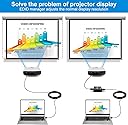
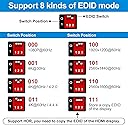
The CMSTEDCD HDMI EDID Emulator Manager 4K Prophecy 8 is a compact, hardware-based device that resolves HDMI EDID compatibility issues by copying and managing up to 8 programmable EDID modes. Supporting HDMI 2.0b standards, 4K@60Hz resolution, 18Gbps bandwidth, HDCP 2.2, HDR, and CEC pass-through, it amplifies and equalizes signals for seamless multi-device integration. Designed for plug-and-play ease and continuous 24/7 operation, it comes backed by professional support and a 1-year replacement warranty.


| ASIN | B09NPWKQYC |
| Best Sellers Rank | #473 in Video Converters |
| Customer Reviews | 4.4 4.4 out of 5 stars (61) |
| Date First Available | December 16, 2021 |
| Item Weight | 2.29 ounces |
| Item model number | ED001-Black-AAA |
| Manufacturer | CMSTEDCD |
| Product Dimensions | 2.28 x 2.05 x 0.87 inches |
S**Y
Success!!
Fixed the issue of no audio at 1080i between my DirecTV HR24 and TCL Q series TV!!
O**J
It works
It does as it's designed to do.
T**A
Works on Sony X90J and Marseille mClassic
Like another reviewer, I wanted to add 1440p support for the Marseille mClassic to my Sony X90J TV which seems to support 1080p and 4k resolutions but nothing in between. After I configured it for 4k and plugged it in, I did need to zoom in by changing from Normal to Full 1. I'm using this setup with a PS3 (don't forget to set it to 720p for most games). I tried plugging in a computer via HDMI, but unfortunately it didn't seem like like that. That could've been a cool use case for me (I have older computers that support HDMI 1.4), but it's not the main reason why I purchased this.
M**S
Did exactly what I needed
My Verizon FiOS cable box and AppleTV worked fine via my Denon receiver and one TV (all high quality HDMI cabling). When I added a second TV on the same zone (my receiver has dual output HDMI on Zone 1), the HDMI negotiation would take forever and often result in one TV not displaying a picture. As soon as I added this EDID manager between the receiver and one of the TVs everything stabilized and worked perfectly. 4k@60hz with 4:2:2 (HDR) on both TVs. Super happy with this product!
J**E
Worked to get my DirecTV receiver to work.
Worked to get my DirecTV receiver to communicate with my new Marantz Cinema 50 reciever.
G**C
I really wanted this to work..
I'm a certified IT technician. I don't say that to brag.. only that I'm somewhat decent at following instructions and troubleshooting when things don't work right. This product sounded promising but failed to his the intended purpose. The best I could get with any of the settings was an oversaturated image. One of those images where things look close to where it should be.. but also nowhere close at the same time. I spent an hour troubleshooting every method and re-reading the instructions. I finally got to the point where i needed to stop focusing on figuring it out.. and start the process of returning it. I really wanted it to work.
J**.
It works well
I use it for a church, where we have six HDMI TVs and several HDMI Splitters. And this one works well with Apple laptop. Without this, the display will interrupt every minute for no reason.
C**A
Gran solución para atem mini que se le daña el reescalador de imagen.
A**N
I recently purchased the HDMI Audio Embedder Inserter Digital Analog Audio + DVI to HDMI Support TOSLINK Optical 3.5mm Jack AUX Audio Input, and it has truly exceeded my expectations! As someone who deals with various audio and video setups, this device has been a game-changer in creating smooth, high-quality connections across multiple devices. Pros: 4K Support at 60Hz: This HDMI audio embedder delivers crisp, clear 4K video at 60Hz, making it perfect for any high-definition displays or media devices. Wide Audio Compatibility: The inclusion of TOSLINK Optical, 3.5mm Jack, and AUX audio inputs means you can easily integrate with a variety of audio systems. The sound quality is superb, with no noticeable latency or distortion. High Bandwidth and HDR Support: With an impressive 18Gbps bandwidth, it supports HDR content without issues, offering vibrant colors and deep contrast for an enhanced viewing experience. CEC and HDCP 2.2 Compatibility: These features ensure seamless device control and prevent any copyright issues when streaming content from protected sources. DVI to HDMI Support: For those still using DVI connections, this device offers an easy solution to convert to HDMI with no loss in video quality. Cons: Setup Might Be Tricky for Beginners: While the device works great once connected, the setup can be a little overwhelming for those unfamiliar with these types of connections. But once it's up and running, it's smooth sailing. No Remote Control: A small downside is the lack of a remote to control the settings on the device, which would have been a nice touch for convenience. Overall, this HDMI Audio Embedder Inserter is a versatile, high-performance device that delivers excellent video and audio quality. It’s perfect for anyone looking to integrate multiple audio inputs into their HDMI system while maintaining top-notch visual performance. Highly recommend!
P**Y
This embedder is nicely made in a grey steel box with clear labelling. Its function is simple, but achieving it is far from simple with ADC (Analogue to Digital Converter) and HDMI decoding/encoding operations happening simultaneously. The embedder is inserted in the HDMI feed and has the options to pass the original sound, or replace it with an analogue source from the 3.5mm jack input, or another digital source from the TOSLINK / S/PDIF optical input. The original audio is replaced with the new audio. It is not mixed with it. If you require a mixed result you will need to extract the original audio from the HDMI stream before passing the signal through this embedder and mix it externally before feeding back into the embedder - a much more complex process. I tested the embedder using the analogue input and it worked well. The sound seemed a little quiet, but I had no control over the level of the analogue signal and it might have just needed winding up. I played a test recording and left, right, balance and phasing were all correct. When switching among the inputs the HDMI signal is interrupted for a few seconds until the embedder sorts itself out. If you are using this for presentations you need to be aware that switching from sync sound to external sound results in a black screen. The embedder needs an external 5V power supply and a USB-A to micro-USB lead is supplied. In the arrangement I had, the embedder did not draw parasitic power from the HDMI connections, as sometimes happens, so a power source is required. This audio embedder worked well and was easy to set up. At a penny short of thirty-two pounds, at the time of this review it, looks competitively priced compared to others that are available.
L**W
A good quality audio embedder. I manage the IT for a large school and we have a lot of AV requirements, especially in the theatres on-site. It's often difficult to source quality equipment to do the more unusual jobs. In one theatre we have an inaccessible (except by scaffold tower) lighting rig which contains the projector and other equipment. The projector has been cabled with a high quality HDMI cable with a splitter in the roofspace to pull off the audio signal to send to the projector. By using this embedder, we were able to insert a different audio into the HDMI signal, which then is transported up to the sound booth in perfect digital. This has been invaluable for such a niche usage case. We use it to insert the audio from CD players and other local systems when the theatres are rented out, it stops people playing with the projector input etc. settings. The hardware itself is good quality, if a little pricy, but that's understandable given that these devices are far less common than audio splitters. No video or audio degradation was noticed when using optical inputs and no interference.
M**2
What do I do with it? This is a simple device to get your sound mixed with a running video over HDMI cable. There are some ways to do that, with sound mixer, and in OBS. This here is simpler: Just connect the sound source to this device, let the video play to a screen with loudspeaker. Depending on the switch setting on the back the video can pass through its original sound (or none if there is none) as usual. The other setting allows to replace the video sound with your own (replace, not mix). So for example on an exhibition you show a video, and do your speech to it or play to the video from a life camera a different music. There is no loudness adjuster, no equalizer, but also no hassle with software and other problem zones. Just simple as that, plug it including power (comes with cable, but now power adapter, the old one 5V 1A USB A does the job). You can use it also to make a simple streaming device to get your voice instead the video when you record your game play. I would not advise to use the tiny fragile switch to swap often. Not meant to use it for that. Note, the Audio input is analogue. If you use microphone it must deliver analogue signal loud enough.
G**S
I often switch between watching movies on my Blu-ray player and listening to music from my external audio devices. With this handy device, I can seamlessly switch between digital and analog audio sources without having to mess with any cable! I can enjoy 4K@60Hz with vibrant colors and sharp details while having full control over the audio sources. Whether I want to hear the original HDMI audio or my external audio input, flipping the switch makes it super easy. Plus, the pass-through feature ensures that when I want to stick with HDMI audio, it's just as flawless as ever. One feature I love is the support for multiple audio formats—my surround sound system can now easily handle Dolby, DTS, and PCM formats, making movie nights an absolute blast. It even supports DVI to HDMI, which was great when I connected my older monitor with a DVI output to my newer HDMI-based system. you only need to plug and play, no software or drivers needed. Overall, it’s been an excellent addition to my home entertainment setup.
Trustpilot
5 days ago
1 month ago