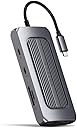
🚀 Elevate your desk game — power, ports, and pixels in one sleek hub!
The Satechi MX USB-C Multiport Adapter is a premium docking solution designed for Mac and Windows professionals. It features dual 4K HDMI outputs, 100W USB-C Power Delivery charging, Gigabit Ethernet, multiple USB ports, SD/microSD card readers, and an audio jack — all packed into a compact, space gray aluminum chassis. Perfect for maximizing productivity with seamless connectivity and stunning visuals.


| Asin | B09MDP4DL7 |
| Best Sellers Rank | #1,325 in USB Hubs |
| Brand | Satechi |
| Color | Space Gray |
| Compatible Devices | MacBook Pro 14/16-inch (2026 M5/M4/M3/M2/M1), MacBook Air 13/15-inch (2026 M5/M4/M3/M2/M1), MacBook Neo 13-inch (2026), iPad Pro 11/13-inch (2025 M5/M4/M3/M2/M1), iPad Air 11/13-inch (2026 M4/M3/M2/M1), iPad Mini (A17 Pro/6), iPad (A16/10th Gen), iPad Pro 12.9-inch (6th/5th/4th/3rd/2nd/1st gen), Mac Mini (2024 M4/M2/M1), iMac (2024 M4/M3/M1), Mac Studio (2025 M4/M3/M2/M1), Lenovo ThinkPad, Microsoft Surface, Google Pixelbook |
| Customer Reviews | 3.9 3.9 out of 5 stars (63) 3.9 out of 5 stars |
| Eu Spare Part Availability Duration | 1 years |
| Global Trade Identification Number | 00810086360130 |
| Hardware Interface | USB Type C |
| Item Dimensions L X W X H | 5.12"L x 2.28"W x 0.79"H |
| Item Weight | 171 g |
| Manufacturer | Satechi |
| Mfr Part Number | ST-UCISDS |
| Model Number | ST-UCMXAM |
| Number Of Items | 1 |
| Number Of Ports | 9 |
| Total Number Of Hdmi Ports | 1 |
| Total Usb Ports | 4 |
| Unit Count | 1 Count |
| Upc | 810086360130 |
| Warranty Description | 2-year limited warranty |
| Wattage | 100 |
User
Rock Solid, Never Dropped a Connection, looks premium
I was very reluctant buying this adapter as most of the cheap one I had bought over the years on Amazon have failed. This one worked right out-of-the-box. It tends to get a little hot, but I do not see that as a cause of concern as it is controlling a lot of ports. BUY IT!!!
User
Awesome device for my Macbook air with 2 external monitors
I did go to the SiliconMotion website and downloaded the most recent driver to make sure i had the latest software for my M2 Macbook air. It works great, remembers my settings after a reboot, and always seems to work when i connect it! I use it with 2 external monitors and can still use my built-in screen. All 3 work just fine
User
It works, it's sturdy, it connects securely
It works, it's sturdy, it connects securely. Although that's what you should expect from any product, it seems that a lot of these type of Chinese-made products are unreliable. I've had several from several different manufacturers and they have all failed quickly, some right out of the box, particularly with gigabit ethernet ports. Satechi is a US company based in San Diego, although their products are actually made in China, they are designed in the US (kinda like Apple) and they seem to have been able to master the QC that Apple has despite having products made in China.PROS:-This particular unit does not have a VGA port - which is great. (Who still uses or needs a VGA monitor anymore??) Instead, it has TWO HDMI ports. That's useful. (Specs are slightly different. one is 30hz the other 60 Hz)- It has a gigabyte ethernet port that has a flashing light to indicate connectivity, a nice touch.- Two USB 30. ports and two USB-C (not including the power port.)- It says it's (Apple) "M1 ready" so I'll take their word for it from the specs.- Importantly for me, the USB-C connector to the laptop is within precise specs - how do I know? Because it fits snugly and securely into the port. I've had several of these kinds of adapters that had USB-C connectors that were so loose that if you tapped the unit in any way, you'd pull it out the computer USB-C port far enough to lose everything that was mounted. Certainly putting in or taking out an SD card was guaranteed to disconnect. So, this is a good indication of QC as far as I'm concerned. It has a nice, snug fit. Haven't accidentally disconnected it yet.CONS: none that matter. Sure, a couple of more ports might be nice, maybe, but at what cost? It serves its purpose by providing a reliable connection for multiple accessories securely through one USB-C port on your computer. At a certain point, too many options means that you might overtax the one USB-C port and start losing efficiency anyway.Recommended.
User
Unreliable, Runs Hot, Requires Software for Monitors, Poor Support
I had two of these for about 5 months before I gave up on both of them. One was being used for an Intel Macbook, and the other for an M1 Pro MacBook.To start with, it's worth calling out that the device needs 3rd party software to power multiple monitors, something that was not obvious to me at time of purchase. I was using it to support 2 external monitors for each machine I was using it with. One of the monitors it will only support at 30 hz, which is not ideal. In addition, I suspect the software was somewhat CPU intensive, which was particularly noticeable if I was in a Google Meet on a display going through this device.As others have noted, the device does run quite hot.After several months, I began to notice that the HDMI ports had become unreliable as well. One of the HDMI ports on one of my devices would not output to a display. Having switched to known good cables and changed the output display, it became clear the issue was the port itself on the device. I attempted to contact support, and they wanted a screenshot of my purchase on Amazon, and then ultimately a video of the device not working. They got the screenshot of the purchase, but I can't be bothered to video the device not working.Since the first one stopped, I started seeing similar behavior on the second device on a different machine, where one of the HDMI ports would not output to a display.I have no interest in going back and forth with support sending videos of their devices not working. I would advise not purchasing these, they definitely aren't worth the money.
User
It got hot very quickly
I work in IT, and I use equipment like this all the time. I like the versatility and availability of the ports, as my work laptop doesn't have enough USB ports. I had no issues with lag or disconnects, which was nice.The two things I don't like:1) It got warm very quickly. I only had an external keypad and a microphone plugged into it at the time. I cannot have it laying on the side of or directly next to the side of my laptop where the fan is, because it was alarmingly hot. I've used other hubs on that side of my laptop before, and it was never previously a problem. I have to keep it on the right-hand side of my laptop, and although it's slightly warm, it's not bad.2) It's heavy and bulky. I don't have a lot of room on my desk, and other hubs I've used have slipped off the edge before. This one is so heavy it drags cords with it, and I was afraid the male USB would bend. I had to set it up so that it isn't pulling on the cord. Not the biggest inconvenience.I did not get a chance to test the ethernet port; however, I was able to successfully use all the other ports without issue.
User
Lots of ports, costs a little too much, probably worth it if you need them all
So, a couple of things: 1) yes it does get warm, but almost all USB C hubs with USB C Power Delivery passthrough charging do this 2) the USB C data port is a DATA port, and it doesn't support DisplayPort Alternate mode. The idea is that you buy these so that you can use older type of connectors like HDMI, as far as I know, almost no multiport adapters with USB C data ports support video output (unless using thunderbolt 3/4 hubs or docks). I just really don't like to see unfair reviews that are the buyer's fault for not understanding how technology works and/or not reading through the spec sheet to see what a product is capable of.This thing is probably overpriced though, but it has really good build-quality and it's from Satechi that are a premium brand that make accessories targeted at Mac/iPhone/iPad users. That said, this thing does have basically every port you could want/need except for DisplayPort or Thunderbolt 3/4. It has two HDMI ports, one supports 4k/60Hz, the second one only supports 4k/30Hz AND you need to download software in order to be able to use it alongside the first (main) HDMI port. I think this is meant to allow M1 Mac users to be able to use two external monitors (something that is not supported natively because of limitations of the M1 chip itself).You also get 2x USB A ports (5 Gigabits per second data transfer), a Micro SD and SD card reader (UHS-I speed), Gigabit Ethernet, a 3.5mm headphone jack, a USB C port for Power Delivery passthrough charging (100w minus the 15w needed to power the hub itself), and finally you get a USB C port that supports data ONLY. The USB C port is not a full feature port with power/data/video, if you are interested in a hub that gives you USB C ports with more than just data then you should be looking at Thunderbolt hubs/docks. Standard USB C (which is what this hub is using) does NOT have the bandwidth to be able to give you all of these legacy ports and still have enough left over to spit out a full-blown USB C port with video.As mentioned in the other reviews, this thing does get warm, bordering on hot, the higher the amount of power you are pushing through it, the hotter it will be. Like if you are using this with a MacBook Air that only needs 30 watts, it won't be as warm as it would with a 16" MacBook Pro that requires over 3x as much. I think that this is normal operation for this hub, look at the design of the top of the hub. To me, that looks A LOT like a heatsink (where the Satechi logo is placed).At $180, if you are considering buying this and you don't need all of those ports (or you do and you need faster data transfer), you can buy some Thunderbolt docks for around this same price.
User
Compatibility with Mac
Does not fully support Mac Book Air M3 and Mac Book Pro M1.main issues are with LAN and HDMI connectivity.
User
No funciona la carga
No funciona la carga ubs tipo c
User
produto de qualidade.
Produto de qualidade. Cumpre com as especificações.
User
1a Produkt
Hochwertige Verarbeitung, alles bestens
User
Works well - but more bulky than I anticipated
The dock works very well and does everything you would expect - but is slightly larger than I had thought nand as such not really too portable.Great if you want a home dock - but if planning to use this when ravelling you may wabnt to look at smaller alternatives,.
User
見た目もゴツくてかっこいい
USB Aが2、Cが2、メモリーカード、HDMIが2、イーサネネットが拡張されるドッキングハブになります。この手のハブって、シンプルなものが多くて、見た目がかっこいいものを探していたのですが、ごっつい外観をしていてとても気に入っています。各、IOの速度についても、公証どおりの安定した速度で、使い勝手も非常によいです。
User
Did not work for me.
Did not work properly. Gets way too hot and one of the monitors always looked blurry. No matter what I did, I couldn’t get it to work. I changed/swapped hdmi cables, installed latest app but it was a no go with my Mac
Trustpilot
3 weeks ago
1 month ago