Buy anything from 5,000+ international stores. One checkout price. No surprise fees. Join 2M+ shoppers on Desertcart.
Desertcart purchases this item on your behalf and handles shipping, customs, and support to Ireland.
๐ Power, speed, and controlโyour ultimate USB command center.
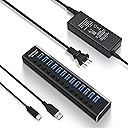
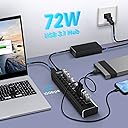
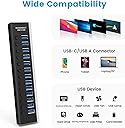
The Rosonway 13 Port Powered USB 3.2 Hub delivers ultra-fast 10Gbps data transfer speeds across 13 ports, powered by a robust 72W adapter. Featuring individual on/off switches with LED indicators, it offers precise control and safety with built-in surge protection. Compatible with a wide range of USB-A and USB-C devices, its premium aluminum build ensures durability and style for professional setups.


| ASIN | B09HBQS54V |
| Additional Features | Play, Plug, Powered |
| Best Sellers Rank | #1,037 in USB Hubs |
| Brand | Rosonway |
| Color | Black |
| Compatible Devices | Gaming Consoles, Keyboards, Mouse, Printers, USB Flash Drives |
| Customer Reviews | 4.4 out of 5 stars 460 Reviews |
| Data Transfer Rate | 10 Gigabits Per Second, 5 Gigabits Per Second |
| Enclosure Material | Aluminum |
| Hardware Interface | USB, USB Type C |
| Item Dimensions L x W x H | 8.2"L x 1.6"W x 1"H |
| Manufacturer | Rosonway |
| Mfr Part Number | RSH-A13 |
| Model Number | RSH-A13 |
| Number of Ports | 13 |
| Operating System | ['Mac OS X', 'Windows 11/10/8/7', 'Linux'] |
| Special Feature | Play, Plug, Powered |
| Total USB Ports | 13 |
| Total Usb Ports | 13 |
| Warranty Description | 18 months warranty for non-human damage |
T**O
This is what you need! Fast , Reliable, Quality
I purchased this unit for a new home setup involving multiple MacBooks (4), over a dozen mobile phones, a few tablets, a Surface Pro, and a few other hubs and docks I am testing out. This Powered USB Hub Rosonway 16 Ports 100W USB 3.0 Data Hub Aluminum USB Hub 3.0 Splitter with 12V/8.3A UL Certified Power Adapter and Individual On/Off Switches RSH-A16 (Black) is the first hub I've been impressed by since a 2.0 Anker Hub in 2015. It was to be my phone Hub for my setup; however, in my confusion, I got it mixed up with another unit Rosonway builds and had to exchange. That being said, I still wanted to try it out to see if it was worth sticking with the brand for future upgrades. The unit itself is a high-quality all-aluminum body, housing what appear to be LED lights running down one side that indicate whether the ports are engaged. The lights, conveniently next to their corresponding USB port, easily blend behind a mirrored finish during the day and are surprisingly neither too bright nor too distracting at night. The other side has buttons for each port that are easy to switch off, with a very smooth press and release. I personally would prefer a button that requires more deliberate force, because I found myself toggling the buttons accidentally. But that's just me. Also in the box with the hub were the power supply and a 4ft long USB 3.0 detachable cable - both quality built. Installation was easy. It was a simple plug and play operation straight out of the box, with no cause for confusion. In my setup, there were never less than 8 iOS devices connected at all times. While connected, these devices all maintained 100% charge even when removing and installing apps, data, and OSs. Speeds were in-line with what was stated; the only thing I regret was the fact that they were not high enough for my current build at 5Gbps speeds. The 3.1 10Gbps is actually the unit I need, so I'm looking forward to testing that one once it arrives. Overall, this Hub is very well built. It delivers on what it promises, and would've fit all of my needs had it been 10Gbsp instead of 5Gbps. I look forward to trying many more devices from the Rosonway family. Deleted User. io
R**N
This Thing is Fast.
What blew me away when I tried this is when I was copying data from one external hard drive to another. The transfer speed was more than twice as fast as what my previous USB 3 hub gave me. I honestly did not know that USB 3 was capable of this speed. I never experienced this before. I have 14 external desktop hard drives connected to this, and they work perfectly. I have all the hard drives and this USB hub wired to the computer's internal 12V power supply, so I don't have 15 power adapters. I therefore cannot comment on the included power adapter. I like the switches which allow me to power on and off the hard drive I want. The aluminium enclosure is sleek and smooth. Overall quality is pretty good. I got a defective switch on one USB outlet. The switch would not stay down. Because of where I live, returns would be costly, so I will live with this by gluing the switch down to have it permanently on and not run an external hard drive on that port. I believe this is may not be a common defect to affect many people, so I am keeping this a 5 star rating.
S**T
Nice features, good support, parts may need some QC
This is a nice hub. It overall works as expected. The build quality is nice, it feels sturdy and looks sleek. Both the hub and power adapter are silent, no electrical hiss or whine. FUNCTION: - The ability to turn ports on/off is great for having external hard drives (you have to eject them from the computer first, of course), which I use 2 for redundant external storage and 1 for Mac Time Machine. - The hub also works fine with my Focusrite audio interface (recording/playback), my iLok, etc. - I am able to daisy-chain my Dell monitor's built-in USB hub as expected and even run my mouse receiver off of that! So no latency issues whatsoever. LIGHTS: - The lights are steady on for USB 3.0 Devices, flash during disk read/write, and flash constantly for USB 2.0 Devices like my keyboard. - They are a good brightness - not too bright. - It would make more sense for the indicator lights to be on the side with the buttons, but this is not a huge issue. ISSUES: The main issue I had with my hub is that after a few weeks, the button on port 4 stopped working, so this port would not stay "on" - I contacted support via email who was very responsive - they offered to replace the device for free, either immediately or anytime during the extended warranty (I registered the product after purchase which extends the coverage period). I will probably take them up on this offer towards the end of the warranty. Secondly, if I forget to disconnect an external drive before shutting down my computer, the hub will power off with the computer, sort of hard-stopping the drive, and then moments later power back on in stand-alone mode, again kinda jolting the drive awake... this is of course primarily user-error, but it would maybe be better if the hub didn't turn the drive off and on again and instead just stayed powered. I should also note that the product box came a bit beat up from Amazon (the brown shipping box was fine). But I'm willing to bet this happened in the Amazon distro center and isn't the fault of the manufacturer. The product was fine inside. I wrote this review after using the hub consistently for ~7 months, and other than that one port button going bad towards the beginning, there have been no other issues! I would recommend you buy it.
A**N
One USB Hub to RULE THEM ALL!
I probably have bought/used around 10 different USB 3.0 hubs over the last few years. I have multiple external hard drives, audio/video USB devices, and other peripherals. Needless to say, I need a lot of ports. Well, I finally found one that can take care of all my issues. AND the ability to turn any port on/off is a huge benefit! Other Hubs seem to have 75% USB 3.0 ports, then one or two 2.0 ports, and maybe one or two for just charging. The fact that this one has 16 ports of ALL 3.0 Data ports is a huge blessing. It's a beast! It's heavy enough that I don't need to place some velcro on the bottom to hold it on my desk with several ports being in use. I might have to once it gets more use, but for now, I'm good to go! I've had zero issues with any peripherals losing power with this hub thus far. I mean, the simple fact is, it JUST WORKS. I have no complaints and so far it is one amazing USB Hub that does what I need it to do. It's a little pricey, but if I have to pay $60 once to get all the ports I'll need, it's money well spent.
A**.
Stopped Working But Replacement Works Well
This usb hub looks great, very solid construction. The lights and on/off buttons look excellent as well. However, none of this matters because the ports (power and data) stopped working about 8 month after purchase, even though nothing changed and it is a 72 Watt hub. I use this hub for work and it caused me and my IT department a bunch of trouble as I have a plethora of peripherals. I have noticed that this and other powered usb hubs have the same reviews about stopping working after a while, so I am unaware of a solution at this time. Update 12/30/2022: I contacted customer support at RSHTECH, the company who manufactures this product, on their website (rshtech dot com), and they sent a warranty replacement very quickly. Their customer support was excellent. I increased this rating from 1-star to 4-stars for their exceptional support. Thank you. Update 05/06/2024: This USB Hub is still working properly, so I am increasing my rating from 4-stars to 5-stars.
K**E
Game changer
This thing saved me. I simply ran out of USB ports on the back of my computer and also wanted to clean up the appearance of my computer space. Utilizing the extra ports on my monitors simply wasn't pretty. Everyone likes to hide the cords, right? It doesn't help that some Corsair products have very thick USB cables that are difficult to plug in beside each other (keyboard in particular). I used some heavy duty double sided tape to attach this hub to the back of my desk and have so far plugged 7 different cords and dongles into it. Tadaa! I don't even need to have the USB on my monitors powered anymore, so that actually allowed me to put some cords away for good. Everything looks so much cleaner with all the cables tucked way down behind my desk. Everything works as you'd expect, just like plugging it into the back of your computer. I didn't have to make any adjustments. The hub shuts off by default when the computer shuts off, so all your little led lights and such don't stay on all the time. It's great for any device that doesn't require power 24/7. If you have an external drive that you want to keep running, perhaps you can play with some settings (BIOS?) or just plug it in elsewhere. Speaking of LED lights, the blue lights on this are not too bright. This is good in my opinion. I don't want bright blue lights lighting up the room or clashing with the custom ARGB lighting of my computer. So, thank you for keeping it subtle. This hub does exactly what it needs to. It's perfect in my opinion. Buy it. Also do what I did and get some quality double sided tape to keep it secure (and hidden).
S**R
Works but it's an odd arrangement.
It uses a really odd USB topology to get to 13 ports that might not work for you. Internally this thing uses 4 USB hubs chained together with 2 ports at level0, 4 ports at level1, 3 ports at level2, and 4 ports at level3. 13 ports, 4 levels. The physical order of the ports also isn't the same as the logical order of the ports, so you're trial-and-error guessing with HwInfo to figure it out. The problems with doing this deep chaining instead of a flatter layout is weird latency/timing issues or disconnects with audio devices. You can also run into the hub depth limit on windows if you use a port that your motherboard is also chaining into a hub (common with front panel USB ports). Or you'll get random "this device has stopped working" popups. Anyways while this thing does work, it can be very finicky. If you only want a single "hub" you're limited to 4 ports. Any 7 port hubs are doing 3+4 with 2 hubs internally. 10 ports is likely doing 3+3+4 with 3 hubs. The most reliable strategy for getting 10 or more ports would be to get a really good USB 3.2 10Gbps 4 port hub and plug other hubs into it so you know you're only dealing with 2 levels of chaining instead of 3 or 4.
R**G
Best usb hub I've ever used
I got this because of the power rating on it, I have 3 external hard drives attached with no problems. That, 3 mice, headphones, and a lot of slots to spare to quickly connect anything I might need. If you tend to use multiple monitors and use two keyboards and a drawing tablet, then this thing is amazing. It also has an amazing build quality. It's very steel like all around. Other usb hubs I've used have been on the plastic side with the bottom being a bit flimsy, but not this one. I had a sabrent usb hub before this that was also amazing. It didn't fail on me, I just needed more usb ports, that sabrent one still gets use elsewhere and has been working for two years now. I'll always recommend sabrent, I haven't had a bad product from them yet. This brand is new to me, and I hope this usb hub doesn't fail me. I've been using this for maybe 3 months now. The biggest flaw that someone mentioned was the buttons. They do go down easily. If the buttons were on the right side, then it would be perfect. Do be careful with hard drives attached to the hub, it really is easy to turn off the switch. It's not enough to take a star off though. I'll update if anything changes for sure.
E**D
Very flawed product
Where do I start. The ports are loose so any bump and cause devices to disconnect. The lights are so dim and at an odd angle so it's almost impossible to see which ports are on unless your in the dark. And finally the 72W seems to be limited to 10W per port so you can't even fast charge anything.
Trustpilot
2 weeks ago
2 weeks ago